A Trend indicator

Viewing 9 posts - 1 through 9 (of 9 total)

  • Author
    Posts
  • #225746 quote
    Bryggare
    Participant
    Average

    Hi I wonder if you could help me create  an indicator that I use for determine if a stock goes sideways.

    I would like to have an indicator that shows how many times the closing price has been touched in the last 30 bars before the current bar.
     For example, if the closing price has touched five bars out of the last 30 bars, the indicator should show 5. The result could be shown in a histogram. 
    
    Thankful if you could help me
    #225748 quote
    JS
    Participant
    Senior

    Hi @Bryggare

    Hereby the indicator…


    Touched=0
    For i=1 to 30
    If Close[i] Crosses Over Close or Close[i] Crosses Under Close then
    Touched=Touched+1
    EndIf
    Next
    Return Touched as "Touched" Coloured("Green")Style(Histogram)
    
    #225763 quote
    Bryggare
    Participant
    Average

    Thank you , it works fine

    #225765 quote
    Bryggare
    Participant
    Average

    Hi again.  It seems like the indicator compares to days range with previous close for the last 30 days.  Can you change so that the close of the current bar compares with the hole range from high to low of the previous bars.  For example the to days close compares if it has touched any of the last 30 days bars (from high to low).

    #225772 quote
    JS
    Participant
    Senior
    Hi,

    This indicator compares whether the current Close falls between the High and the Low (Range) of the previous 30 candles…  

    Touched=0
    For i=1 to 30
    If Close<High[i] and Close>Low[i] then
    Touched=Touched+1
    EndIf
    Next
    Return Touched as "Touched" Coloured("Green")Style(Histogram)

    Bryggare thanked this post
    #225778 quote
    Bryggare
    Participant
    Average
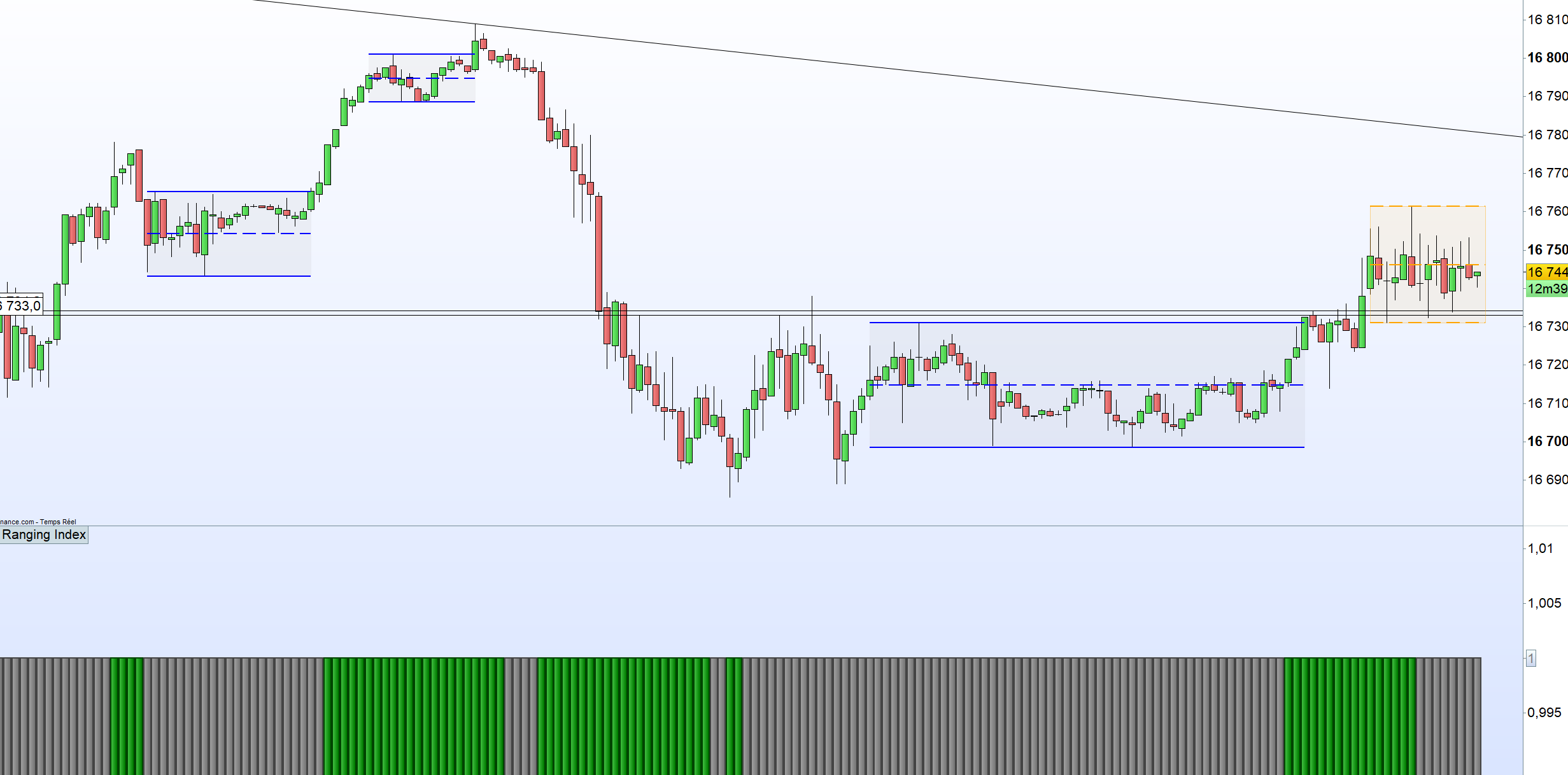
    Hi again, now it seems to work. When it is trending it is not touched so many times and when it is not trending it is touched many times. Thank you for helping me
    JS thanked this post
    #225800 quote
    LucasBest
    Participant
    Average
    An other upgrade/version… Try with total price instead of close
    src = customclose
    
    Touched=0
    For i=1 to 30
    If src<High[i] and src>Low[i] then
    Touched=Touched+1
    EndIf
    Next
    
    Filtre = Average[5](Touched)
    
    If Filtre < 5 then
    ColR = 0
    ColG = 128
    ColB = 0
    Else
    ColR = 128
    ColG = 128
    ColB = 128
    Endif
    
    Return 1 as "Ranging Index" Coloured(ColR,ColG,ColB)Style(Histogram)
    Bryggare thanked this post
    #225807 quote
    LucasBest
    Participant
    Average
    Little upgrade… The idea is not bad, but still not accurate as my main range detector.
    src = customclose
    
    Touched=0
    For i=0 to 28
    If src<High[i] and src>Low[i] then
    Touched=Touched+1
    EndIf
    Next
    
    Filtre = ExponentialAverage[2](Touched)
    
    If Filtre < 5 then
    ColR = 0
    ColG = 128
    ColB = 0
    Else
    ColR = 128
    ColG = 128
    ColB = 128
    Endif
    
    Return 1 as "Ranging Index" Coloured(ColR,ColG,ColB)Style(Histogram)
    
    pror thanked this post
    #225814 quote
    Bryggare
    Participant
    Average
    Thank you for the upgraded version. I will look on them and see which suits me best
Viewing 9 posts - 1 through 9 (of 9 total)
  • You must be logged in to reply to this topic.

A Trend indicator


ProBuilder: Indicators & Custom Tools

New Reply
Author
author-avatar
Bryggare @bryggare Participant
Summary

This topic contains 8 replies,
has 3 voices, and was last updated by Bryggare

2 years, 1 month ago.

Topic Details
Forum: ProBuilder: Indicators & Custom Tools
Language: English
Started: 12/28/2023
Status: Active
Attachments: 3 files
Logo Logo
Loading...