ProRealCode - Trading & Coding with ProRealTime™
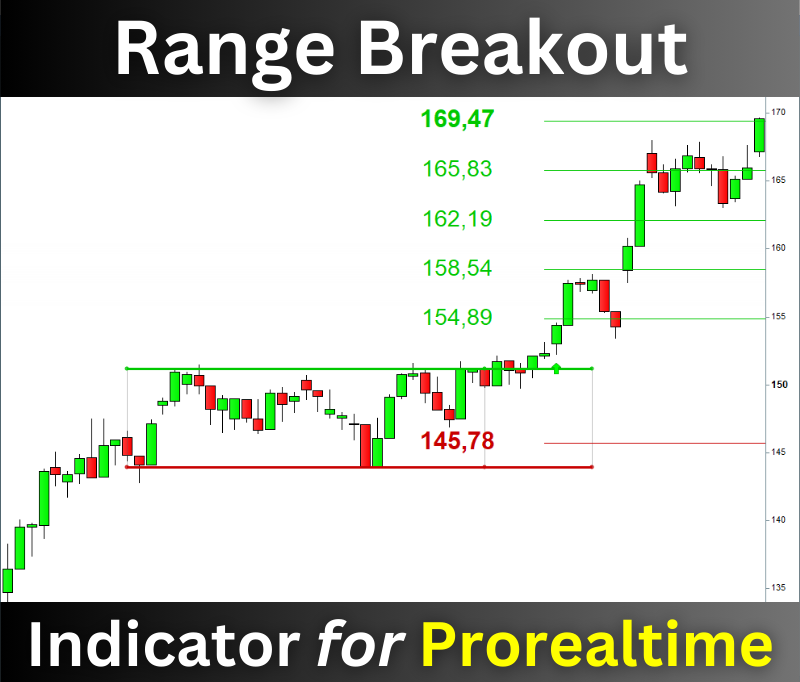
The Range Breaker will help you seize the best trading opportunities! It detects range breakouts, which are often followed by durable price movements.
The indicator recognizes ranges on all assets in any time unit. It detects bullish and bearish breakouts and displays the targets and stop-losses on the chart.
You can download the indicator for free on this page:
XXXXXXXXXXXXXXXXXXXXXXXXXXX
Thanks to this indicator, you will never miss a breakout again. 😊
Have good trades
Vivien
Roberto je parle en français ou en anglais en haut il y a le drapeau français et en bas des lignes jaunes il y a indiqué cet article sera publié dans le forum anglais???? Cet article sera publié sur le forum anglais, veuillez choisir le forum approprié si vous souhaitez écrire dans une autre langue.
Roberto I speak in French or English at the top there is the French flag and at the bottom of the yellow lines it says this article will be published in the English forum???? This article will be published in the English forum, please choose the appropriate forum if you wish to write in another language.
Post only direct links to a downloadable file, no other links to external websites. Thanks 🙂
Hello Vivien
Could you propose a strategy with this indicator.
thank you
Hello @Madrosat, yes I can 😊
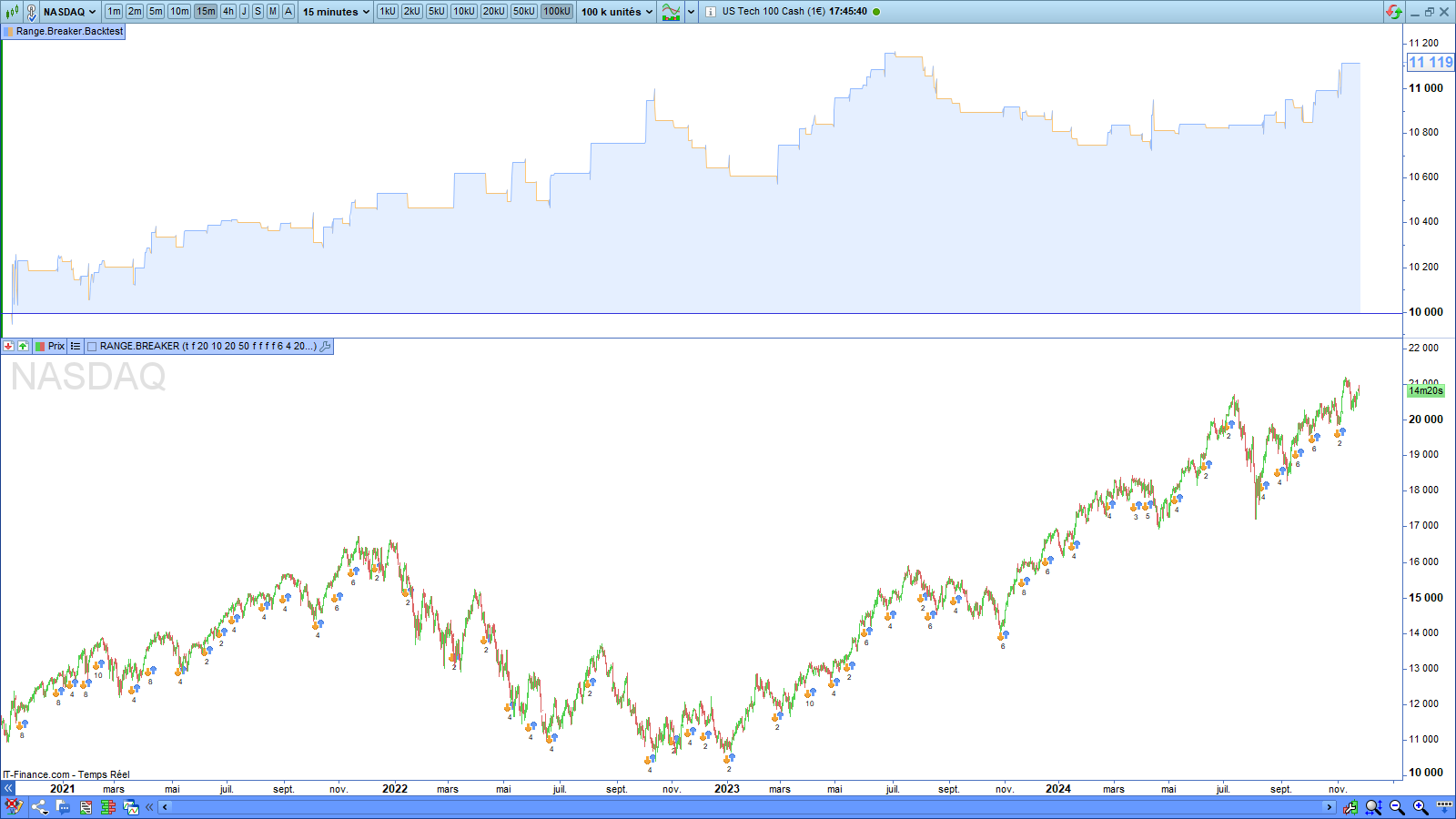
Here is an example of a strategy I created from the Range Breaker indicator. It works on the Nasdaq in the 15-minute time unit:
//--------------------------------------------------------//
// *** Range Breakout Strategy - Nasdaq - 15-minutes *** //
//--------------------------------------------------------//
// Author: Vivien Schmitt
// Website: https://artificall.com
// Indicator: Range Breaker
//--------------------------------------------------------//
DEFPARAM CUMULATEORDERS = False
//--------------------------------------------------------//
// *** SETTING BLOCK *** //
//--------------------------------------------------------//
// Capital to invest
ONCE CapitalToInvest = 10000
// Position Size
NumberOfContracts = ROUND(CapitalToInvest / Close, 2)
// Type of Breakout. Values: 1 to activate; 0 to inactivate
ONCE BullishBreakout = 1
ONCE BearishBreakout = 0
// Length of the range. Best values: 50; 100; 200
ONCE RangeLength = 20
// Extension of the Range
ONCE RangeExtension = 10
// Min range height (%)
ONCE HeightMin = 20
// Max range height (%)
ONCE HeightMax = 50
// Breakout conditions. Values: 1 to activate; 0 to inactivate
ONCE ValidatedBreakout = 0
// Volume Filter
ONCE VolumeIncreases = 0
// Trend Filter
ONCE PositiveTrend = 0
ONCE NegativeTrend = 0
// Target and Stoploss levels
ONCE TargetLevel = 6
ONCE StoplossLevel = 6
// Starting Year
ONCE StartingYear = 2000
// Font Size
ONCE FontSize = 12
// Return target and stoploss. Values: 1 to activate; 0 to inactivate
ONCE ReturnData = 1
//--------------------------------------------------------//
//--------------------------------------------------------//
// * INITIALIZATION OF THE VARIABLES * //
//--------------------------------------------------------//
ONCE myBreakout = 0
ONCE myTargetLong = 0
ONCE myStoplossLong = 0
ONCE myTargetShort = 0
ONCE myStoplossShort = 0
ONCE myHeight = 0
ONCE myTrend = 0
//--------------------------------------------------------//
//--------------------------------------------------------//
// *** IMPORT OF THE RANGE BREAKER INDICATOR *** //
//--------------------------------------------------------//
// -> TO DO BEFORE RUNING THE BACKTEST / A FAIRE AVANT DE LANCER LA BACKTEST //
// * Uncomment the following line before running the backtest (Remove de "//" at the beginning of the line)
// * Decommentez la ligne suivante avant de lancer le backtest (supprimez les "//" au début de la ligne)
myBreakout, myTargetLong, myStoplossLong, myTargetShort, myStoplossShort, myHeight, myTrend = CALL "RANGE.BREAKER"[BullishBreakout, BearishBreakout, RangeLength, RangeExtension, HeightMin, HeightMax, ValidatedBreakout, VolumeIncreases, PositiveTrend, NegativeTrend, TargetLevel, StoplossLevel, StartingYear, FontSize, ReturnData](close)
//--------------------------------------------------------//
IF close >= myTargetLong THEN
myBreakout = 0
ENDIF
//--------------------------------------------------------//
// *** LONG POSITION OPENING *** //
//--------------------------------------------------------//
IF NOT OnMarket AND myBreakout = 1 THEN
BUY NumberOfContracts CONTRACTS AT MARKET
Set Target Price myTargetLong
Set Stop Price myStoplossLong
ENDIF
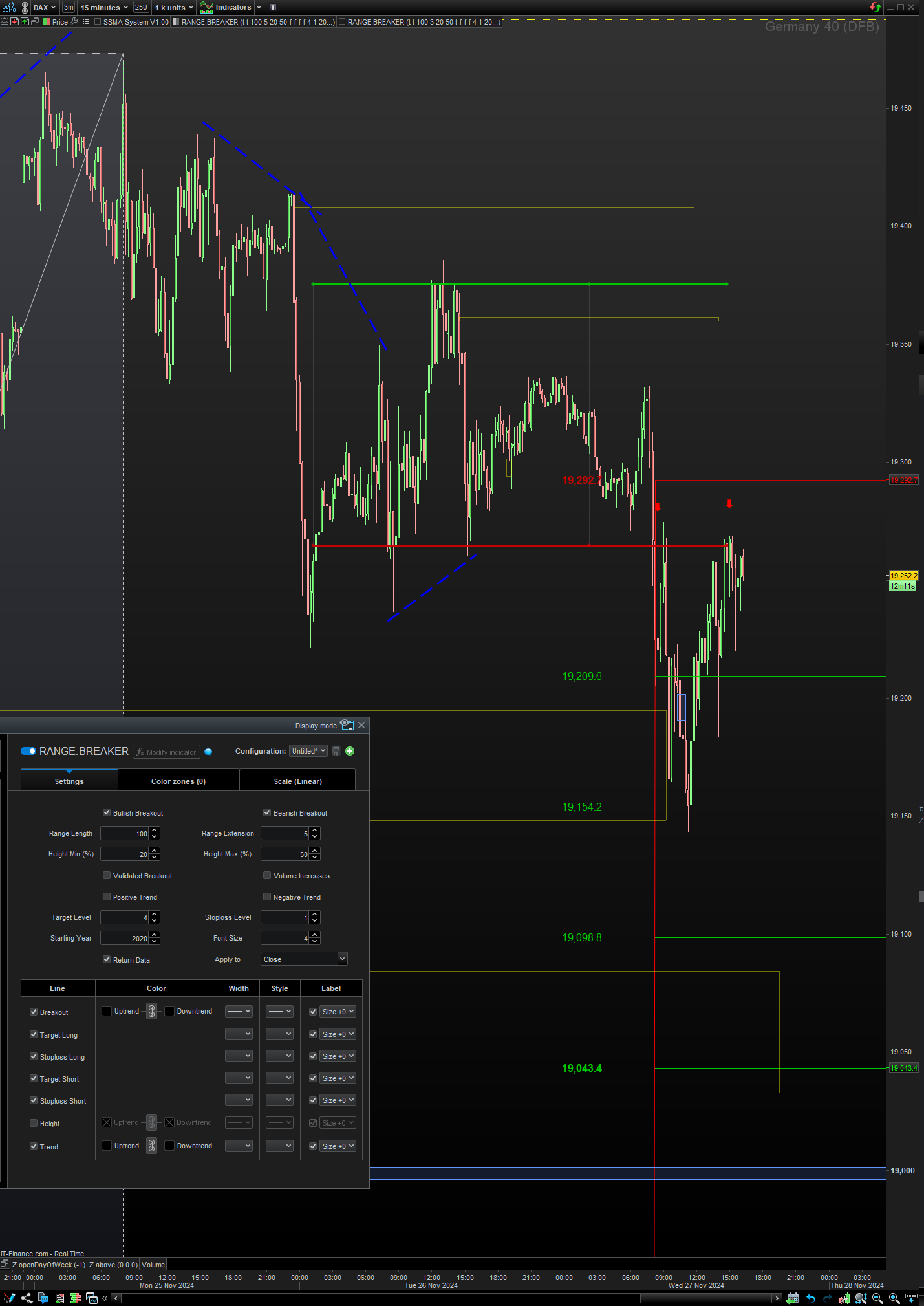
You will find the explanation of the indicator parameters in the documentation here:
https://artificall.com/docs/range-breaker/range-breaker-documentation-en/
Kind Regards
Hi! Thanks for the example strategy. However, I cant get it to work. I got error “Range.Breaker returns 6 values but your code needs 7.” Do you mind double check it?
Hi SweTrade,
Have you downloaded the latest version of the indicator? The last version date is 2024/11/19.
I just copied and pasted the code from this topic on my Prorealtime platform, and it works.
Please try to download the indicator and restart the backtest.
I hope that will solve your problem.
Hello Vivien
Thanks for post, could not download from link when available do to already being subscribed.
Found a link you sent me in email.
I know the code above specifically states NAZDAQ 15min but saw promising results with Dax40 (DFB) @ 5,8,30 mins in back-tests.
Run all three in IG demo proOrder to see what happens going forward, all three initially ran, but all failed at the end of the relative timeframe period.
Tried with US Tech 100 (DFB) @ 15m, same outcome.
All stated error regarding ‘define or access of invalid array element’.
Any idea’s or comments.
It was pointed out that zero appears to be a valid index in documentation and so indicators and back-tests but the error from proOrder doesn’t specifically state zero as a vaild index.
Not tested this out myself to verify.
regards
Hello druby,
I emailed the latest version of the indicator to my list of subscribers some time ago. Indeed, it returns an additional parameter.
Send me an email, and I will send you the latest version of the indicator. You can contact me via the About page of my site: https://artificall.com/about/
Kind Regard
I emailed the latest version of the indicator
It be good to change the file on the link you posted to the latest version Indicator to save others wasted time.
I downloaded the Indicator file on the link I received by email on Monday (see attached for ss of file version) and set the Algo running today and, at the first run of the Algo, I got the same error as druby – ‘define or access of invalid array element’.
If you compare attached and below you will see same date … so where do we go from here please? Do I need to email you direct to get the latest Indicator file? Even though it appears that I have the latest Indicator file?
Thank You for Your Support
The last version date is 2024/11/19.
Hello,
You have the latest version of the indicator. The previous code is not a trading system but a backtest.
It is a code example that can help you find a setup for manual trading.
You could add the PRELOADBARS instruction in the code and set a minimum number of contracts to fix potential issues.
Here is the code, including PRELOADBARS and a minimum number of contracts:
//--------------------------------------------------------//
// *** Range Breakout Strategy - Nasdaq - 15-minutes *** //
//--------------------------------------------------------//
// Author: Vivien Schmitt
// Website: https://artificall.com
// Indicator: Range Breaker
//--------------------------------------------------------//
DEFPARAM CUMULATEORDERS = False
DEFPARAM PRELOADBARS = 1000
//--------------------------------------------------------//
// *** SETTING BLOCK *** //
//--------------------------------------------------------//
// Capital to invest
ONCE CapitalToInvest = 1000
// Minimum number of contracts
ONCE NumberOfContractsMin = 0.5
// Position Size
NumberOfContracts = MAX(ROUND(CapitalToInvest / Close, 2), NumberOfContractsMin)
// Type of Breakout. Values: 1 to activate; 0 to inactivate
ONCE BullishBreakout = 1
ONCE BearishBreakout = 0
// Length of the range. Best values: 50; 100; 200
ONCE RangeLength = 20
// Extension of the Range
ONCE RangeExtension = 10
// Min range height (%)
ONCE HeightMin = 20
// Max range height (%)
ONCE HeightMax = 50
// Breakout conditions. Values: 1 to activate; 0 to inactivate
ONCE ValidatedBreakout = 0
// Volume Filter
ONCE VolumeIncreases = 0
// Trend Filter
ONCE PositiveTrend = 0
ONCE NegativeTrend = 0
// Target and Stoploss levels
ONCE TargetLevel = 6
ONCE StoplossLevel = 6
// Starting Year
ONCE StartingYear = 2000
// Font Size
ONCE FontSize = 12
// Return target and stoploss. Values: 1 to activate; 0 to inactivate
ONCE ReturnData = 1
//--------------------------------------------------------//
// * INITIALIZATION OF THE VARIABLES * //
ONCE myBreakout = 0
ONCE myTargetLong = 0
ONCE myStoplossLong = 0
ONCE myTargetShort = 0
ONCE myStoplossShort = 0
ONCE myHeight = 0
ONCE myTrend = 0
// *** IMPORT OF THE RANGE BREAKER INDICATOR *** //
// -> TO DO BEFORE RUNING THE BACKTEST / A FAIRE AVANT DE LANCER LA BACKTEST //
// * Uncomment the following line before running the backtest (Remove de "//" at the beginning of the line)
// * Decommentez la ligne suivante avant de lancer le backtest (supprimez les "//" au début de la ligne)
myBreakout, myTargetLong, myStoplossLong, myTargetShort, myStoplossShort, myHeight, myTrend = CALL "RANGE.BREAKER"[BullishBreakout, BearishBreakout, RangeLength, RangeExtension, HeightMin, HeightMax, ValidatedBreakout, VolumeIncreases, PositiveTrend, NegativeTrend, TargetLevel, StoplossLevel, StartingYear, FontSize, ReturnData](close)
IF close >= myTargetLong THEN
myBreakout = 0
ENDIF
// *** LONG POSITION OPENING *** //
// NOT OnMarket AND
IF NOT OnMarket AND myBreakout = 1 THEN
BUY NumberOfContracts CONTRACTS AT MARKET
Set Target Price myTargetLong
Set Stop Price myStoplossLong
ENDIF
// *** SHORT POSITION OPENING *** //
//IF NOT OnMarket AND myBreakout=-1 THEN
//SELLSHORT NumberOfContracts CONTRACTS AT MARKET
//Set Target Price myTargetShort
//Set Stop Price myStoplossShort
//ENDIF
I ran the code on Probacktest today and have no issues.
Kind Regards
Vivien
Hello Vivien,
I did not try anything – I just follow this thread with interest. 🙂
To avoid misunderstanding, your code does not run on Demo (or Live for that matter). The fact that it runs in Backtest does not tell much – or at least not everything.
It is a known issue that array-based code may run will in backtest but does not run in Demo/Live with not-understandable errors. So the least you need to do is run it yourself in Demo and see what happens. Next, chance is quite high that you will not be able to solve those errors.
A small chance exists that if you could elaborate as much as possible about where your code fails, people with the appropriate experience may be able to help.
In any event : though you may think it will be obvious that the Demo/Live environment behaves differently than Backtest, the issue most probably will be an internal PRT issue, that won’t allow “seeing-though” and therefore may not be solved at any time.
N.b.: When I read druby’s post yesterday, I immediately wanted to advise you to eliminate all what’s arrays, if that is possible; notice that moist we do in PRT code can be done without arrays as well. Most, but not all. Just try it.
Regards and thank you for your work,
Peter
IG Demo …Not to go too far down the array rabbit hole, the
‘defined or access an invalid index in an array’
error, does stop the proOrder algo if:
The meaning of ‘define’ I think refers to, NO actual code, defining the array[element] = something, or, the defining definition is within a logic block that has not been executed before using.
Those appears to be different to, defining the array and, UNdefining the element, array[element] = UNDEFINED, which appears allowed.
The latter doesn’t appear to stop the algo even if it is accessed and used in a logic path, since UNDEFINED is probably taken as FALSE possibly.
In a calculation, it may be a different story, making the result n/a, and depending on where its used, maybe gives erroneous data and/or throws a different error.
Additionally, if a call’ed file RETURNS a not-defined array/element then you get the same error message.
Sending and/or/then RETURN’ing a UNDEFINED variable or array element from a called file gives the error:
‘server.strategy.probacktest.error.missing_data.call’
Also it appears that the array index works when zero.
Further, I couldn’t trigger an error for a FOR/LOOP or ARRAY INDEX being too big.
Maybe that’s a breeding ground for some bugs, I wonder what’s happening there!
Not yet seen any other array error’s, but not been deep down rabbit hole with complex code example, I keep #Peter’s advisory’s/warnings always in mind though.
#Vivien can you verify that array(s) ARE used in the Indicator, did early version come out before array’s in v11.
I also noticed that the contract size could be an issue in proOrder, re: your modification, but it didn’t get that far.
Still early days but Indicator and back-test work ok, had a good indication on DAX 15m today, reach 2nd target within 1 stop.
Only other thing that bugged me was with the y-axis auto scale, having to resize because some variables initially at zero or low values.
Not so bad when setup, but never fun.
Its a pity that it won’t run with proOrder, I second Peter suggestion to change that if possible.
Regards All
I was testing DAX 15m this morning to get an idea how indicator worked.
After giving a short breakout, it reached Target 1.
I entered after it pulled back near breakout point.
Came out with ~60 points.
Did get to Target 2. but I’d exited before then.
A Free Range Breakout indicator for Prorealtime
This topic contains 16 replies,
has 7 voices, and was last updated by Vivien

11 months, 2 weeks ago.
| Forum: | General Trading: Market Analysis & Manual Trading |
| Language: | English |
| Started: | 11/22/2024 |
| Status: | Active |
| Attachments: | 8 files |

The information collected on this form is stored in a computer file by ProRealCode to create and access your ProRealCode profile. This data is kept in a secure database for the duration of the member's membership. They will be kept as long as you use our services and will be automatically deleted after 3 years of inactivity. Your personal data is used to create your private profile on ProRealCode. This data is maintained by SAS ProRealCode, 407 rue Freycinet, 59151 Arleux, France. If you subscribe to our newsletters, your email address is provided to our service provider "MailChimp" located in the United States, with whom we have signed a confidentiality agreement. This company is also compliant with the EU/Swiss Privacy Shield, and the GDPR. For any request for correction or deletion concerning your data, you can directly contact the ProRealCode team by email at privacy@prorealcode.com If you would like to lodge a complaint regarding the use of your personal data, you can contact your data protection supervisory authority.