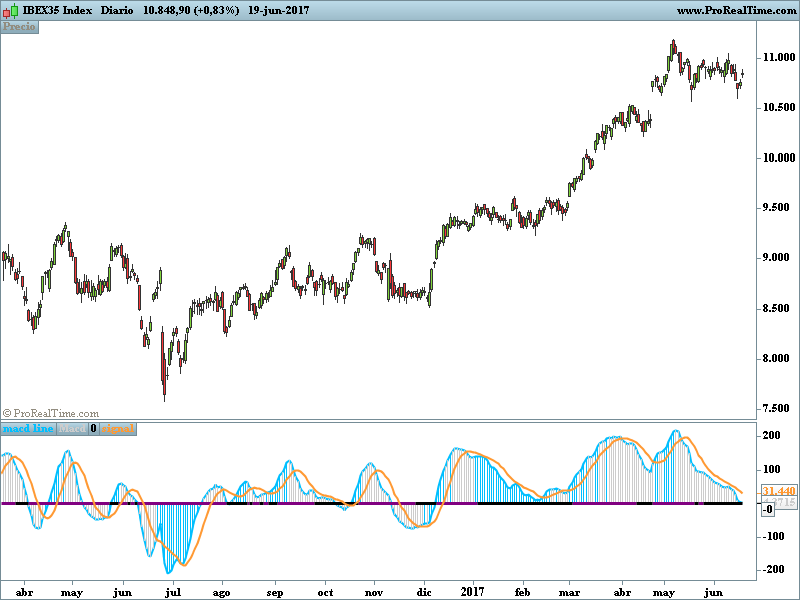
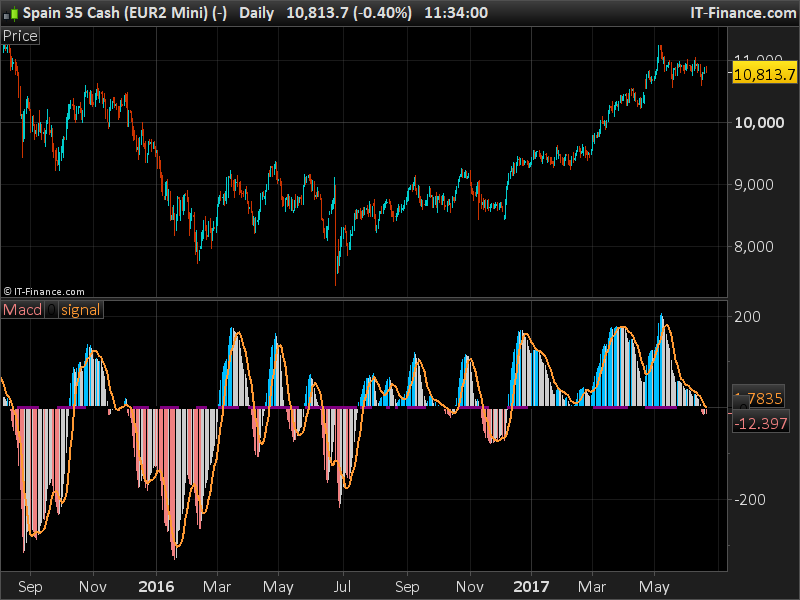
Buenos días.Estoy intentando pasar a Prorealtime este código de la plataforma Tradingview : https://es.tradingview.com/script/hzOZZ1dU-4CMACDSqueeze/
El problema lo tengo al intentar poner los colores del histograma del macd. Solo he podido poner dos colores correctamente,celeste y gris en la parte superior del macd.
¿Alguien puede ayudar para sacar el código lo más posiblemente similar al del original?
Aquí la parte de código que llevo traducida :
REM 4CMACDSqueeze


//@version=3
//study("4CMACDSqueeze"

//===============macd================//
source = close

fastLength = 12
slowLength=26
signalLength=9

fastMA =ExponentialAverage[fastLength](source)
slowMA =ExponentialAverage[slowLength](source)

macdd = fastMA - slowMA
signal =Average [signalLength](macdd)

outMacD = macdd
outSignal = signal

//=========================4CHistogram===================//
currMacd = MACD[fastLength,slowLength,9](close[0])
prevMacd = MACD[fastLength,slowLength,9](close[1])

if currMacd >0 then
if currMacd >prevMacd then
r=0
g=191
b=255
else
r=204
g=204
b=204
endif
endif


//========================Squeeze==================//

length = 20 //title="Bollinger Band Length"

lengthKC=20 //title="Keltner Channel Length"
multKC =1.5 //title="KC Deviations"

//useTrueRange =true title="Use TrueRange (KC)", type=bool)

// Calculate BB
basis =Average [length](source)
dev = multKC *STD[length](source)
upperBB = basis + dev
lowerBB = basis - dev

// Calculate KC
ma = Average [lengthKC](source)
rango=useTrueRange
if rango = useTrueRange then
useTrueRange=TR(close)
else
useTrueRange=(high - low)
endif
rangema =Average[lengthKC](rango)
upperKC = ma + rangema * multKC
lowerKC = ma - rangema * multKC

sqzOn  = (lowerBB > lowerKC) and (upperBB < upperKC)
sqzOff = (lowerBB < lowerKC) and (upperBB > upperKC)
noSqz  = sqzOn  and sqzOff

val =LinearRegression(source) - (highest[lengthKC]( high)and lowest[lengthKC] (low))and Average [lengthKC](close) and lengthKC and 0

if  noSqz then
sr=0
sg=0
sb=0
elsif  sqzOn then
sr=0
sg=0
sb=0
else
sr=128
sg=0
sb=128
endif


return outmacd coloured (0,191,255)style(line,2)as "macd line",outmacd coloured(r,g,b)style (histogram)as "Macd", val coloured (sr,sg,sb)style(line,3) as "0",outsignal coloured(255,153,51)style (line,2)as "signal"
He modificado el código un poco. Creo que ha cometido algunos errores entre lo que es y cómo se calcula un histograma MACD en tradingview y prorealtime. Hay algo diferente. Espero que no haya ningún error en mi código aunque 🙂 Por favor, hágamelo saber!
REM 4CMACDSqueeze
//@version=3
//study("4CMACDSqueeze"

//===============macd================//
source = close

fastLength = 12
slowLength=26
signalLength=9

fastMA =ExponentialAverage[fastLength](source)
slowMA =ExponentialAverage[slowLength](source)

macdd = fastMA - slowMA
signal =Average [signalLength](macdd)

outMacD = macdd
outSignal = signal

//=========================4CHistogram===================//
//currMacd = MACD[fastLength,slowLength,9](close[0])
//prevMacd = MACD[fastLength,slowLength,9](close[1])

if outMACD <0 then
if outMACD <outMACD[1] then
r = 240
g = 128
b = 128
else
r=204
g=204
b=204
endif
elsif outMACD >0 then
if outMACD >outMACD[1] then
r=0
g=191
b=255
else
r=204
g=204
b=204
endif
endif


//========================Squeeze==================//

length = 20 //title="Bollinger Band Length"

lengthKC=20 //title="Keltner Channel Length"
multKC =1.5 //title="KC Deviations"

//useTrueRange =true title="Use TrueRange (KC)", type=bool)

// Calculate BB
basis =Average [length](source)
dev = multKC *STD[length](source)
upperBB = basis + dev
lowerBB = basis - dev

// Calculate KC
ma = Average [lengthKC](source)
rango=useTrueRange
if rango = useTrueRange then
useTrueRange=TR(close)
else
useTrueRange=(high - low)
endif
rangema =Average[lengthKC](rango)
upperKC = ma + rangema * multKC
lowerKC = ma - rangema * multKC

sqzOn  = (lowerBB > lowerKC) and (upperBB < upperKC)
sqzOff = (lowerBB < lowerKC) and (upperBB > upperKC)
noSqz  = sqzOn  and sqzOff

val =LinearRegression(source) - (highest[lengthKC]( high)and lowest[lengthKC] (low))and Average [lengthKC](close) and lengthKC and 0

if  noSqz then
sr=0
sg=0
sb=0
elsif  sqzOn then
sr=0
sg=0
sb=0
else
sr=128
sg=0
sb=128
endif


return outmacd coloured(r,g,b)style (histogram,1)as "Macd", val coloured (sr,sg,sb)style(line,3) as "0",outsignal coloured(255,153,51)style (line,2)as "signal"
Es correcto, le quedo eternamente agradecido.Otro indicador más para la biblioteca de Prorealcode. ¿ lo subirá?
Sí, por favor, publícalo con alguna explicación y lo revisaré para publicarlo públicamente. Gracias por tu trabajo 🙂