ProRealCode - Trading & Coding with ProRealTime™
Hi everyone,
As I had already mentioned, great work Nicolas!!! Thank you very much.
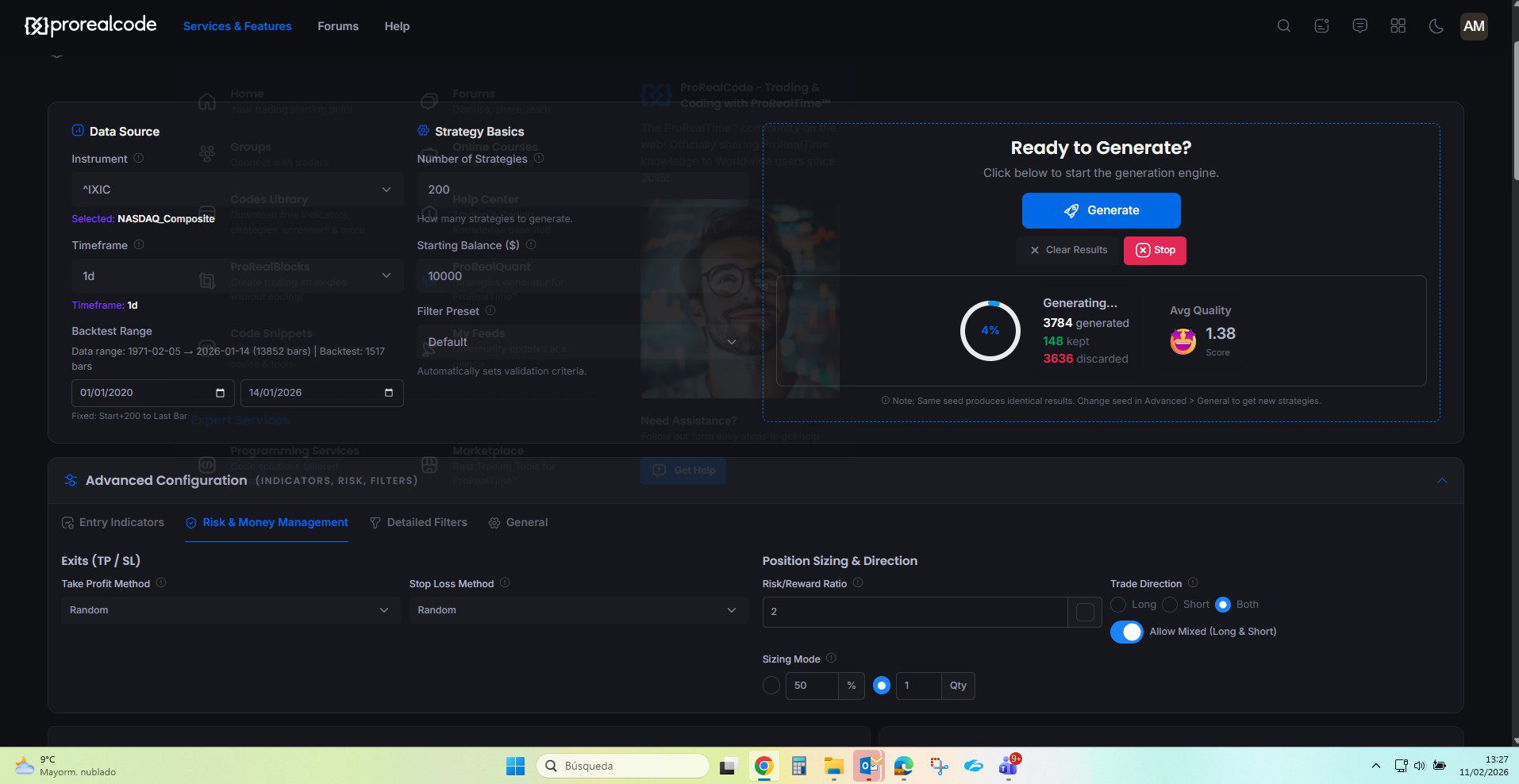
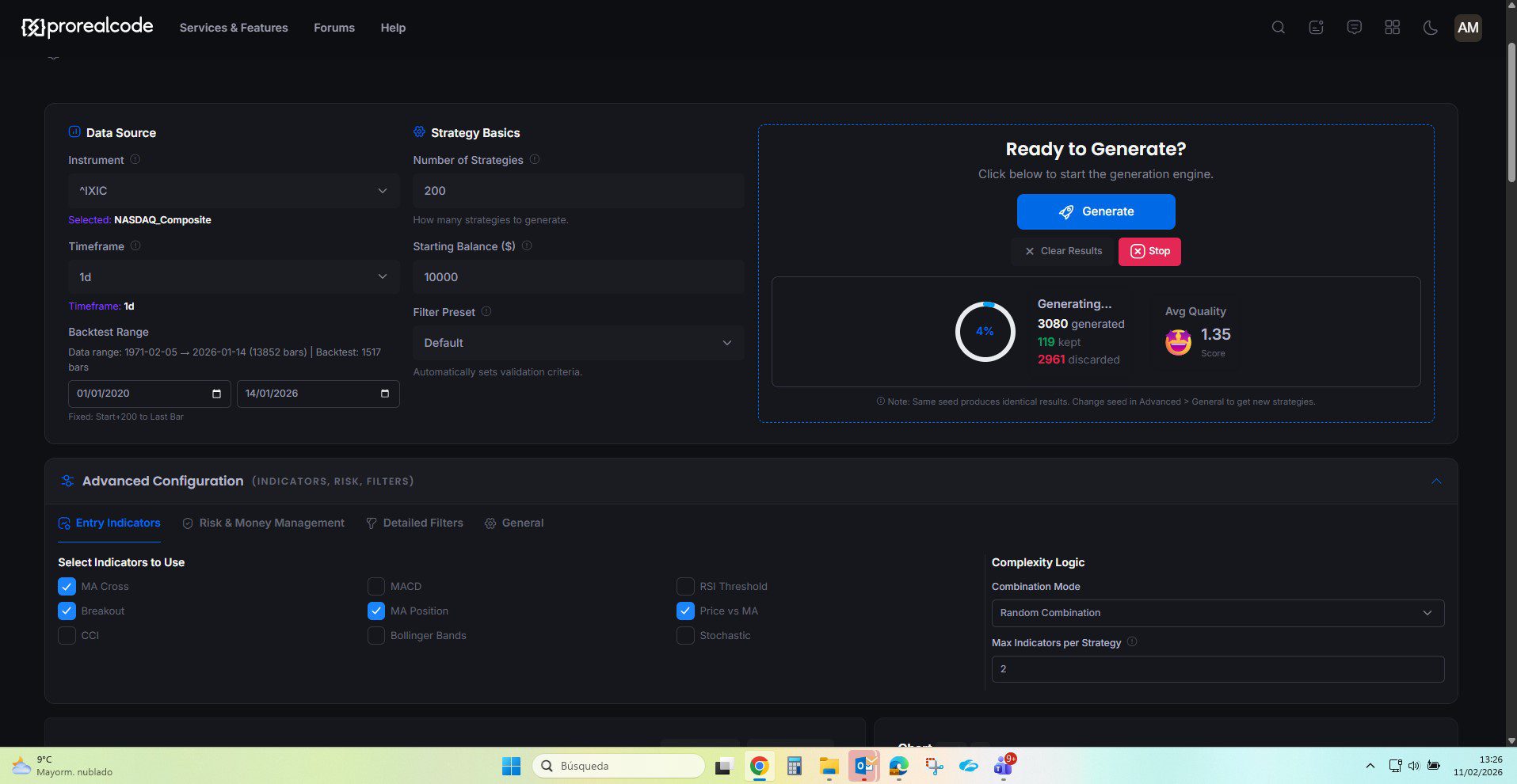
I’ve started testing ProRealQuant and, so far, I like it: in 5 minutes it produced 250 strategies out of almost 6,800 evaluated.
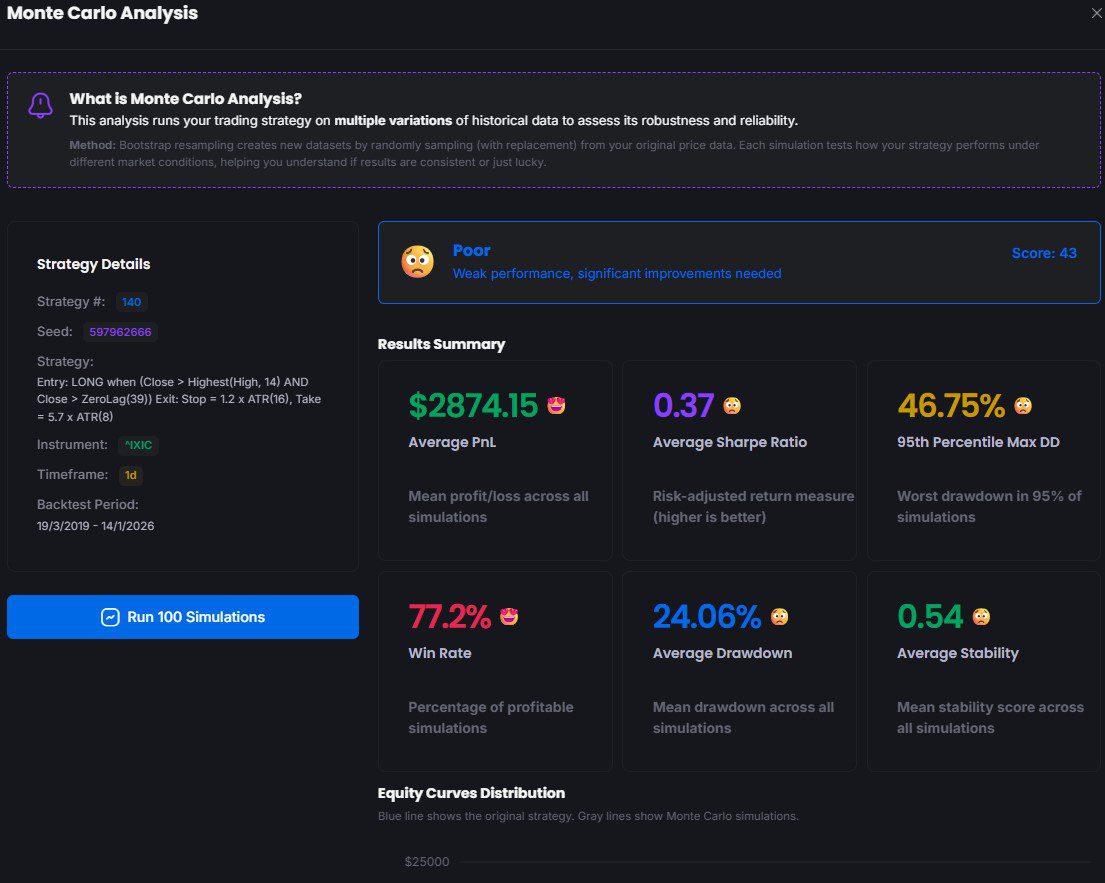
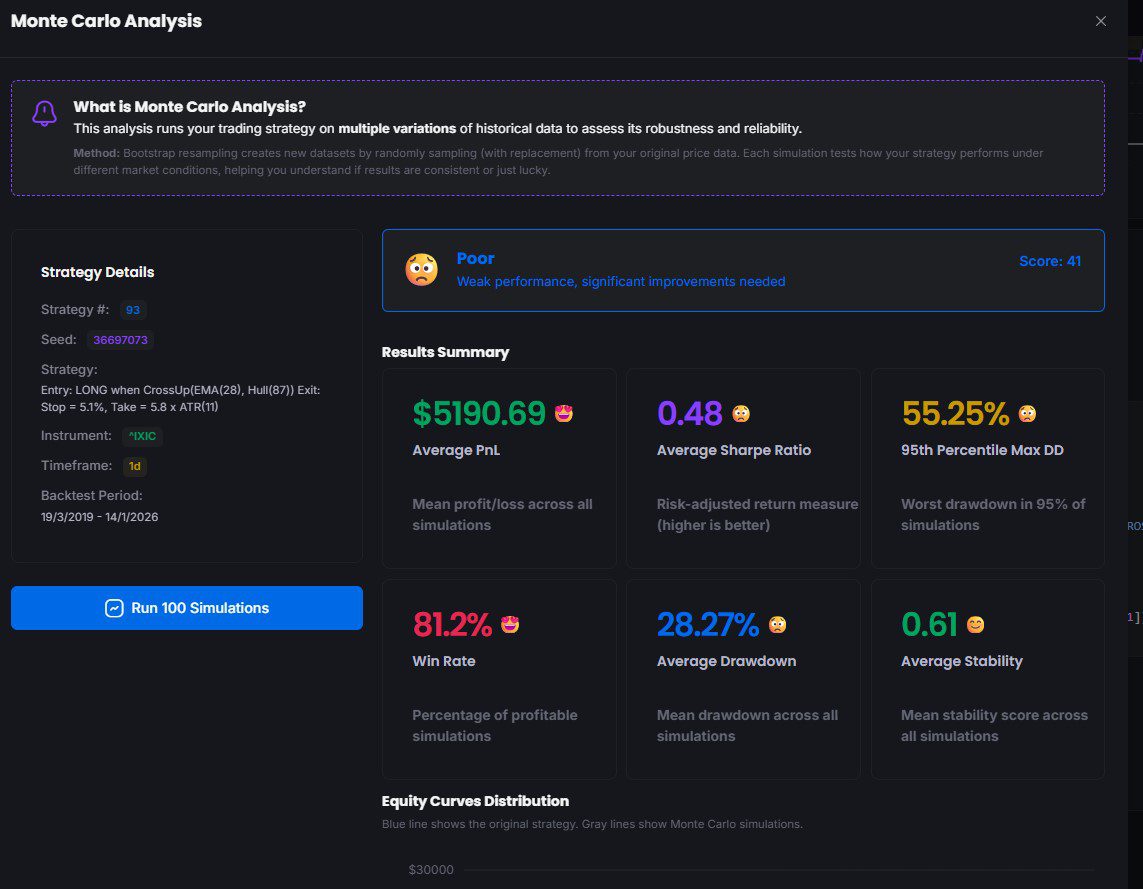
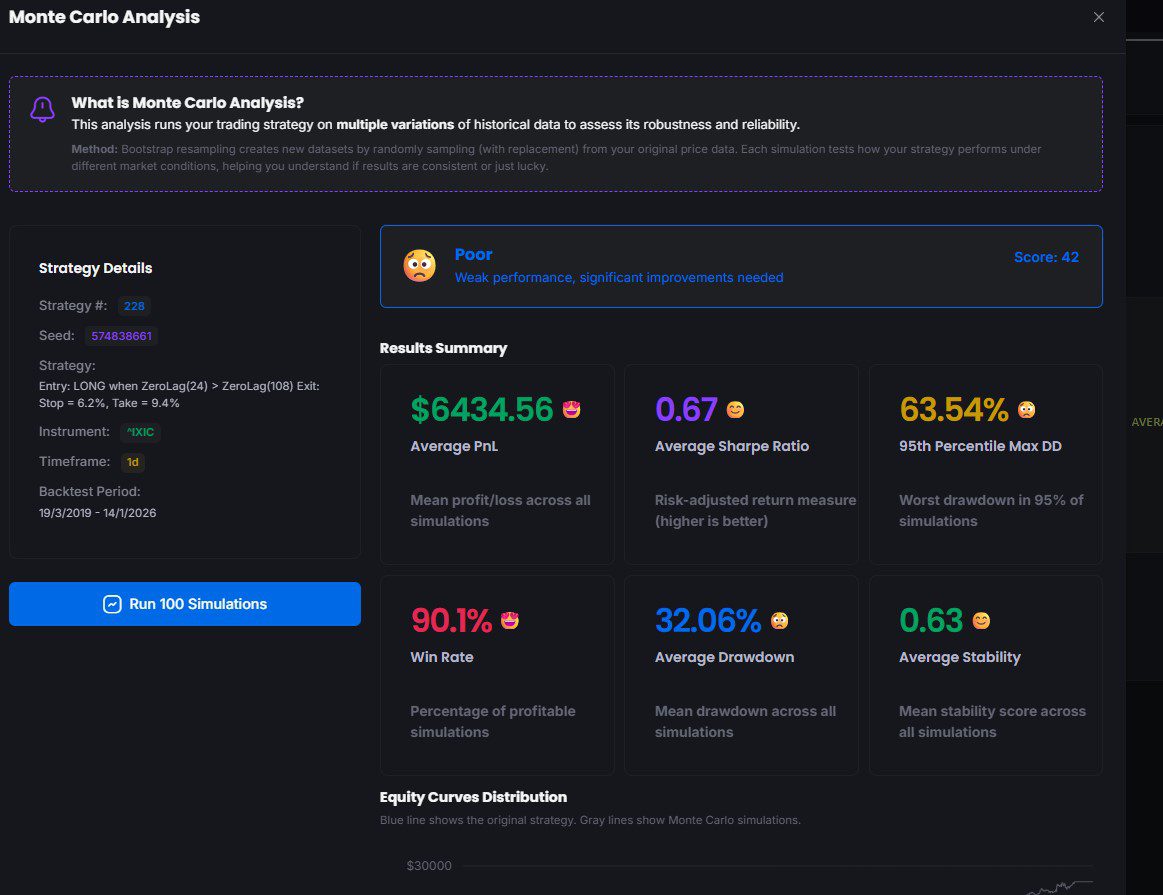
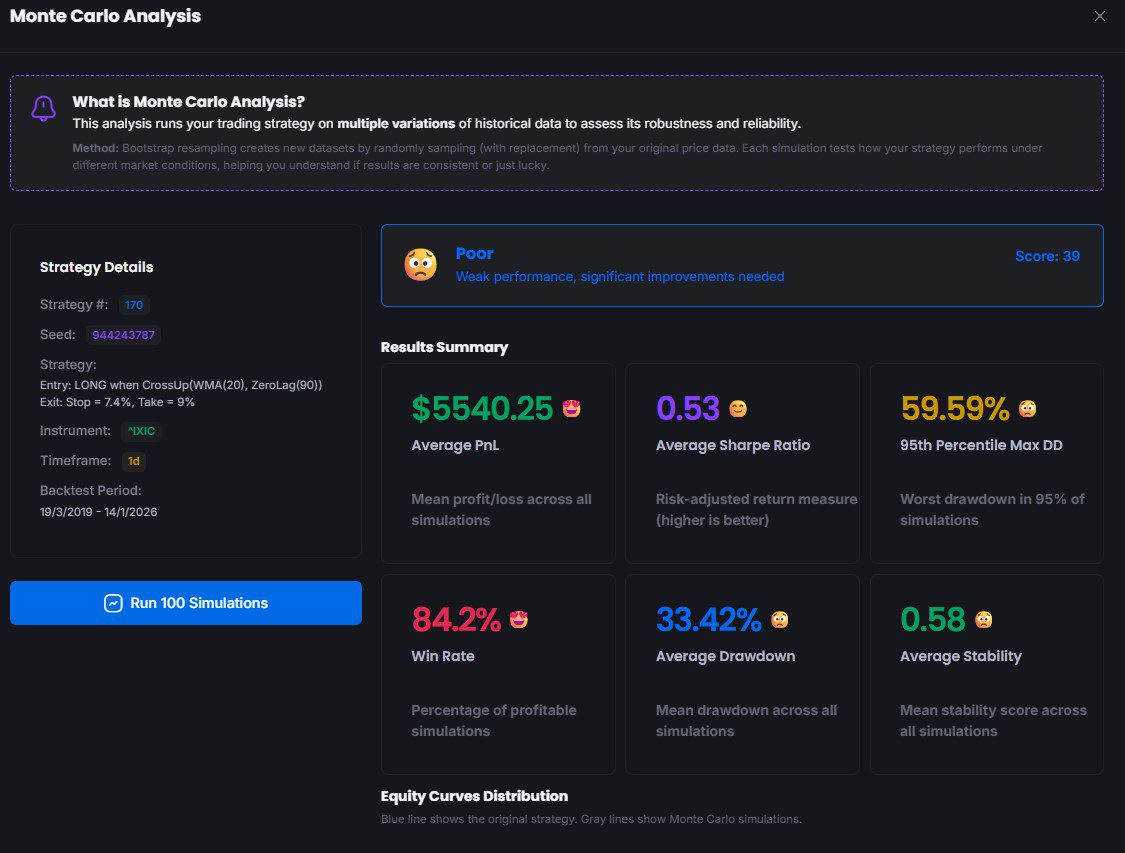
After selecting the most profitable strategies, I ran Monte Carlo tests on each of the chosen ones: all of them show “Poor” results.
I understand that the next steps would be:
I would appreciate any guidance on whether there is another order that has been tested and has resulted in robust strategies.
On the other hand, here is what I’m seeing:
Maybe the daily timeframe allows strategies to be generated quickly and gives an initial idea of their viability.
If lower-timeframe data could be included, perhaps it would speed up the phase of improving the predictive capacity of the strategies.
Thank you very much.
Regards,
Alfonso
Hi Alfonso,
Thank you so much for your kind words and for taking the time to test ProRealQuant, feedback like yours really encourages me to keep improving the tool!
Great job generating 250 strategies out of nearly 6,800 evaluated in just 5 minutes, that’s exactly the kind of quick screening the tool is designed for 🙂
Regarding your Monte Carlo results showing “Poor” grades, don’t be discouraged, this is actually a very common and healthy finding. It means the Monte Carlo filter is doing its job: exposing strategies that looked good on historical data but are likely overfit. A strategy that passes backtesting filters but fails Monte Carlo is telling you something important about its fragility.
A few suggestions to improve robustness:
First, tighten your filters before looking at Monte Carlo. Try the Conservative preset (or a custom setup) with Min Stability > 0.7, Max Drawdown < 20%, Min Trades > 30, and Profit Factor > 1.3. The idea is to only run Monte Carlo on strategies that already have a smooth, consistent equity curve, those have the best chance of passing.
Second, regarding your proposed steps (new filters → new exits → trailing), that order makes sense. I’d also add: try reducing Max Complexity to 1 (single indicator strategies). Simpler strategies tend to be more robust and less prone to overfitting. You can always add complexity later.
Third, keep in mind that the score formula heavily rewards strategies with good OOS Sharpe and low drawdown. Sorting by Stability first (rather than P&L) often surfaces more robust candidates.
On your point about lower timeframes:
you’re absolutely right. Daily data gives a quick first pass but limits the number of trades, which weakens statistical significance. Lower timeframe data (1H, 15min) would generate far more trades and allow better validation. This is definitely something I’m looking into for future updates as it was already requested by many users..
Keep experimenting with different seeds and filter combinations, the continuous mode is great for letting it run in the background while you refine settings. And remember, finding that most random strategies are fragile is the expected outcome. The tool is designed to help you find the rare exceptions, and Monte Carlo is your best friend for confirming those (that’s why I made it .. I’ll try to add Walk Forward analysis later).
Thanks again Alfonso, and don’t hesitate to share more feedback as you continue testing!
I’ve dipped-in several times and got similar results to yourself – overall ‘Poor’ after MonteCarlo (mainly due to massive DD I think).
If I restrict my dates to 12 months or less (suits me better) then I did get a few Systems that gave ‘average results’ after MonteCarlo (but I still couldn’t sleep with the DD).
So yes, interesting tool, glad we have it, but hope the option to select lower timeframes comes in due course.
Btw I can’t believe how fast it all runs – a credit to Nicolas!!
I hope if I am running on ‘Continuous’ that I’m not slowing anybody else down??
It’s a pity that PRT isn’t as fast on backtesting / optimising??
Thank you for the kind words about the speed, that really means a lot, I rebuilt ProRealCode with speed in mind and PRQuant inherit from it!
To answer your question about Continuous mode: no, you’re absolutely not slowing anyone else down! ProRealQuant runs 100% client-side in your browser, meaning all the computation happens on your own computer. There’s no server involved during backtesting. So the speed you’re experiencing is actually a credit to your own hardware! Run Continuous mode as long as you like without any guilt.
That’s also why it feels so much faster than ProRealTime’s backtesting because PRT are doing backtests server side (such as real trading operations with ProOrder), while ProRealQuant crunches everything locally with no network latency.
Regarding the massive drawdowns, here’s a practical tip: try increasing the Risk/Reward ratio (for example, from 2:1 to 3:1 or even higher) and make sure Enforce R:R is toggled on. This forces every strategy to have a take profit that’s significantly larger than the stop loss, which structurally limits how much each losing trade can hurt you. Combined with a tight Max Drawdown filter (say 15-20%), this should help surface strategies you could actually sleep with.
Keep experimenting and thanks again for the feedback!
Just added IG DAX40 1-hour timeframe (1 year only) for testing purpose. Enjoy.
On Seed: 712344306
When I try and run the code on PRT, I get the error percentk is undefined (at the end of Line 9).
Thought it best to let you know Nicolas.
Stochastic[16,2](percentK) > 70)
Thank you for pointing that out, it seems to be a very rare error during stochastic evaluation, noted!
EDIT: fixed
Good morning Nicolas,
I’m continuing to test ProRealQuant and, truthfully, I’m really liking the tool. With the criteria you mentioned and giving it enough time, strategies with a Monte Carlo > 60 are now appearing. I wanted to ask you several questions:
Once again, congratulations on the tool you’ve created.
Best regards,
Alfonso
Hi Alfonso,
Thanks for the kind words, really glad to hear you’re getting strategies with Monte Carlo grades above 60, that’s a great sign!
Let me go through your questions one by one.
1. Monte Carlo variability
Yes, you’re correct. Each time you run Monte Carlo, it generates 100 new random synthetic price series using block bootstrap resampling, so the results will naturally vary slightly between runs. This is expected behavior, not a flaw. If you want more confidence in the grade, you can simply run it 3 to 5 times and look at the average or the range. If a strategy consistently scores above 60 across multiple runs, that’s a solid indicator of robustness. If it swings between 45 and 70, it’s more borderline. There’s no magic number of runs, but 3 to 5 gives you a reasonable picture.
2. DAX H1
Intraday data like DAX H1 is trickier for several reasons. Intraday data tends to be noisier, so I’d recommend using the Conservative preset, setting Max Complexity to 1 (single indicator strategies), and keeping the Risk/Reward ratio enforced at 2:1 or above. Also try focusing on Long only or Short only rather than Both, as mixed strategies on intraday are harder to validate. If you’re still struggling, try increasing the number of strategies generated (1000+) in continuous mode, the hit rate is naturally lower on intraday so you need more attempts. And because the whole history I added cover a lof of different stages of market, it is way more difficult to find an edge on the complete set..
Also important, try to use only ATR takeprofit and stoploss, percentage of price in intraday strategies is not recommended.
3. Automating the next phase (filters, exits, trailing)
Not at this stage. ProRealQuant is designed to find the raw skeleton of a strategy, a valid entry logic with basic stop/take profit exits that shows statistical robustness. The next phase of refinement (adding trailing stops, time filters, session filters, additional exit conditions) is intentionally manual for now. The reason is that automating that layer would dramatically increase the risk of overfitting, you’d essentially be curve-fitting on top of curve-fitting. My recommendation is to take a strategy with Monte Carlo > 60, export the ProBuilder code, and then manually test incremental improvements in ProRealTime’s backtester, validating each addition separately. That said, AI-assisted refinement is something I’m thinking about for the future, but it needs to be done carefully to preserve the anti-overfitting philosophy of the tool (or maybe a “simple” Walk Forward IS/OOS tester).
4. Forex pairs and commodities
Good suggestion, and I’ve noted it. Adding more instruments is on the roadmap. I’ll look into adding some popular Forex pairs and commodities to the pre-loaded dataset in a future update.
5. Strategies on stocks
Strategies on stocks should work fine, the pre-loaded data includes AAPL, AMZN, GOOG, META, MSFT, NVDA and TSLA. If you’re getting no results at all, the most likely cause is that your filters are too strict for the selected stock. Try resetting to the Default preset first to confirm that strategies are being generated, then gradually tighten filters. Also make sure the date range you’ve selected contains enough data. Some stocks may also need different parameter ranges, for example a stock with lower volatility might not trigger breakout conditions as often, so try disabling Breakout and focusing on MA Cross, RSI or Price vs MA entries. And if you are using the complete history, I think it might not be relevant to include more than 10-15 years of data?
Thanks again Alfonso, and don’t hesitate if you have more questions!

Is there any way to save results?
For example, if I have generated 20 sets of code and I want to check them out tomorrow?
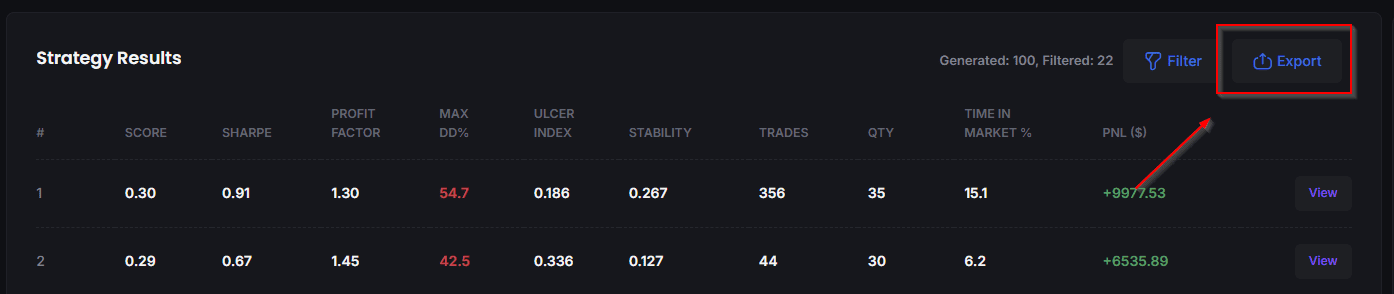
You can export results with all metrics into a csv comma delimited format with the Export button at top of strategies results window.
Export gives me the Results Table showing the Seed for each result row, so then how do I use, for example ‘#1 / Row 1 Seed’ to get the code tomorrow (after closing PRC when I go to bed! 🙂 )?
I am probably asking for a function that is not available / never was intended i.e. come back tomorrow and carry on where I left off??
Yes, I understand… Indeed, there’s no export of strategy codes as a bundle, because each one is generated individually when the “view” button is clicked. Then you have to copy/paste the code to save it if you’re interested.
The information collected on this form is stored in a computer file by ProRealCode to create and access your ProRealCode profile. This data is kept in a secure database for the duration of the member's membership. They will be kept as long as you use our services and will be automatically deleted after 3 years of inactivity. Your personal data is used to create your private profile on ProRealCode. This data is maintained by SAS ProRealCode, 407 rue Freycinet, 59151 Arleux, France. If you subscribe to our newsletters, your email address is provided to our service provider "MailChimp" located in the United States, with whom we have signed a confidentiality agreement. This company is also compliant with the EU/Swiss Privacy Shield, and the GDPR. For any request for correction or deletion concerning your data, you can directly contact the ProRealCode team by email at privacy@prorealcode.com If you would like to lodge a complaint regarding the use of your personal data, you can contact your data protection supervisory authority.