Checking conditions in an indicator

Viewing 8 posts - 1 through 8 (of 8 total)
  • Author
    Posts
  • #98079 quote
    robertogozzi
    Moderator
    Master

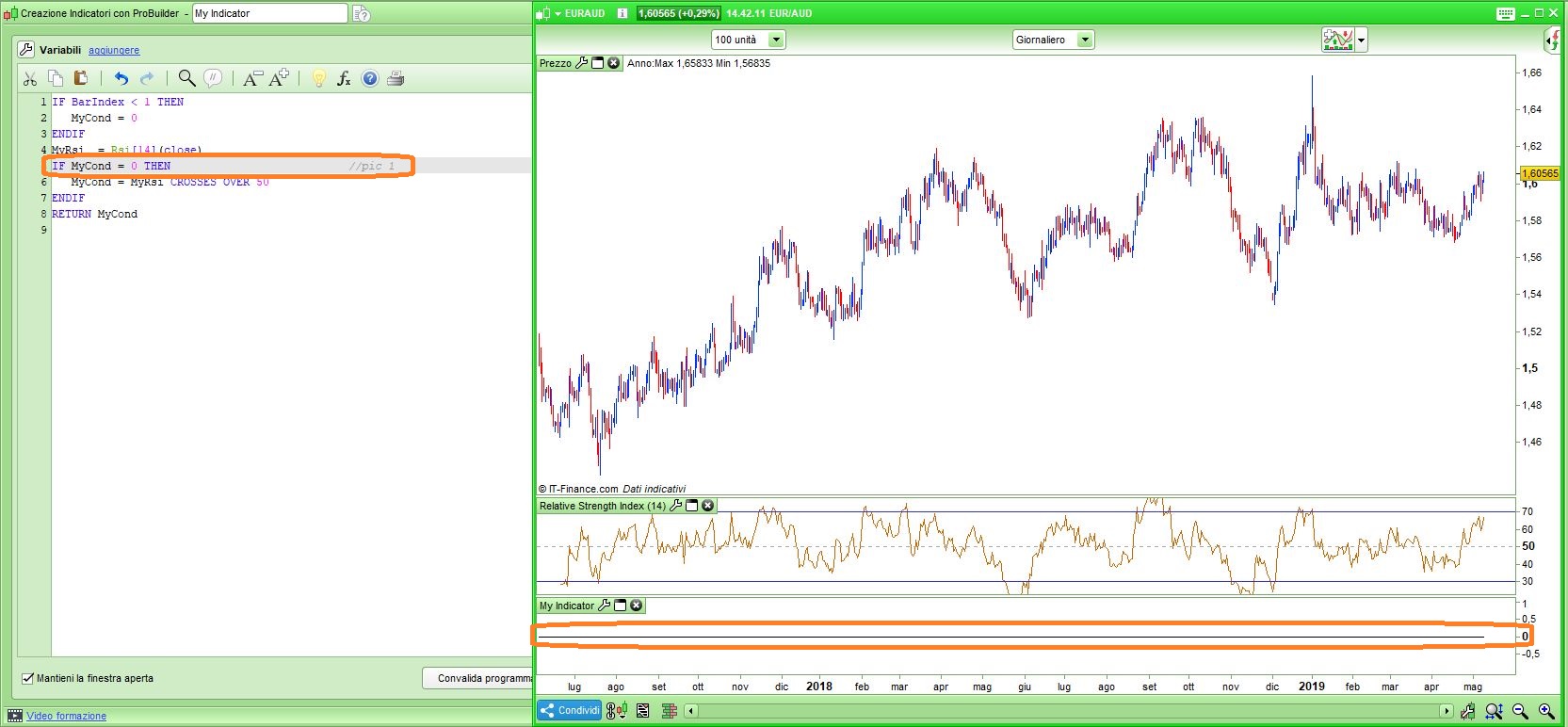
    I wrote an indicator to signal when a price crosses over the middle line (50) of RSI for the first time, but the code I wrote always returns 0 (pic 1):

    IF BarIndex < 1 THEN
       MyCond = 0
    ENDIF
    MyRsi = Rsi[14](close)
    IF MyCond = 0 THEN
       MyCond = MyRsi CROSSES OVER 50
    ENDIF
    RETURN MyCond

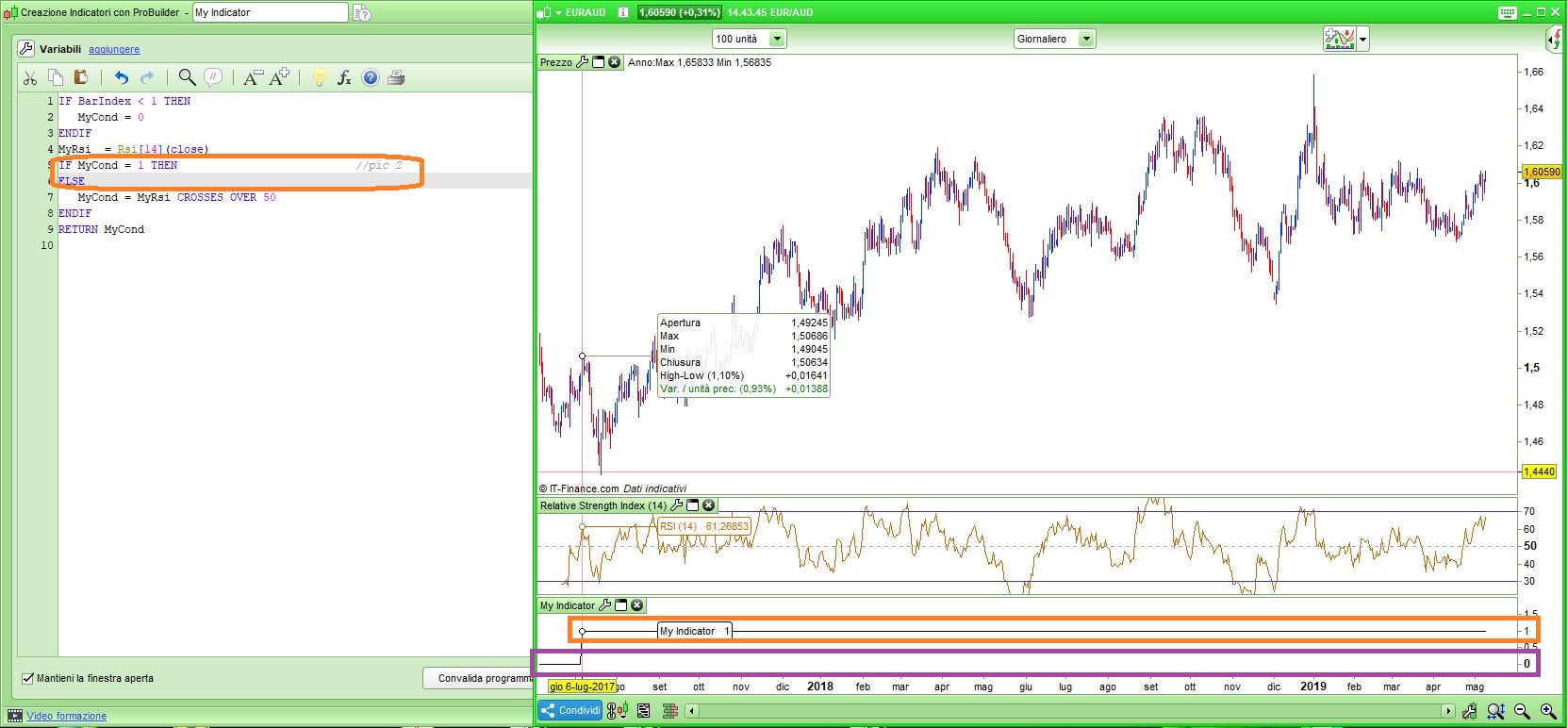
    I could find this workaround, by adding a dummy condition to test if MyCond=1 (pic 2):

    IF BarIndex < 1 THEN
       MyCond = 0
    ENDIF
    MyRsi = Rsi[14](close)
    IF MyCond = 1 THEN
    ELSE
       MyCond = MyRsi CROSSES OVER 50
    ENDIF
    RETURN MyCond

    Why this behaviour (both on v10.3 and beta v11)?

    Pic1.jpg Pic1.jpg Pic2.jpg Pic2.jpg
    #98086 quote
    Nicolas
    Keymaster
    Master

    I made a report too.

    #98087 quote
    pableitor
    Participant
    Master

    It seems that from barindex = 0 to 14  the RSI(14) value is undefined. Just do like this:

    IF BarIndex < 15 THEN
       MyCond = 0
    ENDIF
    MyRsi = Rsi[14](close)
    IF MyCond = 0 THEN
       MyCond = MyRsi CROSSES OVER 50
    ENDIF
    RETURN MyCond
    #98095 quote
    Vonasi
    Moderator
    Master

    It seems that from barindex = 0 to 14  the RSI(14) value is undefined.

    This was my first thoughts but even if it is undefined then it should just be a case that myCond = 0 and there is no cross of RSI over 50 during the first 14 bars so MyCond should remain at zero but then once the RSI does have a defined value after 14 bars then MyCond should change to a value of 1 once the first cross of 50 happens – but it never changes.

    #98096 quote
    robertogozzi
    Moderator
    Master

    I can also work it out by clearing MyCond everytime (same as IF BarIndex < 9999999 THEN) :

    MyCond = 0
    MyRsi = Rsi[14](close)
    IF MyCond = 0 THEN
       MyCond = MyRsi CROSSES OVER 50
    ENDIF
    RETURN MyCond

    but it’s not what I need to do.

    Thank you.

    #99146 quote
    Nicolas
    Keymaster
    Master

    Here is the fixed code:

    IF BarIndex < 1 THEN
    MyCond = 0
    ENDIF
    MyRsi = Rsi[14](close)
    
    IF MyCond = 0 and barindex >= 14 THEN
    MyCond = MyRsi CROSSES OVER 50
    ENDIF
    
    RETURN MyCond
    

    The problem is that the code tries to check the MyRsi CROSSES OVER 50 condition if the barindex is equal to 1.
    But at this moment there is not enough candlestick to calculate RSI.
    So it returns that mycond = NaN (Not a Number)
    And then we never go back into the loop because IF MyCond = 0 is never true.

    robertogozzi thanked this post
    #99148 quote
    robertogozzi
    Moderator
    Master

    Great Nicolas, thank you!

    #99164 quote
    GraHal
    Participant
    Master

    So there is no way in an Indicator to have preloadbars?

    This will answer a problem I was having with an Indicator a few days ago.

Viewing 8 posts - 1 through 8 (of 8 total)
  • You must be logged in to reply to this topic.

Checking conditions in an indicator


ProBuilder: Indicators & Custom Tools

New Reply
Author
Summary

This topic contains 7 replies,
has 5 voices, and was last updated by GraHal

6 years, 8 months ago.

Topic Details
Forum: ProBuilder: Indicators & Custom Tools
Language: English
Started: 05/09/2019
Status: Active
Attachments: 2 files
Logo Logo
Loading...