


Problems with getting any optimisation results

Viewing 3 posts - 1 through 3 (of 3 total)
  • Author
    Posts
  • #96366 quote
    Ac123
    Participant
    New

    Hello,


    I have played around with the optimisation previously and its worked fine but I am now unable to get any different results. Very basic code and strategy but first time playing around with this all, so slowly learning.

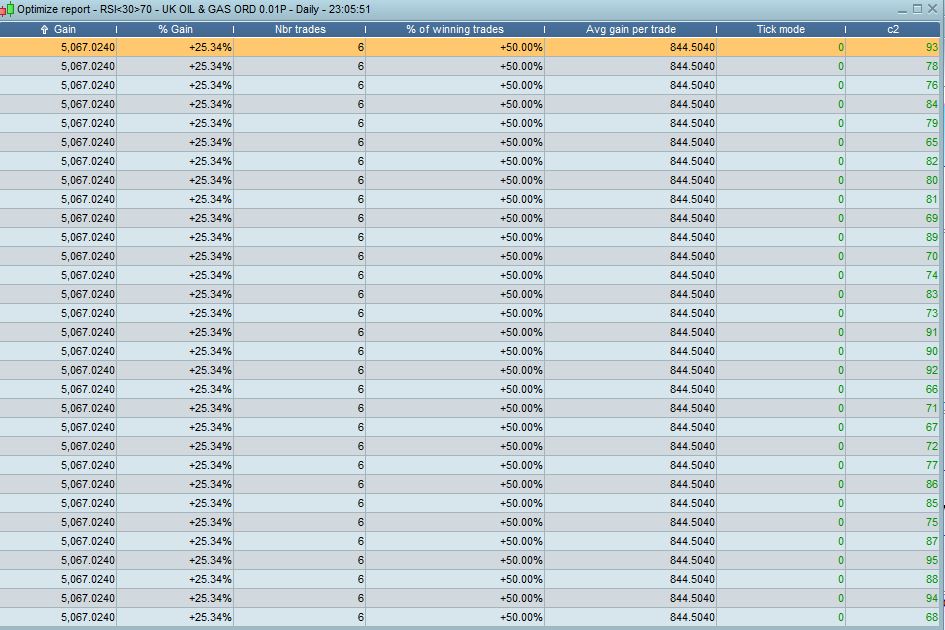
    I am trying to change the c1 and c2 so that it tests different RSI levels. Have even tried entering into optimisation as the indicator1 and 2 for the lable in program.


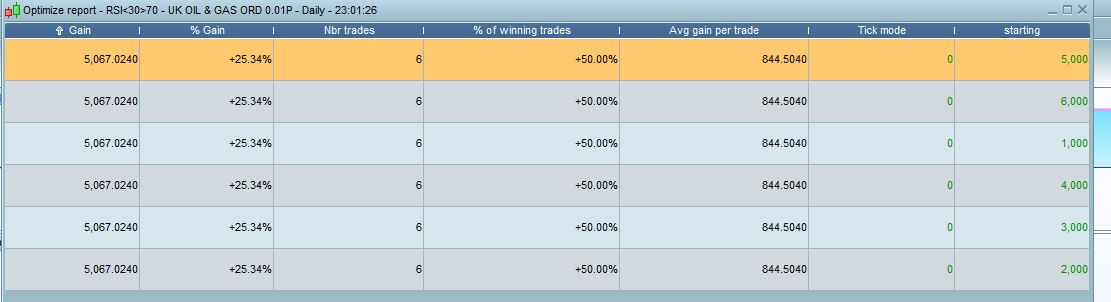
    Secondly I have also tried testing the optimisation for the Starting and Adding variables for buying different cash amounts of shares. Again, still same gain and % on each variables result.


    What am I doing wrong?


    Thanks


    // Definition of code parameters
    DEFPARAM CumulateOrders = True // Cumulating positions Activated
    
    indicator1 = RSI[14](close)
    indicator2 = RSI[14](close)
    
    c1 = (indicator1 <= 30)
    c2 = (indicator2 >= 70)
    test = summation[3](rsi[14]<=30)=3
    starting = 3000
    adding = 2000
    Sizeofpos = countoflongshares*POSITIONPRICE
    
    
    // Conditions to enter long positions
    //If no position and RSI goes below 30 then BUY "starting" worth of shares
    IF c1 AND Not LongOnMarket THEN
    BUY starting CASH AT MARKET
    ENDIF
    
    //If in a long position and the last trade put on is more than (daystradeopen) days old and RSI has been below 30 for "test" consecutive days then buy "Adding" more shares
    IF longonmarket AND (BarIndex - TradeIndex) >= Daystradeopen-1 AND test THEN
    BUY Adding CASH AT MARKET
    ENDIF
    
    // Conditions to exit long positions
    IF longonmarket AND c2 THEN
    SELL AT MARKET
    ENDIF
    
    GRAPH sizeofpos COLOURED (0,141,200)
    c1-RSI-Sell-optimisation.jpg c1-RSI-Sell-optimisation.jpg Starting-Optimisation.jpg Starting-Optimisation.jpg
    #96370 quote
    robertogozzi
    Moderator
    Master

    To test RSI level replace 30 and 70 with x1 and x2, or whatever name you prefer, then in the variable form enter them assigning a start, end and a step value for each one of them, then activate walk forward, then start backtest.

    Ac123 thanked this post
    #96371 quote
    Ac123
    Participant
    New

    To test RSI level replace 30 and 70 with x1 and x2, or whatever name you prefer, then in the variable form enter them assigning a start, end and a step value for each one of them, then activate walk forward, then start backtest.

    Wow why didn’t I think of that!! Easy haha


    Thank you so much!

Viewing 3 posts - 1 through 3 (of 3 total)
  • You must be logged in to reply to this topic.

Problems with getting any optimisation results


ProOrder: Automated Strategies & Backtesting

New Reply
Author
author-avatar
Ac123 @ac123 Participant
Summary

This topic contains 2 replies,
has 2 voices, and was last updated by Ac123

6 years, 10 months ago.

Topic Details
Forum: ProOrder: Automated Strategies & Backtesting
Language: English
Started: 04/13/2019
Status: Active
Attachments: 2 files
Logo Logo
Loading...
