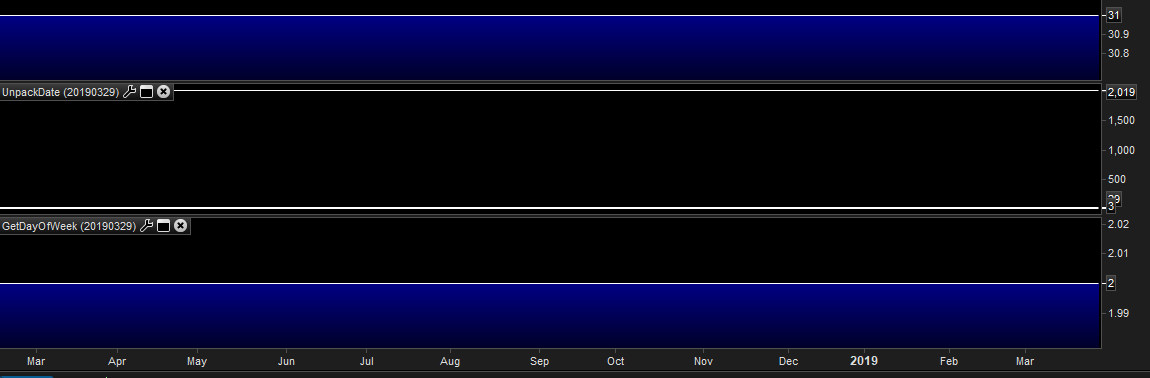
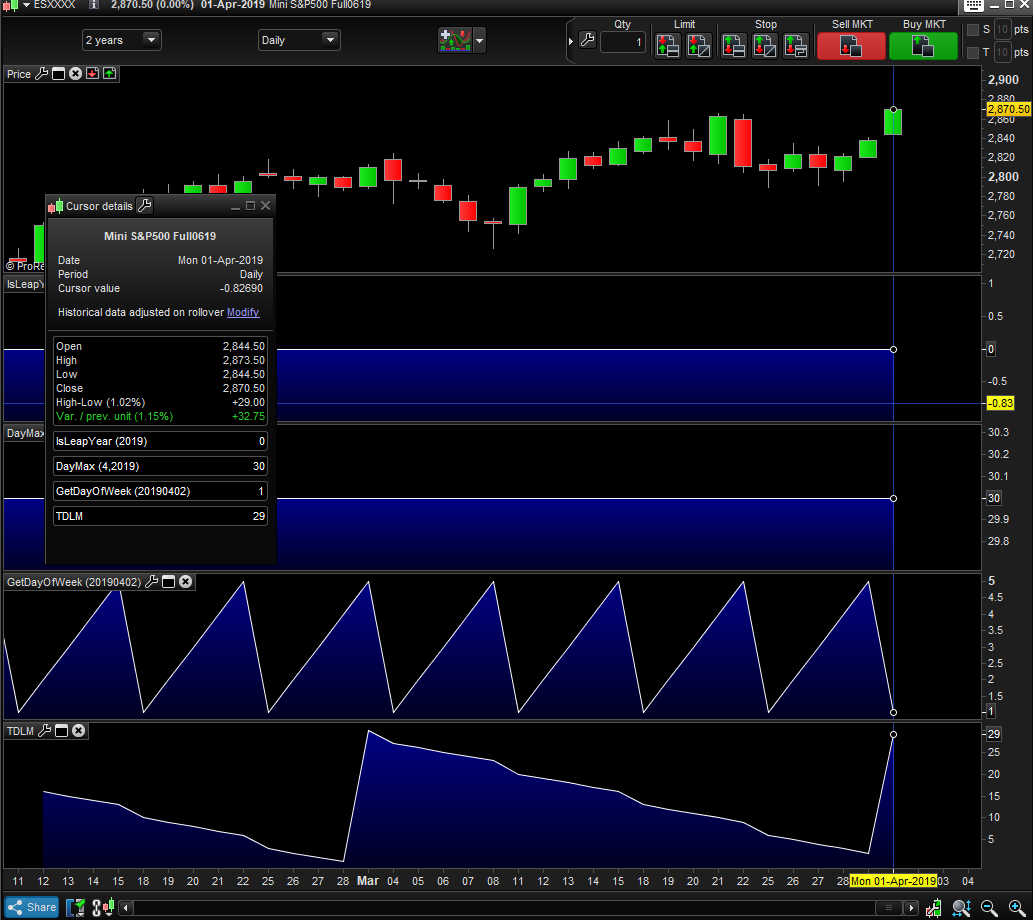
You’re the best! I am having trouble getting the GetDayOfWeek to work, however. It is returning 2 (Tuesday) for 20190329. Any ideas?
I’m still working on it, to check calculations.
Not yet, I’m trying to write a new algorithm.
In the meantime you can use OpenDayOfWeek (or DayOfweek if you prefer the DoW at the closure of the candlestick), which works finely. Mine was just a replacement.
Dayofweek and opendayofweek do not permit input into the function so I don’t think I use them on ‘future’ dates (only present and past). This is the only thing left to solve, I believe.
I’ll post the code as soon as I have a correct version.
This version works fine after Jan. 31st, 2011:
//           (Works fine after Jan. 31st, 2011)
//
//input: DATE
MyDay, MyMonth, MyYear = CALL "UnpackDate"[OpenDate]
//--------------------------------------------------------------------------
// A - calculate the YEAR Code
yy    = MyYear MOD 100
y1    = (yy - (yy MOD 4)) / 4
y2    = y1 +  MyDay
MySum = y2 + yy
//--------------------------------------------------------------------------
// B - calculate the LEAP YEAR Code
LeapYear = CALL "IsLeapYear"[MyYear]
//--------------------------------------------------------------------------
// C - calculate the MONTH Code
IF LeapYear THEN
   IF MyMonth = 10 THEN
      Mvalue = 0
   ELSIF MyMonth = 3 OR MyMonth = 11 THEN
      Mvalue = 3
   ELSIF MyMonth = 1 OR MyMonth = 4 OR MyMonth = 7 THEN
      Mvalue = 6
   ELSIF MyMonth = 9 OR MyMonth = 12 THEN
      Mvalue = 5
   ELSIF MyMonth = 5 THEN
      Mvalue = 1
   ELSIF MyMonth = 6 THEN
      Mvalue = 4
   ELSIF MyMonth = 2 OR MyMonth = 8 THEN
      Mvalue = 2
   ENDIF
ELSE
   IF MyMonth = 1 OR MyMonth = 10 THEN
      Mvalue = 0
   ELSIF MyMonth = 2 OR MyMonth = 3 OR MyMonth = 11 THEN
      Mvalue = 3
   ELSIF MyMonth = 4 OR MyMonth = 7 THEN
      Mvalue = 6
   ELSIF MyMonth = 9 OR MyMonth = 12 THEN
      Mvalue = 5
   ELSIF MyMonth = 5 THEN
      Mvalue = 1
   ELSIF MyMonth = 6 THEN
      Mvalue = 4
   ELSIF MyMonth = 8 THEN
      Mvalue = 2
   ENDIF
ENDIF
MySum = MySum + Mvalue
//--------------------------------------------------------------------------
// D - calculate the CENTURY Code
Cy = (MyYear - yy) MOD 400
IF Cy = 0 THEN
   cc = 6
ELSIF Cy = 100 THEN
   cc = 4
ELSIF Cy = 200 THEN
   cc = 2
ELSE
   cc = 0
ENDIF
MySum = MySum + cc
//--------------------------------------------------------------------------
// E - calculate Day Of Week
d = (MySum MOD 7) + 1         //0=Sun, 1=Mon, 2=Tue, 3=Wed, 4=Thu, 5= Fri, 6=Sat
RETURN d
I tried to use several different methods, but couldn’t find any perfect one, each method turned out to have some faults. This is the most reliable I could write.
Excellent – thank you very much. Is there a reason we have the plus one before the return statement? It produces values: Monday == 2 to Friday == 6 on my end (maybe because I’m in US EST time zone?)
Anyways, I removed the plus one and get values 1-5. Thank you for this!
No reason for +1, I just added it to test what I liked most and forgot to remove it (0-6 is the most common used range).
This morning I tried another slightly different version and still got the same discrepancies:
- up to some date in 2006 everything works in a different way and I get plenty wrong results
- from there on till Jan.2011 the function returns almost always correct results but on some rare occasion sunday (not the other days) is reported incorrectly
from the end of January 2011 everything works fine. I’m giving up!
Have a good day.
So I tried putting together the code to retrieve the trading (business) days left in the month, but it appears to still be counting weekends. Not sure where/what I am missing?
DEFPARAM CalculateOnLastBars = 35

d,m,y = CALL UnpackDate[date]
myDayMax = CALL DayMax[m, y]

businessdaysleft = 0

FOR count = 1 to myDayMax DO
newdate = date + count
d,m,y = CALL UnPackDate[newdate]
if d > myDayMax THEN
 BREAK
ENDIF
myDayOfWeek = CALL GetDayOfWeek[newdate]
IF myDayOfWeek >= 1 and myDayOfWeek <= 5 THEN
businessdaysleft = businessdaysleft + 1
ENDIF
NEXT


RETURN businessdaysleft
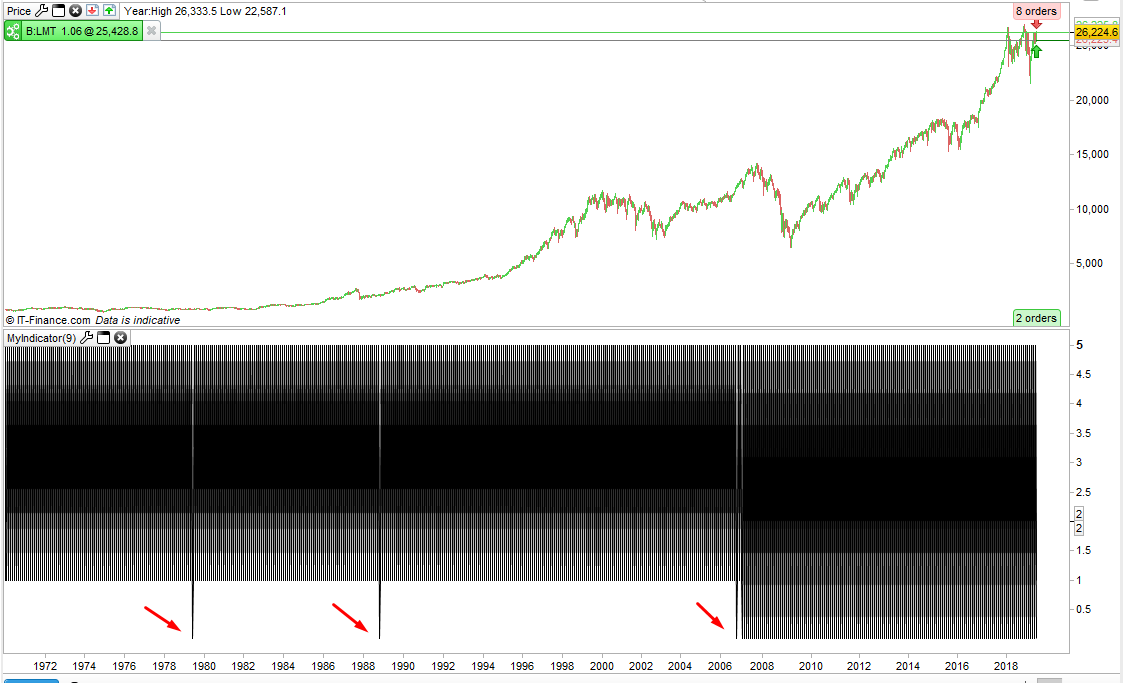
up to some date in 2006 everything works in a different way and I get plenty wrong results
If you check the chart in this post here you can see that the number of candles/bars in any year varies wildly.
How many bars in a year indicator
I can understand some reasons such as the switch from 5 candle weeks to 6 candle weeks and leap years and varying holidays each year and special events that lead to market closures but it appears to me that more is going on than just this. I have the feeling that some of the back test data is not very clean!
If you just put this simple indicator on a daily DJI chart it can clearly be seen when the switch to 6 bar weeks happened but prior to this there are also clearly some odd things in the data.
return opendayofweek as "opendayofweek", dayofweek as "dayofweek"
[attachment file=95332]
I tried to GRAPH all individual elements from July 1979 (how come Eur/usd is quoted since then, but had only been approved on Jan, 1st 1999, 20 years later?!), Day, Month, Year separately and everything is fine, also, DayOfWeek matches the one calculated by eXcel.
I tried several different formulas and ALL of them reported some kind of error. They cannot be ALL erroneous!!!
I must assume that either:
- I did not fully understand the logic behind those formulas (likely to be the main reason)
- PRT use a different way of dealing with integers; actually PRT does support only floating point numbers, so even “i” in a FOR…NEXT iteration is not an integer. This may lead to some unwanted decimal digits being used or dropped when rounding or using MOD. They don’t need much integers for trading, so many basic features found in other programming languages are missing and this may lead to errors when doing some conversions.
But, since from Jan. 17th 2011 the code works fine, well… that’s enough for most cases!
dburgh, I changed a bit your code to make it easier to calculate the remaining business days:
DEFPARAM CalculateOnLastBars = 35

d,m,y = CALL UnpackDate[opendate]
myDayMax = CALL DayMax[m, y]

businessdaysleft = 0
myDayOfWeek = CALL GetDayOfWeek[opendate]
FOR count = d to myDayMax DO
//newdate = date + count
//d,m,y = CALL UnPackDate[newdate]
//if d > myDayMax THEN
//BREAK
//ENDIF
//myDayOfWeek = CALL GetDayOfWeek[newdate]
IF myDayOfWeek >= 1 and myDayOfWeek <= 5 THEN
   businessdaysleft = businessdaysleft + 1
ENDIF
myDayOfWeek = (myDayOfWeek + 1) MOD 7
NEXT


RETURN businessdaysleft
I also replaced DATE with OPENDATE, since the first one is the date when a candle closes, while the latter when it opens.
In the first case both THURSDAY and FRIDAY report 5, since at the end of the closing daily Thursday candle the date is actually Friday, which is 5, when the next candle closes trading is stopped, so the DayOfWeek is not updated and it will still be 5 also on Friday. OPENDATE works fine.
Moreover, line 8 should start looping from “d”, not from 1.
Beautiful! Thank you v much