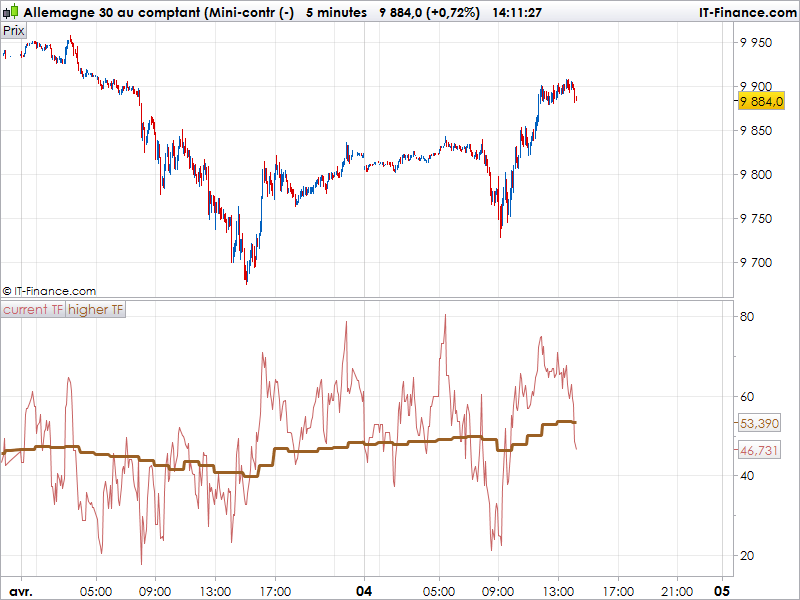
Because there is a lot of questions about how to deal with multitimeframe (MTF) indicator on the same chart, please find below a code example of displaying the RSI indicator from 2 different TF :
currentTF = 5
higherTF = 60

//indicator
currentPeriod = 14
higherPeriod = (higherTF/currentTF)*currentPeriod
currentRSI = RSI[currentPeriod](close)

now = hour
if(now<>now[1]) then
 higherRSI = RSI[higherPeriod](close)
endif

RETURN currentRSI coloured (200,100,100) as "current TF", higherRSI coloured (155,96,36) as "higher TF"
Of course, this is not as accurate as the real higher timeframe value but I think it would be useful for a lot of people around here. In this example, the 2 timeframe displayed are the 5 minutes and the hourly ones.
The higher timeframe curve is refreshed once an hour. I will continue investigate more on the best way to do it.
very interesting , also hope that the function is implemented to study different timeframe ( as you did for the screener )
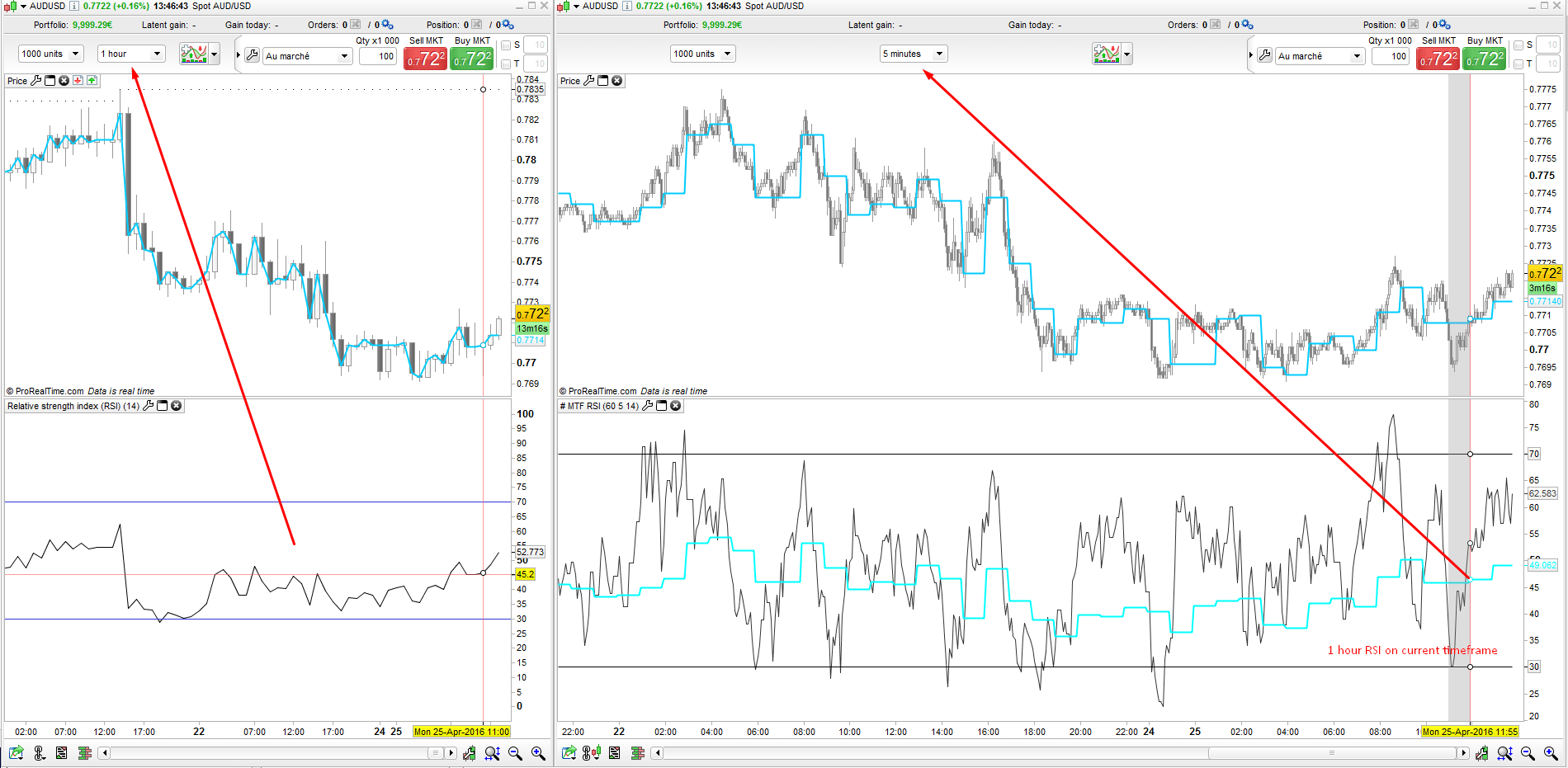
Here is the complete code to display a 1 hour RSI on any timeframe. Much better and precise than the version of the first post! I still find the easiest way and “user friendly” to manage settings for all timeframes that we can make a choice on the fly. The ITF file and example are attached to this post.
//higher timeframe minutes count
//HigherTFminutes = 60

//current timeframe minutes count
//CurrentTFminutes = 5

//RSI period to display
//RSIperiod = 14

if hour<>hour[1] then
 c = close
endif

currentRSI = RSI[RSIperiod](close)

factor = ROUND(HigherTFminutes/CurrentTFminutes)

MTFRSI = RSI[RSIperiod*factor](c)

RETURN currentRSI as "current TF RSI", MTFRSI as "higher TF RSI"
The data are updated once per hour, so the indicator can be used very well in ProOrder or conditions are tested once a bar. In live trading, of course, this causes a shift because the indicator will wait the close in 1hr candle to update the curve.
I want to use multiple time-frames in my indicators but don’t think they are possible at the moment (please correct me if I am wrong). I was thinking about creating a ProScreener as they can use multiple time-frames (my strategy would not create a huge number of signals) but I don’t want to spend all day looking at the ProScreener window. Is there any way to create an audible alert with the ProScreener?
ProScreener has already sound alert. Look into your platform options under “Alerts and sounds” tab.
I never knew that. Thank you very much Nicolas!
Just read this topic now. The MTF RSI indicator looks very useful. Thanks for that Nicolas.
I’ve amended the code for a simple 20 period moving average (see below). It seems to be a close(ish) approximation. Anyone any thoughts? It could be of use until the next version of PRT with the MTF function.
Question: for example, if we wanted to amend the code to be 5 mins and 4 hr MAs, what would we need to change? Apart from the number for “HigherTFminutes” would we also need to amend the “if hour<>hour[1]” and “then c = close” conditions?
Cheers
//higher timeframe minutes count
HigherTFminutes = 60

//current timeframe minutes count
CurrentTFminutes = 5

//MA period to display
MAperiod = 20

if hour<>hour[1] then
c = close
endif

currentMA = Average[MAperiod](close)

factor = ROUND(HigherTFminutes/CurrentTFminutes)

MTFMA = Average[MAperiod*factor](c)

RETURN currentMA as "current TF MA", MTFMA as "higher TF MA"
Hi again
Thought this may be an easier way of calculating it (taken from the help you gave me last week Nicolas on this thread: https://www.prorealcode.com/topic/rsi-trigger-simplified-coding/)
For a simple MA this looks like a simpler way of working with it.
// 60 minute 20 period MA on a 5 min chart
X = 240 //lookback periods to calculate the MA (ie 12 5 min bars in an hour * 20 for a simple 20 period MA)
MA60min = summation[X](Close) / X

RETURN MA60min
Do think this would be possible if you were using tick charts?
Would you replace the time with barindex, I.E if you were using the 39 and 416 tick charts.?
Robert
Currently working on a multitimeframe SuperTrend indicator based on ‘seconds timeframe showing 1 minute ST’
I don’t know about ticks but I had thought to use barindex but due to there being no candles in some seconds ‘counting’ things didn’t seem to work too well (although with all the ways I have had a go at this I could be misunderstanding and a missing candle still counts as a barindex/please correct me if I am wrong)
@jonjon good idea/approach on the MA will give it a go thanks and thanks Nicolas for kicking this off – hope MTF support in ProOrder will soon become a reality 🙂
There is an indicator for the MultiTimeFrame under PRT ……..
There is an indicator for the MultiTimeFrame under PRT ……..
why the attached image that has been deleted ?
why the attached image that has been deleted ?
You have multiple posts. Please refer to this post for a response to your question:
https://www.prorealcode.com/topic/indicateur-multitimeframe/#post-90210