hull ma in indicator code

Viewing 8 posts - 1 through 8 (of 8 total)

  • Author
    Posts
  • #86086 quote
    MertMert
    Participant
    Average

    Hello,


    I have a HULL moving average in my chart and am trying to use it as a condition in my code. Unfortunately I can not find the right words to describe the HULL MA. if I use average it is ok but it seems not to recognise an average being a HULL one.


    Can someone help or advice me?

    Thanks in advance


    Mert

    #86088 quote
    VonasiVonasi
    Moderator
    Master
    Period = 20
    
    HullAverage = WeightedAverage[ROUND(SQRT(close))](2 * WeightedAverage[ROUND(Period / 2)](close) - WeightedAverage[Period](close))

    You can find the calculations for many different averages within this indicator code:

    Average Filter Regression

    #86090 quote
    MertMert
    Participant
    Average


    Thanks Vonasi.


    I have various codes for the HULL ma. The problem is that if I want to write code like: HULLMA current period crosses over HULLMA previous period the description of the HULLMA seems not to be recognised by the software.

    #86095 quote
    VonasiVonasi
    Moderator
    Master

    There is no built in Hull MA in PRT so you have to hard code it into your strategy.

    Period1 = 20
    Period2 = 50
    
    HullAverage1 = WeightedAverage[ROUND(SQRT(close))](2 * WeightedAverage[ROUND(Period1 / 2)](close) - WeightedAverage[Period1](close))
    HullAverage2 = WeightedAverage[ROUND(SQRT(close))](2 * WeightedAverage[ROUND(Period2 / 2)](close) - WeightedAverage[Period2](close))
    
    If HullAverage1 crosses over HullAverage2 then
    buy 1 contract at market
    endif
    #86097 quote
    MertMert
    Participant
    Average

    Ok. Thanks a lot.

    #86098 quote
    robertogozzirobertogozzi
    Moderator
    Legend

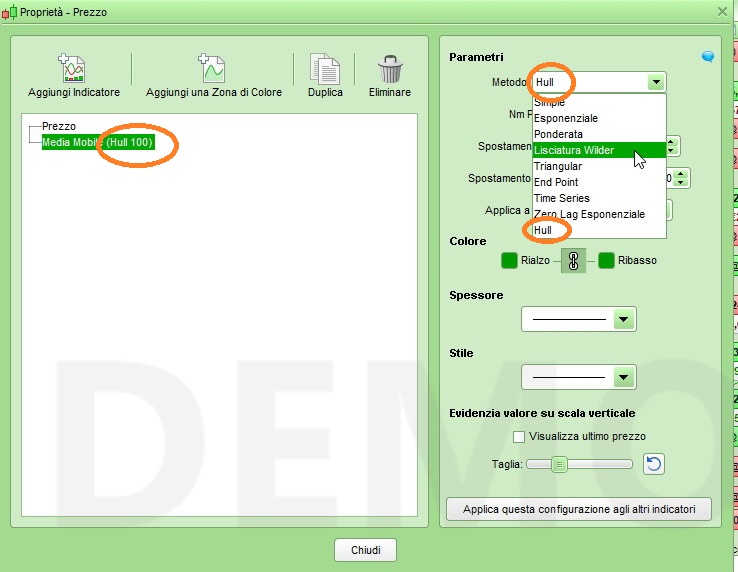
    There’s no built-in HULL MA by itself, but clicking on the properties of MA ypou can select HULL to be displayed (only) on charts.

    Oddly enough ProOrder does not recognize average types beyond 6 with AVERAGE[Periods,Type] and reports an error if you write 8 as type!

    x-25.jpg x-25.jpg
    #86101 quote
    VonasiVonasi
    Moderator
    Master

    Oddly enough ProOrder does not recognize average types beyond 6 with AVERAGE[Periods,Type]

    I thought that it was above 7 not 6?

    Not having 8 and 9 is almost as if someone put them in the platform but then never told the person responsible for putting them in ProOrder that they had done it!

    #86103 quote
    robertogozzirobertogozzi
    Moderator
    Legend

    Lack of communication 😀

Viewing 8 posts - 1 through 8 (of 8 total)

  • You must be logged in to reply to this topic.

ProRealAI ProRealAI New

Stuck on this ProBuilder code?

Describe what this topic is trying to build, in plain English, and ProRealAI writes the ProRealTime™ indicator, screener or system for you.

Available in 7 languages
Try ProRealAI

hull ma in indicator code


ProBuilder: Indicators & Custom Tools

New Reply
Author
author-avatar
Mert @mert Participant
Summary

This topic contains 7 replies,
has 3 voices, and was last updated by robertogozzirobertogozzi
7 years, 10 months ago.

Topic Details
Forum: ProBuilder: Indicators & Custom Tools
Language: English
Started: 11/30/2018
Status: Active
Attachments: 1 files
ProRealCode ProRealCode
Loading...