Keep them, they won’t take much ram space!
At least until they recognize that IGNORED is a reserved word, not a variable!
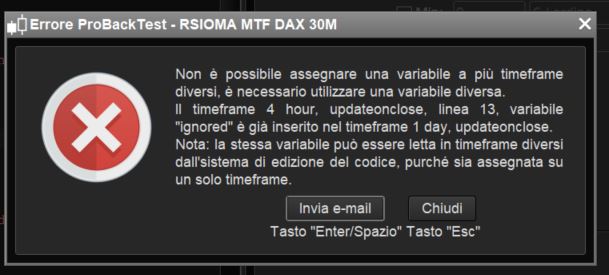
Roberto, look again at my picture:
[attachment file=79331]
The system doesn’t allow the word “ignored” more than one time, because it sees it as a variable!
It won’t run.
That’s why I suggested that you keep the complete set of variable names, even if you don’t need some of them, at least until they correct the bug, they won’t take much space in your PC’s ram!
But if I keep all variables, I have to use them all!! Or am I wrong?
If you have X and Y unused, but need to keep them, you can use a dummy IF…ENDIF:
IF x AND y THEN //no action
ENDIF
For future eventual use of variables I used something like :
X = X
Y = Y
But your suggestion is more efficient because it doesn’t use memory ressources by assigning useless values.
Thx Roberto
In this scenario, will:
- OnMarket be updated every minute despite it is tested within the 1-hour TF?
- more than one trade be opened within the same 1-hour candle if the first one is entered and exited in a few of minutes, since all conditions still apply and code is read every minute (but conditions updated on close)?
TIMEFRAME (1 hour,updateonclose)
IF close > average[20](close) AND Not OnMarket THEN
   BUY 1 CONTRACT AT MARKET
   SET TARGET pPROFIT 20
   SET STOP   pLOSS   20
ENDIF
//
TIMEFRAME (default)                  //run from a 1-minute chart
//  trailing stop code here
I suggest the implementation of the keyword SKIPTIMEFRAME or BREAKTIMEFRAME, similar to BREAK, to skip to the next TF in the code or to the end:
TIMRFRAME (daily,updateonclose)
   .
   .
TIMRFRAME (1 hour,updateonclose)
   .
IF MyConditions THEN
   SkipTimeFrame           //resume at the beginning of the following TF, if any
ENDIF
   .
TIMEFRAME (default)
   .
   .
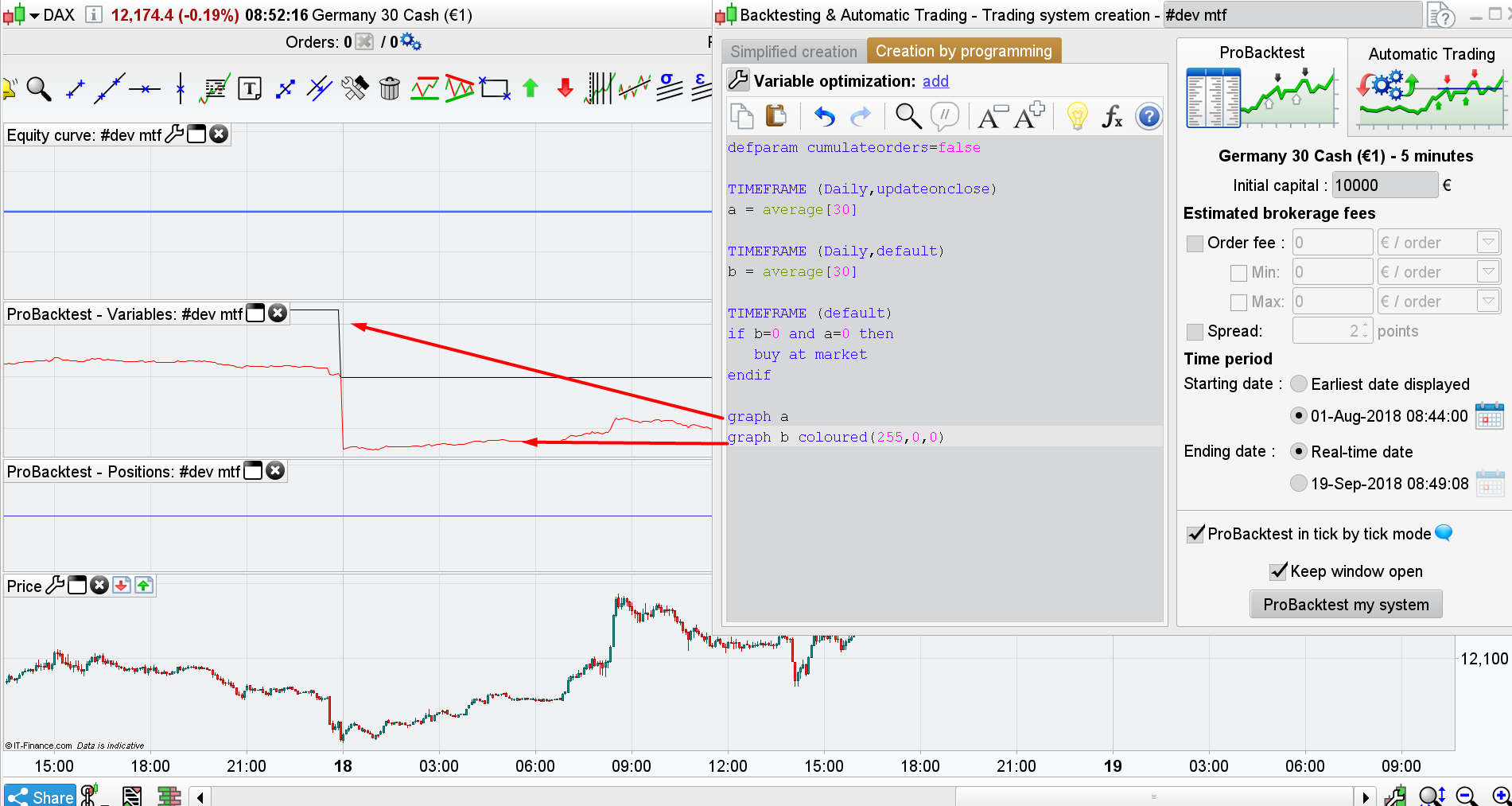
Does MTF support the use od the same TF more than once with different behaviours:
TIMEFRAME (Daily,updateonclose)
   .
   .
TIMEFRAME (Daily,default)
   .
   .
TIMEFRAME (1 hour,updateonclose)
   .
   .
TIMEFRAME (default)
Yes it works. In the attached picture you clearly see the use of the daily timeframe 2 times: a and b variables are calculated differently.
 Jan
JanParticipant
Veteran
Hallo all,
interesting discussions all above, I will certainly test MTF in my future strategies.
I have 2 very basic questions:
- If I let turn on the MTF-possibility in my real IG-account, would it have effect on my existing trading strategies ? (given the obvious fact that I do not change those existing strategies with new MTF-code). Any bugs known when turn the MTF possibility on, but not using any MTF code in the strategies? I would think that it would not have any impact, but please give me your thoughts.
- Already any testresults known of the Walk forward analysis in combination with Multiple Time Frame code, no bugs known sofar, it works as expected ?
Thanks in advance, KR Jan
I’m not with IG, but I know that many users asked them to turn the MTF on their accounts. By reading all the topics of the forums, I have no feeling that it has changed the way the “old” strategies should have behaves without it.
I am using strategies in real account with MTF and old strategies, nothing changes with those
MTF simply applied to old strategies won’t be beneficial (maybe just for trailing stops, but not always). You have to write a strategy suited for MTF!
MTF simply applied to old strategies won’t be beneficial (maybe just for trailing stops, but not always). You have to write a strategy suited for MTF!
I think Gianluca is just pointing out that his old strategies have not been effected in any way by now having MTF available on his platform/account – which is what Jan Wind wanted to know with his first question.