0.00 in optimize report

Viewing 11 posts - 1 through 11 (of 11 total)
  • Author
    Posts
  • #76412 quote
    Vonasi
    Moderator
    Master

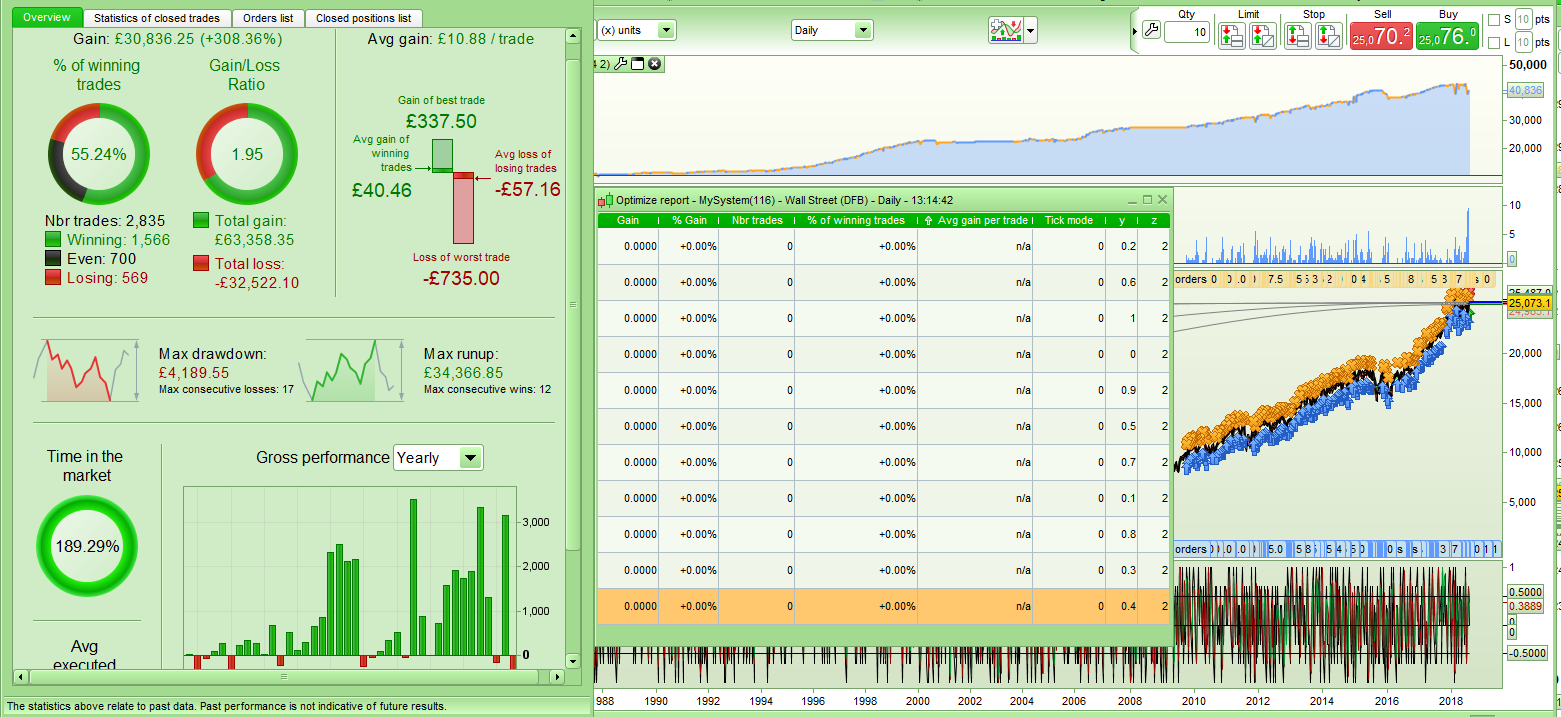
    Weird issue today. I am back testing a strategy on the DJI daily on demo. When I use a position size of 1 all is OK but if I use a position size of 0.5 the ‘Optimize Report’ window shows values of 0.00. The back test optimization has run OK and if I click on any return it shows me the correct equity curve etc but the ‘Optimize Report’ window just does not show the results. Change the position size to 1 and the window is filled out correctly.

    [attachment file=76413]

    Screenshot_1-10.png Screenshot_1-10.png
    #76425 quote
    Vonasi
    Moderator
    Master

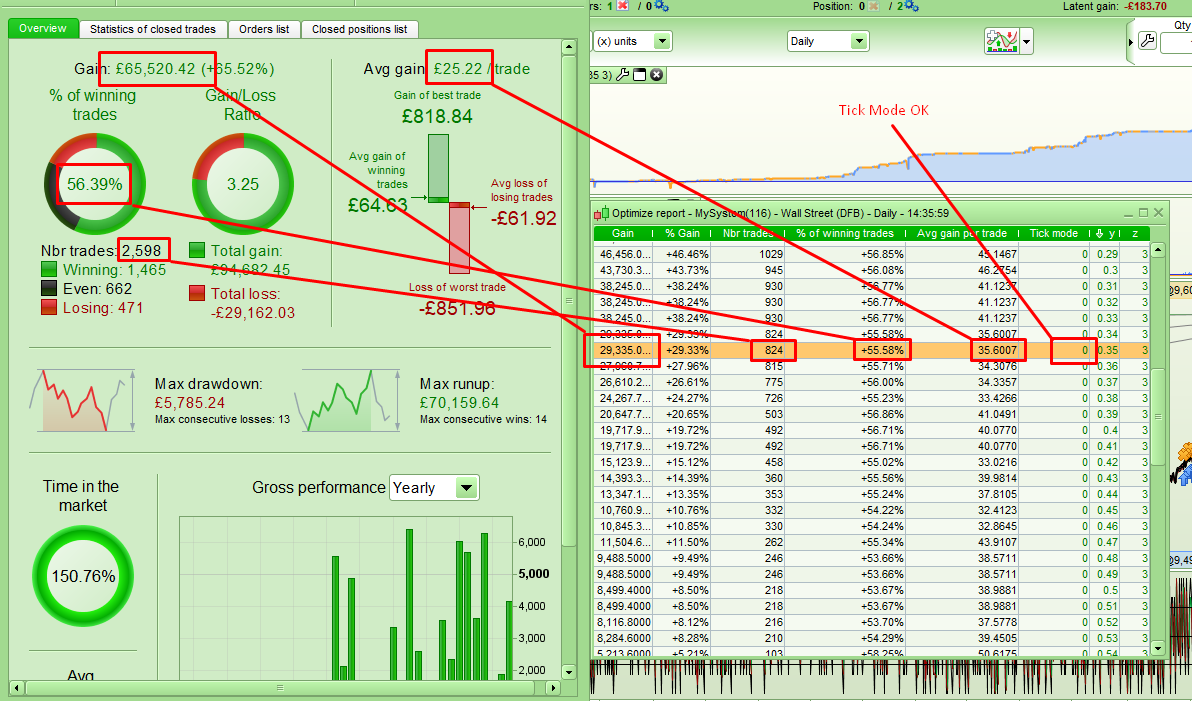
    I have now added a variable position size to the strategy and I notice that I get different results in the ‘Optimize Report’ window to the results in the ‘Detailed Report’ window. The tick mode is showing zero and it is not a strategy that uses tick by tick data anyway so that is not the issue. If I fix the position size to 1 then the results in each window are the same.

    This is making back testing impossible to do with any thing but a position size of 1.

    [attachment file=76426]

    Screenshot_2-8.png Screenshot_2-8.png
    #76435 quote
    GraHal
    Participant
    Master

    PRT should be snapping you up Vonasi as a 1st rate Tester … you find all the weird glitches!

    I vote PRT buy you a new Radar for your Yacht! 🙂

    I can’t add anything technical sorry as I am having a beer now after a hard days work on my daughter’s house extension! 🙂

    #76784 quote
    Vonasi
    Moderator
    Master

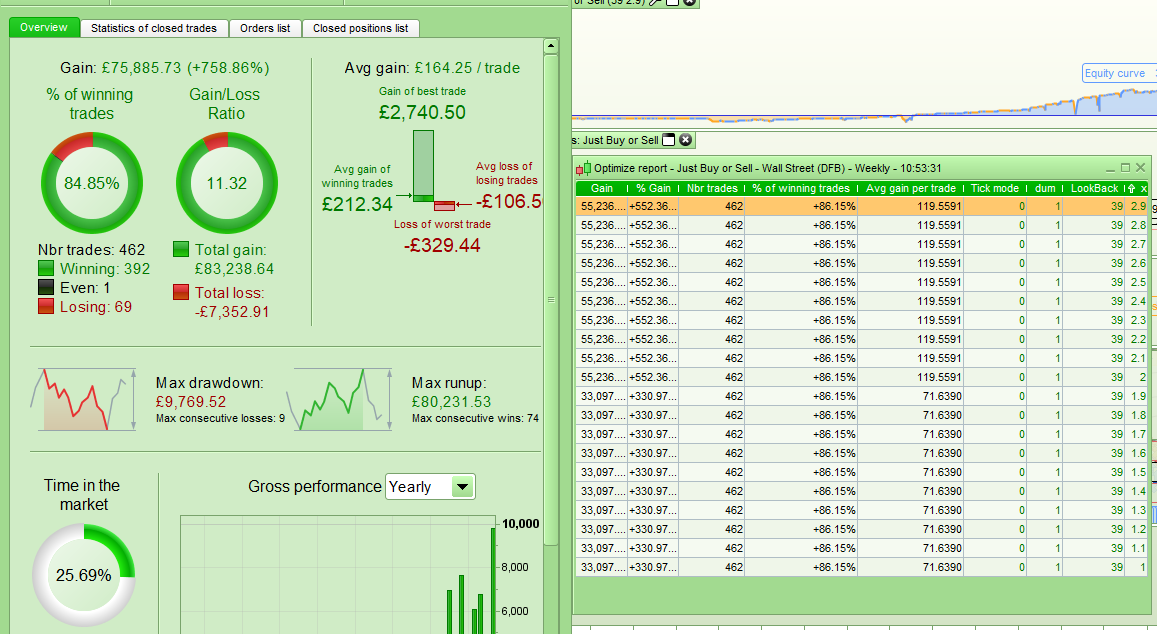
    This issue is still occurring. A different strategy today and I am getting different results in the ‘Optimize Report’ window to the actual results of the strategy. I have a variable x which is multiplying position size and the results are identical with a multiple of 1 to 1.9 and from 2 to 2.9 so it seems that the ‘Optimize Window’ is not displaying the results with decimal position in the position sizing and defaulting to displaying the results of whole number position sizing only.

    [attachment file=76785]

    Screenshot_10.png Screenshot_10.png
    #76799 quote
    GraHal
    Participant
    Master

    Have you sent a Technical Report in whilst still keeping the respective windows open?

    #76812 quote
    Vonasi
    Moderator
    Master

    Have you sent a Technical Report in whilst still keeping the respective windows open?

    I certainly have as it makes reading the optimized results impossible and you have to click on each and every line to see the true results which is unworkable.

    #77622 quote
    Carine
    Moderator
    Average

    Hello,

    We have not received a technical report from you.

    Regards,

    Carine

    #77630 quote
    Vonasi
    Moderator
    Master

    Hello,

    We have not received a technical report from you.

    Regards,

    Carine

    That’s strange – I will try to replicate the issue and send another one.

    #77631 quote
    Vonasi
    Moderator
    Master

    Unfortunately I do not recall which strategy caused the issue and at the moment I cannot replicate it. If it re-occurs then I will send in a report again.

    #77649 quote
    GraHal
    Participant
    Master

    We have not received a technical report from you.

    Was it on your Platform which is direct with IG Vonasi? Because as we know in such cases Tech Reports go straight to IG and then get forwarded to PRT as required?

    #77651 quote
    Vonasi
    Moderator
    Master

    Was it on your Platform which is direct with IG

    Recently I have been developing on three different platforms. Two direct with IG and one via PRT which can be a little confusing. Luckily I have coloured them differently and so I can say that as the images I posted have green backgrounds than it was definitely on the PRT sponsored account.

    GraHal thanked this post
Viewing 11 posts - 1 through 11 (of 11 total)
  • You must be logged in to reply to this topic.

0.00 in optimize report


Platform Support: Charts, Data & Broker Setup

New Reply
Author
author-avatar
Vonasi @vonasi Moderator
Summary

This topic contains 10 replies,
has 3 voices, and was last updated by Vonasi

7 years, 6 months ago.

Topic Details
Forum: Platform Support: Charts, Data & Broker Setup
Language: English
Started: 07/21/2018
Status: Active
Attachments: 3 files
Logo Logo
Loading...