Getting back to ProRealCode after a few weeks away…
Thanks for the answers. that makes more sense now.
I have a few quick questions:
- I see that adding or removing the “GRAPH” command causes the algorithm not to work or changes the results sometimes. any possible reason for that? is it a bug or am I missing something
- Does the location of the GRAPH command matter to the results? if I place a GRAPH X inside an IF statement would I get different results from outside the if statement for example
- Is StrategyProfit for each specific strategy? if I run 2 separate strategies will this parameter be changed? if I run manually trading and automatic trading will this parameter be altered
Thanks again,
A.
Getting back to ProRealCode after a few weeks away…
Thanks for the answers. that makes more sense now.
I have a few quick questions:
- I see that adding or removing the “GRAPH” command causes the algorithm not to work or changes the results sometimes. any possible reason for that? is it a bug or am I missing something
- Does the location of the GRAPH command matter to the results? if I place a GRAPH X inside an IF statement would I get different results from outside the if statement for example
- Is StrategyProfit for each specific strategy? if I run 2 separate strategies will this parameter be changed? if I run manually trading and automatic trading will this parameter be altered
Thanks again,
A.
1. I never experienced that, I assume it doesn’t affect strategies, it only may affect the VARIABLES window, if you exeperienced this issue you should post the whole code in order to replicate it.
2. Wherever you place GRAPH will never affect your strategies, but for sure the output on the screen will change if the code between the two GRAPH locations modifies the value of GRAPHed data. I just tried putting GRAPH in an IF statement and it ALWAYS displays the same value retained when the condition was last true.
3. STRATEGYPROFIT returns data relative to a single strategy; manual trades won’t affect automated strategies, unless you manually close/modify automated trades.
Thanks again.
Here is the skeleton of my code. I need a way to see were the program is at every stage (I am used to debugging and tools, system printouts, IDE etc…)
I created a state parameter and tried to set different values to it based on the position it is in, but the state stays 0 all the time.
What am I doing wrong here? how can I quickly debug my code?
//removed all params just left the state and program skeleton to see why it is not changing the state
ONCE State=0
GRAPH State
EnableTrade=0
LongTriggered=0
ShortTriggered=0

IF time = FirstHour THEN
State=1

ENDIF

IF ONMARKET THEN
State=2
IF LONGONMARKET THEN
State=3

ELSIF SHORTONMARKET THEN
State=4
ENDIF
ENDIF

IF NOT ONMARKET THEN
State=5
IF EnableTrade=0 THEN
State=6

ELSIF InitDailyProfit < StrategyProfit OR StopHour < time THEN
EnableTrade=0
State=7


ELSIF InitDailyProfit > StrategyProfit THEN
State=8
if LongTriggered>0 AND ShortTriggered>0 THEN
EnableTrade=0
State=9
ELSIF LongTriggered>0 THEN
State=10

ELSIF ShortTriggered>0 THEN
State=11
ENDIF
ELSIF InitDailyProfit = StrategyProfit THEN
State=12
ENDIF
ENDIF
Line 21 can be replaced by ELSE and, if you do, line 23 must be commented out.
Apart from these details (not affecting the value of variable STATE), I can only recap all your conditions as follows
STATE values:
0 = initial
1 = when FirstHour is true, but will be immediately overridden by one of the following conditions (OnMarket or Not OnMarket)
2 = when OnMarket is true, but will be immediately overridden by the following two conditions (Long/ShortOnMarket)
3 = LongOnMarket
4 = ShortOnMarket
5 = Not OnMarket AND all of the following conditions (from ELSE through the last ENDIF) are FALSE
6 = Not OnMarket AND EnableTrade = 0
7 = Not OnMarket AND EnableTrade = 1 AND there was a Loss OR outside trading Hours
8 = Not OnMarket AND EnableTrade = 1 AND all the following conditions (from there through ENDIF before the last ELSIF) are false
9 = Not OnMarket AND EnableTrade = 1 AND both LongTriggered & ShortTriggered are TRUE
10 = Not OnMarket AND EnableTrade = 1 AND LongTriggered is TRUE
11 = Not OnMarket AND EnableTrade = 1 AND ShortTriggered is TRUE
12 = Not OnMarket AND EnableTrade = 1 AND no change in Equity
This is all I coud do without the full code, check if they are what you really wanted to happen within your strategy.
Thanks Roberto for the quick reply.
Yes, the conditions are correct.
I managed to fix this problem by changing the time frame to 10 seconds instead of 1 min. That way it triggered correctly.
This causes another issue. I want to test the code on different dates and with 10 seconds I can only get today.
Changing the date frames (for example 5/3/18-6/3/18) in the date period on the right hand side of the proBackTest resulted in an error: “Please check your start and end date”
is there any way of backtesting with this short time frame?
BTW, I did see instances when adding a graph command removed the trading for that day and then removing it and re-adding it or changing it to “ONCE” made it work again…
could be a bug and I can PM the code if you like.
Also, before I go fully live, a general question.
How can I test this with small amounts say 1$ per point for a few days?
How much is 1 contract considered?
Thanks again for all the help and support!
ONCE is used to initialize a constant or a variable (PRT makes no difference between the two).
GRAPH is used to show the contents of constants/variables for debugging purposes only.
As for the time range when backtesting, there’s no limit; I used sometimes to shrink it to a couple of hours. That error message occurs once in a while, I usually close the running strategy and all backtest so far and open it again to restart and it always worked. On a worst case you could try to close PRT and restart it all over.
On a 10-second TF I have one week of data to backtest.
Thanks again,
I did restart the whole program but the message persists.
so my questions are:
- Is it possible to ask for a time frame in the past like 1.5.18 at 15:00 till 2.5.18 till 15:00 – and if so is there a support team to be contacted in case it does not work?
- I am shown only 1 day for 10sec frames. I can only choose 10,000 units so I was guessing that is the limit. are there any other options?
- How much money is “1 contract” considered? (I am used to manually typing the amount in PPT (pounds per point)
Thanks again
Thanks again, got it and will fill the help form.
Today I added another short script. It is very basic:
At the end of every daily bar exit all active positions and set new buy and sell orders with stoploss and limit
It works fine, but in the cases where for example the buy stoploss is activated and the sell should be triggered it reacts weird.
It shows me on the graph as if it created 2 orders but the profit is off and the equity curve gets hit as if the strategy lost thousands. that doesn’t make sense
I can’t debug it since I am using daily bars and can’t look into each sell/buy separately.
Is the sell stoploss value maintained even after a buy was triggered and stopped? I am guessing that could be the problem
I think I can easily fix it with hourly bars but that seems like a complicated solution to a simple task which is why I want to verify I haven’t missed something here
DEFPARAM CumulateOrders = false

ONCE StopLoss=0
ONCE StopLimit=10
ONCE StakeSize=10
ONCE EntryBuffer=0


IF LONGONMARKET THEN
SELL AT MARKET
ELSIF SHORTONMARKET THEN
EXITSHORT AT MARKET
ENDIF


MyBuyprice = High+EntryBuffer
MySellprice= Low-EntryBuffer
StopLoss = 100

BUY StakeSize CONTRACTS AT MyBuyprice stop
SELLSHORT StakeSize CONTRACTS AT MySellprice stop
SET STOP LOSS StopLoss
SET TARGET PROFIT StopLimit
Yes, that’s the issue. ProOrder takes control of operations when a bar closes to run a strategy, after that control is released to the broker, who is not aware of that strategy, so if there are two pendin orders sometimes they may be entered within the same bar, no matter what
DEFPARAM CumulateOrders says.
This will change with the incoming MTF (Multi Time Frame) version, since your strategy will be able to setup any trade according to greater TFs but execute orders on a very low TF, even a second.
The main drawback is that you will need to launch the strategy from within the lower TF (say 1 second) so I’m afraid backtesting will be limited to a few days instead of years of data history available for the daily TF. This is a question I asked Nicolas this morning in another topic. I’m eager to know his answer!
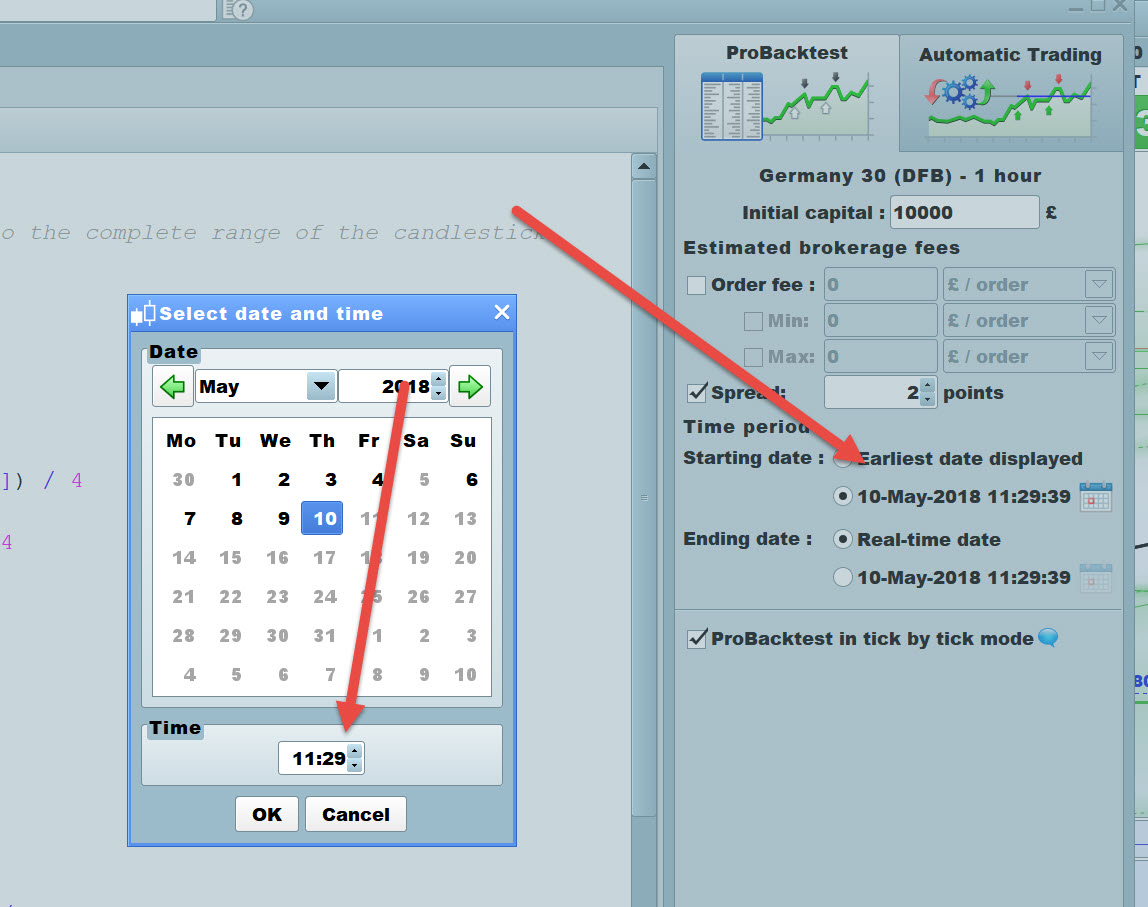
Is it possible to ask for a time frame in the past like 1.5.18 at 15:00 till 2.5.18 till 15:00 – and if so is there a support team to be contacted in case it does not work?
I am shown only 1 day for 10sec frames. I can only choose 10,000 units so I was guessing that is the limit. are there any other options?
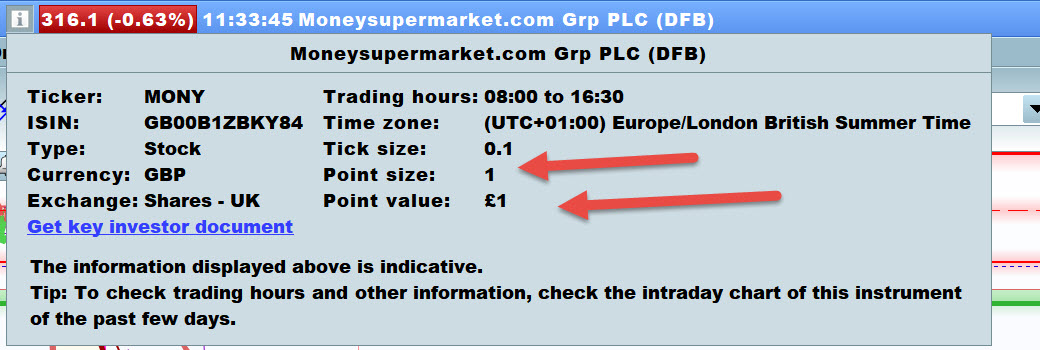
How much money is “1 contract” considered? (I am used to manually typing the amount in PPT (pounds per point)
See attached re 1 and 2.
Re 3 1 Contract is always £1 per point in UK with IG when spreadbetting.
Ok, Thanks
So until MTF comes out, how can I ask:
“give me the high (or low) of previous day” on a time frame of 3 min for example.
when I use :
high = highest[480](high)
it will not work on some days as there aren’t 480 bars per day I guess and it will definitely not work after a weekend – so I am getting results that differ from the actual high and low of the day
Thanks
I am familiar with 2 of the screens for the timeframe (but for some reason it gives me an error when I try and set the dates there)
Thanks for the reply for question 3