So using the MFE stop loss that exists in this forum:
//************************************************************************
// MFE trailing stop function
//************************************************************************
///trailing stop
trailingstop = 50
StartTrailingStopValue = 10

//resetting variables when no trades are on market
if not onmarket then
MAXPRICE = 0
priceexit = 0
endif


//case LONG order
if longonmarket then
MAXPRICE = MAX(MAXPRICE,close) //saving the MFE of the current trade
if close-tradeprice(1) > StartTrailingStopValue*pointsize then
if MAXPRICE-tradeprice(1)>=trailingstop*pointsize then //if the MFE is higher than the trailingstop then
priceexit = MAXPRICE-trailingstop*pointsize //set the exit price at the MFE - trailing stop price level
endif
endif
endif

//exit on trailing stop price levels
if onmarket and priceexit>0 then
EXITSHORT AT priceexit STOP
SELL AT priceexit STOP
endif
I want to make the trailingstop = 50 into trailingstop = 25
IF i cross over 100 pips in profit
Meaning that When im above 10 pips in profit, i start the 50 trailing stop loss.
But if trade goes over 100 pips in profit, i want the new trailing to not be 50 pips anymore, but 25 pips.
Did that make sense?
Basicly the more profit i get, the tighter the stop loss should be!
Edit: Thinking out loud, could it be a good idea to limit the code above to be the trailing stop ONLY when profit is > 10 but < 100. Then just copy paste the same code but then use THAT trailing stop loss when profit is > 100 but < 200?
just as an example..
Thinking out loud, could it be a good idea to limit the code above to be the trailing stop ONLY when profit is > 10 but < 100. Then just copy paste the same code but then use THAT trailing stop loss when profit is > 100 but < 200?
Yeah that sounds good, try it and let us know please?
I also forked this code a while ago and had a different step for Longs and Shorts.
Nicolas and others may consider this even more curve fitting! 🙂 But from my observations, shorts in up trends behaves different than shorts in down trends (and vice versa) and so to have different parameter values for shorts and longs can be beneficial (it can also be even more curve fitting! 🙂 ).
Anyway I’m rambling, re your question, instead of copying the whole code again (as you said) why not use something like …
If Gain > 10 and Gain < 100 Then
trailingstop = 50
StartTrailingStopValue = 10
Elseif  Gain > 100 and Gain < 200 Then
trailingstop = 25
StartTrailingStopValue = 5
Endif
Yes that is what i want @GraHal!
Make it work please 🙁 (i cant just copy paste ur code into the code right? how do i define “gain” etc?
haha, i will also update. I belive this will make my algos alot more profitable. (i hope)
I calculated “Peak performance” on each trade (or the Max profit on trade) and im loosing SO MUCH profit hehe 🙂
That is the life of a trend follower tho, i will never exit on peak, except if i hit target and target is peak/close to peak..) i will always go back down with price until my exit or stop / trailing stop is hit.
And thats fine, but if i could get more profit when im very profitable that would be great i think..
different step for Longs and Shorts. Nicolas and others may consider this even more curve fitting!
I used to think like this but then realised that everything that we add to a strategy is a form of curve fitting as we only have historical data to work with. The skill is to curve fit as little as possible with as few variables and conditions as possible.
Markets do behave in a different way when going down than they do going up – especially instruments such as indices that have an overall long term up trend – so now I do not consider it wrong to have different set ups for long or short positions. In fact the difference could just be the edge that is the difference between profit and loss.
I normally prefer to have completely separate strategies for long and short positions to simplify the analysis of the different behaviour of the up or down of the instrument I am testing on.
I’m not a big fan or user of trailing stops but I do think that if used then they need to be based on current market volatility rather than a set quantity of pips. Longer time frames give better results as short term time frame volatility can be very difficult to determine with much accuracy due to our old enemy market noise.
how do i define “gain”
Gain could be abs(Tradeprice – Close)*pipsize ?
Or you could use Positionperf but this has to expressed like 0.001 … which would be 0.1%.
could you give a good example?
….which is the million dollar question….. and the answer is ‘no not really’! Which is why I do not really use stops or trailing stops very much. I prefer a strategy to assess price action and decide that now is a good time to exit rather than set levels. We all use the same theory for entry so why not for exit?
If I do consider using a stop then TRP or ATRP (True/Average True Range as Percentage of Price) are two of my preferred volatility indicators to base it on. I find median price to be better than close as a basis for these calculations as close is just a moment in time whereas median price represents average opinion for each candle.
I created this today. I belive it works fine.
Trailing stop 1 = the trailing stop that u start out with. Works when profit is between 30-70 (in example code under)
Trailing stop 2 = the trailing stop that starts when profit is above 70 (in example code under)
Background:
I was in a trade yesterday that reached 135 pips profit, target was 150. After peaking around 130-135 it dropped 60 pips until my trailing stop caught it.
If i had a much more tight stop loss i could have maybe gotten just a 20 pip stop, meaning 40 more pips of profit. My profit ended at 135-60 = 75 pips of profit. Which ofc is nice, but if u can add +40 on that, then u increase the profit by 57%!
So the whole idea is that my trailing stop 1 works as usual, but when i get close to target i want the trailing stop loss to tighten. So i put a limit that profit must be above 30 and below 70 for trailing stop 1 to work, and above 70+ for trailing stop 2 to work.
These are just examples, i suggest u optimize the values so it makes sense for your algo.
//trailing stop 1
trailingstop1 = 70 // this is trailing stop 1
bottomTrailingStopValue1 = 30 //How many pips in profit before it starts to trail?
TopTrailingStopValue1 = 70 // When should the "loose" trailing stop #1 end and when should #2 start?


//trailing stop 2
trailingstop2 = 10 // this is trailing stop 2
bottomTrailingStopValue2 = 71 // How many pips in profit before trailing stop #2 starts to trail? (should be same as ("TopTrailingStopValue1"+1) (or maybe it dosnt need +1? not sure tbh)
TopTrailingStopValue2 = 150 // should be same as target i guess.

//resetting variables when no trades are on market
if not onmarket then
MAXPRICE1 = 0
priceexit1 = 0
endif

a = close-tradeprice(1) > bottomTrailingStopValue1*pointsize
b = close-tradeprice(1) < TopTrailingStopValue1*pointsize

//case LONG order
if longonmarket then
MAXPRICE1 = MAX(MAXPRICE1,close) //saving the MFE of the current trade
if a and b then
if MAXPRICE1-tradeprice(1)>=trailingstop1*pointsize then //if the MFE is higher than the trailingstop then
priceexit1 = MAXPRICE1-trailingstop1*pointsize //set the exit price at the MFE - trailing stop price level
endif
endif
endif

//exit on trailing stop price levels
if onmarket and priceexit1>0 then
EXITSHORT AT priceexit1 STOP
SELL AT priceexit1 STOP
endif


//resetting variables when no trades are on market
if not onmarket then
MAXPRICE2 = 0
priceexit2 = 0
endif

a2 = close-tradeprice(1) > bottomTrailingStopValue2*pointsize
b2 = close-tradeprice(1) < TopTrailingStopValue2*pointsize

//case LONG order
if longonmarket then
MAXPRICE2 = MAX(MAXPRICE2,close) //saving the MFE of the current trade
if a2 and b2 then
if MAXPRICE2-tradeprice(1)>=trailingstop2*pointsize then //if the MFE is higher than the trailingstop then
priceexit2 = MAXPRICE2-trailingstop2*pointsize //set the exit price at the MFE - trailing stop price level
endif
endif
endif

//exit on trailing stop price levels
if onmarket and priceexit2>0 then
EXITSHORT AT priceexit2 STOP
SELL AT priceexit2 STOP
endif
I created this today. I belive it works fine.
Trailing stop 1 = the trailing stop that u start out with. Works when profit is between 30-70 (in example code under)
Trailing stop 2 = the trailing stop that starts when profit is above 70 (in example code under)
Background:
I was in a trade yesterday that reached 135 pips profit, target was 150. After peaking around 130-135 it dropped 60 pips until my trailing stop caught it.
If i had a much more tight stop loss i could have maybe gotten just a 20 pip stop, meaning 40 more pips of profit. My profit ended at 135-60 = 75 pips of profit. Which ofc is nice, but if u can add +40 on that, then u increase the profit by 57%!
So the whole idea is that my trailing stop 1 works as usual, but when i get close to target i want the trailing stop loss to tighten. So i put a limit that profit must be above 30 and below 70 for trailing stop 1 to work, and above 70+ for trailing stop 2 to work.
These are just examples, i suggest u optimize the values so it makes sense for your algo.
1
2
3
4
5
6
7
8
9
10
11
12
13
14
15
16
17
18
19
20
21
22
23
24
25
26
27
28
29
30
31
32
33
34
35
36
37
38
39
40
41
42
43
44
45
46
47
48
49
50
51
52
53
54
55
56
57
58
59
60
61
62
|
//trailing stop 1
trailingstop1 = 70 // this is trailing stop 1
bottomTrailingStopValue1 = 30 //How many pips in profit before it starts to trail?
TopTrailingStopValue1 = 70 // When should the “loose” trailing stop #1 end and when should #2 start?
//trailing stop 2
trailingstop2 = 10 // this is trailing stop 2
bottomTrailingStopValue2 = 71 // How many pips in profit before trailing stop #2 starts to trail? (should be same as (“TopTrailingStopValue1″+1) (or maybe it dosnt need +1? not sure tbh)
TopTrailingStopValue2 = 150 // should be same as target i guess.
//resetting variables when no trades are on market
if not onmarket then
MAXPRICE1 = 0
priceexit1 = 0
endif
a = close–tradeprice(1) > bottomTrailingStopValue1*pointsize
b = close–tradeprice(1) < TopTrailingStopValue1*pointsize
//case LONG order
if longonmarket then
MAXPRICE1 = MAX(MAXPRICE1,close) //saving the MFE of the current trade
if a and b then
if MAXPRICE1–tradeprice(1)>=trailingstop1*pointsize then //if the MFE is higher than the trailingstop then
priceexit1 = MAXPRICE1–trailingstop1*pointsize //set the exit price at the MFE – trailing stop price level
endif
endif
endif
//exit on trailing stop price levels
if onmarket and priceexit1>0 then
EXITSHORT AT priceexit1 STOP
SELL AT priceexit1 STOP
endif
//resetting variables when no trades are on market
if not onmarket then
MAXPRICE2 = 0
priceexit2 = 0
endif
a2 = close–tradeprice(1) > bottomTrailingStopValue2*pointsize
b2 = close–tradeprice(1) < TopTrailingStopValue2*pointsize
//case LONG order
if longonmarket then
MAXPRICE2 = MAX(MAXPRICE2,close) //saving the MFE of the current trade
if a2 and b2 then
if MAXPRICE2–tradeprice(1)>=trailingstop2*pointsize then //if the MFE is higher than the trailingstop then
priceexit2 = MAXPRICE2–trailingstop2*pointsize //set the exit price at the MFE – trailing stop price level
endif
endif
endif
//exit on trailing stop price levels
if onmarket and priceexit2>0 then
EXITSHORT AT priceexit2 STOP
SELL AT priceexit2 STOP
endif
|
It works great in backtest. But in real time it never changes the stop loss…? Any ideas?
Hi Zausen
Welcome Aboard (I hope you read below in the friendly and helpful tone it is intended).
If you had written just the last line of your post above we would all have known what you referred to as your post immediately followed the post above (which is what you are referring to).
I ended up starting to read all your post then realised that it was a copy quote of the post above.
If we all copy quoted full posts then we would end up with a slow website all muddled up and a hard to understand Forum?
That is why we only quote the minimum text that we are referring to / answering and this is generally 1 sentence only or even a few words as part of a sentence.
All we need do is to select a few words which show what we are referring to and click on Quote.
Thank You
See the difference between backtest and real time?
What might be the reason…?
I start with “SET STOP pTRAILING 84” before the code above
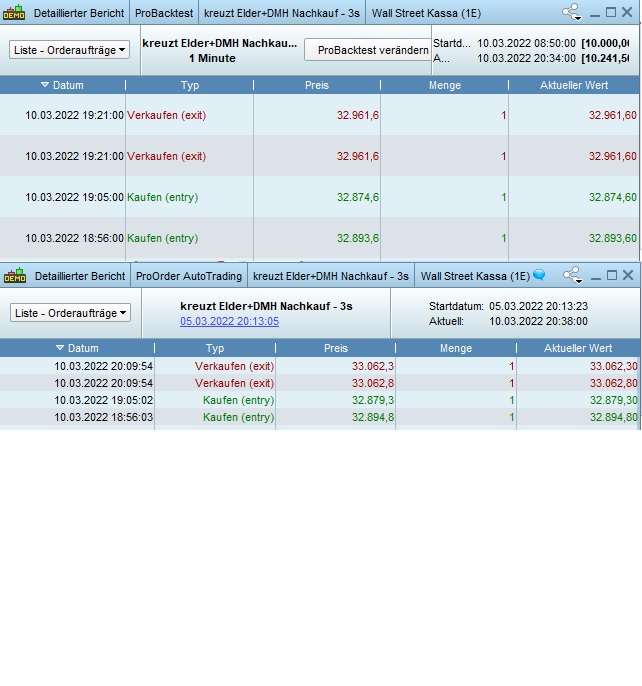
Probably me missing something (?) but are you sure you posted the correct screenshots … they both show same values?
Sorry, the picture was uploaded twice.
In one picture you can see real results above (ending 32961) und below back test results (ending 33062) – so backtest is much better…
100 ish out of 33,000 is within fully acceptable difference between Backtest and Live.
Or am I missing something again? 🙂
But the trailling stop is supposed to be tighter so much in profit – as you can see in backtest
It starts with 75 then (when 75p in profit) it should be 45 and finally (when 111 in profit) 25
// Stops und Targets
SET STOP pTRAILING 75
//trailing stop 1
trailingstop1 = 45 // this is trailing stop 1
bottomTrailingStopValue1 = 75 //How many pips in profit before it starts to trail?
TopTrailingStopValue1 = 110 // When should the “loose” trailing stop #1 end and when should #2 start?
//trailing stop 2
trailingstop2 = 25 // this is trailing stop 2
bottomTrailingStopValue2 = 111 // How many pips in profit before trailing stop #2 starts to trail? (should be same as (“TopTrailingStopValue1″+1) (or maybe it dosnt need +1? not sure tbh)
TopTrailingStopValue2 = 200 // should be same as target i guess.