Export platform data

Viewing 13 posts - 1 through 13 (of 13 total)
  • Author
    Posts
  • #69005 quote
    Pierre
    Moderator
    Average

    Hello everybody,

    We have added a new feature that allows you to export all your platform data at once.

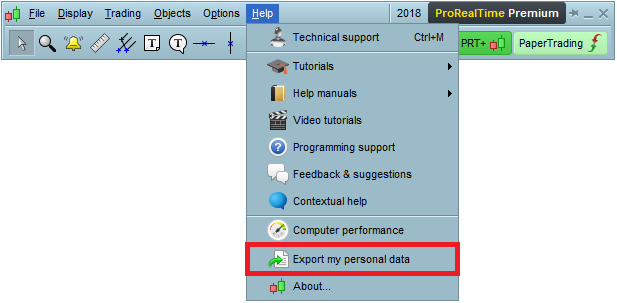
    To to so, click on “Help” > “Export my personal data”.

    [attachment file=69006]

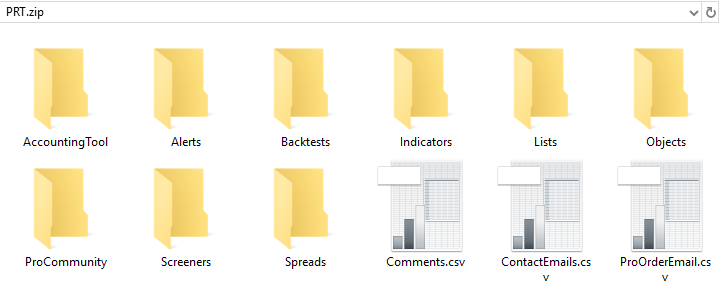
    This will create a .ZIP file that contains all your platform data including all your indicators, trading systems and screeners.
    It will be particularly useful if you want to create a local backup of your codes.

    [attachment file=69007]

    Note this new feature has been released today on ProRealTime.com and will be released on ProRealTime Trading and broker versions soon (within 1 to 4 weeks).

    Regards,

    Pierre

    Despair, Andyswede and Andre Vorster thanked this post
    export-data.png export-data.png export-data-zip.png export-data-zip.png
    #69011 quote
    GraHal
    Participant
    Master

    Wow this is great news!!!!

    Thank you Pierre and PRT Developers … this will save us a load of faffing and frustration.

    GraHal

    #69013 quote
    Vonasi
    Moderator
    Master

    Yes this is great progress and thank you for this development- but can I ask how is the re-importing done?

    For example I recently moved all my strategies and indicators from one IG account to another and it was a massive job exporting each one and importing each one. Now I will be able to export them all in one go but can I import them all in one go?

    #69063 quote
    Pierre
    Moderator
    Average

    Hi,

    For now, codes are exported as .txt files so they cannot be re-imported all at once.

    I’ll check with our developers if they can be also included as .itf files and allow group import.

    Regards,

    Pierre

    GraHal, robertogozzi, Vonasi and Inertia thanked this post
    #69129 quote
    David
    Participant
    Veteran

    I guess this not available for IG clients? I can’t see it in my menu.

    #69131 quote
    GraHal
    Participant
    Master

    Note this new feature has been released today on ProRealTime.com and will be released on ProRealTime Trading and broker versions soon (within 1 to 4 weeks).

    See timescale above @David

    #70485 quote
    Vonasi
    Moderator
    Master

    Having just had IG tell me that they intend to switch off my PRT access on one of my accounts I am now looking to transfer all my strategies and indicators over to my other account – so I checked out this feature. It does not seem very useful in its current format of .txt files. As an emergency way of saving of all our data it is OK as at least we have something but getting that data back into PRT is a right faff. What we really need are block exports and imports of all our indicators and strategies .itf files  – a  one click solution rather than a million click hassle!

    Any news on when this process is going to be made easier before I waste yet another day of my short time on this revolving globe moving files back and forth and cutting and pasting?

    robertogozzi and GraHal thanked this post
    #70962 quote
    GraHal
    Participant
    Master

    Why are Systems stored in the ProOrder AutoTrading window not included in the zip file when I export my Personal Data.

    Thank You
    GraHal

    #70963 quote
    GraHal
    Participant
    Master

    For now, codes are exported as .txt files so they cannot be re-imported all at once.

    Not only can’t we re-import all at once, we can’t re-import one at a time either because exported Systems are .txt files and PRT Import only recognises .itf files.

    So the Export Personal Data is not useful with respect to Auto-Systems?

    #71440 quote
    Despair
    Blocked
    Master

    I assume you have to copy/paste on all you want to re-import. 🙂

    #71501 quote
    GraHal
    Participant
    Master

    I assume you have to copy/paste on all you want to re-import.

    Well yeah, I did copy and paste but lost patience almost immediately as I’m sure there was a load of formatting code included which I had to then delete etc … more faffing!?

    Why the eff not export as .itf and then import as .itf??

    Also there is the issue below, which PRT have not even commented on, beggars belief??

    Why are Systems stored in the ProOrder AutoTrading window not included in the zip file when I export my Personal Data.

    I’ve given up for the summer anyway, hoping PRT & Support will function better when I return and if it’s all no different then I’ll hibernate for the winter! 🙂

    #71502 quote
    Nicolas
    Keymaster
    Master

    This feature was added in the first place for the new GDPR regulation which everyone has probably heard about (export of personal data). It is for this reason that the import in “block” is not planned, for the moment ..

    #71506 quote
    Despair
    Blocked
    Master

    Also having the data as text files can be of advantage. In this way you can also open the files if you at a later point no longer have access to PRT (itf-files can only be opened within PRT). I like that.

    thanked this post
Viewing 13 posts - 1 through 13 (of 13 total)
  • You must be logged in to reply to this topic.

Export platform data


Platform Support: Charts, Data & Broker Setup

New Reply
Author
author-avatar
Pierre @pierre-prt Moderator
Summary

This topic contains 12 replies,
has 6 voices, and was last updated by Despair

7 years, 8 months ago.

Topic Details
Forum: Platform Support: Charts, Data & Broker Setup
Language: English
Started: 04/23/2018
Status: Active
Attachments: 2 files
Logo Logo
Loading...