Trade from Pivot-R-S points

Viewing 15 posts - 1 through 15 (of 17 total)
  • Author
    Posts
  • #63069 quote
    Marco Tampellini
    Participant
    New

    Good Evening,

    i posted similar question on italian forum, we are working on it but still didn’t work correctly.

    Here what i would like to do, for backtest.

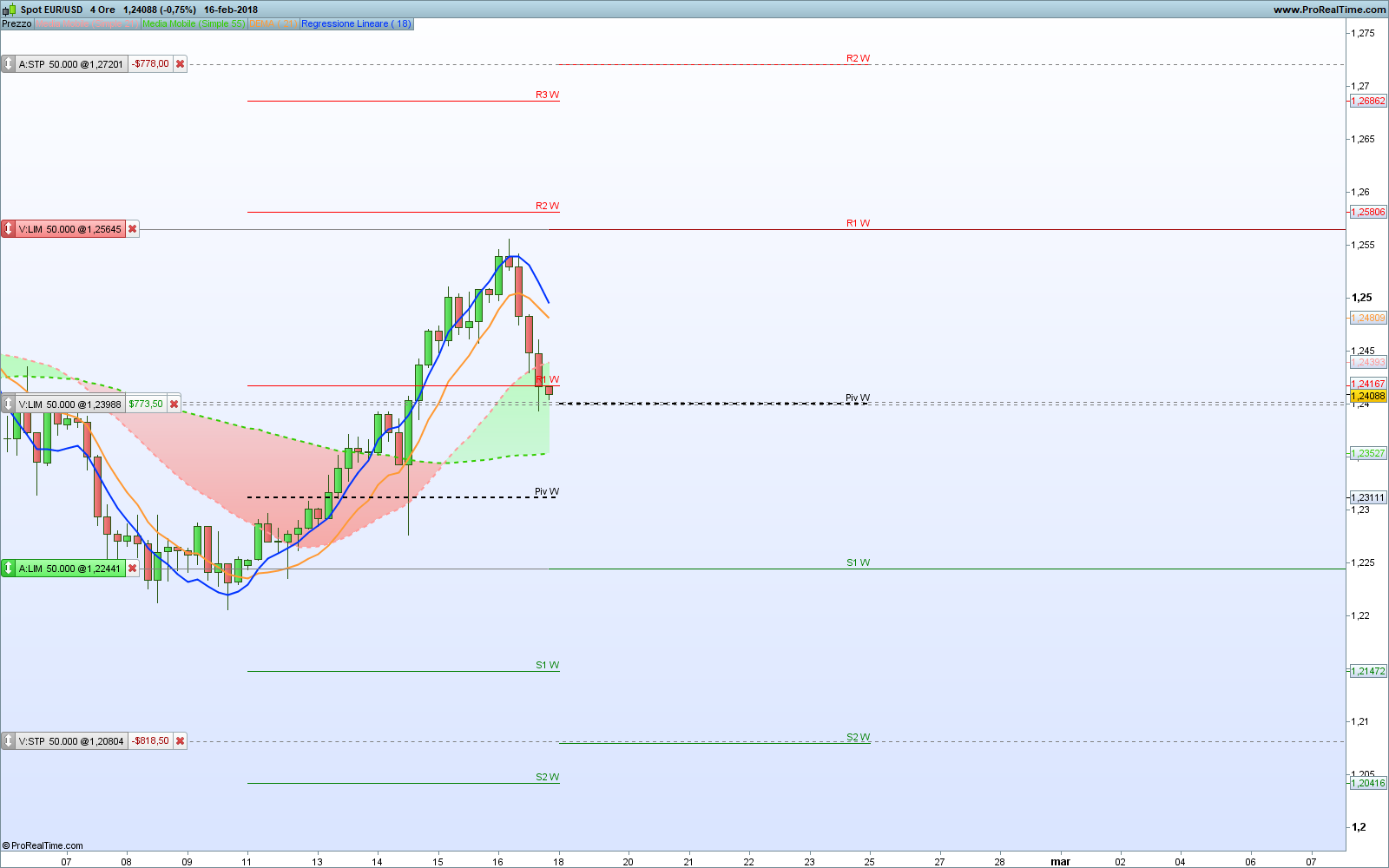
    Let’s consider for example Spot Eur/Usd, and TF weekly. As in the picture attached.

    I would like to set this code:

    At the begin of the week, it starts 2 pending orders, with related Stop Loss and Target Price.

    1st) Pending Long, from S1 with target Pivot, and SL on S2

    2nd) Pending Short, from R1, with target Pivot and SL on R2

    additional instructions:
    1) I would like to make sure that ONLY ONE order is executed per week, so that if the Long enters first, the Short one is cancelled, and same thing on the contrary.
    2) At the end of the period (in this case week), if the order entered is still active (therefore it has not reached either the stop loss or the target price), I would like it to be closed.

    In this case i considered wS1 – wS2 – wR1 -wR2 – wP, but i would like it works correctly even if i set dS1 – dS2 , so orders would be closed withing a day, and so on.

    Here i post a code that im trying to improve thanks to other users support, but still doesn’t work correctly.

    DEFPARAM CumulateOrders = False       // Posizioni cumulate disattivate
     
    // Pivot Giornalieri
    ONCE dP  = Undefined
    ONCE dR1 = Undefined
    ONCE dS1 = Undefined
    ONCE dR2 = Undefined
    ONCE dS2 = Undefined
    ONCE dR3 = Undefined
    ONCE dS3 = Undefined
     
    // Pivot Setgtimanali
    ONCE wP  = Undefined
    ONCE wR1 = Undefined
    ONCE wS1 = Undefined
    ONCE wR2 = Undefined
    ONCE wS2 = Undefined
    ONCE wR3 = Undefined
    ONCE wS3 = Undefined
    // Pivoy Mensili
    ONCE mP  = Undefined
    ONCE mR1 = Undefined
    ONCE mS1 = Undefined
    ONCE mR2 = Undefined
    ONCE mS2 = Undefined
    ONCE mR3 = Undefined
    ONCE mS3 = Undefined
     
    IF OnMarket THEN
       SELL AT MARKET
       EXITSHORT AT MARKET
    ENDIF
     
    dP, dR1, dS1, dR2, dS2, dR3, dS3, wP, wR1, wS1, wR2, wS2, wR3, wS3, mP, mR1, mS1, mR2, mS2, mR3, mS3 = CALL "Pivots D-W-M"
     
    BUY       1 CONTRACT AT dR1 STOP
    SELLSHORT 1 CONTRACT AT dS1 STOP
     
    SET TARGET PROFIT dR2 - dR1
    SET STOP   LOSS   dS1


    // dummy lines to avoid errors being reported by ProOrder because some variables are not used
    // linee inutili e superflue, messe solo per evitare che ProOrder segnali che alcune variabili non sono utilizzate
    x = dP + dR1 + dS1 + dR2 + dS2 + dR3 + dS3 + wP + wR1 + wS1 + wR2 + wS2 + wR3 + wS3 + mP + mR1 + mS1 + mR2 + mS2 + mR3 + mS3
    IF x < 0 then
       buy at market
    endif

    Thanks to anyone who can help 🙂

    EURUSD-4-Ore-2.png EURUSD-4-Ore-2.png
    #63074 quote
    robertogozzi
    Moderator
    Master

    Do not duplicate topics in different languages, because this will spread info from different members over multiple topics making it difficult to keep track of them, thus making it less interesting.

    Choose a language with which you feel more at ease and stick to it, please. Thank you.

    #63081 quote
    Marco Tampellini
    Participant
    New

    Sorry, i didn’t know. So, let’s keep it here, there could be more users interested/able to help us with it.

    Thanks

    #63144 quote
    Despair
    Blocked
    Master

    In pro builder zou do not have to define variables so you can take away all the definitions in the beginning since you don’t assign a value to the variables anyway. Just sayin’…

    #63156 quote
    JC_Bywan
    Moderator
    Master

    You don’t need the dummy lines at the end if instead of avoiding the error message, you correct the error, by using in line 34 the keywork “ignored” for each variable not used afterwards: (untested, but should work if I spotted the correct 3 variables used)

    ignored, dR1, dS1, dR2, ignored, ignored, ignored, ignored, ignored, ignored, ignored, ignored, ignored, ignored, ignored, ignored, ignored, ignored, ignored, ignored, ignored = CALL "Pivots D-W-M"
    #63158 quote
    Marco Tampellini
    Participant
    New

    I’m going to try it! 🙂

    #63162 quote
    Marco Tampellini
    Participant
    New

    Well, the result is profitable 😀  but not what I wanted to achieve,
    also corrected like this, it makes orders within the same week while I would like it to enter a maximum of 1 order only: if it intercepts wR1 first, it opens the short order, and cancels the pending long (with its stop and target). If, on the other hand, it first intercepts wS1, it should open the long order and cancel the pending short with its stop loss and target.
    We would thus have a maximum of one order per week.

    Limit case is when wS1 or wR1 are intercepted, it starts the order but then the price doesn’t reach TP or SL. In this case i would like it to close all the orders at the end of the week.

    Any idea how to proceed? 🙁

    #63163 quote
    JC_Bywan
    Moderator
    Master

    Just in case, even if I might be charged of stating the obvious, the line I suggested for line 34 is if only dR1 DR2 dS1 are used as per lines 36 through 40, having considered all the rest lines 44 through 49 as dummy. If you need to use more than just dR1 dR2 and dS1 from the “call”, the modification needs to be adapted by *not* replacing by “ignored” the relevant other variables used, and furthermore by picking them in the right order within the list of “ignored” (another source of frequent bug when using a “call” with a long list of returned variables most of them being ignored)

    #63168 quote
    Marco Tampellini
    Participant
    New

    Thanks for your help,

    i feel so stupid, i can’t make it work 😀

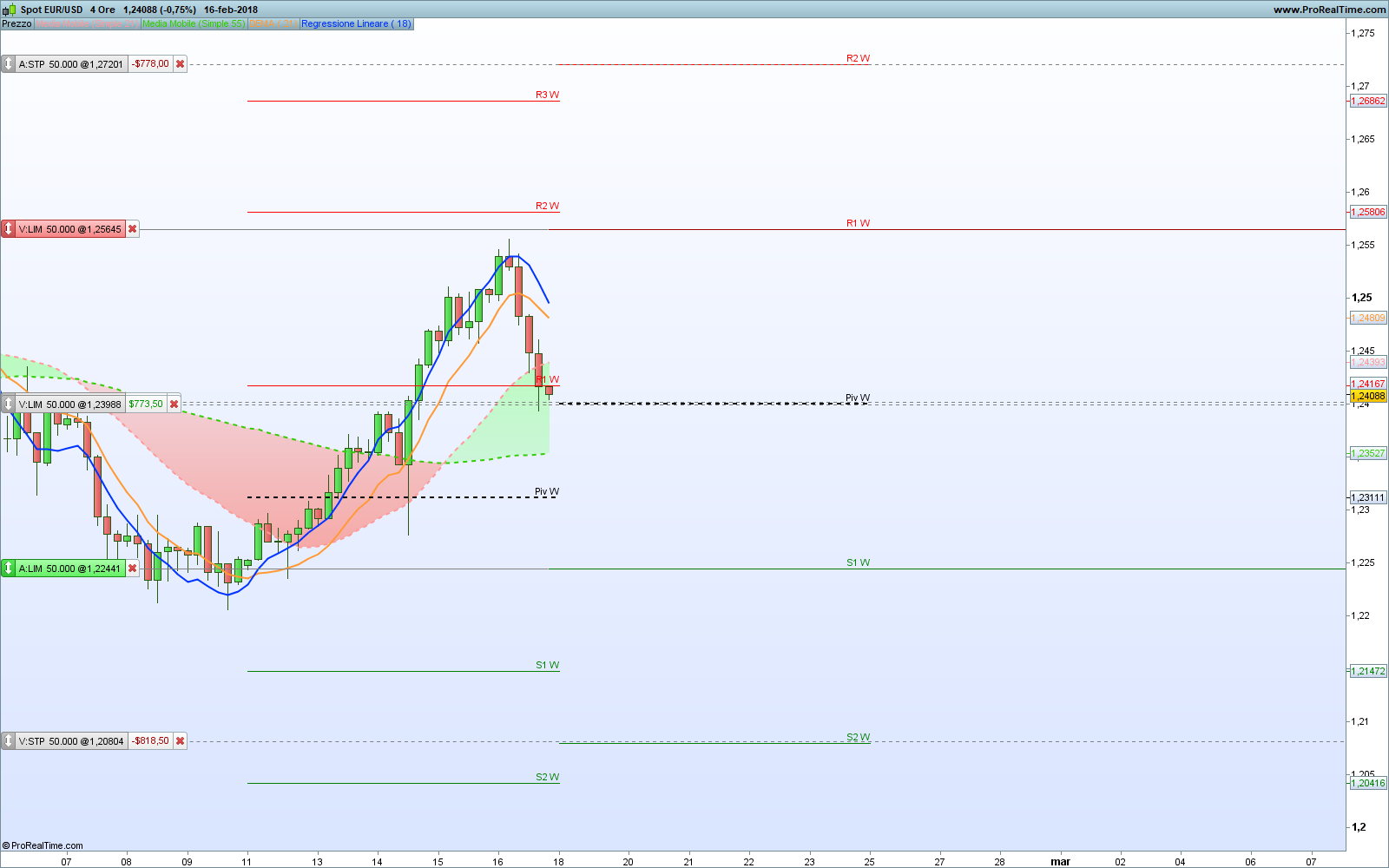
    Let’s say i want to use onlw weekly pivot lines: so wP, wS1 wS2 wR1 and wR2. Same as in the pic attached.

    i modified the code like this:

    DEFPARAM CumulateOrders = False       // Posizioni cumulate disattivate
    
    // Pivot Giornalieri
    ONCE dP  = Undefined
    ONCE dR1 = Undefined
    ONCE dS1 = Undefined
    ONCE dR2 = Undefined
    ONCE dS2 = Undefined
    ONCE dR3 = Undefined
    ONCE dS3 = Undefined
    
    // Pivot Setgtimanali
    ONCE wP  = Undefined
    ONCE wR1 = Undefined
    ONCE wS1 = Undefined
    ONCE wR2 = Undefined
    ONCE wS2 = Undefined
    ONCE wR3 = Undefined
    ONCE wS3 = Undefined
    // Pivoy Mensili
    ONCE mP  = Undefined
    ONCE mR1 = Undefined
    ONCE mS1 = Undefined
    ONCE mR2 = Undefined
    ONCE mS2 = Undefined
    ONCE mR3 = Undefined
    ONCE mS3 = Undefined
    
    IF OnMarket THEN
    SELL AT MARKET
    EXITSHORT AT MARKET
    ENDIF
    
    ignored, ignored, ignored, ignored, ignored, ignored, ignored, wP, wR1, wS1, wR2, wS2, ignored, ignored, ignored, ignored, ignored, ignored, ignored, ignored, ignored = CALL "Pivots D-W-M"
    
    // entrata LONG
    BUY       1 CONTRACT AT wS1 STOP                         //ordine pendente su Resistenza 1 giornaliera
    SELL                 AT wS2 STOP                         //SL su Supporto 2
    SELL                 AT wP LIMIT  //TP su pivot
    
    // entrata SHORT
    SELLSHORT 1 CONTRACT AT wR1 STOP                         //ordine pendente su Supporto 1 giornaliero
    EXITSHORT            AT wR2 STOP                         //SL su Resistenza 2
    EXITSHORT            AT wP LIMIT  //TP su pivot


    // dummy lines to avoid errors being reported by ProOrder because some variables may not be used
    x = dP + dR1 + dS1 + dR2 + dS2 + dR3 + dS3 + wP + wR1 + wS1 + wR2 + wS2 + wR3 + wS3 + mP + mR1 + mS1 + mR2 + mS2 + mR3 + mS3

    but it’s not working, it starts many order inside the same week. how would you change it?

    EURUSD-4-Ore-3.png EURUSD-4-Ore-3.png
    #63173 quote
    robertogozzi
    Moderator
    Master

    Well, the result is profitable 😀 but not what I wanted to achieve, also corrected like this, it makes orders within the same week while I would like it to enter a maximum of 1 order only: if it intercepts wR1 first, it opens the short order, and cancels the pending long (with its stop and target). If, on the other hand, it first intercepts wS1, it should open the long order and cancel the pending short with its stop loss and target. We would thus have a maximum of one order per week. Limit case is when wS1 or wR1 are intercepted, it starts the order but then the price doesn’t reach TP or SL. In this case i would like it to close all the orders at the end of the week. Any idea how to proceed? 🙁

    All strategies are executed when each candle is closed, so on a 1-week chart all pending orders will be cancelled at the end of the week, NOT before! If a week is too much to wait you’ll have to switch to a lower TF, as of this version of PRT!

    #63174 quote
    robertogozzi
    Moderator
    Master

    The way you call the indicator and the number of variables used won’t change the behaviour of your strategy, you may also delete lines 3-28, to make your strategy shorter, but it won’t affect the output.

    #63177 quote
    Marco Tampellini
    Participant
    New

    Ok thanks, i understood about the fact it will delete pending orders at the end of the week. And it could be ok, but in this way i should only have max of 2 orders in a week (1 pending short and 1 pending long, eventually deleted at the end of the week), but actually the output is that i get more orders  in the same week, almost each 4h candele :/

    #63185 quote
    Marco Tampellini
    Participant
    New

    Ok it’s working now, just the fact that it doesn’t consider the candle during it’s progress it gives me different results from my excel analysis. I hope they fix this :/

    #63186 quote
    robertogozzi
    Moderator
    Master

    I just pasted your code but I can’t get any trade, on which instrument and TF are you testing this strategy?

    Also, I think lines 37-38 for LONGs and 42-43 for SHORTS shouldn’t have the same variable for the pending orders.

    #63188 quote
    Marco Tampellini
    Participant
    New

    I backtested it on Eur Usd weekly!

Viewing 15 posts - 1 through 15 (of 17 total)
  • You must be logged in to reply to this topic.

Trade from Pivot-R-S points

ProOrder: Automated Strategies & Backtesting

New Reply
Author
Summary

This topic contains 16 replies,
has 4 voices, and was last updated by Marco Tampellini
8 years ago.

Topic Details
Forum: ProOrder: Automated Strategies & Backtesting
Language: English
Started: 02/18/2018
Status: Active
Attachments: 2 files
Logo Logo
Loading...