WAVES Of WOLFE

Viewing 15 posts - 1 through 15 (of 15 total)
  • Author
    Posts
  • #32090 quote
    ALE
    Moderator
    Master

    Hi,

    many people ask for waves of wolfe code in prorealtime, someone is able to translate the code from easy language to PRT languege?

    Thanks in advance

    Ale

    //Wolfe Wave Pattern --------------------------- 
    Pa:=Trough(4,LOW,5);
Pb:=Peak(3,HIGH,5);
P1:=Trough(3,LOW,5);
P2:=Peak(2,HIGH,5);
P3:=Trough(2,LOW,5);
P4:=Peak(1,HIGH,5);
P5:=Trough(1,LOW,5);
tb:=TroughBars(1,LOW,5);
eki1:=If(tb<=4 AND p1 > pa AND pb < p2 AND p1 < p4 AND p1 > p3 AND p3 > p5 AND p4 < p2,1,0); p1:=Trough(3,LOW,5); 
    p3:=Trough(2,LOW,5);
p5:=Trough(1,LOW,5);
o1:=p1-p3;
o2:=p1-p5; a1:=TroughBars(3,LOW,5)-TroughBars(2,LOW,5); a2:=TroughBars(3,LOW,5)-TroughBars(1,LOW,5); tan1:=o1/a1; 
    tan2:=o2/a2; eki2:=Abs(tan1-tan2); If(eki1 AND eki2 <= .2 ,2,0 
    
    //Codice Easy language ==============HEADER============== 
    //Study based on Connors & Raschke's "Wolfe Waves" 
    //====== DECLARATIONS ==== 
    INPUTS:
TICKCHG(10), {Change (number of ticks) required to set up a new swing high/low.} PCTCHG(.2), {Percent change in price to set up a new swing high/low}
OCCUR(1),
PLOTBARS(40),
ETALINE(TRUE),
ZIGZAG(TRUE); 
    ARRAY: PBAR[50](0), P[50](0); 
    VARS:
X(0),
PP(1),
JA_SLOPE1(0),
JLA_CTR(0),
JLA_LINE(0),
JAIRHBAR(0), { LAST SWING HIGH BAR}
JAIRLBAR(0), {LAST SWING LOW BAR} LOWSEEK(FALSE), {LOOKING FOR A LOW OR A HIGH?} W(0), {COUNTER} 
    JLA_IRH(0), {LAST SWING HIGH VALUE} JLA_IRL(99999), {LAST SWING LOW VALUE} JA_SLOPE2(0),
JA_SLOPE3(0), 
    JLA_PT1(0), WOLFE(0); 
    {===========MAIN PROGRAM============} 
    
    IF CURRENTBAR = 1 THEN P[50] = C; 
    IF LOWSEEK = FALSE AND P[50] <= H THEN BEGIN
P[50] = H;
PBAR[50] = 0; 
    END; 
    IF LOWSEEK = TRUE AND P[50] >= L THEN BEGIN
P[50] = L;
PBAR[50] = 0; 
    END; 
    IF (LOWSEEK = FALSE AND PBAR[50] <> 0) THEN BEGIN
IF (TICKCHG = 0
AND L < P[50] * ( 1 - PCTCHG / 100) ) 
    OR (TICKCHG <> 0
AND L < ( P[50] - tickchg * minmove points)) THEN
BEGIN
IF ZIGZAG = TRUE THEN PLOT4[PBAR[50]](P[50],"SWINGS"); 
    LOWSEEK = TRUE; 
    FOR W = 1 TO 49
BEGIN
PBAR[W] = PBAR[W+1]; P[W] = P[W+1]; 
    END; 
    P[50] = L; PBAR[50] = 0; END;
END; 
    IF (LOWSEEK = TRUE AND PBAR[50] <> 0) THEN BEGIN
IF (TICKCHG = 0 
    
    AND H> P[50] * ( 1 + PCTCHG / 100))
OR (TICKCHG <> 0
AND H > (P[50] + tickchg * minmove points )) THEN
BEGIN
IF ZIGZAG = TRUE THEN PLOT4[PBAR[50]](P[50],"SWINGS"); LOWSEEK = FALSE; 
    FOR W = 1 TO 49
BEGIN
PBAR[W] = PBAR[W+1]; P[W] = P[W+1]; 
    END; 
    P[50] = H; PBAR[50] = 0; END;
END; 
    IF TIME = LASTCALCTIME
AND DATE = LASTCALCDATE
AND P[48 - PP] <> 0 THEN
BEGIN
PP = -1;
WOLFE = 0;
WHILE WOLFE < OCCUR AND PP < 46 BEGIN
PP = PP + 1;
VALUE1 = P[47-PP];
VALUE2 = P[48-PP];
VALUE3 = P[49-PP];
VALUE4 = P[50-PP]; 
    CONDITION1 =
VALUE2 > VALUE1
AND VALUE4 > VALUE3 AND VALUE4 < VALUE2 AND VALUE3 < VALUE1 AND VALUE4 > VALUE1; 
    
    CONDITION2 =
VALUE2 < VALUE1
AND VALUE4 < VALUE3 AND VALUE4 > VALUE2 AND VALUE3 > VALUE1 AND VALUE4 < VALUE1; 
    IF CONDITION1 OR CONDITION2 THEN WOLFE = WOLFE + 1; END; 
    JA_SLOPE1 = (P[49-PP] - P[47-PP]) / (PBAR[47-PP] - PBAR[49-PP]); JA_SLOPE2 = (P[50-PP] - P[47-PP]) / (PBAR[47-PP] - PBAR[50-PP]); 
    {LINE 1-3}
VALUE90 = TL_New(DATE[PBAR[47-PP]],TIME[PBAR[47-PP]],P[47-PP],
DATE[PBAR[49-PP]], TIME[PBAR[49-PP]],P[49-PP]);
Value14=TL_SetColor(VALUE90, 5);
{VALUE93 = TL_SetExtRight(VALUE90,TRUE);}
VALUE94 = TL_SETEND(VALUE90,DATE[PBAR[49-PP]-PLOTBARS],TIME[PBAR[49-PP]- PLOTBARS],TL_GETVALUE(VALUE90,DATE[PBAR[49-PP]-PLOTBARS],TIME[PBAR[49-PP]-PLOTBARS])); 
    {LINE 1-4}
VALUE91 = TL_NEW(DATE[PBAR[47-PP]],TIME[PBAR[47-PP]],P[47-PP],
DATE[PBAR[50-PP]], TIME[PBAR[50-PP]],P[50-PP]);
Value14=TL_SetColor(VALUE91, 16); TL_SETEND(VALUE91,DATE[PBAR[49-PP]-PLOTBARS],TIME[PBAR[49-PP]- PLOTBARS],TL_GETVALUE(VALUE91,DATE[PBAR[49-PP]-PLOTBARS],TIME[PBAR[49-PP]-PLOTBARS])); 
    {ETA LINE} 
    IF ETALINE THEN
BEGIN
VALUE92 = TL_NEW(DATE[PBAR[48-PP]],TIME[PBAR[48-PP]],P[48-PP],
DATE[PBAR[50-PP]], TIME[PBAR[50-PP]],P[50-PP]);
Value14=TL_SetColor(VALUE92, 4); TL_SETEND(VALUE92,DATE[PBAR[50-PP]-PLOTBARS],TIME[PBAR[50-PP]- PLOTBARS],TL_GETVALUE(VALUE92,DATE[PBAR[50-PP]-PLOTBARS],TIME[PBAR[50-PP]-PLOTBARS])); 
    
    END; END; 
    IF DATE = LASTCALCDATE AND TIME = LASTCALCTIME AND ZIGZAG = TRUE THEN BEGIN 
    JA_SLOPE3 = (P[50] - P[49]) / (PBAR[49] - PBAR[50]);
FOR JLA_CTR = PBAR[49] DOWNTO PBAR[50]
BEGIN
PLOT4[JLA_CTR](P[49] + (PBAR[49] - JLA_CTR) * JA_SLOPE3,"Swings"); END; 
    END; 
    FOR W = 1 TO 50
BEGIN
PBAR[W] = PBAR[W]+1; END; 

    atxeel and Schinkenbaron thanked this post
    #47595 quote
    Jim Moto
    Participant
    New

    I’m also interested 🙂

    #56446 quote
    Zemary
    Participant
    New

    A mí me da error de sintaxis.

    #56466 quote
    robertogozzi
    Moderator
    Master

    A mí me da error de sintaxis.

    As ALE said, this code is witten in Easy Language. It must be converted to PRT, if anyone knows how to do it, before using it.

    If you write it AS IS you will get hundreds of errors.

    Also, please write in English in the english forum. Thank you.

    Roberto

    ALE thanked this post
    #56709 quote
    Alai-n
    Participant
    Veteran

    UP

    #57103 quote
    Leo
    Participant
    Veteran

    I just suscribe to this post. Hope someone can traslate it

    #96895 quote
    ALE
    Moderator
    Master
    Hi guys,
    about two years ago, I inserted this post, because I was studying the problem, and I had a pleasant response.
    I managed to code Wolfe’s waves, obviously not repainted, otherwise I wouldn’t be writing to you, this code works as an indicator, market scan and can be integrated into any strategy because the signal is in real time.
    If you are interested you can find it here:
    https://www.automatictrading.it/product/wolf-waves-chart-pattern/
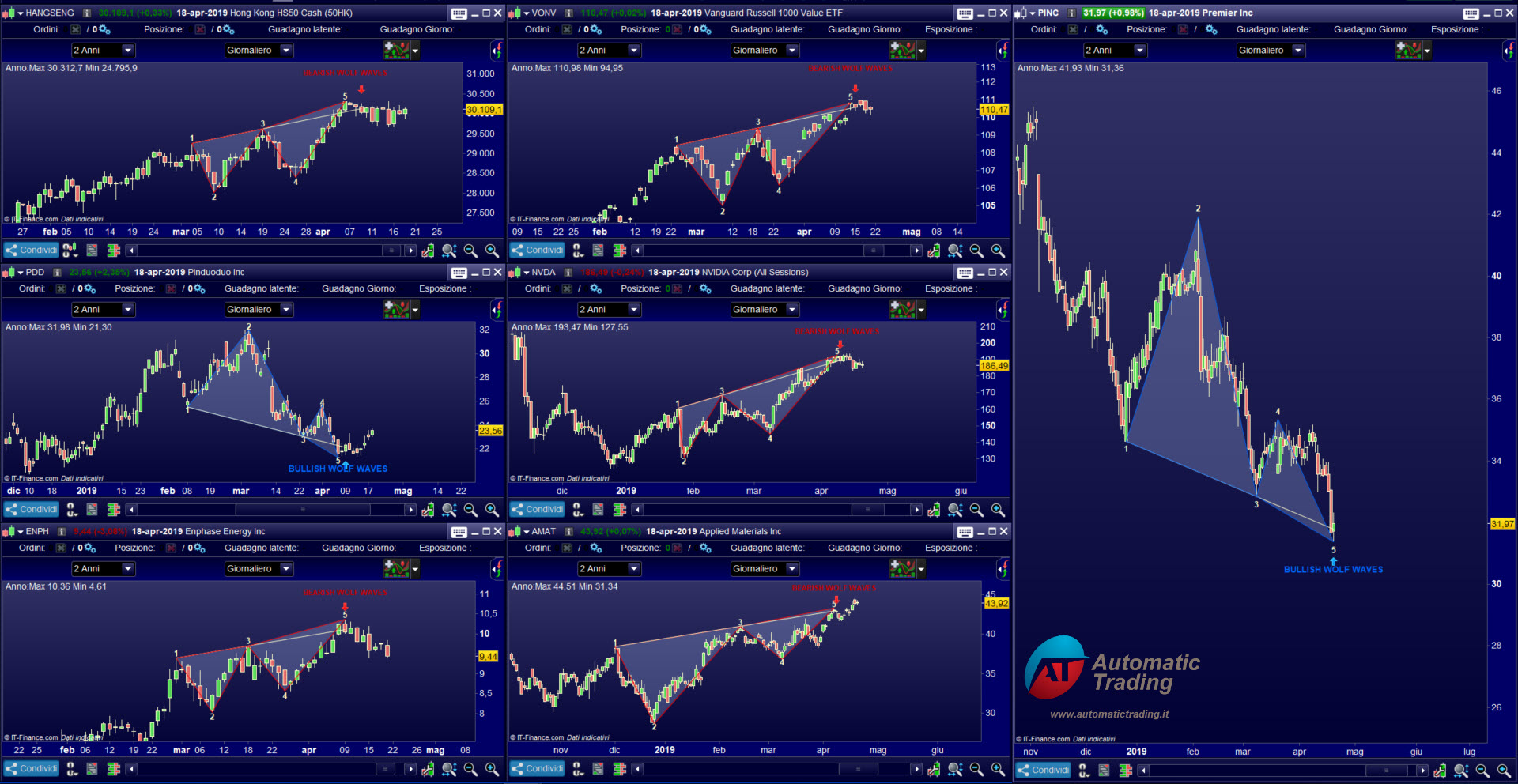
    I am attaching a mosaic of some signals found with proscreener on the daily chart, obviously I cannot show all the signals found in all timeframes. :-).
    Thanks
    Ale
    2019-04-19_20-03-21.jpg 2019-04-19_20-03-21.jpg
    #153449 quote
    Moufi
    Participant
    Junior

    Hello, made you a period of trying I think you did a remarkable job, and I would like to use your code!! But before I would like to try it if possible?

    Thank you

    #153464 quote
    ALE
    Moderator
    Master

    Hi thank you very much for your appreciation, however, I cannot handle the request, I receive many requests, and to create a demo it is necessary to create a file for each request, and I cannot physically manage the requests.

    I decided to make a Christmas discount of 20% on the total shopping cart.
    The coupon code is: bye2020
    Valid until 31th December
    For 1 purchase only.

    Thanks
    Ale

    #153497 quote
    Moufi
    Participant
    Junior

    Thank you ery much, I would need more information before a possible purchase. The waves are well detected before the formation of point 5? Because I would not want to scanned waves already finish or even enter position too late, I need to see the wave in formation. Is the software capable of doing that?

    Thank you

    #153514 quote
    ALE
    Moderator
    Master

    Hello Moufy

    This is possible for the version of the indicator compatible only with the V11. The problem is that actually for this version is not available the screener, because screener application is not compatible with part of code yet

    Thanks
    Ale

    #153521 quote
    Moufi
    Participant
    Junior

    I use the V11 version, so that means I would have the indicator, but not yet the screener that is in development is that? So I’m forced to iron my assets to find a vague potential right?

    #153538 quote
    ALE
    Moderator
    Master

    Yes, because some parts of the Wolfe indicator code that uses the new ProRealtime V11 language is not compatible with the screener, even if compatibility will soon be resolved. I currently have the Wolfe wave indicator in two versions. Version 10.3 detects the figure when the breakOut occurs, and this version is complete with screener; Version V11 detects the figure before the breakout but has no screener.

    #153564 quote
    ALE
    Moderator
    Master

    @Moufi

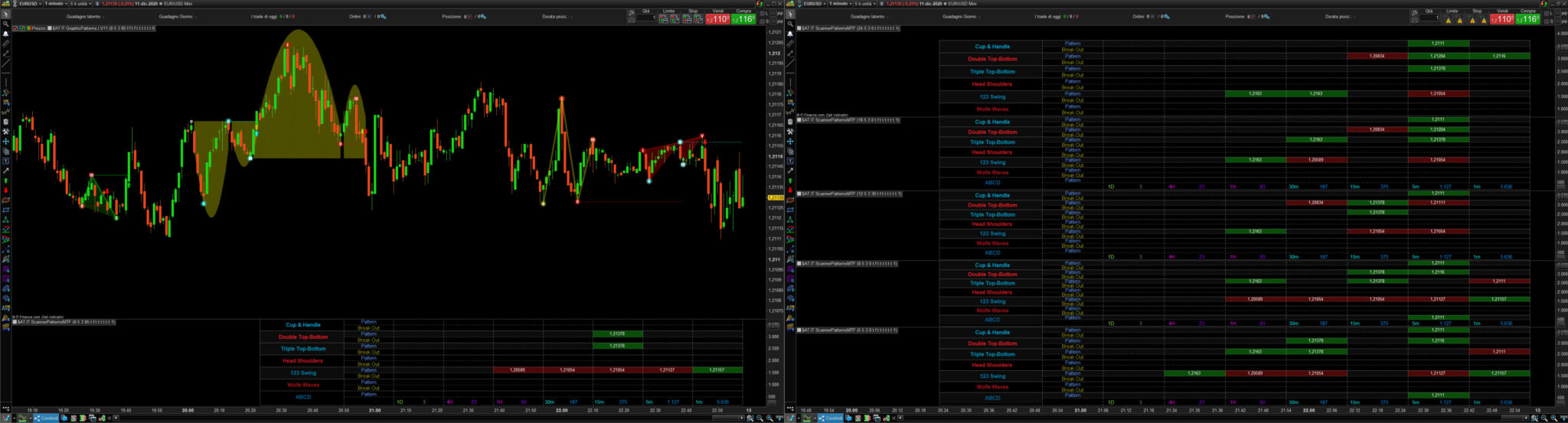
    I am working on the multi timeframe dashboard of the Graphic Patterns indicator, it is an indicator that automatically detects 7 classic patterns, including Wolfe waves.
    The dashboard allows to detect the patternsin formation and the patterns in breakout, on 6 time frames simultaneously.
    https://www.automatictrading.it/product/graphic-patterns-indicator-v11/

    AutomaticTrading-Graphic_Patterns-V11.jpg AutomaticTrading-Graphic_Patterns-V11.jpg
    #153599 quote
    Moufi
    Participant
    Junior

    Wow excellent travail, pas nécessairement dans mon budget encore. Je dois penser parce que c’est une grosse somme d’argent. Offrez-vous une formation pour maîtriser cet outil ? Merci

Viewing 15 posts - 1 through 15 (of 15 total)
  • You must be logged in to reply to this topic.

WAVES Of WOLFE


ProBuilder: Indicators & Custom Tools

New Reply
Author
author-avatar
ALE @aleale Moderator
Summary

This topic contains 14 replies,
has 7 voices, and was last updated by Moufi
5 years, 2 months ago.

Topic Details
Forum: ProBuilder: Indicators & Custom Tools
Language: English
Started: 04/15/2017
Status: Active
Attachments: 2 files
Logo Logo
Loading...