ProRealCode - Trading & Coding with ProRealTime™
Hi everyone,
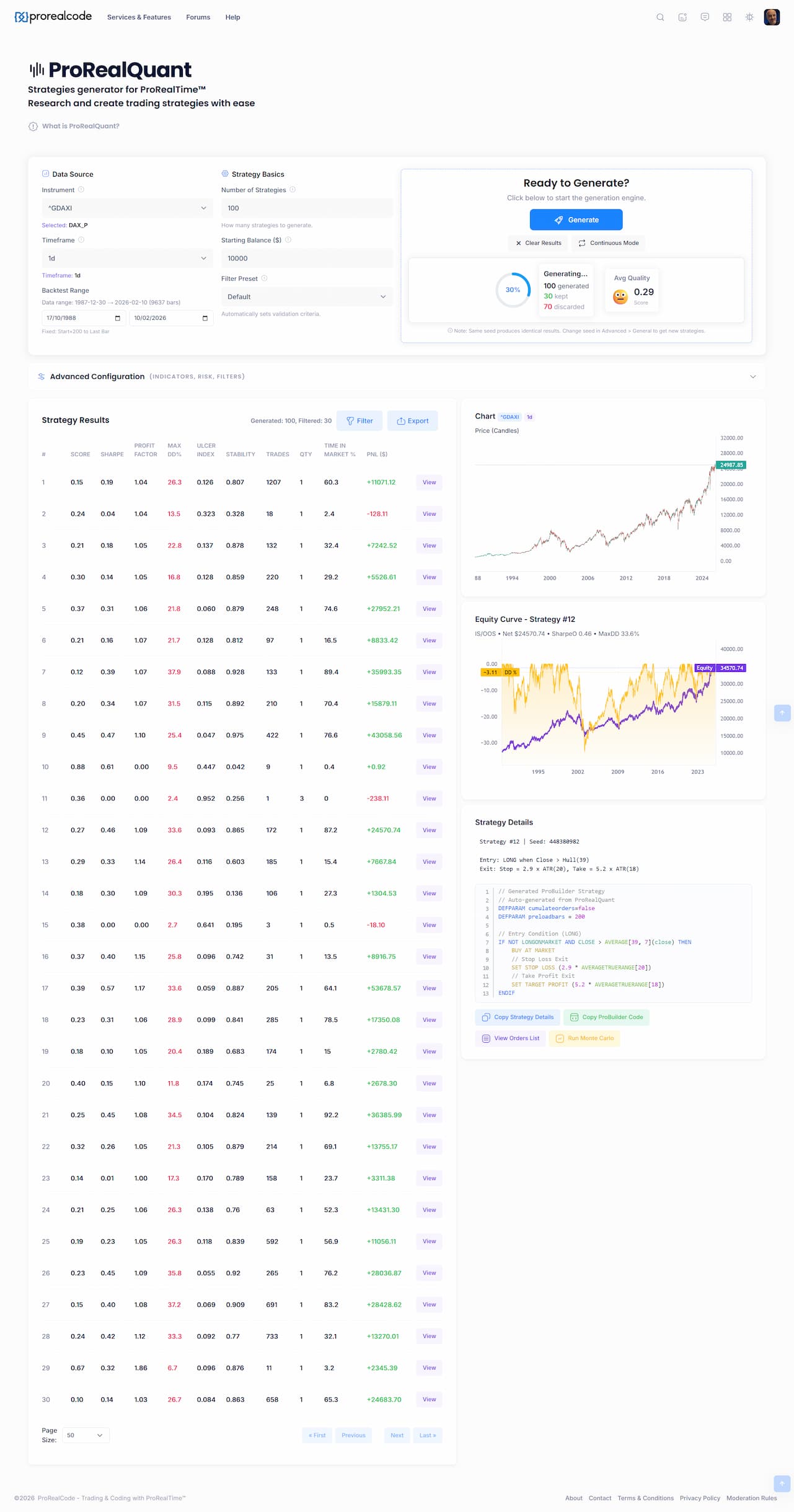
Since the release of ProRealQuant, I’ve been collecting your questions, suggestions and bug reports. First of all, thank you to everyone who took the time to test the tool and share their experience (on forums, through chat or direct message in the website!), it’s incredibly valuable and it directly shapes the development priorities. So far, millions of strategies have been generated.
I wanted to share what has been improved already, what’s coming next, and gather even more feedback from the community.
What’s been improved recently
Based on your early testing sessions, here are the adjustments and clarifications that came out of the first wave of feedback:
Questions from the community, answered
Several recurring questions came up during testing, here are the key takeaways:
What’s on the roadmap
Based on your requests, here are the features and improvements I’m prioritizing:
Your turn
If you have suggestions, feature requests, bugs to report, or if you’ve found strategies with Monte Carlo > 60 and want to share your settings and approach, please post below. Every piece of feedback helps make ProRealQuant better for the whole community.
Thanks again for your support and your testing efforts!
Hi, I have been quietly working on a big performance update, and it’s now live. If you’ve used the strategy generator before, you’ll notice the difference immediately. Here’s what changed and why it matters 🙂
Previously, loading 50,000 bars of intraday data could freeze your browser for several seconds. Now it renders immediately and stays responsive. Zooming, panning, and switching between charts is fluid.
Before, charts were silently cutting off data older than roughly 5–6 years even if history went back to the 1990s. That’s now fixed. Load 30 years of daily data and the chart shows all of it.
This is the big one. The generator now runs on all your CPU cores at the same time, instead of just one.
Before 1 core was used, now it can use up to 8! In practical terms: what used to take 60 seconds now takes around 8. And while it’s running, you can still interact with the page normally: filter results, view charts, change settings, without any lag!
Nothing. Just reload the page. All improvements are automatic.
If you’re using a multi-core processor (which covers virtually every desktop and laptop made in the last decade), you’ll immediately benefit from the full speedup.
Now I can focus on data: add more pre-loaded instruments and intraday timeframes.
Happy backtesting!
Test it by yourself: https://www.prorealcode.com/prorealquant/
WOW ! Amazing rebuild to use these multi cores CPUs Nicolas ! Just one question: right now it seems you have to run the Monte Carlo test on the manually selected strategies one by one, which takes quite a long time. Would it be possible to run the Monte Carlo test automatically in one batch to all or a group of N of the selected strategies ?
Hi,
Thanks! Glad the speedup is noticeable.
That’s a great suggestion and you’re right, running Monte Carlo one by one on each strategy is tedious, especially when you have dozens of candidates to evaluate.
Batch Monte Carlo is definitely something I want to add. The idea would be to let you select multiple strategies (or all filtered results) and run Monte Carlo on the whole batch automatically, then display the grade directly in the results table as an extra column. That way you could sort and filter by Monte Carlo grade just like any other metric, which would make the whole workflow much smoother.
The good news is that with the new multi-core engine, this is now technically feasible without freezing your browser. Before this update, running even one Monte Carlo (100 simulations) was already heavy on a single core, so batching would have been painful. Now that the workload is distributed across all available cores, batch processing becomes realistic.
I’ll add it to the priority list. It fits naturally as the next usability improvement after the performance overhaul.
Thanks for the suggestion!
Hi everyone,
Another update just went live on ProRealQuant. This one addresses the most requested feature from the last changelog: batch Monte Carlo testing. But instead of just batching it, I went a step further.
Auto Monte Carlo, built into the backtest
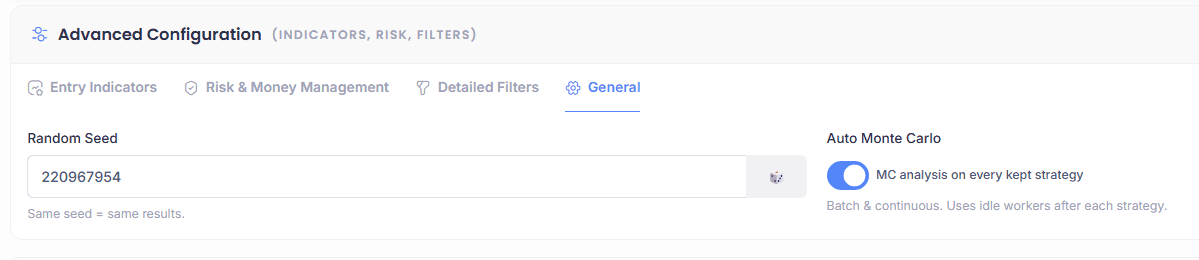
You can now enable automatic Monte Carlo analysis directly during strategy generation. The option is in Advanced Configuration, General tab, check the “Auto Monte Carlo” box and you’re set.
When enabled, each strategy that passes your filters will automatically go through a Monte Carlo stress test right after its backtest. The MC grade then appears directly in the results table as a new column, no need to manually select strategies one by one anymore.
It works in both single batch mode (Generate) and in Continuous mode. So you can launch a continuous session, go grab a coffee, and come back to a table full of strategies already graded by Monte Carlo.
One thing to keep in mind: since Monte Carlo uses bootstrap randomization (100 synthetic price series generated randomly each time), if you run a second MC analysis on the same strategy, the score might differ slightly. That’s completely normal and expected. A robust strategy will stay in the same grade range across multiple runs.
Improved Monte Carlo scoring
I also reworked the scoring formula. The previous version was too harsh on drawdown.
Here’s what was wrong: the old formula penalized drawdown via two metrics (95th percentile max DD and average DD) with a combined weight of 35%. The penalty curves were set so that 50% drawdown scored zero on one metric and 33% drawdown scored zero on the other. The problem is that this was too aggressive for strategies using reasonable stop losses. For example, a strategy with a 5% stop loss that simply hits 5 consecutive losing trades would produce roughly 23% drawdown by pure math (compound: 1 minus 0.95 to the power of 5 = 22.6%). Under the old scoring, that scenario alone would already score around 50 on the drawdown component, even though there’s nothing wrong with the strategy, it’s just experiencing a normal losing streak within its risk parameters.
The fix: the drawdown penalty is now normalized against an “expected baseline” derived from the average stop loss size observed in the simulations. In other words, the scoring now distinguishes between drawdown that’s a natural consequence of the strategy’s risk profile and drawdown that signals a genuine problem. On top of that, the total weight of drawdown in the overall score has been reduced from 35% to 25%, redistributing weight to the other components.
In practice, this means strategies with tight risk management will no longer be unfairly penalized for normal losing streaks. Strategies that produce abnormal drawdown relative to their stop loss size will still be flagged appropriately.
What you need to do
Nothing, just reload the page. Enable Auto Monte Carlo in the General tab if you want it, and let the engine do the work.
Happy backtesting!
Hi everyone,
New update just went live! This one focuses on what many of you have been asking for: more instruments to work with.
New instruments available
The instrument list has been significantly expanded. On top of the existing US stocks and world indices, you can now generate and backtest strategies on:
All on daily timeframe. The DAX 40 in 1H is also still available for those of you who want to experiment with intraday.
The full instrument list now covers 26 instruments across 5 categories: Indexes (S&P 500, Dow Jones, NASDAQ, DAX, CAC 40, FTSE 100, Nikkei 225), Stocks (AAPL, AMZN, GOOG, META, MSFT, NVDA, TSLA), Forex, Commodities and Crypto.
This opens up a lot of possibilities, especially for building portfolios of uncorrelated strategies across different asset classes, which is exactly what several of you mentioned wanting to do.
Instrument selection revamped
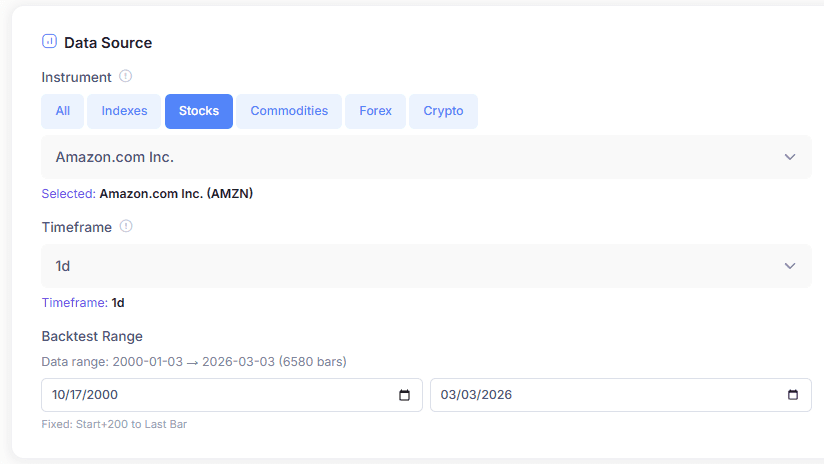
The instrument picker has been reorganized with category buttons so you can quickly filter by Indexes, Stocks, Forex, Commodities or Crypto instead of scrolling through one long list.
Historical data trimmed to year 2000
The pre-loaded data used to go back to the 1980s for some instruments. I’ve trimmed everything to start from the year 2000. Market structure, volatility regimes and electronic trading have changed so much since then that backtesting on data from the 80s and 90s was adding noise rather than value. Starting from 2000 gives you 25+ years of relevant history, which is more than enough for robust daily strategy research.
Default sizing changed to 1 contract
The default position sizing is now set to 1 contract (fixed quantity) instead of percentage of equity. This makes the P&L figures easier to read and compare across strategies, especially when evaluating raw strategy logic. The percentage of equity mode is still available in the Risk & Money Management tab if you prefer dynamic sizing.
What’s next
More instruments and more timeframes are still the priority. If there’s a specific instrument or pair you’d like to see added, let me know below.
Happy backtesting!
Hi everyone,
Fresh update today with a nice batch of intraday data and several quality-of-life fixes.
New intraday instruments
This is the big addition. You can now generate and backtest strategies on:
EUR/USD 1H, with data going back to 2010 XAU/USD (Gold) 1H, with data going back to 2010 DAX 1H and 30min, with data going back to 2012 US500 1H and 30min, with data going back to 2012
That’s a lot of bars to work with, which means much better statistical significance for your strategies compared to daily timeframes. More trades, more robust Monte Carlo validation, and better Out-of-Sample testing. This was by far the most requested addition, so I hope you’ll enjoy exploring what these timeframes produce.
Fixes and improvements
Charts now render correctly for instruments with more than 2 decimal places. Previously, Forex pairs and some other instruments with small tick sizes were not displaying properly. This is now fixed.
The timescale on charts has been adjusted for timeframes below 1 day. Intraday charts now display time labels that actually make sense instead of showing daily dates.
Trade duration in the orders list is now expressed in bars rather than “days”. This was misleading on intraday timeframes where a trade lasting 5 bars on H1 is obviously not 5 days. Now the unit is consistent regardless of the timeframe you’re working on.
Default order size for Forex pairs is now automatically set to 10,000 contracts. This reflects a more realistic lot size for Forex and avoids having to manually adjust the sizing every time you switch to a currency pair.
The drawdown scale on equity charts has been refined. Values are now always displayed as positive numbers, which makes the chart much easier to read at a glance.
Thank you all
I want to take a moment to thank everyone who has been testing, reporting bugs, suggesting features and pushing the tool forward. Every piece of feedback counts and directly shapes what gets built next. Since launch, millions of strategies have been generated by the community every week, which is honestly amazing to see. The tool is growing fast and that’s thanks to you.
Now I’d love to see more of you sharing your findings here on the forum too! Whether it’s a strategy with a solid Monte Carlo grade, a particular configuration that works well on a given instrument, or just tips and observations from your testing sessions, this is the place to discuss it. The more we share, the more we all learn.
What’s next
More intraday data for other instruments is coming. If there are specific instruments or timeframes you’d like prioritized, drop a message below. Your feedback directly shapes what gets added next.
Happy backtesting!
The information collected on this form is stored in a computer file by ProRealCode to create and access your ProRealCode profile. This data is kept in a secure database for the duration of the member's membership. They will be kept as long as you use our services and will be automatically deleted after 3 years of inactivity. Your personal data is used to create your private profile on ProRealCode. This data is maintained by SAS ProRealCode, 407 rue Freycinet, 59151 Arleux, France. If you subscribe to our newsletters, your email address is provided to our service provider "MailChimp" located in the United States, with whom we have signed a confidentiality agreement. This company is also compliant with the EU/Swiss Privacy Shield, and the GDPR. For any request for correction or deletion concerning your data, you can directly contact the ProRealCode team by email at privacy@prorealcode.com If you would like to lodge a complaint regarding the use of your personal data, you can contact your data protection supervisory authority.