Just a quick question guys n gals.
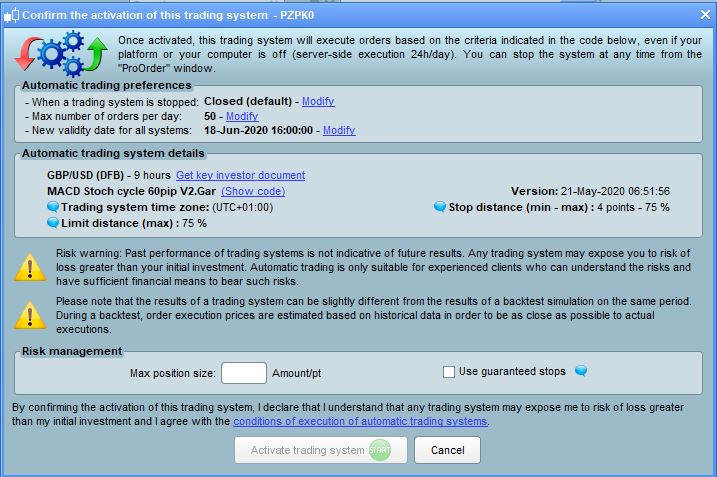
I’m running a couple of strategies, one of which has 2 codes running on the same pair. However with Prorealtime you get a risk management window popping up when enabling. So for me I can see this meaning 2 things in relation to what it refers to.
A: For cumulative orders within the code don’t go past a certain amount
B: Don’t trade if your overal positions are greater than this amount.
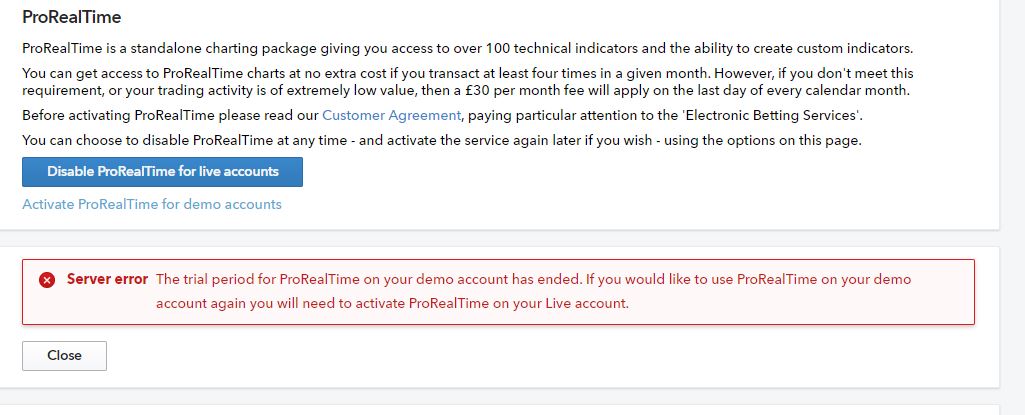
Now without wasting money live as my demo seems to have expired, can someone clarify what it refers to?
My query stems from the fact that I’d normally look to make any restrictions in the code, so I’m just wondering whether if I put a trade on at market, or another code executes on the same pair, whether the restriction will prevent the code from execution of a trade if there’s already a position on.
I rely on it to ensure both A and B as you state above.
In case my code is flawed etc.
Thanks Grahal, however in my case I don’t want it to not execute if I’m already in a trade, my code already has cumulated orders to false, so I have a natural limitation on orders running subject to my risk tolerance, I can see it being useful if runing a scalping program and I may want to limit my risk or margin tolerance, but the main question is:-
Will it stop an order executing in proorder if I have a seperate order running already where the accumulation of the separate orders is greater than that spcified for the proorder execution.
So I have £10 per point at market order on for instance. The Proorder is running at £5 per point so I put in the risk management query £5 MAx for the proorder.
Will my £10 PP at market trade already running stop the order from executing.?
Does it take into account al my positions in all markets currently running as well maybe?
Why don’t you try / test out your questions on your demo account?
Write a code that executes a trade every 10 seconds so you not waiting long for results etc.
Let us know your findings please as others may have similar questions?
I’ve never given it a moments thought … I just enter 2 in the box and click Activate System.
You must have loads of cash to be considering 5 and 10 per point?? 🙂
Does it take into account al my positions in all markets currently running as well maybe?
No, whatever you put in that box only relates to that one single Auto-System.
OK
I have no demos, for some reason IG de-actvated all PRT demos even on the demo accounts – might query that again, cos it is a nuisance not being able to try stuff out..
IG de-actvated all PRT demos even on the demo accounts
If you have a PRT Real Live Account which is funded then you are entitled to have a Demo Account …to do this sort of testing etc.
Have you tried reactivating Demo via the IG Settings?
Let us know if you don’t know where the setting is?
Ah.. Suddenly the option is there, well I did send an email earlier, I now have option for activating demo account which didnt seem ot be there before as they were active and disappeared, when I queried many moons ago they simply said it must e past the trial date, now its showing agaain so think theyve rectified an error… hmmm
ok.. same issue, I have it live, I’m trading live and I get this error message.. so sending it to IG
IG have a habit of switching off little used demo accounts. Once they do this you can only reactivate it by enabling your real account before then enabling your demo account. You will be required to meet their minimum trade quantity each month in the real account and the trades must be what they consider to be sufficient.
I get this error message.. so sending it to IG
Do you get the error message when you click … Activate PRT for Demo Accounts?
yeh my Live account is already active. I’de have to de-activate and re-activate, dont fancy doing that with these issues
Yes GraHal, when I click the Activate prorealtime for Demo I get the message, but my account is live and I actively trade through PRT Live
I’d send IG an email to ask them to throw a switch somewhere?? 🙂
But maybe you have already?
If Yes … next step might be a post on the IG Forum? 🙂
https://community.ig.com/forums/forum/12-ig-technical-support-platform-and-app-help/?ct=1590079701
So that was them messing about for sure. They’ve now activated it, have to admit I haven’t used the demo in some time, always traded live, but doesn’t mean I don’t need the option there from time to time.