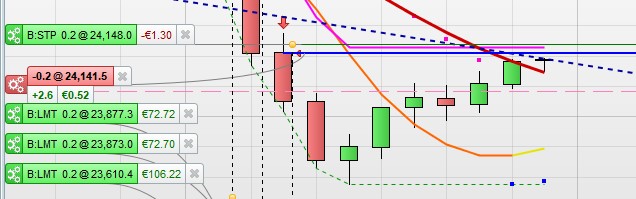
In the attached image, you can see where a short position opened @24141.5
The pink dashed line is the trailing start which is met at the close of the first candle. From there, everything behaved as normal and the stop moved down at the close of each bar. Then as the price retraced, at the second last candle it suddenly jumped back above entry price to 24148. Presumably “2.6 €0.52” indicates where the stop should have been, ie 24138.9
The position closed @ 24145.9 for a small loss.
I’ve seen this happen before but only on v short TF (<1m). This is a 5 minute chart.
Anyone else seeing this? Anyone know why it happens? Stops should only ever move in one direction.
Correction, “2.6 €0.52” is the current points and profit from the opening, nothing to do with the stop (although that is more or less where it should have been).
Seriously? I’m the only person who gets stops with a mind of their own? Obviously the difference between a small win and a small loss is negligible in this case – but if it can’t be explained then it’s is a bug that needs to be addressed.
Apart from the financial loss, which could be an issue if running larger positions, it messes with the performance data. This will register as a loss when it wasn’t, so that headline number can’t be trusted. You have to go through trade by trade and try to guess which were actual losses and which were the result of a stop that changed it’s mind.
WTF???
Seriously? I’m the only person who gets
I’ve thought above many times over the years … am I the only one etc??
I came to the conclusion that lots of folk can’t be bothered spending a few minutes typing?
Anyway re your Issue … surely you need to post the code so the Wizards can see if they can spot anything?
Might it be due to a flash widening of the spread?? Would that be a logical explanation of what you are seeing?
Would that be a logical explanation of what you are seeing?
No. I was watching as it happened, the spread didn’t change and even if it did, the position should have just closed. You can’t have the stops moving about to accommodate the spread. It only seems to happen when the price retraces and the stop is very near to break even. This is the TS:
//%trailing stop function
trailingPercent = tst
stepPercent = st
if onmarket then
trailingstart = tradeprice(1)*(trailingpercent/100) //trailing will start @trailingstart points profit
trailingstep = tradeprice(1)*(stepPercent/100) //% step to move the stoploss
endif

//reset the stoploss value
IF NOT ONMARKET THEN
newSL=0
ENDIF

//manage long positions
IF LONGONMARKET THEN
//first move (breakeven)
IF newSL=0 AND close-tradeprice(1)>=trailingstart THEN
newSL = tradeprice(1)+trailingstep
ENDIF
//next moves
IF newSL>0 AND close-newSL>trailingstep THEN
newSL = newSL+trailingstep
ENDIF
ENDIF

//manage short positions
IF SHORTONMARKET THEN
//first move (breakeven)
IF newSL=0 AND tradeprice(1)-close>=trailingstart THEN
newSL = tradeprice(1)-trailingstep
ENDIF
//next moves
IF newSL>0 AND newSL-close>trailingstep THEN
newSL = newSL-trailingstep
ENDIF
ENDIF

//stop order to exit the positions
IF newSL>0 THEN
SELL AT newSL STOP
EXITSHORT AT newSL STOP
ENDIF
Try replacing line 4 with:
if onmarket and Not OnMarket[1] then
Thanks Roberto, I’ll try that – even if I don’t understand it. Doesn’t that mean onmarket this candle but not onmarket in the previous candle? how does that help with a problem that occurred after 7 candles, with 6 of them behaving normally?
At the time of the stop’s weird movement I was ‘onmarket and OnMarket[1]’
I was just guessing, since I can’t spot anything wrong in th code.
Chck there’s not something else in yopur strategy that can affect trailing stop.
At lines 2-3 are you sure either TST or ST don’t ever change while OnMarket?
You could embed them in a IF Not OnMarket THEN… ENDIF.
are you sure either TST or ST don’t ever change while OnMarket?
tst and st were just there for optimisation. When running it had fixed values, .1 and .001
This is Nicolas’s original TS code. It seemed wrong to me, as the trailing step would be the same as the trailing start, no? so I added a separate value for stepPercent
trailingPercent = 0.5
//trailing stop function
if onmarket then
trailingstart = tradeprice(1)*(trailingpercent/100) //trailing will start @trailinstart points profit
trailingstep = tradeprice(1)*(trailingpercent/100) //trailing step to move the "stoploss"
endif

//reset the stoploss value
IF NOT ONMARKET THEN
newSL=0
ENDIF

//manage long positions
IF LONGONMARKET THEN
//first move (breakeven)
IF newSL=0 AND close-tradeprice(1)>=trailingstart THEN
newSL = tradeprice(1)+trailingstep
ENDIF
//next moves
IF newSL>0 AND close-newSL>trailingstep THEN
newSL = newSL+trailingstep
ENDIF
ENDIF

//manage short positions
IF SHORTONMARKET THEN
//first move (breakeven)
IF newSL=0 AND tradeprice(1)-close>=trailingstart THEN
newSL = tradeprice(1)-trailingstep
ENDIF
//next moves
IF newSL>0 AND newSL-close>trailingstep THEN
newSL = newSL-trailingstep
ENDIF
ENDIF

//stop order to exit the positions
IF newSL>0 THEN
SELL AT newSL STOP
EXITSHORT AT newSL STOP
ENDIF

//put the first stoploss
if onmarket and newSL=0 and activatestoploss then
set stop loss trailingstart
endif
You haven’t got the lines below in your code, but they are in Nicolas code at lines 43 to 46
//put the first stoploss
if onmarket and newSL=0 and activatestoploss then
set stop loss trailingstart
endif
TrailingStart and TrailingStep can either be different or equal, it’s up to you.
I think the problem is accumulating positions, as TRADEPRICE is an average af the entry price of all positions, so it will change as any single positions is added.
You haven’t got the lines below in your code, but they are in Nicolas code at lines 43 to 46
Well spotted – that could be it. Probably got left out of the copy and paste somehow. How many algos have i got with that flaw I wonder…
TRADEPRICE is an average af the entry price of all positions
That’s interesting. Cumulateorders is false, so I don’t actually need that. Can I just change TRADEPRICE to CLOSE or CLOSE[1]?
No, you must keep TRADEPRICE.
You haven’t got the lines below in your code, but they are in Nicolas code at lines 43 to 46
Actually, I remember now, this was discussed when the code was originally posted – those lines are unnecessary, just for switching it on/off
Cannot Set Trailing Stop as % through IG