Bard
BardParticipant
Master
Ps/ I know there is an extra 6 months running time on the problem £21k system, not that the extra 6 months helped it much!
BardParticipant
Master
The link above is a link to use of the Heuristic Cycle Limit … is this what you meant to libk to?
That’s what I thought I’d posted but if you look carefully (and I totally get why things are easy to miss in this jungle of code!) you’ll see there’s no “ElsIf HeuristicsAlgo2 = 1 Then” or ElsIf HeuristicsAlgo3 = 1 Then. This is needed to switch algos.
Doesn’t above mean that HeuristicsAlgo2 and HeuristicsAlgo3 would work together at the same time??
Probably, as you can see I tried the more sensible initialisation code that you linked to (126009) but that didn’t work and so I’ve tagged Nicolas. If you read my last post directly above I might still have to go through the code with a tooth comb using the difference checker website and get rid of any other errors/spacing/errant returns.
BardParticipant
Master
WinCount Note: Re: Ehler’s Unic Osc ML systems on here, I would replace my WinCount codes order for this original order of WinCount strategy instructions below and with PIncPos + “1” instead of the older version within this thread, PIncPos + “increments.” I spotted an incorrect order on post: https://www.prorealcode.com/topic/machine-learning-in-proorder/page/8/#post-126009
I’ve pasted the correct ordered code below. (I originally altered the order for easier understanding). Note I’ve also labelled Mode as Mode 1. Be sure to include Mode “1” within the code where needed, or you can strip the “1” off of Mode.
@bertrandpinoy
//ValueX

If WinCountA > WinCountB and StratAvgA > StratAvgB Then
Mode1 = 0 //Strategy is performing well with current variable, do not optimise

ElsIf WinCountA < WinCountB and StratAvgA < StratAvgB and Mode1 = 1 Then
ValueX = ValueX - (Increment*NIncPos)
NIncPos = NIncPos + 1
Mode1 = 2 //For strategy performing worse Next cycle optimise with negative increments

ElsIf WinCountA >= WinCountB or StratAvgA >= StratAvgB and Mode1 = 1 Then
ValueX = ValueX + (Increment*PIncPos)
PIncPos = PIncPos + 1
Mode1 = 1 //For strategy performing better Next cycle again optimise with positive increments

ElsIf WinCountA < WinCountB and StratAvgA < StratAvgB and Mode1 = 2 Then
ValueX = ValueX + (Increment*PIncPos)
PIncPos = PIncPos + 1
Mode1 = 1 //For strategy performing worse Next cycle optimise with positive increments

ElsIf WinCountA >= WinCountB or StratAvgA >= StratAvgB and Mode1 = 2 Then
ValueX = ValueX - (Increment*NIncPos)
NIncPos = NIncPos + 1
Mode1 = 2 //For strategy performing better Next cycle again optimise with negative increments

EndIf

—————

//ValueY

If WinCountA2 > WinCountB2 and StratAvgA2 > StratAvgB2 Then
Mode2 = 0 //Strategy is performing well with current variable, do not optimise

ElsIf WinCountA2 < WinCountB2 and StratAvgA2 < StratAvgB2 and Mode2 = 1 Then
ValueX = ValueX - (Increment2*NIncPos2)
NIncPos2 = NIncPos2 + 1
Mode2 = 2 //For strategy performing worse Next cycle optimise with negative increments

ElsIf WinCountA2 >= WinCountB2 or StratAvgA2 >= StratAvgB2 and Mode2 = 1 Then
ValueX = ValueX + (Increment2*PIncPos2)
PIncPos2 = PIncPos2 + 1
Mode2 = 1 //For strategy performing better Next cycle again optimise with positive increments

ElsIf WinCountA2 < WinCountB2 and StratAvgA2 < StratAvgB2 and Mode2 = 2 Then
ValueX = ValueX + (Increment2*PIncPos2)
PIncPos2 = PIncPos2 + 1
Mode2 = 1 //For strategy performing worse Next cycle optimise with positive increments

ElsIf WinCountA2 >= WinCountB2 or StratAvgA2 >= StratAvgB2 and Mode2 = 2 Then
ValueX = ValueX - (Increment2*NIncPos2)
NIncPos2 = NIncPos2 + 1
Mode2 = 2 //For strategy performing better Next cycle again optimise with negative increments

EndIf
So does above mean you are getting more consistent results now with the ML Systems?
Are you able to see / detect that the Heuristics Cycle Limit is working?
If as an experiment if you set the Heuristic Cycle Limit = 10 then you should see from GRAPH Valuex, ValueY and ValueZ that for 10 trades only ValueX changes for example (while ValueY and ValueZ do not change for 10 trades etc)?
You may be able to see above for Heuristic Cycle Limit = 3, but it may not be so obvious??
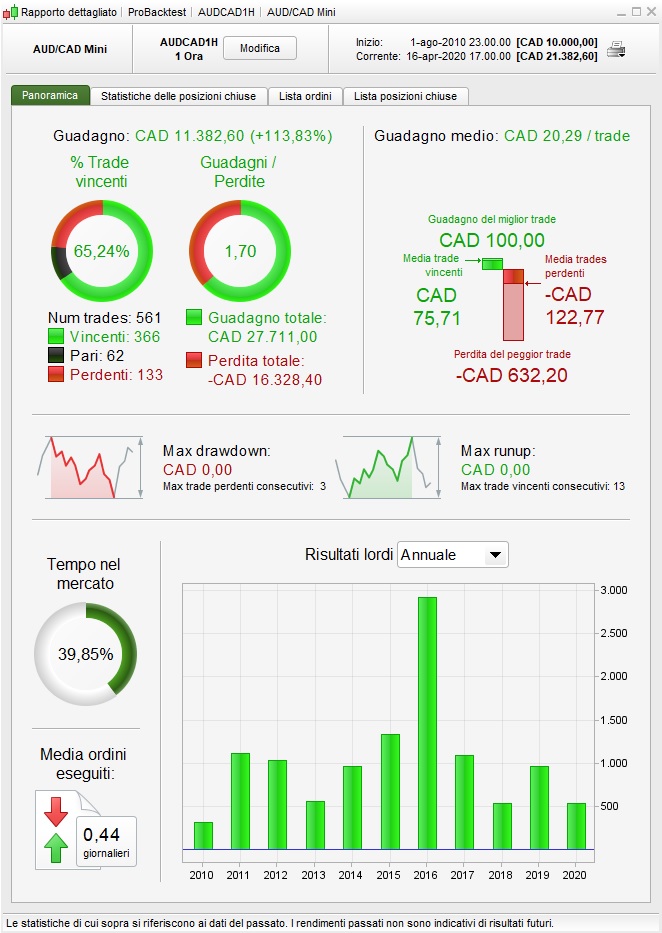
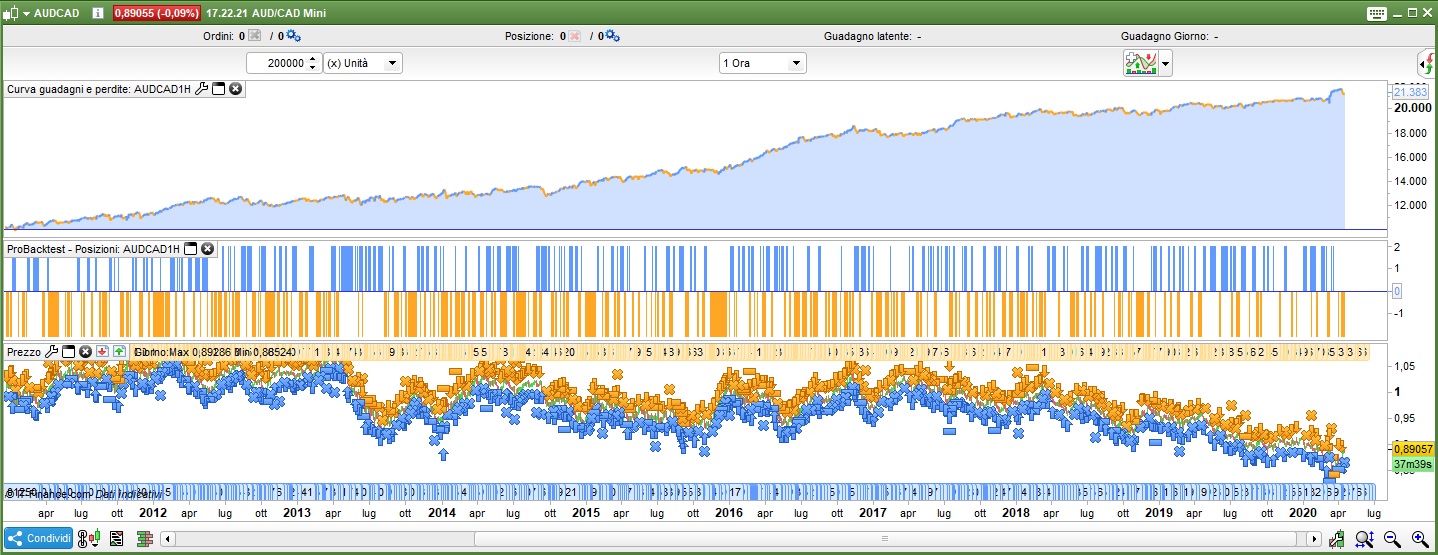
Machine learning implemented in a simple AUDCAD system, robustness test included.
defparam cumulateorders = false

once longtrading= 1
once shorttrading= 1

n = 1
m = 3
l = 90

//Robustness Tester
once j = 0
once flag = 1

if flag = 1 then
j = j + 1
if j > 1 then
flag = -1
j = j - 1
endif
endif

if flag = -1 then
j = j - 1
if j = 0 then
j = j + 1
flag = 1
endif
endif

tradeon = 1
if opendate >= 20000101 then
if barindex mod 1 = 0 or barindex mod 1 = j then
tradeon = 1
endif
endif

// Heuristics Algorithm Start

If onmarket[1] = 1 and onmarket = 0 Then
optimize = optimize + 1
EnDif

StartingValue = 140
ResetPeriod = 26 //Specify no of months after which to reset optimization
Increment = 20
MaxIncrement = 3 //Limit of no of increments either up or down
Reps = 22 //Number of trades to use for analysis
MaxValue = 320 //Maximum allowed value
MinValue = increment //Minimum allowed value

once monthinit = month
once yearinit = year
If (year = yearinit and month = (monthinit + ResetPeriod)) or (year = (yearinit + 1) and ((12 - monthinit) + month = ResetPeriod)) Then
ValueX = StartingValue
WinCountB = 0
StratAvgB = 0
BestA = 0
BestB = 0
monthinit = month
yearinit = year
EndIf
once ValueX = StartingValue
once PIncPos = 1 //Positive Increment Position
once NIncPos = 1 //Neative Increment Position
once Optimize = 0 ////Initialize Heuristicks Engine Counter (Must be Incremented at Position Start or Exit)
once Mode = 1 //Switches between negative and positive increments
//once WinCountB = 3 //Initialize Best Win Count
//GRAPH WinCountB coloured (0,0,0) AS "WinCountB"
//once StratAvgB = 4353 //Initialize Best Avg Strategy Profit
//GRAPH StratAvgB coloured (0,0,0) AS "StratAvgB"

If Optimize = Reps Then
WinCountA = 0 //Initialize current Win Count
StratAvgA = 0 //Initialize current Avg Strategy Profit

For i = 1 to Reps Do
If positionperf(i) > 0 Then
WinCountA = WinCountA + 1 //Increment Current WinCount
EndIf
StratAvgA = StratAvgA + (((PositionPerf(i)*countofposition[i]*100000)*-1)*-1)
Next
StratAvgA = StratAvgA/Reps //Calculate Current Avg Strategy Profit
//Graph (PositionPerf(1)*countofposition[1]*100000)*-1 as "PosPerf1"
//Graph (PositionPerf(2)*countofposition[2]*100000)*-1 as "PosPerf2"
//Graph StratAvgA*-1 as "StratAvgA"
//once BestA = 300
//GRAPH BestA coloured (0,0,0) AS "BestA"
If StratAvgA >= StratAvgB Then
StratAvgB = StratAvgA //Update Best Strategy Profit
BestA = ValueX
EndIf
//once BestB = 300
//GRAPH BestB coloured (0,0,0) AS "BestB"
If WinCountA >= WinCountB Then
WinCountB = WinCountA  //Update Best Win Count
BestB = ValueX
EndIf

If WinCountA > WinCountB and StratAvgA > StratAvgB Then
Mode = 0
ElsIf WinCountA < WinCountB and StratAvgA < StratAvgB and Mode = 1 Then
ValueX = ValueX - (Increment*NIncPos)
NIncPos = NIncPos + 1
Mode = 2
ElsIf WinCountA >= WinCountB or StratAvgA >= StratAvgB and Mode = 1 Then
ValueX = ValueX + (Increment*PIncPos)
PIncPos = PIncPos + 1
Mode = 1
ElsIf WinCountA < WinCountB and StratAvgA < StratAvgB and Mode = 2 Then
ValueX = ValueX + (Increment*PIncPos)
PIncPos = PIncPos + 1
Mode = 1
ElsIf WinCountA >= WinCountB or StratAvgA >= StratAvgB and Mode = 2 Then
ValueX = ValueX - (Increment*NIncPos)
NIncPos = NIncPos + 1
Mode = 2
EndIf

If NIncPos > MaxIncrement or PIncPos > MaxIncrement Then
If BestA = BestB Then
ValueX = BestA
Else
If reps >= 10 Then
WeightedScore = 10
Else
WeightedScore = round((reps/100)*100)
EndIf
ValueX = round(((BestA*(20-WeightedScore)) + (BestB*WeightedScore))/20) //Lower Reps = Less weight assigned to Win%
EndIf
NIncPos = 1
PIncPos = 1
ElsIf ValueX > MaxValue Then
ValueX = MaxValue
ElsIf ValueX < MinValue Then
ValueX = MinValue
EndIF

Optimize = 0
EndIf

// Heuristics Algorithm End


cs= summation[n](close>open) = n
cs = cs  and close>bollingerup[valuex](close)  and close>dlow(2)
cl= summation[m](close<open) = m
cl = cl   and close<bollingerdown[valuex](close) and close<Dhigh(2)


size = 2

//entry conditions
if shorttrading then
if cs and tradeon then
sellshort size contract at market
endif
endif

if longtrading then
if cl and tradeon then
buy size contract at market
endif
endif

//exit conditions
if shortonmarket and close<average[l](close) then
exitshort at market
endif


if longonmarket and close>average[l](close) then
sell at market
endif

// Stop and target
SET TARGET pPROFIT 50

StartBreakeven = 30 // How much pips/points in gain to activate the Breakeven function?
PointsToKeep = 0 // How much pips/points to keep in profit above of below our entry price when the Breakeven is activated (beware of spread)

// Reset the BreakevenLevel when no trade are on market
IF NOT ONMARKET THEN
BreakevenLevel=0
ENDIF

// Test if the price have moved favourably of "startBreakeven" points already
IF LONGONMARKET AND close-tradeprice(1)>=startBreakeven*pipsize THEN
//Calculate the BreakevenLevel
BreakevenLevel = tradeprice(1)+PointsToKeep*pipsize
ENDIF

// Place the new stop orders on market at BreakevenLevel
IF BreakevenLevel>0 THEN
SELL AT BreakevenLevel STOP
ENDIF

IF SHORTONMARKET AND tradeprice(1)-close>startBreakeven*pipsize THEN
//Calculate the BreakevenLevel
BreakevenLevel = tradeprice(1)-PointsToKeep*pipsize
ENDIF

//Place the new stop orders on market at BreakevenLevel
IF BreakevenLevel>0 THEN
EXITSHORT AT BreakevenLevel STOP
ENDIF
Well done You!
if barindex mod 1 = 0 or barindex mod 1 = j then
Anybody … do you know what mod is in the above code (at Line 32) and what is it used for?
I used the e-find and can’t find mod anywhere else in the code apart from the line above.
I inserted ‘modulo’ instead of mod but it gave a syntax error.
Well i don’t know Grahal, it’s part of the robustness tester you should ask Vonasi.
I just edited qty and random variables with “1” and deactivated the tester, so line 10 to 35 are useless in the code.
BardParticipant
Master
Hi fifi743, thanks for the code modifications. Whilst I find it easy to understand using Value X and Y for an Oscillator’s threshold entries/exits, I’m not clear what this system is optimising? Could you please explain the Period 7 and Period 14 and how they’re being optimised in relation to the “once Value Y = 6”? Why is the Slow Period set to 6 but the Fast Period allowed to be optimised? Could you also please explain the buy and sell conditions: If c1 (the average of valuex) crosses over c2 (the average of valuex)? Thanks again, Bard.
Hi fifi743, thanks for the code modifications
Did you mean @
Francesco? I can’t see Period 7 in his code?
If No … which code of FiFi’s are you referring to, I’ve looked back 3 pages and I can’t see any code posted by FiFi??
Maybe I need to look harder?? 🙂
BardParticipant
Master
I haven’t forgotten your question re: Machine Learning. I wasn’t testing yesterday and will be testing systems over the next few days to find out if it’s better with or without the cycle limit and reset feature. I seem to have a couple of systems that have flat/static graphs of X and Y that need sorting out… I don’t know why I didn’t think of that diff checker before as I used to use it for editing text many aeons ago. Great tip.
Be good, for comparison purposes, to see some of your ML system ideas, if you have anything you’d like to show?
My next task is to get that Pivot system working with ML and then add Vonasi’s Robustness tester to the Univ Osc and Pivot systems. Lot to learn. I feel like I’m back at school! Ha Ha.
BardParticipant
Master
Can anyone get this normally very effective (when not self optimising) Pivot System ML system to work? It’s based on the Pivot Support Resistance Zone indicator first referred to here:
https://www.prorealcode.com/topic/machine-learning-in-proorder/page/7/#post-125498
It uses the 2 Algo ML code along with the Cycle Limit code taken from a working 2 algo optimising Ehler’s Universal Oscillator system (see earlier posts) and the codes have been compared side by side for any differences — of which I can see none – using this very useful free tool:
https://text-compare.com/
I’ve tried for hours to get this system code working but it won’t take any trades at all. The system and two indicators that it uses are attached as itf’s below.
Ideas anyone?
Thanks,
BardParticipant
Master
It’s this one called “Mon Systeme” by Fifi743 thanks GraHal,
https://www.prorealcode.com/topic/machine-learning-in-proorder/page/5/#post-121417
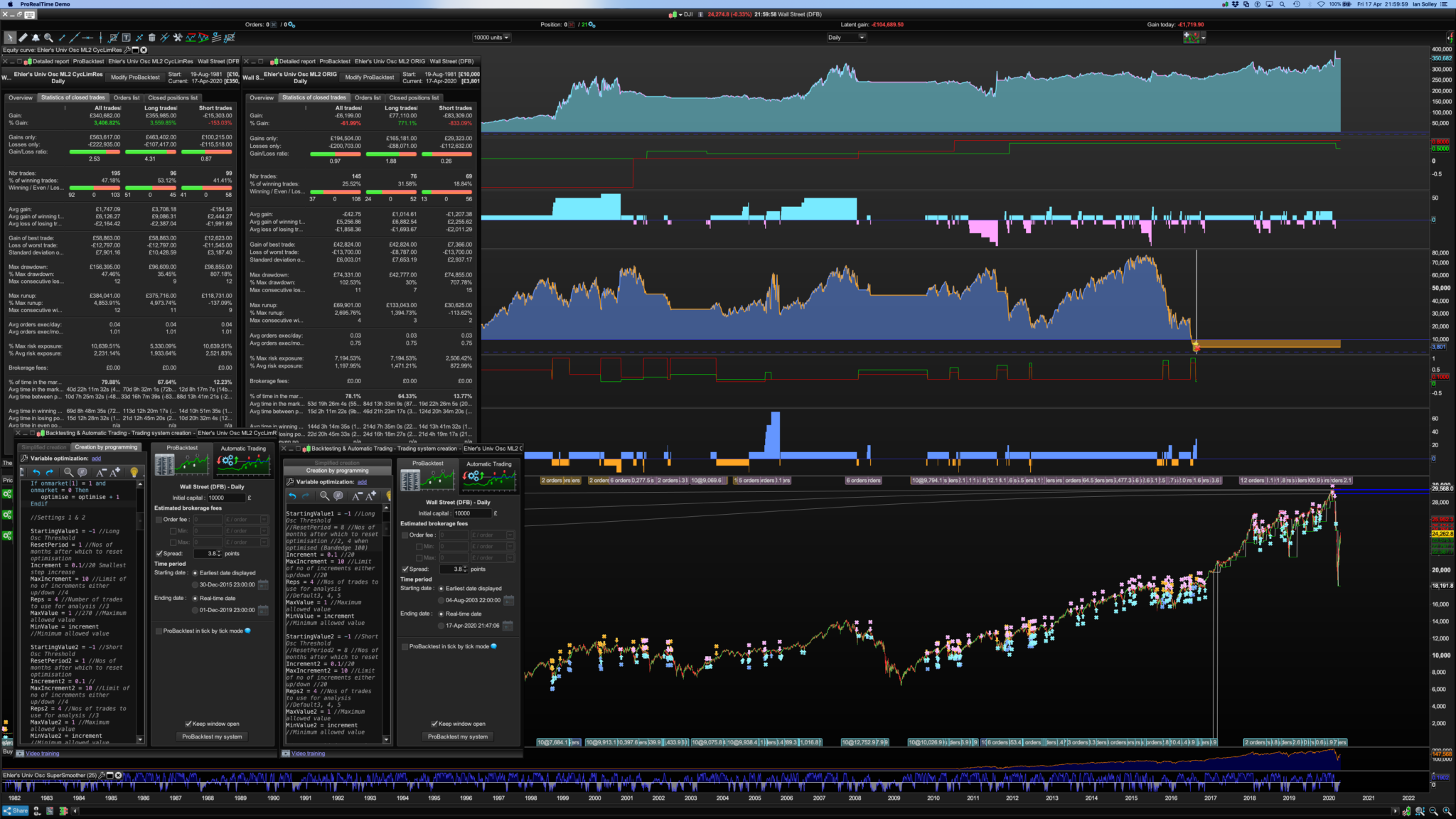
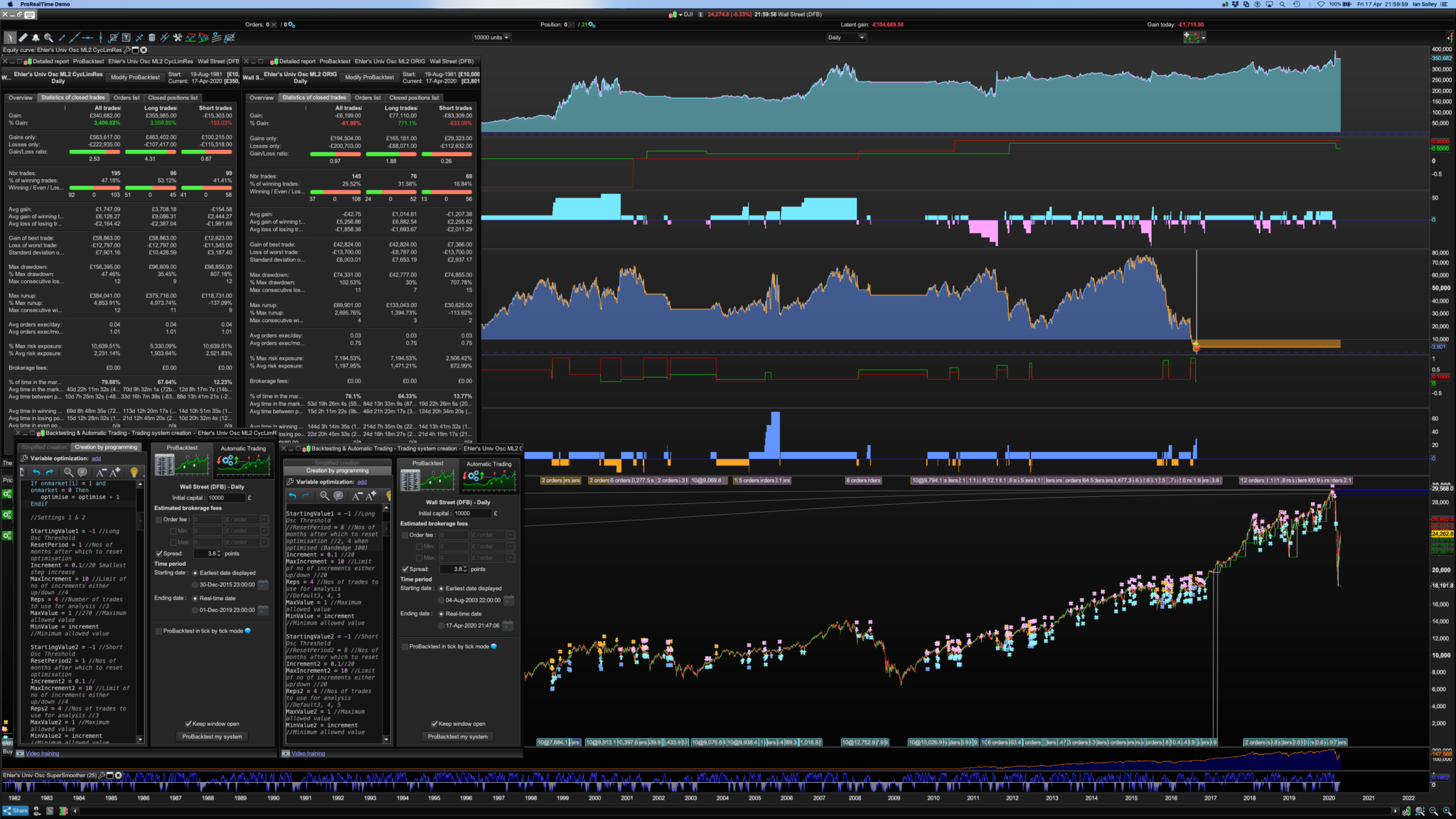
Changed my opinion on the effectiveness of using the cycle limit now I’ve got it working consistently: I played around with the Reset Period/Reps/MaxIncrement figures so to that extent it is optimised, otherwise it’s the same Ehler’s Univ Oscillator algo code as I’ve posted before but including Juanj’s cycle limit code from page 3 of this thread. Bandedge was the usual 100, no Trailing Stop just exits on the 0.0 Oscillator value. The winning system is compared to a system below it that had no reset nor cycle limit added. Pls see image.
How are your systems looking @GraHal and are you getting better results now using the cycle limit?
BardParticipant
Master
It’s this one called “Mon Systeme” by Fifi743 thanks,
https://www.prorealcode.com/topic/machine-learning-in-proorder/page/5/#post-121417
Changed my opinion on the effectiveness of using the cycle limit now I’ve got it working consistently: I played around with the Reset Period/Reps/MaxIncrement figures so to that extent it is optimised, otherwise it’s the same Ehler’s Univ Oscillator algo code as I’ve posted before but including Juanj’s cycle limit code from page 3 of this thread. Bandedge was the usual 100, no Trailing Stop just exits on the 0.0 Oscillator value. The winning system is compared to a system below it that had no reset nor cycle limit added. Pls see image.
How are your systems looking @GraHal and are you getting better results now using the cycle limit?
How are your systems looking @GraHal and are you getting better results now using the cycle limit?
I got back into Real Live last week (after nearly 2 years with Live disabled waiting for V11 !!) and I took a few early losses yesterday on Systems!! It puts me in a good mood to see a steady increase each day (bad mood re losses) so I put all my effort into getting back the losses with manual trades! We shouldn’t trade when in a bad mood! ( 🙂 ) but I’m pleased to say by late afternoon I made up the Auto-losses and a little bit more! Then at about half 8 ish a Renko fired up, went straight into profit and shot for the sky … a good end to the week and a satisfied sleep last night!
You should take a look at the Renko thread … particularly the v2.3p version that we seem to have resurrected yesterday … thanks to eckhaw posting his results. I was running it but had forgotten to optimise the renko box size (another good candidate for ML) and so my results were nowhere near as good as eckhaw’s … more bad moods ( 🙂 ) but it came good in the end as that was the Renko that made me money by the close!
I’ve never proved to myself that the Cycle Limit worked, but now you have done so without any changes to the Cycle Limit code … I can move forward with confidence that it should / does work.
BardParticipant
Master
Congratulations withe live auto trading! Do you use Monte Carlo or Vonasi’s Robustness Tester first and then monitor systems on the demo before going live? Yes, I’ve been watching Renko in one of my new charts. Looks good. Did you do a lot of backtesting using Renko? Is there a statistical edge and do you have a link to that thread please?
I never trade when angry. I stop and take a walk around the canal here where I live. I also don’t trade crazy markets like we saw in March despite huge possible gains from the immense volatility. History teaches me that I makes it slow and lose it fast. It’s a natural human trait to “stand your ground in adversity” but that spells disaster in these kind of markets without properly defined exits before a trade and with unprecedented movements due to an unknown issues (like how long and devastating will the spread of the C19 virus be, will the Fed “Plunge Protection Team” come to the rescue in an effective and long lasting way, — although I’m anti Fed, they have saved the day through every major disaster in recent decades — and billed the taxpayer for it Lol). It just sounds like a hiding to nothing to me. For me it’s easier to make money in predictable markets, and the research from FXMC would seem to bear that out looking at currency pairs, the £/$ being one f the more predictable pairs compared to say the Aus/$ or even the €/$.
It would make more sense that cycle limit should work better as it is self optimising using Reps. What I need to know is how to get a 3 Algo system properly working (entry thresholds for the oscillator plus optimising the bandedge) with that initialisation code I posted earlier. I might make a new post in the forums to see if anyone can code it, I expect Nicolas is very busy and hasn’t had a chance to see it/respond.
I look forward to seeing some of your ideas using this cycle limit algo coding. I love the way people who have posted on this thread have such diverse ways of using the algo optimising code, that’s always insightful. It’s why I asked about Fifi’s Period optimising “Mon Systeme,” I’d like to fully understand what its doing!