Hi,
I’m writing regarding an irregularity between ProBuilder and Proorder which is quite visible when comparing indicators with a Proorder strategy in backtesting. I believe this to be a bug or at least something that needs to be clarified. This affects some indicators more than others and results in inconsistent results. Please note, I have used DEFPARAM PRELOADBARS = 0 (zero) so no bars are loaded by the ProOrder backtest.
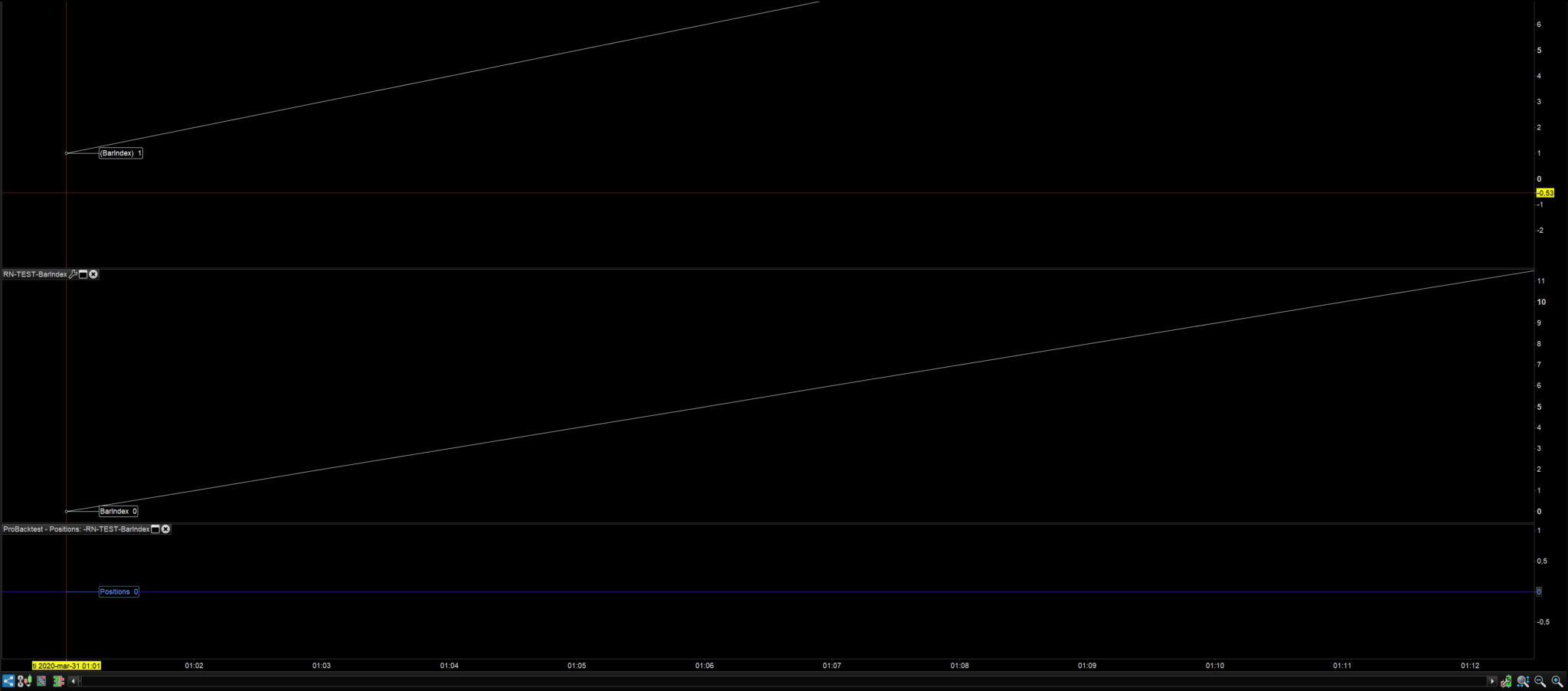
1 The ProBuilder’s first BarIndex starts with bar 0 (zero). The ProOrder starts with BarIndex 1. This is rather peculiar. I understand that Barindex[0] is the lastbar, but this problem causes an issue. This means that if I want to find out the first BarIndex value (lets say I have 101 bars) and I have a variable counting the bars, I need to call the value by BarIndex[101] for Probuilder. For ProOrder the call would be BarIndex[100] . This can be seen in the picture Barindex inconsistency with the applicable code where ProOrder and ProBuilder are shown with their respective BarIndex value.
[attachment file=”125662″]
The code is ProBuilder is:
RETURN BarIndex AS "BarIndex"
The code to visualize in ProOrder is including fake trades not taken:
DEFPARAM PRELOADBARS = 0
GRAPH(BarIndex)


//FAKE TRADING CONDITIONS BELOW

// Conditions to enter long positions
IF NOT LongOnMarket AND CLOSE>30000 THEN
BUY 1 CONTRACTS AT MARKET
ENDIF

// Conditions to exit long positions
If LongOnMarket AND CLOSE>40000 THEN
SELL AT MARKET
ENDIF

// Conditions to enter short positions
IF NOT ShortOnMarket AND CLOSE < 0.000001 THEN
SELLSHORT 1 CONTRACTS AT MARKET
ENDIF

// Conditions to exit short positions
IF ShortOnMarket AND CLOSE = 0 THEN
EXITSHORT AT MARKET
ENDIF
// Stops and targets : Enter your protection stops and profit targets here
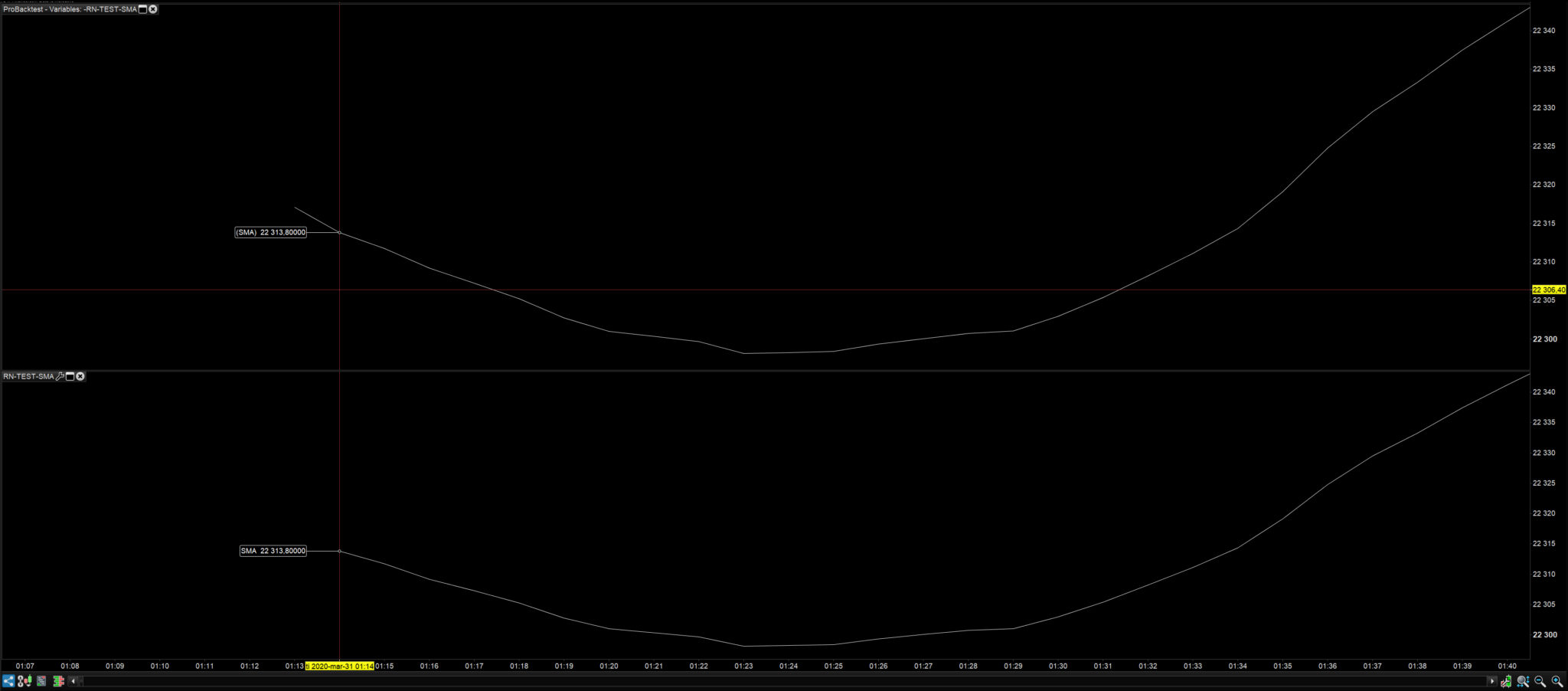
2 If I ask for a SMA to be calculated, this also creates an inconsistency between the ProOrder and Probuilder (Indicator). The Proorder shows a value on the first bar (Bar=1). However, ProBuilder only shows a value on the third bar (Bar= 2 : which means Bar 0 and 1 have no value which they should). This may not be a big problem as the actual value of ProOrder (Bar=2) and ProBuilder (Bar=1) is the same and they are synced on the bar. However, this is an inconsistency. See picture: SMA inconsistency.
[attachment file=”125659″]
The code is for ProBuilder:
SMA = Average[14](close)
RETURN SMA AS "SMA"
The code for ProOrder is:
DEFPARAM PRELOADBARS = 0
SMA = Average[14](close)
GRAPH(SMA)

//FAKE TRADING CONDITIONS BELOW


// Conditions to enter long positions
IF NOT LongOnMarket AND CLOSE>30000 THEN
BUY 1 CONTRACTS AT MARKET
ENDIF

// Conditions to exit long positions
If LongOnMarket AND CLOSE>40000 THEN
SELL AT MARKET
ENDIF

// Conditions to enter short positions
IF NOT ShortOnMarket AND CLOSE < 0.000001 THEN
SELLSHORT 1 CONTRACTS AT MARKET
ENDIF

// Conditions to exit short positions
IF ShortOnMarket AND CLOSE = 0 THEN
EXITSHORT AT MARKET
ENDIF

// Stops and targets : Enter your protection stops and profit targets here
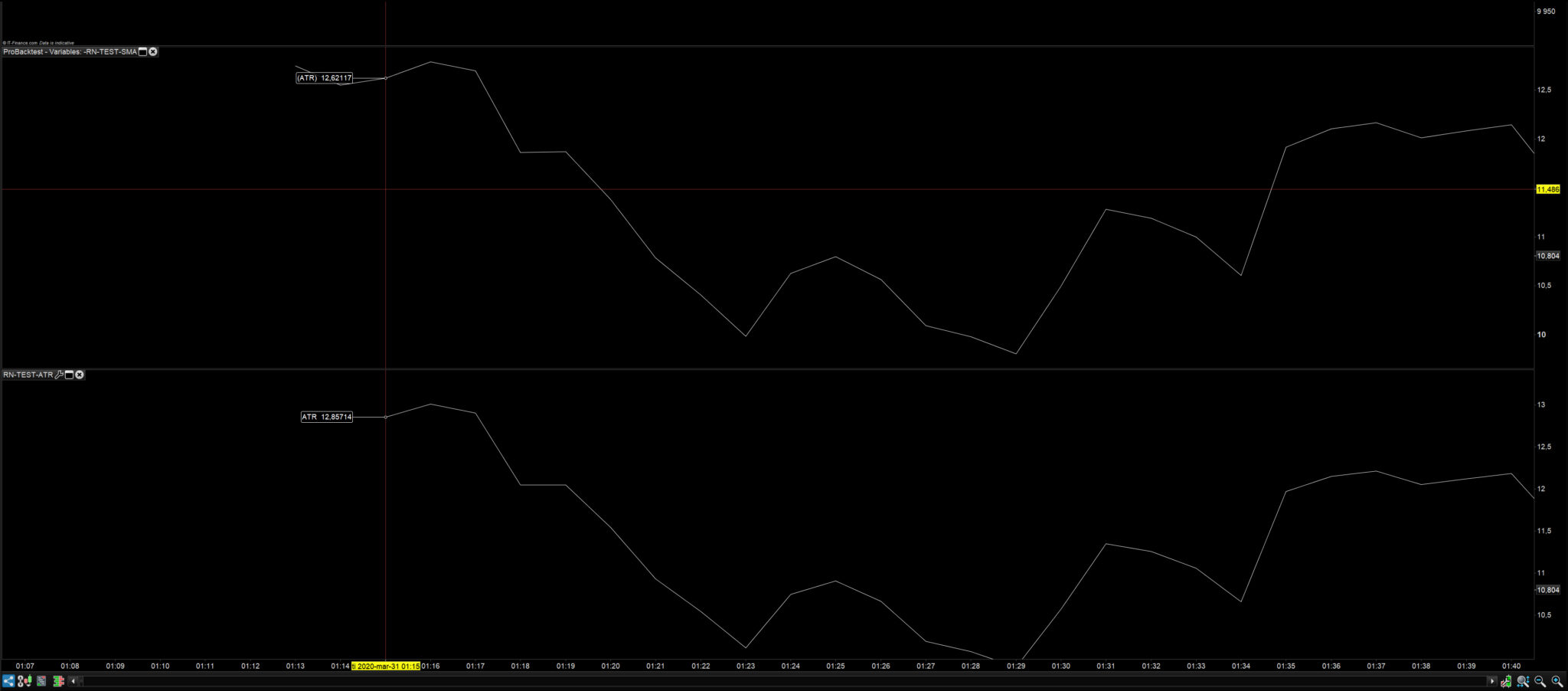
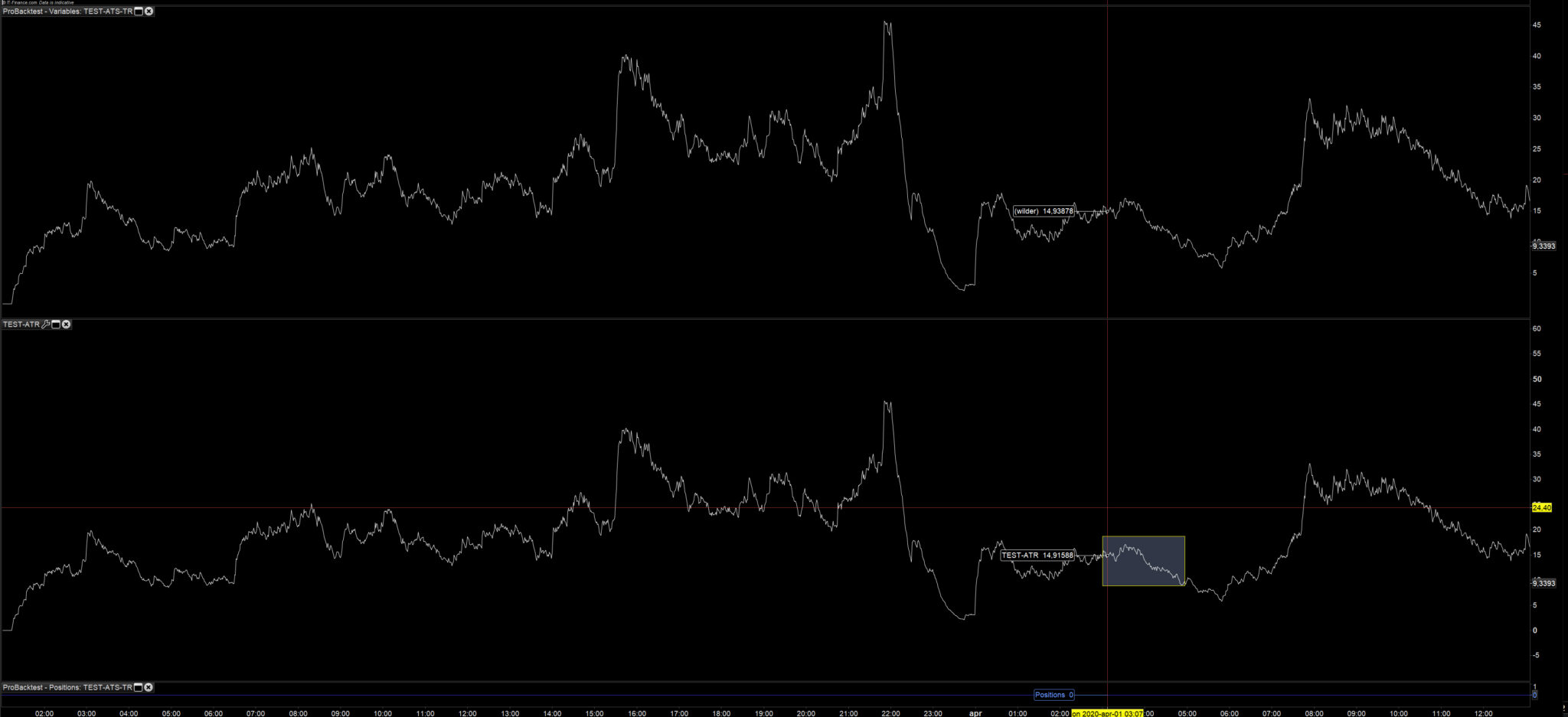
3 The most probleamtic point comes when having specific functions that picks data from the first bar such as ATR. This not only causes an inconsistency in the first bar displayed, but it also gives totally different values with an affect on many bars. This means that the effect from these numbers will take place over some time before they are more “normalised”. Any strategy that looks at the first bars and starts calculating the indicator may have a completely different appearance or effect in the ProOrder. See Picture ATR inconsistency 1 & 2
[attachment file=”125660″]
[attachment file=”125661″]
Code in ProBuilder:
ATR = AverageTrueRange[14](close)
RETURN ATR AS "ATR"
Code in ProOrder:
DEFPARAM PRELOADBARS = 0
ATR = AverageTrueRange[14](close)
GRAPH(ATR)

//FAKE TRADING CONDITIONS BELOW

// Conditions to enter long positions
IF NOT LongOnMarket AND CLOSE>30000 THEN
BUY 1 CONTRACTS AT MARKET
ENDIF

// Conditions to exit long positions
If LongOnMarket AND CLOSE>40000 THEN
SELL AT MARKET
ENDIF

// Conditions to enter short positions
IF NOT ShortOnMarket AND CLOSE < 0.000001 THEN
SELLSHORT 1 CONTRACTS AT MARKET
ENDIF

// Conditions to exit short positions
IF ShortOnMarket AND CLOSE = 0 THEN
EXITSHORT AT MARKET
ENDIF

// Stops and targets : Enter your protection stops and profit targets here
The example above shows an ATR of 14 days, but if I were to call an ATR for all the bars (excluding Bar=0) for ProBuilder as this surprisingly gives a value of zero, then I would have completely different values. Especially for any automatic trading system that uses the first bars, such as Renko etc to create a referencing system. Furthermore, any advanced strategy is completely wrong when comparing the Orders executed to the Indicator (not shown here) as they occur at the wrong bar, for the wrong reason due to incorrect values between the indicator and the ProOrder.
I would appreciate any input on how to solve this issue as it has taken many, many hours to figure out why my strategies were not working consistently when comparing the code for Indicator and ProOrder backtest.
Thanks.