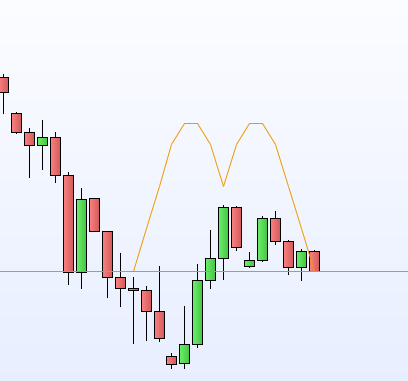
Indicator: drawn not on all bars

Viewing 15 posts - 1 through 15 (of 16 total)
  • Author
    Posts
  • #124529 quote
    robocop
    Participant
    Average

    I want my indicator to draw a solid line only in certain parts of the graph and nothing in others.
    I tried to return a zero value, but if I do, the line on the screen drops to zero and remains visible, while I want it to disappear completely.

    example:

    if close > open then
    a = close/open
    b = a/125
    else
    a = 0
    b= 40
    endif
    
    return (a,b)
    #124531 quote
    Vonasi
    Moderator
    Master

    robocop – Please always use the ‘Insert PRT Code’ button when posting code. I have tidied up your post for you.


    You will have to use DRAWSEGMENT if you want a line to only be shown at certain times.

    DRAWSEGMENT

    #124543 quote
    robocop
    Participant
    Average

    i can’t use drawsegment because i know my drawing is curved and it’s not a straight line.
    imagine having to join the maximum (or mininum) of some non-adjacent candles by means of arches, like the Mc Donald’s symbol.
    So I have to use “return” to return a series of values ​​that make up a curve (code is simplified to make idea).

    Can someone help me?

    Robocop

    PS: thak you to correct my post to insert sample code

    #124553 quote
    Vonasi
    Moderator
    Master

    You simply calculate your value at each candle and draw a segment from one candle to the next. Then you get exactly the same result as using RETURN but you can choose to draw a series of segments or not.

    #124556 quote
    Vonasi
    Moderator
    Master

    Here you go – exactly what you asked for drawn using SEGMENT.

    defparam drawonlastbaronly = true
    
    size = averagetruerange[20]
    
    lasty=close
    drawsegment(barindex-14,lasty,barindex-13,lasty + size)coloured(238,154,0)
    lasty=lasty+size
    drawsegment(barindex-13,lasty,barindex-12,lasty + size)coloured(238,154,0)
    lasty=lasty+size
    drawsegment(barindex-12,lasty,barindex-11,lasty + size)coloured(238,154,0)
    lasty=lasty+size
    drawsegment(barindex-11,lasty,barindex-10,lasty + size/2)coloured(238,154,0)
    lasty=lasty+size/2
    drawsegment(barindex-10,lasty,barindex-9,lasty)coloured(238,154,0)
    drawsegment(barindex-9,lasty,barindex-8,lasty - size/2)coloured(238,154,0)
    lasty=lasty-size/2
    drawsegment(barindex-8,lasty,barindex-7,lasty - size)coloured(238,154,0)
    lasty=lasty-size
    drawsegment(barindex-7,lasty,barindex-6,lasty + size)coloured(238,154,0)
    lasty=lasty+size
    drawsegment(barindex-6,lasty,barindex-5,lasty + size/2)coloured(238,154,0)
    lasty=lasty+size/2
    drawsegment(barindex-5,lasty,barindex-4,lasty)coloured(238,154,0)
    drawsegment(barindex-4,lasty,barindex-3,lasty - size/2)coloured(238,154,0)
    lasty=lasty-size/2
    drawsegment(barindex-3,lasty,barindex-2,lasty - size)coloured(238,154,0)
    lasty=lasty-size
    drawsegment(barindex-2,lasty,barindex-1,lasty - size)coloured(238,154,0)
    lasty=lasty-size
    drawsegment(barindex-1,lasty,barindex,lasty - size)coloured(238,154,0)
    lasty=lasty-size
    
    return
    Nicolas and robocop thanked this post
    #124615 quote
    robocop
    Participant
    Average

    Here you go – exactly what you asked for drawn using SEGMENT.

    Thak you very much. You are right.

    And, i don’t want abuse about your know-how…, two question

    a)

    defparam drawonlastbaronly = true

    force platform to call indicator only on the very last bar, and i can plot any point ‘in the past’?

    b)  my indicator will run in daily or weekly timeframe,  can i read timestamp (something like yyyymmddhhmmss) for maximum and mininum of a candle (day/week depending timeframe)?

    #124629 quote
    Vonasi
    Moderator
    Master

    DRAWONLASTBARONLY does exactly that. It only draws whatever your code is trying to draw once at the last bar on the chart. For example if it was not in your code and you drew a line across the chart at the close price then you would have thousands of lines on your chart but with DRAWONLASTBARONLY = TRUE you only have one at the latest closing value.

    Not sure that I fully understand your second question. You can store anything you like in a variable such as TIME, OPENMINUTE, DAYOFWEEK etc. If however you want to draw something to when that event happened then you have to store the BARINDEX when it happened.

    There are lots of info and coding examples to be found here that might be generally helpful for you:

    https://www.prorealcode.com/prorealtime-documentation/


    If you are using v11 then there is an instruction DATETOBARINDEX that might do what you want. I know there was a slight bug in the first release of it which I’m not sure has been fixed yet or not.

    DateToBarIndex

    #124650 quote
    robocop
    Participant
    Average

    I am in DAILY Timeframe. Whith “High” i can have then High of the current bar. With “low” i can have the low of the current bar.

    Is it possible to know the time when the maximum was recorded? Is it possible to know the time when the minimum was recorded?

    #124653 quote
    Vonasi
    Moderator
    Master

    If I understand what you are asking correctly then in an indicator the answer is no as MTF is not yet available for indicators. In a strategy if you use MTF then yes but then you can’t launch your strategy on the daily time frame.

    #124654 quote
    robocop
    Participant
    Average

    If I understand what you are asking correctly then in an indicator the answer is no as MTF is not yet available for indicators. In a strategy if you use MTF then yes but then you can’t launch your strategy on the daily time frame.

    Yes, i am in an indicator. So, I have to wait until MultiTimeFrame will be available for indicators, right?

    #124656 quote
    robocop
    Participant
    Average

    using DRAWSEGMENT instead of RETUN values, i don’t find a way to control the style of the line, for example dotted line or bold, i think i can control only colour.

    #124657 quote
    Vonasi
    Moderator
    Master

    Yes. Even then we don’t know how it will work. Perhaps we have to do the same as on strategies and run our indicator on the fastest time frame.

    At the moment from what I have heard all update deadlines are unknown due to the staff at PRT working from home. Obviously in this current  situation releasing major updates is not such a good idea. I guess we all just have to be a little patient right now.

    #124658 quote
    robertogozzi
    Moderator
    Master

    Yes, only colour.

    With v11 you’ll be able to control other settings (like RETURN).

    robocop thanked this post
    #124659 quote
    Vonasi
    Moderator
    Master

    Roberto answered your post while I was editing it. Please don’t quote posts that contain a large amount of code as it makes a really unreadable mess of the forums. If you want to quote a statement or sentence in a post so that people know what you are referring to then just highlight it and then click on quote.

    robocop thanked this post
    #124661 quote
    robocop
    Participant
    Average

    Yes, only colour.

    With v11 you’ll be able to control other settings (like RETURN).

    Hi RobertoGozzi, but now i run V11.1-1.8.0_202 and i don’t find any wy to control style (like RETURN).

Viewing 15 posts - 1 through 15 (of 16 total)
  • You must be logged in to reply to this topic.

Indicator: drawn not on all bars


ProBuilder support

New Reply
Author
author-avatar
robocop @robocop Participant
Summary

This topic contains 15 replies,
has 3 voices, and was last updated by Vonasi

5 years, 9 months ago.

Topic Details
Forum: ProBuilder support
Language: English
Started: 04/03/2020
Status: Active
Attachments: 2 files
Logo Logo
Loading...