Hi
I have been getting loads of rejected market orders and get the message “Submitting a ‘points through current’ order will reduce the likelihood of a price rejection.
Please can someone explain to me where/how to find the settings for this order (I have version 10.3 through IG)
Many thanks
Mike
Submitting a ‘points through current’ order
Well I thought I’d had them all in my time, but I can’t recall that one!
Is this as a result of a manual trade or an auto trade?
It was a result of a manual trade ( using the scalping order box, I pressed “exit” to close the trade and then received the rejection message- went from being 25 pips in profit at time of wanting to exit, to being 160 pips down before being able to exit!). I had a stoploss in place which seems to have just disappeared after the rejection message as I would never trade with 160 pip stoploss ( not scalping anyway)
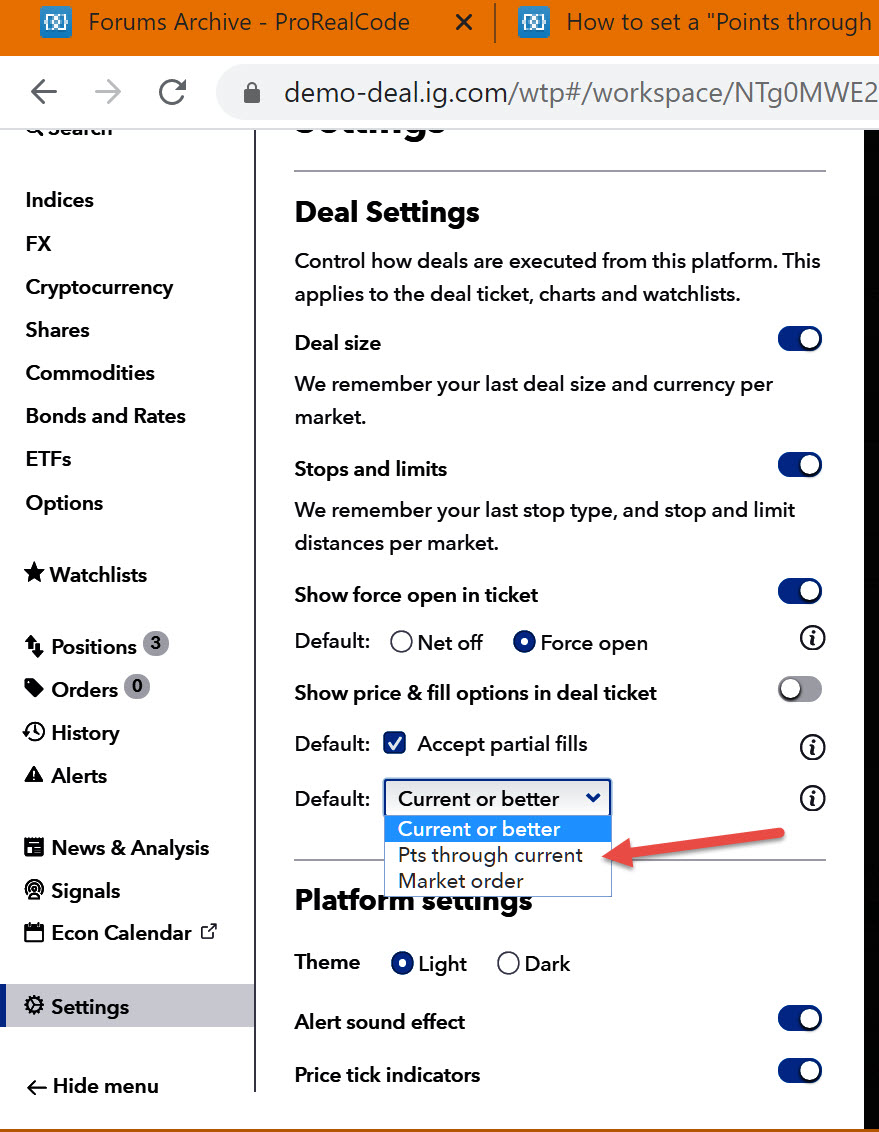
I found this (below) on IG website but cannot find where they are talking about on the chart platform:
Points through current
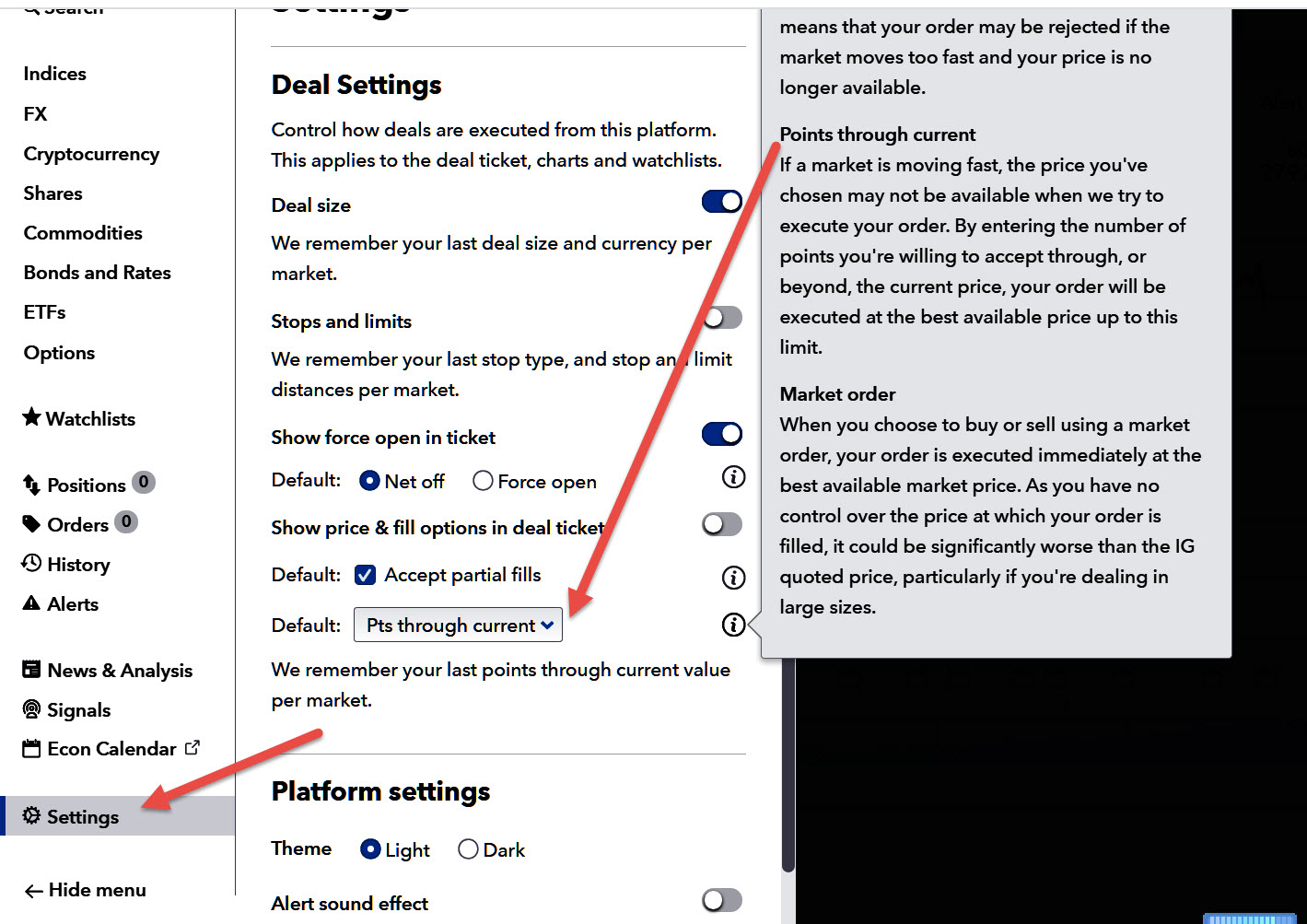
Points through current minimises the chance of a price rejection due to volatile markets. If the market changes suddenly as you click to deal, we’ll still place your order if the market price is within the tolerance (the number of points through the current price) that you specify.
Points through current is not a default order type, so you’ll have to manually select it:
- Log in to My IG and open the platform
- Click on ‘settings’ in the left-hand flyout menu
- Open the order type drop-down menu
- Select ‘Pts through current’
Once you have selected to show price options in the deal ticket, and chosen ‘Pts through current’, you will be able to set your tolerance level in the deal ticket. We’ll always remember your last points through current value per market, to speed up your dealing process.
Cheers
Mike
cannot find where they are talking about on the chart platform:
They are directing you to their own IG Platform … either the New or the Old … prob the New.
Let me know if you can’t find it and I’ll find it on mine.
If you have recently signed up with IG you may not have the Old Platform as an Option anyway
many thanks, GraHal i was looking on the old platform!
I have now made the adjustment on the new platform. However, would you happen to know if this is automatically set on the ProRealtime platform or is there some setting that I need to go into there?
Really appreciate your time
Regards
Mike
automatically set on the ProRealtime platform
IG New Platform (or Old) are nothing to do with PRT.
IG New Platform is IG’s trading Platform for manual trades.
Old Platform is less clunky (for manual trades) but Flash (used on Old but not on New) is not supported after 31 Dec 20 … on Chrome anyway, haven’t checked other browsers.
automatically set on the ProRealtime platform
IG New Platform (or Old) are nothing to do with PRT.
IG New Platform is IG’s trading Platform for manual trades.
Old Platform is less clunky (for manual trades) but Flash (used on Old but not on New) is not supported after 31 Dec 20 … on Chrome anyway, haven’t checked other browsers.
Hi GraHal,
I’m facing the same issue – but not in manual trading, with ProOrder system stopping jobs due to rejected orders. “The price is no longer valid. Please try again. Submitting a ‘points through current’ order will reduce the likelihood of a price rejection”
Could you advise how we set ‘points through current’ option in PRT/ProOrder jobs/code?
Thank you.
Rikki
Could you advise how we set ‘points through current’ option in PRT/ProOrder jobs/code?
See attached … click / select at the red arrowhead.
Attached is from the IG New Platform.
Hi GraHal, I’ve done that already – my impression was that changing that option will only affect the web platform.
Could you please confirm if changing that option in the web platform is effective for PRT/ProOrder jobs as well?
If yes – that’s awesome. 🙂
Thanks again!
Rikki
I suggest you set up and order on the IG Platform and enter your preferred value of ‘Point Through‘. IG state that this latest value is then ‘remembered’.
Then see if you still get the PRT error message … “Please try again. Submitting a ‘points through current’ order will reduce the likelihood of a price rejection” .
You would need to set up your preferred value of ‘Point Through‘ for the specific instrument which you are trading on PRT?
If above does not work (and you still get the same error message) then I suggest you email PRT (link below) and refer them to this Thread … specifically these last 4 posts?
Let us know how you get on please?
https://www.prorealtime.com/en/contact
I have done that now – it’s been a week.
Market hasn’t been moving much this past week – fingers crossed, hopefully it will not happen again.
Hey, thanks a lot for you help. Will follow the link if it comes back.