Paul
PaulParticipant
Master
@juanj Thanks a lot for sharing this!
I’am testing it live on a strategy , 1 sec, stoploss 0.1%, market orders and to make it simple I have long only.
One thing to make sure, while optimising for 200k for a few days, that it’s reset on daily basis. Did I have this (init) right?
once dayinit = day
If (day = (dayinit + ResetPeriod)) Then
boxsize = StartingValue
WinCountB = 0
StratAvgB = 0
BestA = 0
BestB = 0
dayinit = day
EndIf
PaulParticipant
Master
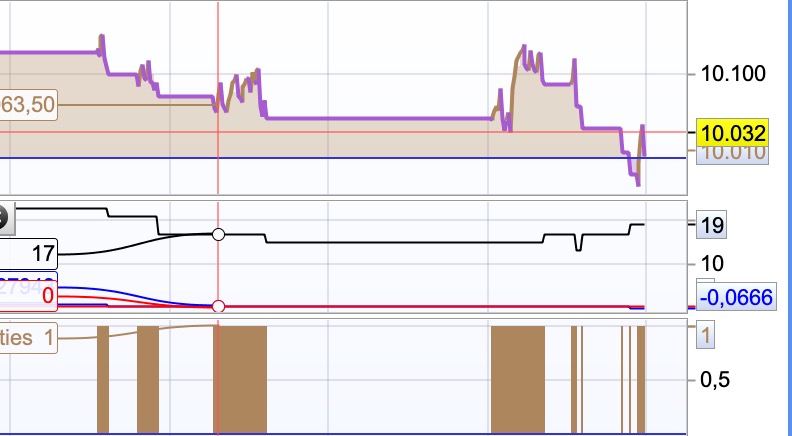
a pic in action, don’t mind the results a.t.m. got it working!
@Paul I prefer keeping the output variable as ValueX and rather assign the target variable to ValueX (i.e. after the algorithm just set boxsize = ValueX)
Also remember ‘day ‘only goes up to 28-31 (depending on the month) and then starts again at 1 from the next month. So perhaps rather try this:
If monthinit = 1 or monthinit = 3 or monthinit = 5 or monthinit = 7 or monthinit = 8 or monthinit = 10 or monthinit = 12 Then
MonthDays = 31
ElsIf monthinit = 4 or monthinit = 6 or monthinit = 9 or monthinit = 11 Then
MonthDays = 30
ElsIf monthinit = 2 Then
If (inityear/4 = round(inityear/4)) or (inityear/400 = round(inityear/400)) Then //haha not sure how exactly to do this
MonthDays = 29 //leap year
Else
MonthDays = 28
EndIf
EndIf

If (month = monthinit and day = dayinit + ResetPeriod) or (month = monthinit + 1 and (day + (MonthDays - dayinit)) >= ResetPeriod) Then
ValueX = StartingValue
WinCountB = 0
StratAvgB = 0
BestA = 0
BestB = 0
dayinit = day
monthinit = month
yearinit = year
EndIf
PaulParticipant
Master
Thanks a lot, as always it’s way more complicated then I thought! I’ve included this and got it working.
I really think your code can be a game changer. Will let you know how it goes after I’ve spent more time on this!
Could this be applied to more then a value in the same system?
Depends on what you mean.
If it is the same target variable just used in different sections of the code then yes else no.
The reason being that if you apply it to 2 or more different variables the algorithm will not be able to tell which one is causing the performance increase or decrease.
I have experimented with literally duplicating the algorithm (slightly changing the name of each variable in the algorithm) and assigning it’s output to a second variable.
And although this works to some extent it definitely reduces the accuracy and efficacy of the algorithm for the same reasons mentioned above.
Yes I was talking about implementing machine learning on all the entry and exit variables of a system; in order to have a fully automated system that can evolve and change simultaneously with the evolution of the markets without needing human intervention.
You would need it to analyse every possible combination of variables as each combination of them is what has to be checked for best performance. With the arrays now in v11 this might be possible. If for example you had three variables then you could set $a[1], $b[1] and $c[1] to your first combination (10,10,10) and $a[1], $b[1] and $c[1] to your second combination (10,10,20) and so on. Then check each set for performance.
@Vonasi exactly! Looking forward to implementing arrays to the algorithm.
Only problem we will still have is that with multiple combinations of variables we will need much more data to determine what works (or don’t work).
Yes – the more variables the more possibility of curve fit and it doesn’t matter if it is us or our strategy that is doing the curve fitting! That was my experience when playing with the concept anyway. Perhaps as something that just tweaks a variable value to improve strategy performance slightly the concept might work but I think that expecting it to create a strategy from a massive quantity of values and variables is a little unlikely with the computing power that we have at our finger tips.
I have experimented with literally duplicating the algorithm (slightly changing the name of each variable in the algorithm) and assigning it’s output to a second variable.
And although this works to some extent it definitely reduces the accuracy and efficacy of the algorithm for the same reasons mentioned above.
Did you try having algo v1 running / optimising on (for example) even number barindex and algo v2 running / optimising on odd number barindex?
Algo v1 and v2 running / optimising on different bars would prevent the algos confusing each other?
Hi Grahal, since the algorithm does not base it’s ‘optimization’ on time (i.e. bars) that wouldn’t make sense.
Although what could work is if you allow the two algorithms to take turns in making optimizations.
In other words each algo get x amounts of trades to analyze and make adjustments
allow the two algorithms to take turns in making optimizations.
Above is what I was proposing … 2 Algos in the strategy with 1 algo only optimising on each alternate bar.
Might you post the duplicate algo please with the changed variable names … I’d like to try my idea.
I did try using ValueX and ValueY, but of course there are other variables part of / common to both algos.
I am getting good results even with 1 algo … can’t believe your self-aware Opti Algo has been overlooked by us all for nearly 2.5 years!
It kinda feels like the most exciting that has happened for a long while!
Thank you so much for sharing juanj.
- If the algo uses the past x number of trades to optimise against … why is there a need to reset optimisation after y months?
Surely the self-optimisation is ongoing on a self improving basis?
Resetting after Y months would defeat the optimisation against recent results??
2. Does the algo increment through all prescribed values at each optimisation (against the last x trades)?
@GraHal to answer your questions:
- There is ‘theoretically’ no need to reset, I have merely included the option to ‘start fresh’ every quarter/year etc. in the event that optimization perhaps went wrong
- Not sure if I understand you correctly but after the evaluation period (Reps) only a single increment is made either up or down depending on which appears to improve performance more.
Here is the version of the algo outputting ‘ValueY’ (Remember the performance evaluation of each algo is only done after the amount of trades (specified as Reps) and will therefore not be useful using an alternate bar optimization method. Best is to code it so that each algo gets it’s own evaluation period. Although it would require at least 2 evaluation periods to really know if performance is increasing or decreasing. So perhaps an additional ‘wait counter’ should be built into the startegy giving each also 2 or more evaluation periods before giving the next algo a turn.
// Heuristics Algorithm 2 Start

If onmarket[1] = 1 and onmarket = 0 Then
optimize2 = optimize2 + 1
Endif

StartingValue2 = 200
ResetPeriod2 = 8 //Specify no of months after which to reset optimization
Increment2 = 20
MaxIncrement2 = 4 //Limit of no of increments either up or down
Reps2 = 3 //Number of trades to use for analysis
MaxValue2 = 270 //Maximum allowed value
MinValue2 = increment //Minimum allowed value

once monthinit2 = month
once yearinit2 = year
If (year = yearinit2 and month = (monthinit2 + ResetPeriod2)) or (year = (yearinit2 + 1) and ((12 - monthinit2) + month = ResetPeriod2)) Then
ValueY = StartingValue2
WinCountB2 = 0
StratAvgB2 = 0
BestA2 = 0
BestB2 = 0
monthinit2 = month
yearinit2 = year
EndIf
once ValueY = StartingValue2
once PIncPos2 = 1 //Positive Increment Position
once NIncPos2 = 1 //Neative Increment Position
once Optimize2 = 0 ////Initialize Heuristicks Engine Counter (Must be Incremented at Position Start or Exit)
once Mode2 = 1 //Switches between negative and positive increments
//once WinCountB2 = 3 //Initialize Best Win Count
//GRAPH WinCountB2 coloured (0,0,0) AS "WinCountB2"
//once StratAvgB2 = 4353 //Initialize Best Avg Strategy Profit
//GRAPH StratAvgB2 coloured (0,0,0) AS "StratAvgB2"

If Optimize2 = Reps2 Then
WinCountA2 = 0 //Initialize current Win Count
StratAvgA2 = 0 //Initialize current Avg Strategy Profit

For i2 = 1 to Reps2 Do
If positionperf(i) > 0 Then
WinCountA2 = WinCountA2 + 1 //Increment Current WinCount
EndIf
StratAvgA2 = StratAvgA2 + (((PositionPerf(i)*countofposition[i]*100000)*-1)*-1)
Next
StratAvgA2 = StratAvgA2/Reps2 //Calculate Current Avg Strategy Profit
//Graph (PositionPerf(1)*countofposition[1]*100000)*-1 as "PosPerf1-2"
//Graph (PositionPerf(2)*countofposition[2]*100000)*-1 as "PosPerf2-2"
//Graph StratAvgA2*-1 as "StratAvgA2"
//once BestA2 = 300
//GRAPH BestA2 coloured (0,0,0) AS "BestA2"
If StratAvgA2 >= StratAvgB2 Then
StratAvgB2 = StratAvgA2 //Update Best Strategy Profit
BestA2 = ValueY
EndIf
//once BestB2 = 300
//GRAPH BestB2 coloured (0,0,0) AS "BestB2"
If WinCountA2 >= WinCountB2 Then
WinCountB2 = WinCountA2  //Update Best Win Count
BestB2 = ValueY
EndIf

If WinCountA2 > WinCountB2 and StratAvgA2 > StratAvgB2 Then
Mode = 0
ElsIf WinCountA2 < WinCountB2 and StratAvgA2 < StratAvgB2 and Mode2 = 1 Then
ValueY = ValueY - (Increment2*NIncPos2)
NIncPos2 = NIncPos2 + 1
Mode2 = 2
ElsIf WinCountA2 >= WinCountB2 or StratAvgA2 >= StratAvgB2 and Mode2 = 1 Then
ValueY = ValueY + (Increment2*PIncPos2)
PIncPos2 = PIncPos2 + 1
Mode = 1
ElsIf WinCountA2 < WinCountB2 and StratAvgA2 < StratAvgB2 and Mode2 = 2 Then
ValueY = ValueY + (Increment2*PIncPos2)
PIncPos2 = PIncPos2 + 1
Mode2 = 1
ElsIf WinCountA2 >= WinCountB2 or StratAvgA2 >= StratAvgB2 and Mode2 = 2 Then
ValueY = ValueY - (Increment2*NIncPos2)
NIncPos2 = NIncPos2 + 1
Mode2 = 2
EndIf

If NIncPos2 > MaxIncrement2 or PIncPos2 > MaxIncrement2 Then
If BestA2 = BestB2 Then
ValueY = BestA
Else
If reps2 >= 10 Then
WeightedScore2 = 10
Else
WeightedScore2 = round((reps2/100)*100)
EndIf
ValueY = round(((BestA2*(20-WeightedScore2)) + (BestB2*WeightedScore2))/20) //Lower Reps = Less weight assigned to Win%
EndIf
NIncPos2 = 1
PIncPos2 = 1
ElsIf ValueY > MaxValue2 Then
ValueY = MaxValue2
ElsIf ValueY < MinValue2 Then
ValueY = MinValue2
EndIF

Optimize2 = 0
EndIf

// Heuristics Algorithm 2 End