Guys/Girls,
I realise this is a very simplistic thing to want to do, but can I add a single ‘Simple Moving Average’ to my chart, then simply ‘Buy’ when the ‘Uptrend’ condition is met, set my TP as desired, and then have a ‘Short’ position activate on the change to a ‘Downtrend’ condition?
I can’t seem to fathom how I might do it, which makes me think I can’t. I know I can setup to have a trigger using two Moving Averages when they cross but it would be much easier for what I need if I can simply trade the ‘Uptrend’ and ‘Downtrend’
I figured it must be possible as you can change the uptrend to green and downtrend to red for example, so I presume there must be a way to trigger?
Thanks in advance!
Matt
Something like this?
defparam cumulateorders = false

p = 100 //average period
tp = 5  //take profit in %
sl = 5  //stop loss in %

avg = average[p](close)

if avg > avg[1] then
buy 1 contract at market
endif

if avg < avg[1] then
sellshort 1 contract at market
endif

set target %profit tp
set stop %loss sl
Hi,
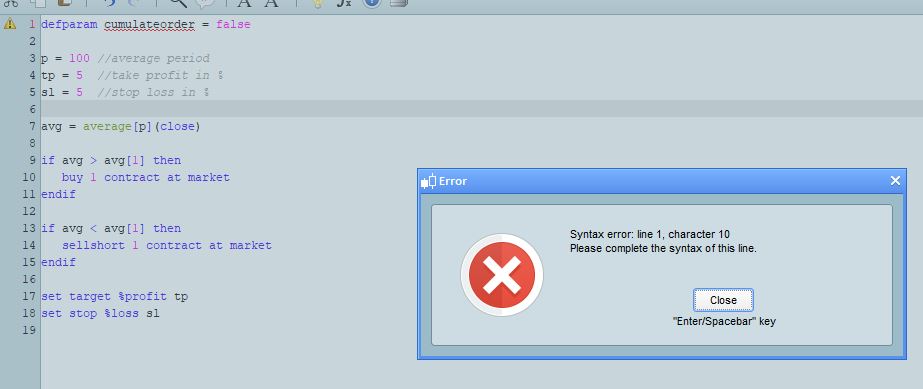
Thanks for that, although it doesn’t seem to work, it gives me a syntax error (See image)
Also, I am looking to TP at 35 points and SL at 150 points rather than a %, I should have been more specific.
Cheers…..
Replace lines 17-18 with:
set target pprofit tp
set stop ploss sl
and assign TP and SL the number of pips you need at lines 4-5.
This is an explanation of how SL and TP can be set:
//Percentage
set target %profit tp
set stop   %loss   sl
//
//Currency (the one of your account, $ is just a symbol)
set target $profit tp
set stop   $loss   sl
//
//Pips
set target pprofit tp
set stop   ploss   sl
//
//Price difference (such as HIGH - CLOSE, or AverageTrueRange[periods], or RANGE)
set target profit tp
set stop   loss   sl
Sorry – for the missing ‘S’. My keyboard is playing up and I don’t always get all the letters – and I typed it up in a hurry just before going to bed and didn’t check for missing letters!
I’ll edit the code in the post to correct it.
Personally I prefer % of price as a stop loss – especially on indices that historically go up in price. In reality I never use stop losses and take profit levels and prefer to exit based on a condition being met rather than a distance from trade price being met. I think TP and SL levels are very easy to curve fit.
Thanks very much for this, hopefully it works, I can have a play with it today!
I understand Re. taking % profits as market changes but I’ve found something interesting that I want to trial with these settings. I have looked back manually and recorded data in an excel sheet and it shows promising results. Since the beginning of Jan I have had 13 from 13 winning trades all with these settings, and if I look back, I don’t think I’d have got better results with other settings, but that’s why I want to get up and running with PRT when I found out I could possibly automate it, it was difficult to get the entries at 02:00 in the morning!!
If it works, and I get the same results as my manual trades and also it backtests similar to my findings going back into 2019….. I’ll send you my findings!
Matt
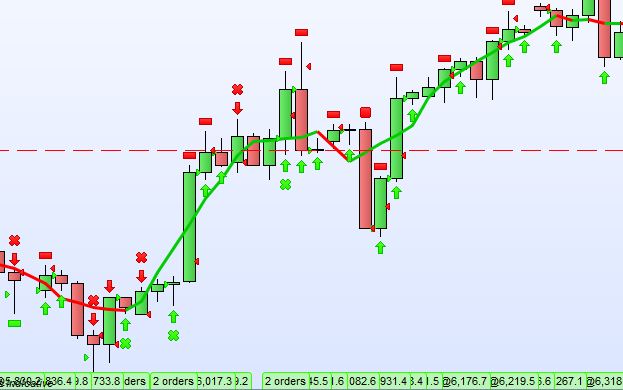
Hi, I have tried this and modified the code to use my TP and SL settings, but it seems to be taking far too many trades compared to what I thought it would.
I have attached an image, I was wanting to take trades when the ‘ma’ goes from uptrend to downtrend and vice versa but this it taking a lot more trades.
Appologies for the questions, I am new to trying to fathom out how to code this.
defparam cumulateorders = false

p = 100 //average period

avg = average[p](close)

if avg > avg[1] then
buy 5 contract at market
endif

if avg < avg[1] then
sellshort 5 contract at market
endif

SET STOP pLOSS 150
SET TARGET pPROFIT 35
Try this:
defparam cumulateorders = false

p = 100 //average period

avg = average[p](close)

if avg > avg[1] and avg[1] < avg[2] then
buy 5 contract at market
endif

if avg < avg[1] and avg[1] > avg[2] then
sellshort 5 contract at market
endif

SET STOP pLOSS 150
SET TARGET pPROFIT 35
Hi, thanks again but sadly not, it still makes multiple trades before the trend turns. Would it help if I gave you the settings and what the product is I am trialling it against? It’s UKOIL (Brent Crude DFB) on 4hr Chart. My Simple MA is set to 6 periods and horizontal shift of -3.
I actually have some other software running within ‘Trading View’ which gives me two ma’s that cross at the perfect points for my needs but I can’t extract their settings and replicating them on PRT is proving very very difficult, but if I can, I will be very happy. Like I said, I have manually taken these trades using an alert for when the cross in Trading View, but I want to automate it now.
Maybe I will have to revert back to trying to master the two single ma’s crossing at the correct points, and just keep playing with settings until I can match the ones in TV. The biggest problem with PRT is one minute it allows me to add the two ma’s then the next they aren’t appearing on the dropdown in the menu, and when I try to do it in the code I’m not up to speed enough to get what I need.
Fingers crossed…..
We can only code what you can accurately describe.
To create a code of the strategy in your head we need to know the exact details of it. Exact indicators used in the strategy and their exact settings as well as the exact criteria for entries and exits.
If you give only half an idea and then we code that for you and then you came back and say ‘oh know I think I meant this and not that’ then it can be a very long process to get to the strategy in your head and it wastes an awful lot of time! 🙂
Just let us know what you want when you have worked it out and I’m sure someone can code it for you. Alternatively have you viewed the training videos as you might be able to create your own simple strategy codes after viewing them?