Hi
If i export a code ie MySystem (1).itf and save to my pc and once saved rename to abccode.itf. When i try to reimport abccode.itf it says MySystem (1) already exists – so basic question is how when you are using a template code with a minor change for example different time frames do you rename from the original MySystem.itf so there is no conflict when importing again.
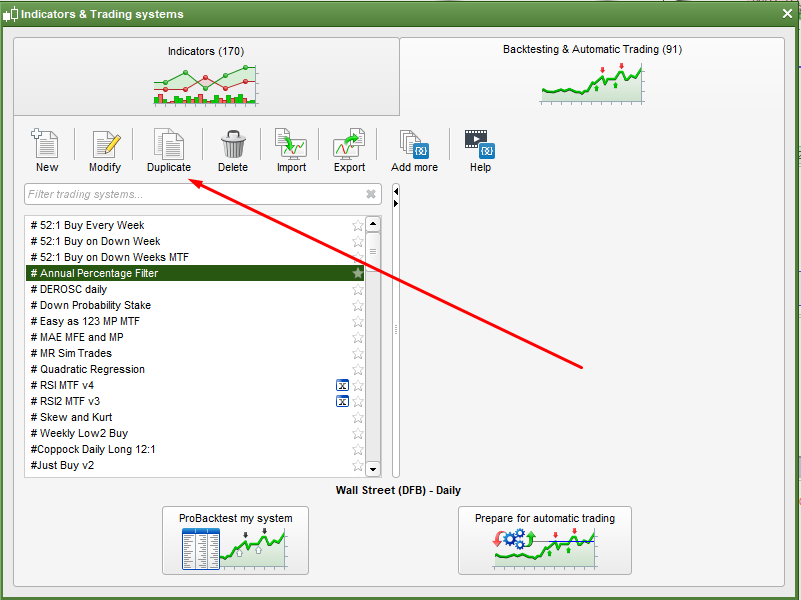
Create a duplicate of the original with the ‘Duplicate’ button. It will then be given the same name with a (1) at the end. Simply make your changes and rename it.
how when you are using a template code with a minor change for example
Make the code changes online / on the PRT Platform and then rename etc?
The filename we see is not the filename the PRT server sees / recognises so that is why you are getting the message you get?? I’ve had same error message a few times and that is my conclusion.
I am making a few changes of the template , and then exporting and renaming once exported. So hence the problem when i then try to reimport . How do i rename within PRT before exporting so PRT recognised each new amended code as a different file .
How do i rename within PRT before exporting
If you have created a duplicate then just retype the name in the title box at the top then when you run it or close and save changes the name will be changed.