







Kama & Sma Trading System DAX mtf
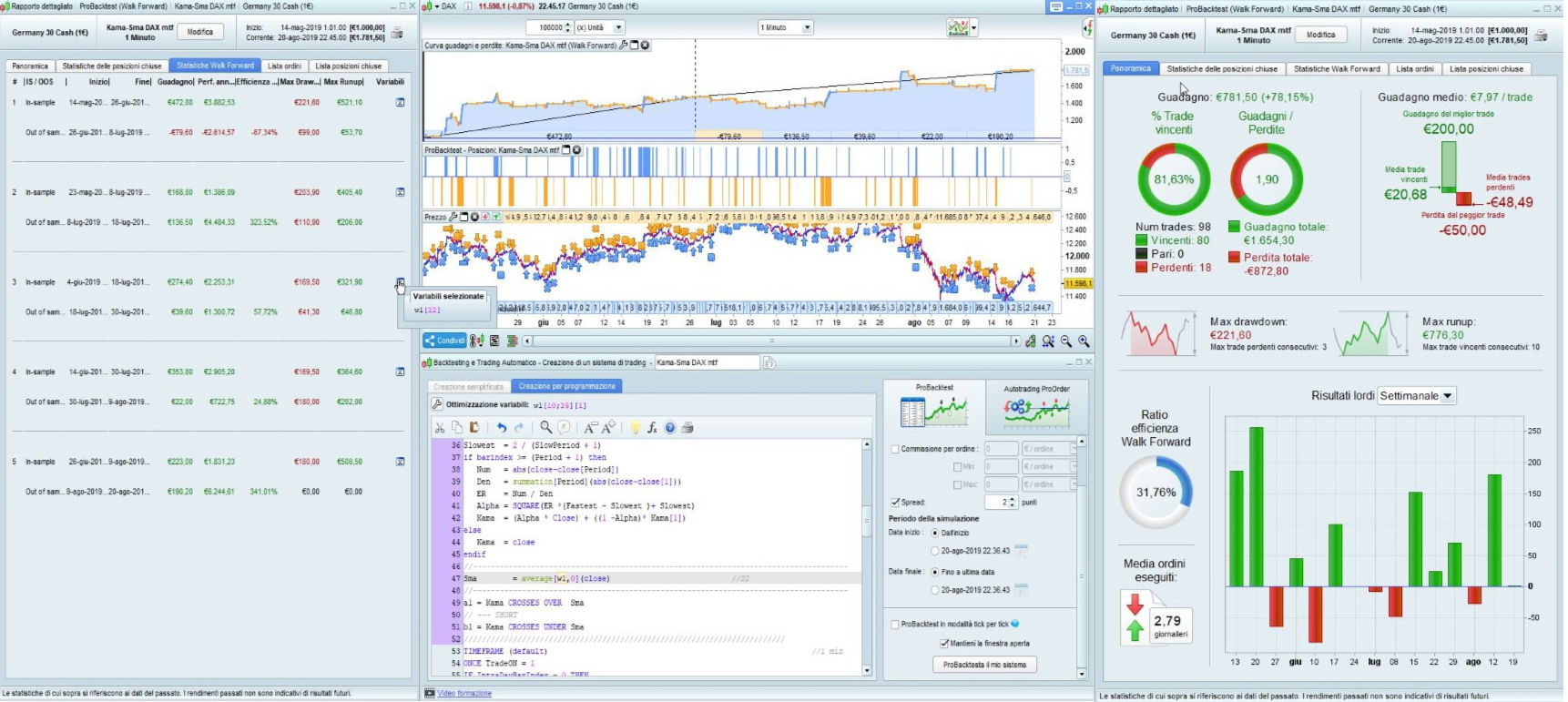
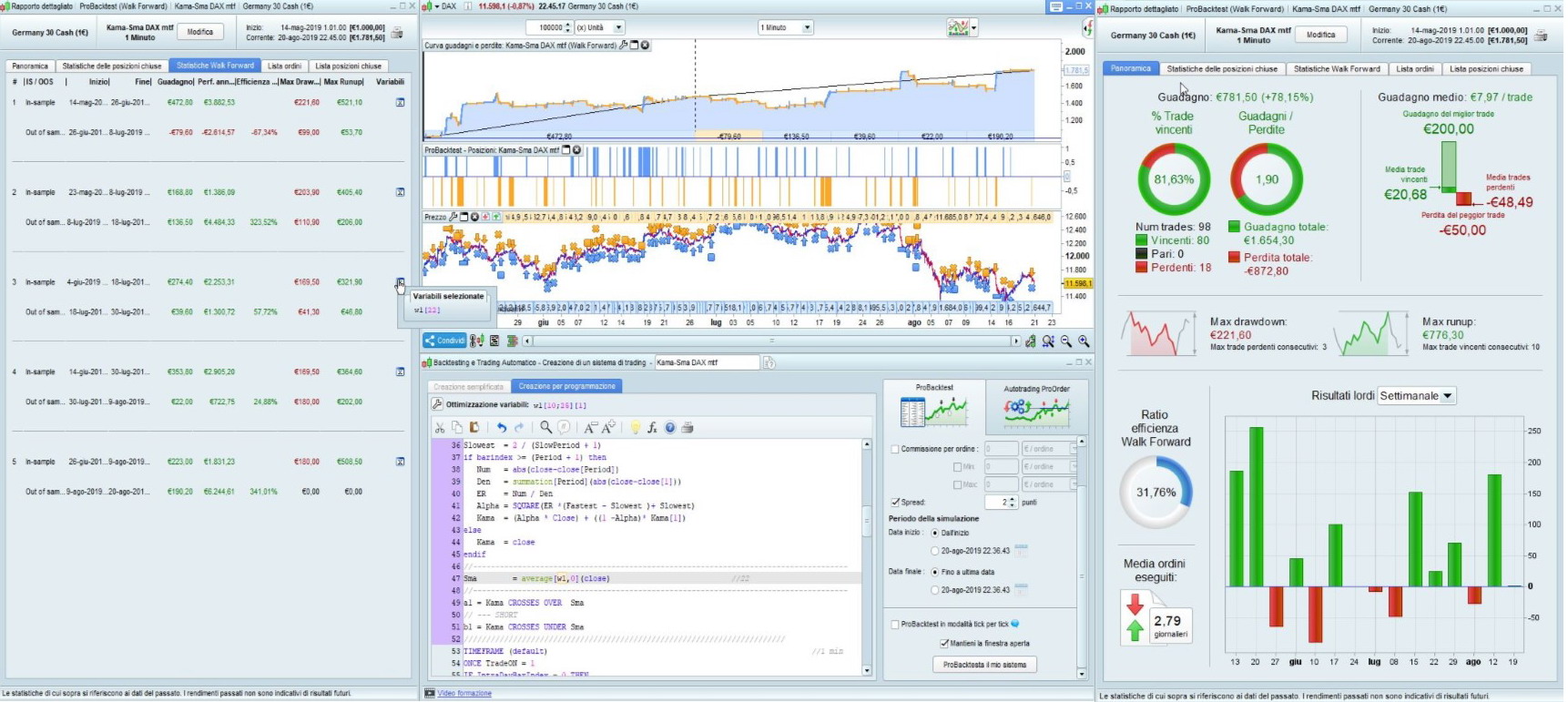
Coded for micro DAX €1 (simply multiply by 25 to run on standard DAX €25 or by 5 to run on mini DAX €5), 1-hour TF.
I used the Multiple Time Frame support to allow Breakeven/Trailing Stop to run on 1-minute bars (default TF).
Strategy from https://www.forexstrategiesresources.com/trend-following-forex-strategies/111-kama-strategy/.
Compared to the original version at the above link, I only optimized the SMA (called MVA in the above site) and set it to 22, instead of 7.
I also added SL & TP plus my own Breakeven/Trailing Stop code snippet.
Lines 10-11 allow to enable/disable Long/Short trading (both enabled by default).
Lines 21-25, along with lines 54-61 and lines 67 and 74, ban further trading before a whole 1-hour bar has elapsed, in case a trade exits within a few 1-minute bars. In such case the 1-hour signal is still set and valid, but it would most likely lead to a losing trade since the momentum is likely to have faded.
//************************************************************************
//                 Kama & Sma Trading System DAX mtf
//************************************************************************
//
DEFPARAM CumulateOrders = False
DEFPARAM PreLoadBars    = 2000
////////////////////////////////////////////////////////////////////////
TIMEFRAME (default)
ONCE nLots         = 1
ONCE LongTrading   = 1                                //1=allowed   0=banned
ONCE ShortTrading  = 1                                //1=allowed   0=banned
//
ONCE TP            = 200                              //200  pips
ONCE SL            = 50                               //50   pips
//
TimeForbidden      = OpenTime < 090000 AND OpenTime > 190000
LongCond           = (Not TimeForbidden) AND LongTrading
ShortCond          = (Not TimeForbidden) AND ShortTrading
//
TIMEFRAME (1 hour, updateonclose)                                             //h1
IF Not OnMarket THEN
 BarCount = 0
ELSE
 BarCount = BarCount + 1
ENDIF
//------------------------------------------------------------------------------------
//                         Kama & Sma Strategy
//
//https://www.forexstrategiesresources.com/trend-following-forex-strategies/111-kama-strategy/
//
Period     = 2                                              //2        (standard 10)
FastPeriod = 2                                              //standard
SlowPeriod = 30                                             //standard
//
Fastest  = 2 / (FastPeriod + 1)
Slowest  = 2 / (SlowPeriod + 1)
if barindex >= (Period + 1) then
 Num   = abs(close-close[Period])
 Den   = summation[Period](abs(close-close[1]))
 ER    = Num / Den
 Alpha = SQUARE(ER *(Fastest - Slowest )+ Slowest)
 Kama  = (Alpha * Close) + ((1 -Alpha)* Kama[1])
else
 Kama  = close
endif
//------------------------------------------------------------------------------------
Sma        = average[22,0](close)                           //22
//------------------------------------------------------------------------------------
a1 = Kama CROSSES OVER  Sma
// --- SHORT
b1 = Kama CROSSES UNDER Sma
////////////////////////////////////////////////////////////////////////
TIMEFRAME (default)                                                           //1 min
ONCE TradeON = 1
IF IntraDayBarIndex = 0 THEN
 TradeON = 1
ENDIF
TradeBar = BarCount
IF Not OnMarket AND TradeBar <> TradeBar[1] THEN
 TradeON = 1
ENDIF
//************************************************************************
//                           LONG  trades
//************************************************************************
IF a1 AND TradeON AND LongCond THEN
 BUY nLots CONTRACT AT MARKET
 TradeON = 0
ENDIF
//************************************************************************
//                           SHORT trades
//************************************************************************
IF b1 AND TradeON AND ShortCond THEN
 SELLSHORT nLots CONTRACT AT MARKET
 TradeON = 0
ENDIF
//
SET TARGET pPROFIT TP
SET STOP   pLOSS   SL
//////////////////////////////////////////////////////////////////////////////////////////////////////////
//                                Trailing Stop
//------------------------------------------------------------------------------------
IF Not OnMarket THEN
 TrailStart    = 10          //10     Start trailing profits from this point
 BasePerCent   = 0.100       //10.0%  Profit to keep
 StepSize      = 6           //6      Pips chunks to increase Percentage
 PerCentInc    = 0.100       //10.0%  PerCent increment after each StepSize chunk
 RoundTO       = -0.5        //-0.5   rounds to Lower integer,  +0.4 rounds to Higher integer
 PriceDistance = 7 * pipsize//8.9    minimun distance from current price
 y1            = 0
 y2            = 0
 ProfitPerCent = BasePerCent
ELSIF LongOnMarket AND close > (TradePrice + (y1 * pipsize)) THEN //LONG
 x1 = (close - tradeprice) / pipsize                            //convert price to pips
 IF x1 >= TrailStart THEN                                       //go ahead only if N+ pips
  Diff1         = abs(TrailStart - x1)
  Chunks1       = max(0,round((Diff1 / StepSize) + RoundTO))
  ProfitPerCent = BasePerCent + (BasePerCent * (Chunks1 * PerCentInc))
  ProfitPerCent = max(ProfitPerCent[1],min(100,ProfitPerCent))
  y1 = max(x1 * ProfitPerCent, y1)                            //y = % of max profit
 ENDIF
ELSIF ShortOnMarket AND close < (TradePrice - (y2 * pipsize)) THEN//SHORT
 x2 = (tradeprice - close) / pipsize                            //convert price to pips
 IF x2 >= TrailStart THEN                                       //go ahead only if N+ pips
  Diff2         = abs(TrailStart - x2)
  Chunks2       = max(0,round((Diff2 / StepSize) + RoundTO))
  ProfitPerCent = BasePerCent + (BasePerCent * (Chunks2 * PerCentInc))
  ProfitPerCent = max(ProfitPerCent[1],min(100,ProfitPerCent))
  y2 = max(x2 * ProfitPerCent, y2)                           //y = % of max profit
 ENDIF
ENDIF
IF y1 THEN                                        //Place pending STOP order when y>0
 SellPrice = Tradeprice + (y1 * pipsize)        //convert pips to price
 IF abs(close - SellPrice) > PriceDistance THEN
  IF close >= SellPrice THEN
   SELL AT SellPrice STOP
  ELSE
   SELL AT SellPrice LIMIT
  ENDIF
 ELSE
  SELL AT Market
 ENDIF
ENDIF
IF y2 THEN                                        //Place pending STOP order when y>0
 ExitPrice = Tradeprice - (y2 * pipsize)        //convert pips to price
 IF abs(close - ExitPrice) > PriceDistance THEN
  IF close <= ExitPrice THEN
   EXITSHORT AT ExitPrice STOP
  ELSE
   EXITSHORT AT ExitPrice LIMIT
  ENDIF
 ELSE
  EXITSHORT AT Market
 ENDIF
ENDIF
Comments
You must be logged in to post a comment.
1. The 2 lines SET TARGET pPROFIT TP and SET STOP pLOSS SL are always executed, each bar. But even if they were executed only once, they would be kept in memory until changed. 2. PipSize is a system value used not to have to deal with the value of pips among different instruments and markets. Usually it's 1/10000th of the price for FOREX (but not when JPY is involved), so that, for instance, in Eur/Usr 1 pip means o.ooo1 in price. With DAX and CAC40, as with most indices, its value is 1, as they have a pip-to-price ratio of 1:1. In any case, to know its value, just create this one-line indicator: RETURN PipSize AS "Value of a PIP".

@robertogozzi. It's done. Thank you
@YvesRobert Please create anew topic in the forum https://www.prorealcode.com/forum/prorealtime-english-forum/prorealtime-support/

On 1-minute TF it works, on a 10-minute TF it may be due to lack of signals.
Hi Roberto, you seem to be good in code programming. I have a question f you know how to do it. I work with renko bars. Is it possible to know when a renko bar is definitely finished and has been displayed on the graphic ? for example in TF 1mn. I ask this question because in 1 mn for example you can have 20 renko bars up or down and they all could be invalidate because the price (the 1mn candle) goes down again. How to do that ? You seem to give an answer frome line 54 to 61 but it is for time candles. Thank you for your help.
The error you reported has been fixed, now the strategy enter trades regularly in AutoTrading. I have experienced that sometimes the backtest doesn't open trades AFTER April 14th, 2021. I tried to close backtest, then switch to 50K units, then 200K, then back to 50K, on both 1-minute and 10-minute TF's and sometimes it worked, sometimes it didn't. I reported this issue to ProrealTime. Please so do you.
It's too early, usually it takes a couple of weeks or more. I'll post any news as I get it.
ProRealTime reported no issues with the PreLoaded bars. I tested it on DAX, 1-minute TF, and it opened trades regularly now. There must have been a temporary issue while IG was working with some updates.
I also was returned the same error message. I opend a ticket with PRT assistance. I will let you know any answer as soon as I get it.
There's no apparent reason, as far as I know. You can increase line 6 up to 10000. You can try shutting down your system, then restarting it. Maybe this will do.
Hi there, I have been using this code for months now.. I adjusted some code and it worked fine.. recently it started having trouble it started giving me the following error: The trading system was stopped because the historical data loaded was insufficient to calculate at least one indicator during the evaluation of the last candlestick. You can avoid this in the future by changing the number of preloaded bars with the instruction DEFPARAM (ex: DEFPARAM Preloadbars = 10000). So I tried to search for errors. Now I entered the original code which is posted here on prorealcode to see if it still works. I run it on the DAX 10 minutes, but this code also gives the same error. Does anyone know why this code isn't working anymore? Are there software updates or something? Hope to hear from you!

Bonjour, merci pour le super partage, la stratégie offre des très beaux résultats. Je ne suis pas expert dans le code de ProOrder et du coup je n'arrive pas à comprendre les principes de base du stop suiveur que vous avez codé, pouvez-vous mes les expliquer rapidement ? Un grand merci par avance, Cordialement.

Cela fonctionne bien, peut-être que vous avez fait un mauvais copier-coller, je ne sais pas. Ouvrez un thread dans le support ProOrder et publiez le code.

You can read this topic (https://www.prorealcode.com/topic/multiple-strategies-within-one-trading-system/#post-41278) and keep posting there, if you need to.

Hello Roberto, some questions about your strategy. 1 - Do the 2 lines SET TARGET pPROFIT TP and SET STOP pLOSS SL disappear and reappear again every minute or remain even if not onmarket ? 2 - What is the value of pipsize ? For example what it is for DAX and CAC40 ? Thank you