




ZigZag Average
May 30, 2018, 7:54 PM
Indicators
13 Comments
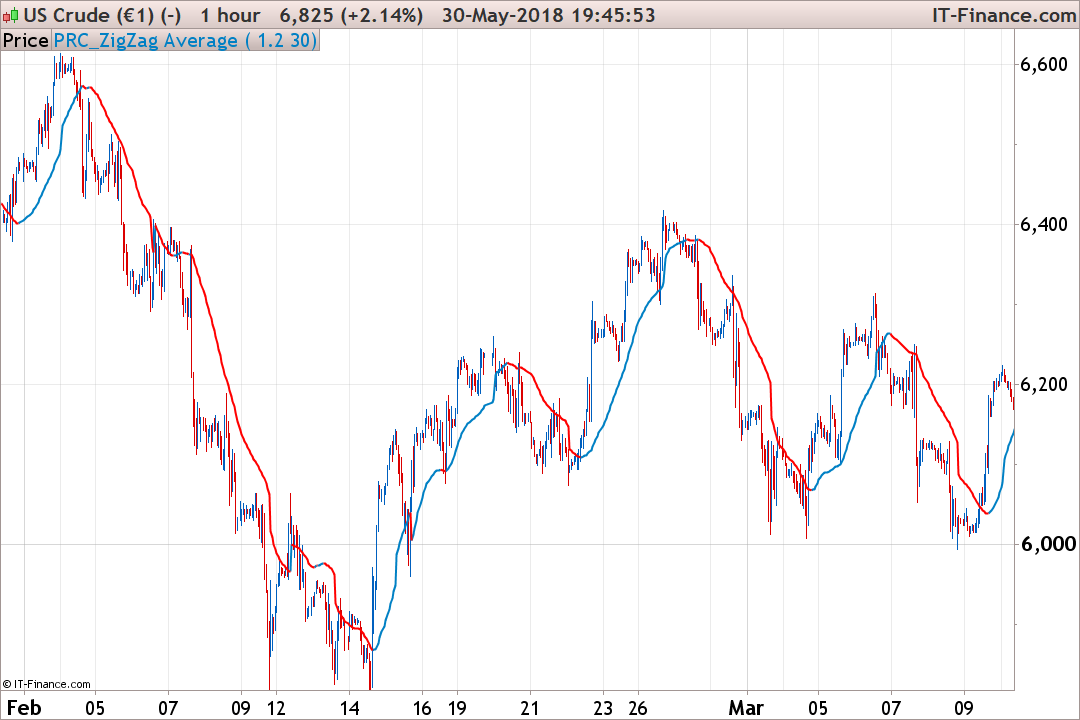
The basic algorithm for this indicator is Zig Zag indicator. Each time a new peak or trough is found, the averaged value are inverted:
- if last ZigZag point is a peak: the moving average is calculated with Highs
- if last ZigZag point is a trough: the moving average is calculated with Lows
This indicator was coded by a request in the English indicators forum.
//PRC_ZigZag Average | indicator
//30.05.2018
//Nicolas @ www.prorealcode.com
//Sharing ProRealTime knowledge

//--- settings
Percentage = 1
mmPeriod = 30
//--- end of settings

peak = ZigZag[Percentage](high)
trough = ZigZag[Percentage](low)
if peak<peak[1] and peak[1]>peak[2] then
 last=1
endif
if trough>trough[1] and trough[1]<trough[2] then
 last=-1
endif

if last>0 then
 mm=average[mmPeriod](high)
else
 mm=average[mmPeriod](low)
endif

if mm>mm[1] then
 r=0
 g=128
 b=196
else
 r=255
 g=0
 b=0
endif

return mm coloured(r,g,b) style(line,2)
Download
Filename:
PRC_ZigZag-Average.itf
Downloads:
499
Master
I created ProRealCode because I believe in the power of shared knowledge. I spend my time coding new tools and helping members solve complex problems.
If you are stuck on a code or need a fresh perspective on a strategy, I am always willing to help. Welcome to the community!
Author’s Profile


Loading...