




SwingARM ATR Trailing Stop
August 4, 2020, 8:55 AM
Indicators
4 Comments
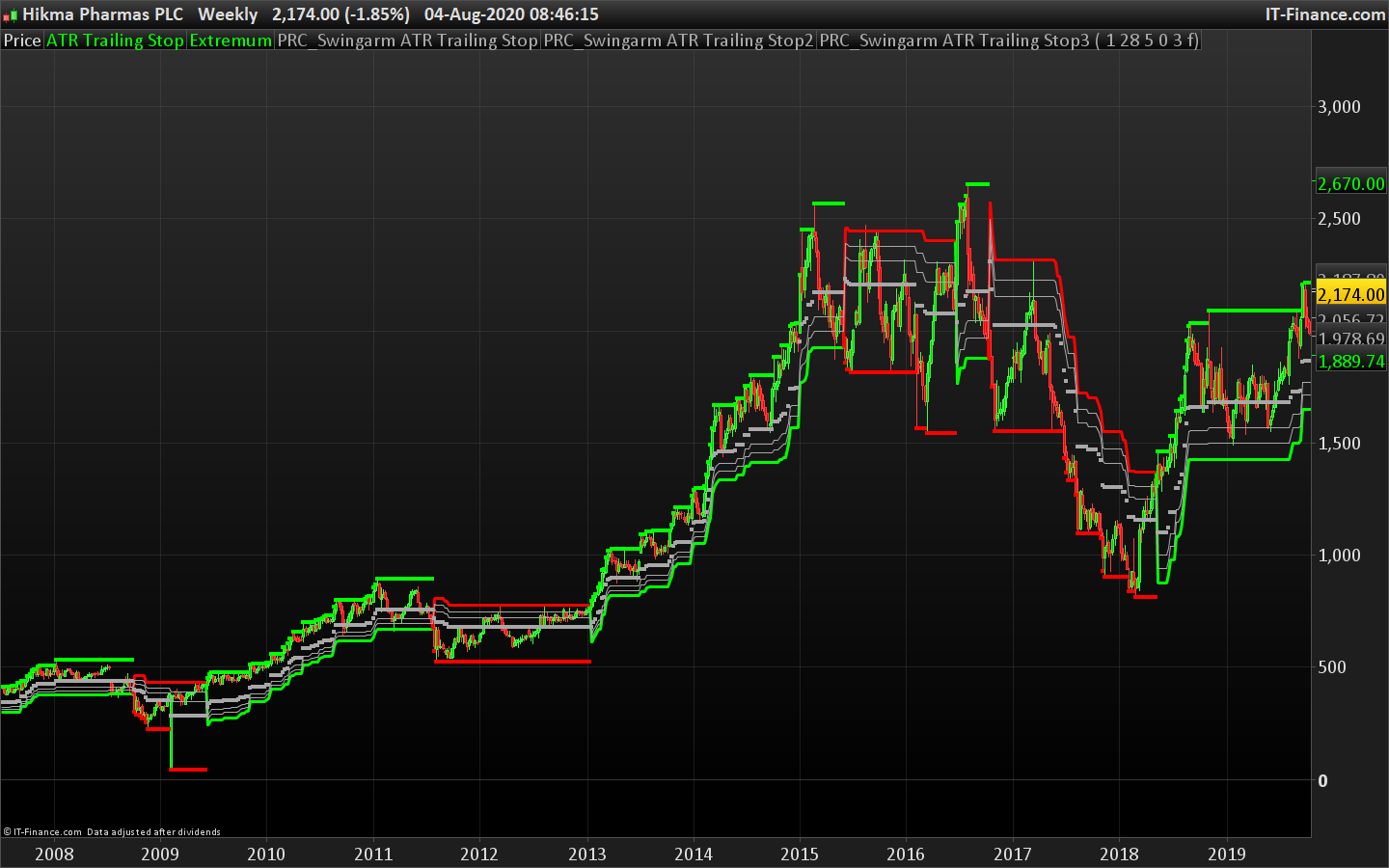
As a trend following indicator, the Swing ARM can be used as a trailing stop. It provides trend change confirmation when the price Close above or below the current trailing line.
It plots Fibonacci retracement around the trailing stop trend line, it provides good entry points when the price retraces in a well established trend.
The SwingArm is using the ATRTrailingStop and modifying it to have FIB Retracements into it.
It can be used on any timeframe. The best for me (day trading) is the 10-minute chart. For Swing Trading, the 4 hours chart works well. (notes from Author).
Original Author: Jose Azcarate
The code has been translated from ToS code following a request in the indicator forum.
//PRC_Swingarm ATR Trailing Stop | indicator
//03.08.2020
//Nicolas @ www.prorealcode.com
//Sharing ProRealTime knowledge
//converted from TOS
//Author: Jose Azcarate
//https://www.prorealcode.com/topic/conversion-of-swingarm-atr-trailing-stop/

// --- settings
trailType = 1  //1=modified, 0=unmodified
ATRPeriod = 28
ATRFactor = 5
firstTrade = 0 //0= long, 1= short
averageType = 3 //0 = SMA 1 = EMA 2 = WMA 3 = Wilder 4 = Triangular 5 = End point 6 = Time series 7 = Hull (PRT v11 only) 8 = ZeroLag  (PRT v11 only)
showArrows = 0 //0=false ; 1=true
//--- end of settings

fib1Level = 61.8
fib2Level = 78.6
fib3Level = 88.6

HiLo = Min(high - low, 1.5 * Average[ATRPeriod](range))

if low <= high[1] then
 Href = high - close[1]
else
 Href = (high - close[1]) - 0.5 * (low - high[1])
endif

if high >= low[1] then
 Lref = close[1] - low
else
 Lref = (close[1] - low) - 0.5 * (low[1] - high)
endif

//case modified:
if trailType = 1 then
 trueRange = Max(HiLo, Max(HRef, LRef))
else
//case unmodified
 trueRange = tr(close) // TrueRange(high, close, low)
endif

iloss = ATRFactor * Average[ATRPeriod,averageType](trueRange)

once init=0
if init=0 then
 if firsttrade=0 then
  state = 0
  trail = close - iloss
 else
  state = 1
  trail = close + iloss
 endif
 init=1
endif

//case long:
if state[1] = 0 then
 if (close > trail[1]) then
  state = 0
  trail = Max(trail[1], close - iloss)
 else
  state = 1
  trail = close + iloss
 endif
endif
//case short:
if state[1] = 1 then
 if (close < trail[1]) then
  state = 1
  trail = Min(trail[1], close + iloss)
 else
  state = 0
  trail = close - iloss
 endif
endif

BuySignal = state<>state[1] and state = 0
SellSignal = state<>state[1] and state = 1

if BuySignal then
 ex = high
elsif SellSignal then
 ex = low
else
 if state = 0 then
  ex = Max(ex[1], high)
 elsif state = 1 then
  ex = Min(ex[1], low)
 else
  ex = ex[1]
 endif
endif

TrailingStop = trail
if state = 0 then
 r=0
 g=255
else
 r=255
 g=0
endif

f1 = ex + (trail - ex) * fib1Level / 100
f2 = ex + (trail - ex) * fib2Level / 100
f3 = ex + (trail - ex) * fib3Level / 100

if showArrows then
 l1 = state[1] = 0 and close crosses under f1[1]
 l2 = state[1] = 0 and close crosses under f2[1]
 l3 = state[1] = 0 and close crosses under f3[1]
 s1 = state[1] = 1 and close crosses over f1[1]
 s2 = state[1] = 1 and close crosses over f2[1]
 s3 = state[1] = 1 and close crosses over f3[1]

atr = AverageTrueRange[14](close)

y=0
if l1 or l2 or l3 then
 y =low - atr
endif
if s1 or s2 or s3 then
 y=high + atr
endif

if y>0 then
  if y>close then
   drawarrowdown(barindex,y) coloured(r,g,0)
  else
   drawarrowup(barindex,y) coloured(r,g,0)
  endif
 endif
endif

return TrailingStop coloured(r,g,0) style(line,3) as "ATR Trailing Stop" , ex coloured(r,g,0) style(point,4) as "Extremum", f1 coloured(168,168,168), f2 coloured(168,168,168), f3 coloured(168,168,168)
Download
Filename:
PRC_Swingarm-ATR-Trailing-Stop.itf
Downloads:
580
Master
I created ProRealCode because I believe in the power of shared knowledge. I spend my time coding new tools and helping members solve complex problems.
If you are stuck on a code or need a fresh perspective on a strategy, I am always willing to help. Welcome to the community!
Author’s Profile


Loading...