




Swing Teller indicator
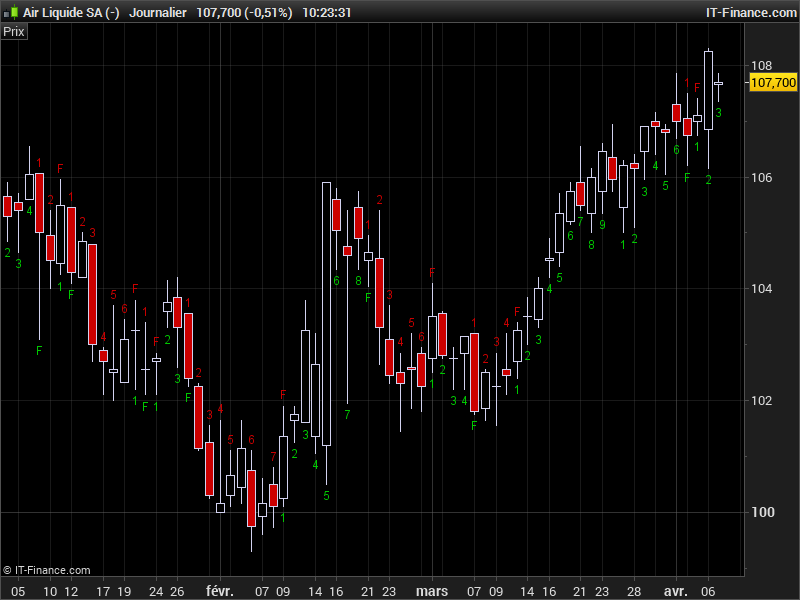
This indicator is a part of a swing strategy described as follows by users in the forum:
Swing +1 starts when a candle closes higher then the 3 candles before. And the swing -1 starts when the candle closes lower then 3 candles before. When a Fully swing has appeared (Swing 1 -> 9) it stops counting because the 10th candle is called the resting candle. If the 11th candle also closes higher then the 3 candles before the swing starts again at swing 1 (in green colour and red for -1). Also if a swing doesn’t succeed in reaching number 9, the swing has failed and an “F” letter appear above or below the candlestick.
The main purpose of this indicator is to signal a reversal. When a full swing +9 or -9 has appeared the chances of an upcoming bottom or a top increases a lot. A fully upswing +9 combined with a red 10th candle suggest to exit your long position. Its the same for a downswing -9 combined with a 10th green candle means exit your short position.
This swing counter indicator has been coded by request in the English forum. The 1 to 9 numbers distance form high or low of candlestick can be modified with the “CountDistance” setting.
The complete discussion can be found here: https://www.prorealcode.com/topic/rewrite-code-to-prorealtime-code/
//PRC_swing teller live count2 | indicator
//version with rounded numbers and below/above each candle
//07.04.2017
//Nicolas @ www.prorealcode.com
//Sharing ProRealTime knowledge
//https://www.prorealcode.com/topic/rewrite-code-to-prorealtime-code/

// --- settings
//CountDistance=20
// --- end of settings

Lb=4

//continue swing Up
if UpCount>0 and Close>Close[Lb] then
 DownCount=0
 UpCount=UpCount+1

 //draw count
 if UpCount=2 then
  drawtext("2",barindex,low-CountDistance*pointsize,Dialog,Standard,12) coloured(0,200,0)
 elsif UpCount=3 then
  drawtext("3",barindex,low-CountDistance*pointsize,Dialog,Standard,12) coloured(0,200,0)
 elsif UpCount=4 then
  drawtext("4",barindex,low-CountDistance*pointsize,Dialog,Standard,12) coloured(0,200,0)
 elsif UpCount=5 then
  drawtext("5",barindex,low-CountDistance*pointsize,Dialog,Standard,12) coloured(0,200,0)
 elsif UpCount=6 then
  drawtext("6",barindex,low-CountDistance*pointsize,Dialog,Standard,12) coloured(0,200,0)
 elsif UpCount=7 then
  drawtext("7",barindex,low-CountDistance*pointsize,Dialog,Standard,12) coloured(0,200,0)
 elsif UpCount=8 then
  drawtext("8",barindex,low-CountDistance*pointsize,Dialog,Standard,12) coloured(0,200,0)
 elsif UpCount=9 then
  drawtext("9",barindex,low-CountDistance*pointsize,Dialog,Standard,12) coloured(0,200,0)
  last9bar=barindex
 //reset count
  UpCount=0
 endif
//up swing fail
elsif UpCount>0 and Close<Close[Lb] then
 //draw fail count
 drawtext("F",barindex,low-CountDistance*pointsize,Dialog,Standard,12) coloured(0,200,0)
 //reset count
 UpCount=0
endif

//continue swing Down
if DownCount>0 and Close<Close[Lb] then
 UpCount=0
 DownCount=DownCount+1

 //draw count
 if DownCount=2 then
  drawtext("2",barindex,high+CountDistance*pointsize,Dialog,Standard,12) coloured(200,0,0)
 elsif DownCount=3 then
  drawtext("3",barindex,high+CountDistance*pointsize,Dialog,Standard,12) coloured(200,0,0)
 elsif DownCount=4 then
  drawtext("4",barindex,high+CountDistance*pointsize,Dialog,Standard,12) coloured(200,0,0)
 elsif DownCount=5 then
  drawtext("5",barindex,high+CountDistance*pointsize,Dialog,Standard,12) coloured(200,0,0)
 elsif DownCount=6 then
  drawtext("6",barindex,high+CountDistance*pointsize,Dialog,Standard,12) coloured(200,0,0)
 elsif DownCount=7 then
  drawtext("7",barindex,high+CountDistance*pointsize,Dialog,Standard,12) coloured(200,0,0)
 elsif DownCount=8 then
  drawtext("8",barindex,high+CountDistance*pointsize,Dialog,Standard,12) coloured(200,0,0)
 elsif DownCount=9 then
  drawtext("9",barindex,high+CountDistance*pointsize,Dialog,Standard,12) coloured(200,0,0)
  last9bar=barindex
  //reset count
  DownCount=0
 endif
 //down swing fail
elsif DownCount>0 and Close>Close[Lb] then
//draw fail count
 drawtext("F",barindex,high+CountDistance*pointsize,Dialog,Standard,12) coloured(200,0,0)
 //reset count
 DownCount=0
endif

//begin swing Up
if UpCount=0 and barindex-last9bar>1 then
 r = close[Lb]
 if close>r then
  UpCount=1
  DownCount=0
  //draw count
  drawtext("1",barindex,low-CountDistance*pointsize,Dialog,Standard,12) coloured(0,200,0)
 endif
endif

//begin swing Down
if DownCount=0 and barindex-last9bar>1 then
 r = close[Lb]
 if close<r then
  DownCount=1
  UpCount=0
  //draw count
  drawtext("1",barindex,high+CountDistance*pointsize,Dialog,Standard,12) coloured(200,0,0)
 endif
endif

return

