




SMC + Delta Zones + Confluence
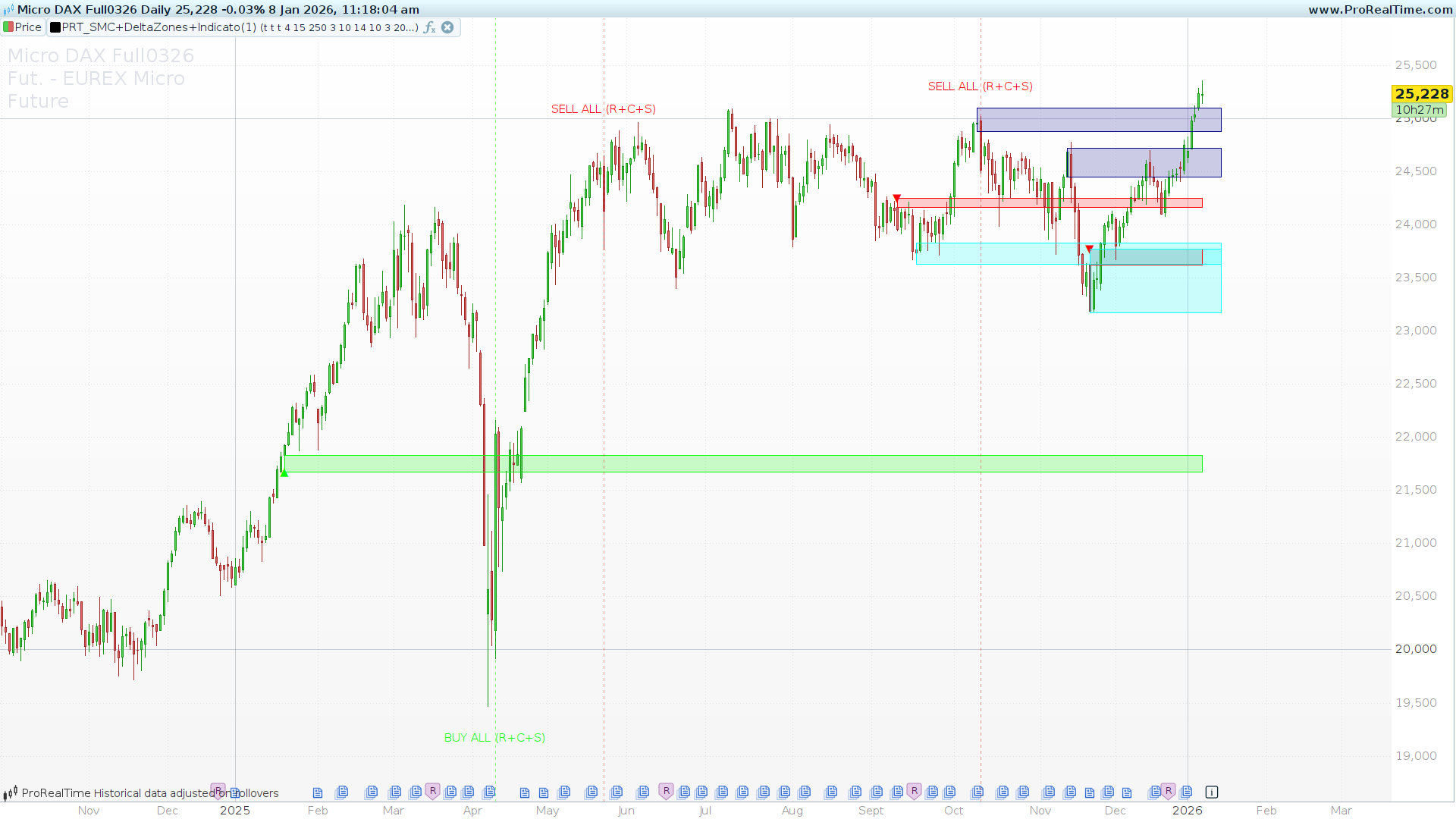
In the modern market, relying on a single indicator often leads to false signals. High-probability trading requires confluence—the alignment of multiple factors before executing a trade.
The SMC + Delta Zones + Confluence indicator is an “All-in-One” solution ((by angkoon4763). It combines institutional Smart Money Concepts (SMC), abnormal Wick Pressure (Delta), and a Triple-Momentum filter into a single, cohesive visual tool.
1. Core Components Explained
Delta Zones (Wick Pressure)
Unlike traditional volume, this component analyzes “Wick Delta.” It calculates the pressure within price action wicks. When this pressure exceeds a specific Standard Deviation threshold (e.g., 4.0), the indicator identifies it as a liquidity “hunting” zone. These zones are drawn as rectangles on the chart to highlight where price was aggressively rejected.
Indicator Confluence System
The tool uses a weighted scoring system based on three classic momentum oscillators:
-
RSI: Relative Strength Index crossing over 30 or under 70.
-
CCI: Commodity Channel Index crossing the +/-100 levels.
-
Stochastic: The Slow %K crossing the 20 or 80 levels.
Instead of isolated signals, the code sums these events. If your minStrength is set to 2, the indicator will only highlight signals where at least two of these indicators agree simultaneously.
Smart Money Concepts (OB & Breakers)
The script automatically detects Order Blocks (OB) based on Swing Highs and Lows.
-
Order Block: A potential institutional accumulation or distribution zone drawn with a rectangle.
-
Breaker Block: If price violates an existing Order Block, the zone changes color (turning into a “Breaker”), signaling a potential shift in market structure.
2. Interface & Settings
You can fully customize the sensitivity of the detection through the following inputs:
| Parameter | Default | Description |
| ShowDelta / ShowSignals / ShowOB | 1 (On) | Toggles the visibility of each module. |
| StdDevLevel | 4.0 | Sensitivity for wick pressure zones. Higher = rarer/stronger. |
| minStrength | 2 | Minimum indicator confluence needed for a signal (1 to 3). |
| Rsi / Cci / Stoch Lengths | Varies | Standard period settings for the momentum filters. |
| MaxOBs | 5 | The maximum number of recent Order Blocks to display. |
| SwingLength | 10 | Sensitivity for identifying market structure pivots. |
3. How to Interpret the Signals
Combined Momentum Labels
The indicator prints specific text above/below the candles to tell you exactly what is aligning:
-
BUY ALL (R+C+S): Perfect confluence. RSI, CCI, and Stochastic all triggered at once.
-
BUY RSI+CCI: Momentum is shifting on two major oscillators.
-
BUY (Single): Shown only if your
minStrengthis set to 1.
High-Probability Setups
The most powerful trades occur when a Confluence Signal appears directly inside an Order Block or Delta Zone. This indicates that momentum is returning precisely at an institutional liquidity level.
4. ProBuilder Code
// ------------------------------------
// PRT_SMC+DeltaZones+Confluence
// version = 1.0
// 08.01.2026
// Iván González @ www.prorealcode.com
// Sharing ProRealTime knowledge
// ------------------------------------
DEFPARAM DrawOnLastBarOnly = True
// ------------------------------------
// INPUTS
// ------------------------------------
ShowDelta = 1
ShowSignals = 1
ShowOB = 1
StdDevLevel = 4.0
StdDevLookback = 15
DeltaLookback = 250
RsiLength = 10
CciLength = 14
StochK = 14
StochD = 3
minStrength = 2      // Nivel de confluencia (1 a 3)
SignalLookback = 250
MaxOBs = 5
SwingLength = 10
// ------------------------------------
// CÁLCULO DE DELTA (Presión de Mechas)
// ------------------------------------
upTop = High - Close
upBot = Open - Low
dnTop = High - Open
dnBot = Close - Low

IF Close > Open THEN
   upDelta = upBot - upTop
   posDelta = MAX(0, upDelta)
   negDelta = 0
ELSE
   downDelta = dnTop - dnBot
   negDelta = MIN(0, -downDelta)
   posDelta = 0
ENDIF

wickDevUp = STD[StdDevLookback](posDelta) * StdDevLevel
wickDevDn = STD[StdDevLookback](ABS(negDelta)) * -StdDevLevel

huntingUp = posDelta >= wickDevUp AND posDelta > 0
huntingDn = negDelta <= wickDevDn AND negDelta < 0

// Dibujado de Delta
IF showDelta AND islastbarupdate THEN
   FOR i = 0 TO DeltaLookback DO
      idx = BarIndex - i
      IF huntingUp[i] THEN
         DRAWRECTANGLE(idx, MIN(Open[i], Close[i]), BarIndex, Low[i]) COLOURED(0, 255, 0, 50) BORDERCOLOR(0, 255, 0, 255)
         DRAWTEXT("▲", idx, Low[i]) ANCHOR(TOP, INDEX, VALUE) COLOURED(0, 255, 0, 255)
      ENDIF
      IF huntingDn[i] THEN
         DRAWRECTANGLE(idx, High[i], BarIndex, MAX(Open[i], Close[i])) COLOURED(255, 0, 0, 50) BORDERCOLOR(255, 0, 0, 255)
         DRAWTEXT("▼", idx, High[i]) ANCHOR(BOTTOM, INDEX, VALUE) COLOURED(255, 0, 0, 255)
      ENDIF
   NEXT
ENDIF

// ------------------------------------
// SEÑALES DE INDICADORES (CONFLUENCIA)
// ------------------------------------
myRSI = RSI[RsiLength](Close)
myCCI = CCI[CciLength](TypicalPrice)
myStochK = Stochastic[StochK, 1](Close)
myStochSlowK = Average[StochD](myStochK)
myATR = AverageTrueRange[14](Close)

// Condiciones de Cruce (Asignación numérica para suma)
sigRsiBuy = 0
IF myRSI CROSSES OVER 30 THEN
   sigRsiBuy = 1
ENDIF

sigCciBuy = 0
IF myCCI CROSSES OVER -100 THEN
   sigCciBuy = 1
ENDIF

sigStoBuy = 0
IF myStochSlowK CROSSES OVER 20 THEN
   sigStoBuy = 1
ENDIF

sigRsiSell = 0
IF myRSI CROSSES UNDER 70 THEN
   sigRsiSell = 1
ENDIF

sigCciSell = 0
IF myCCI CROSSES UNDER 100 THEN
   sigCciSell = 1
ENDIF

sigStoSell = 0
IF myStochSlowK CROSSES UNDER 80 THEN
   sigStoSell = 1
ENDIF

// Cálculo de Fuerza de Confluencia
sumSigBuy = sigRsiBuy + sigCciBuy + sigStoBuy
sumSigSell = sigRsiSell + sigCciSell + sigStoSell

// Dibujado de Señales Combinadas
IF islastbarupdate AND showSignals THEN
   FOR i = 0 TO SignalLookback DO
      currentIdx = BarIndex - i

      // Lógica de COMPRA
      minStrength = min(3,max(1,minStrength))
      IF sumSigBuy[i] >= minStrength THEN
         DRAWVLINE(currentIdx) STYLE(DOTTEDLINE, 1) COLOURED(0, 255, 0, 100)

         // Determinar texto según combinación
         IF sumSigBuy[i] = 3 THEN
            DRAWTEXT("BUY ALL (R+C+S)", currentIdx, Low[i] - myATR[i]) COLOURED(0, 255, 0)
         ELSIF sigRsiBuy[i] AND sigCciBuy[i] THEN
            DRAWTEXT("BUY RSI+CCI", currentIdx, Low[i] - myATR[i]) COLOURED(0, 255, 0)
         ELSIF sigRsiBuy[i] AND sigStoBuy[i] THEN
            DRAWTEXT("BUY RSI+STO", currentIdx, Low[i] - myATR[i]) COLOURED(0, 255, 0)
         ELSIF sigCciBuy[i] AND sigStoBuy[i] THEN
            DRAWTEXT("BUY CCI+STO", currentIdx, Low[i] - myATR[i]) COLOURED(0, 255, 0)
         ELSif sumSigBuy[i] = 1 then
            DRAWTEXT("BUY (Single)", currentIdx, Low[i] - myATR[i]) COLOURED(0, 255, 0)
         ENDIF
      ENDIF

      // Lógica de VENTA
      IF sumSigSell[i] >= minStrength THEN
         DRAWVLINE(currentIdx) STYLE(DOTTEDLINE, 1) COLOURED(255, 0, 0, 100)

         IF sumSigSell[i] = 3 THEN
            DRAWTEXT("SELL ALL (R+C+S)", currentIdx, High[i] + myATR[i]) COLOURED(255, 0, 0)
         ELSIF sigRsiSell[i] AND sigCciSell[i] THEN
            DRAWTEXT("SELL RSI+CCI", currentIdx, High[i] + myATR[i]) COLOURED(255, 0, 0)
         ELSIF sigRsiSell[i] AND sigStoSell[i] THEN
            DRAWTEXT("SELL RSI+STO", currentIdx, High[i] + myATR[i]) COLOURED(255, 0, 0)
         ELSIF sigCciSell[i] AND sigStoSell[i] THEN
            DRAWTEXT("SELL CCI+STO", currentIdx, High[i] + myATR[i]) COLOURED(255, 0, 0)
         ELSif sumSigSell[i] = 1 then
            DRAWTEXT("SELL (Single)", currentIdx, High[i] + myATR[i]) COLOURED(255, 0, 0)
         ENDIF
      ENDIF
   NEXT
ENDIF

// ------------------------------------
// SMC (ORDER BLOCKS & BREAKERS) - Sin cambios, optimizado
// ------------------------------------
IF showOB THEN
   isSwingHigh = High[SwingLength] >= Highest[SwingLength*2+1](High)
   isSwingLow = Low[SwingLength] <= Lowest[SwingLength*2+1](Low)

   IF isSwingLow THEN
      FOR j = SwingLength TO SwingLength + 5 DO
         IF Close[j] < Open[j] THEN
            lastIdx = LastSet($obIndex) + 1
            $obIndex[lastIdx] = BarIndex - j
            $obTop[lastIdx] = High[j]
            $obBot[lastIdx] = Low[j]
            $obType[lastIdx] = 1
            $obStatus[lastIdx] = 0
            BREAK
         ENDIF
      NEXT
   ENDIF

   IF isSwingHigh THEN
      FOR j = SwingLength TO SwingLength + 5 DO
         IF Close[j] > Open[j] THEN
            lastIdx = LastSet($obIndex) + 1
            $obIndex[lastIdx] = BarIndex - j
            $obTop[lastIdx] = High[j]
            $obBot[lastIdx] = Low[j]
            $obType[lastIdx] = -1
            $obStatus[lastIdx] = 0
            BREAK
         ENDIF
      NEXT
   ENDIF

   lastArrIdx = LastSet($obIndex)
   startIdx = MAX(1, lastArrIdx - MaxOBs)

   IF islastbarupdate THEN
      FOR k = startIdx TO lastArrIdx DO
         thisIndex = $obIndex[k]
         thisTop = $obTop[k]
         thisBot = $obBot[k]
         thisType = $obType[k]
         thisStatus = $obStatus[k]
         isBreaker = 0

         IF thisStatus <> 2 THEN
            IF thisType = 1 THEN
               IF Close < thisBot THEN
                  $obStatus[k] = 1
                  isBreaker = 1
               ENDIF
               IF isBreaker OR thisStatus = 1 THEN
                  DRAWRECTANGLE(thisIndex, thisTop, BarIndex + 5, thisBot) COLOURED(139, 0, 0, 50) BORDERCOLOR(139, 0, 0, 255)
               ELSE
                  DRAWRECTANGLE(thisIndex, thisTop, BarIndex + 5, thisBot) COLOURED(0, 255, 255, 50) BORDERCOLOR(0, 255, 255, 255)
               ENDIF
            ELSIF thisType = -1 THEN
               IF Close > thisTop THEN
                  $obStatus[k] = 1
                  isBreaker = 1
               ENDIF
               IF isBreaker OR thisStatus = 1 THEN
                  DRAWRECTANGLE(thisIndex, thisTop, BarIndex + 5, thisBot) COLOURED(0, 0, 139, 50) BORDERCOLOR(0, 0, 139, 255)
               ELSE
                  DRAWRECTANGLE(thisIndex, thisTop, BarIndex + 5, thisBot) COLOURED(255, 0, 0, 50) BORDERCOLOR(255, 0, 0, 255)
               ENDIF
            ENDIF
         ENDIF
      NEXT
   ENDIF
ENDIF

RETURN

