







Perfect Trend Line 2
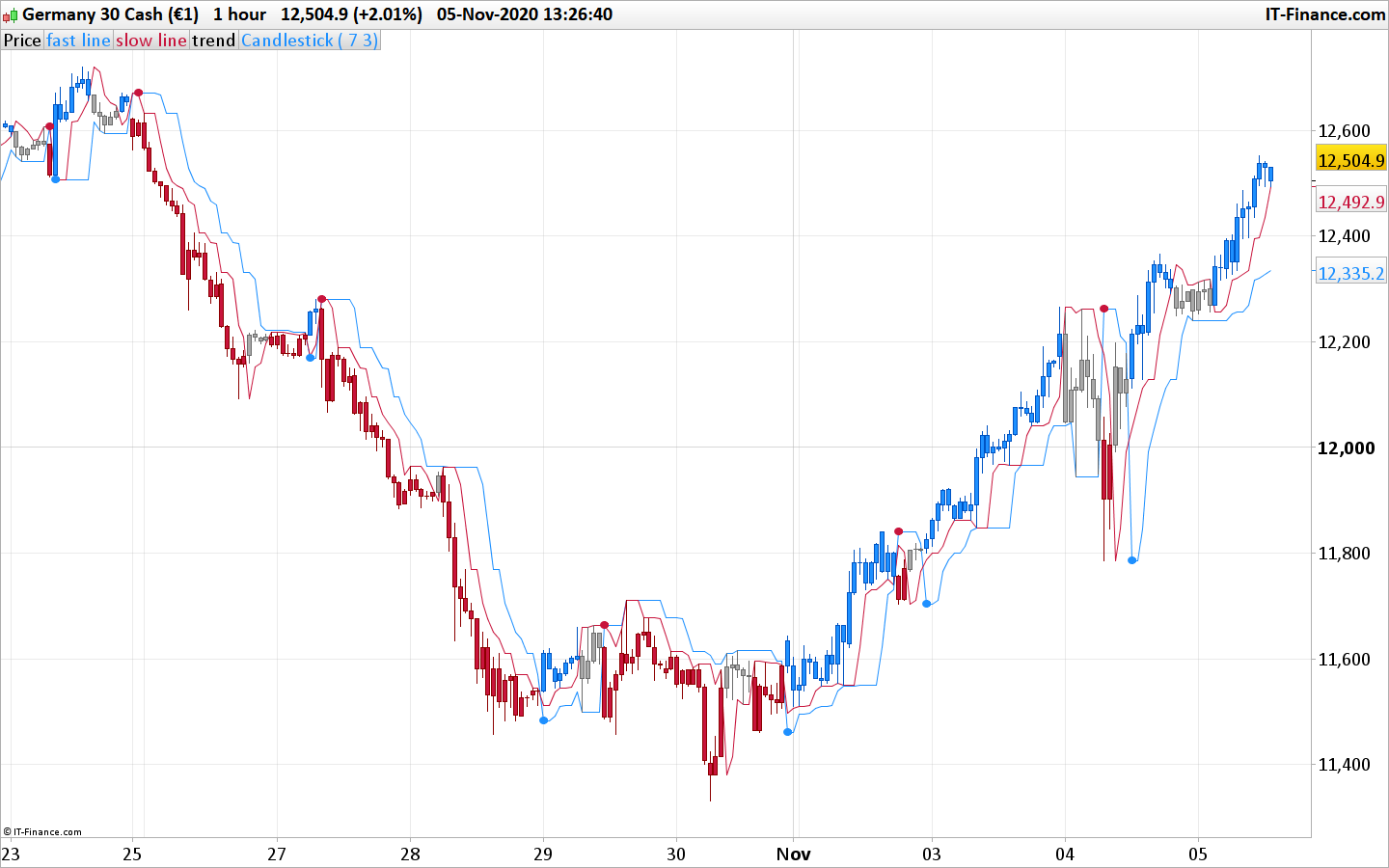
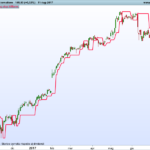
This is a variation of a well known perfect trend line indicator (the initial version can be found here: Perfect Trend Line
This version is adding a sort of signals filtering which helps in cleaning up some false signals that are there in the original version.
Usage :
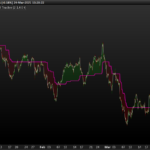
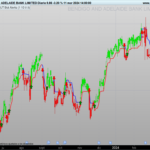
- You can use the arrows (dots) as early signals
- You can use the appearance of the color candle as signal for entry or re-entry
//PRC_PerfectTrendLine 2 | indicator
//05.11.2020
//Nicolas @ www.prorealcode.com
//Sharing ProRealTime knowledge
//converted from MT5 version (original author mladen)
//enhanced version by Nicolas

// --- settings
SlowLength         = 7 // Slow length
FastLength         = 3 // Fast length
// --- end of settings

fasthigh = Highest[SlowLength](high)//[1]
fastlow  = Lowest[SlowLength](low)//[1]
slowhigh = Highest[FastLength](high)//[1]
slowlow  = Lowest[FastLength](low)//[1]

if high<slowhigh then
 thighs=slowhigh
else
 thighs=high
endif
if low>slowlow then
 tlows=slowlow
else
 tlows=low
endif
if high<fasthigh then
 thighf=fasthigh
else
 thighf=high
endif
if low>fastlow then
 tlowf=fastlow
else
 tlowf=low
endif

if close>slowln[1] then
 slowln=tlows
else
 slowln=thighs
endif
if close>fastln[1] then
 fastln=tlowf
else
 fastln=thighf
endif

once trend=-1
if close<slowln and close<fastln then
 trend=1
endif
if close>slowln and close>fastln then
 trend=0
endif

if trend<>trend[1] then
 if trend=0 then
  r=30
  g=144
  b=255
 else
  r=200
  g=20
  b=60
 endif
 drawtext("●",barindex,fastln,Dialog,Bold,10) coloured(r,g,b)
endif
drawcandle(open,high,low,close) coloured(168,168,168)
if trend=0 then
 if close>slowln then
  drawcandle(open,high,low,close) coloured(30,144,255)
 endif
elsif trend=1 then
  if close<slowln then
   drawcandle(open,high,low,close) coloured(200,20,60)
  endif
endif


return fastln coloured(30,144,255) as "fast line",slowln coloured(200,20,60) as "slow line", trend as "trend"
Comments
You must be logged in to post a comment.

Bonjour Nicolas, comment est-il possible de backtester cet indicateur? cela fait une erreur "retourne 3 valeurs mais votre code en a besoin de 4" désolé cela fait plus de 5 ans que je n'ai pas programmé sur PRT...je vais profiter des vacances pour m'y remettre D'avance merci pour votre réponse Et merci et bravo pour la qualité des indicateurs que vous postez !

defparam drawonlastbaronly = true //fractals cp = lookback if high[cp] >= highest[(cp)*2+1](high) then LLH = 1 else LLH = 0 endif if low[cp] <= lowest[(cp)*2+1](low) then LLL = -1 else LLL = 0 endif if LLH = 1 then oldLTOPy = LTOPy[1] oldLTOPx = LTOPx[1] LTOPy = high[cp] LTOPx = barindex[cp] endif if LLL = -1 then oldLBOTy = LBOTy[1] oldLBOTx = LBOTx[1] LBOTy = low[cp] LBOTx = barindex[cp] endif //trend line DRAWLINE(oldLTOPx,oldLTOPy,LTOPx,LTOPy)coloured(112,169,161) DRAWLINE(oldLBOTx,oldLBOTy,LBOTx,LBOTy)coloured(211,78,36) //support/resistance if showSR then DRAWHLINE(LTOPy) COLOURED(207,215,199,100) DRAWHLINE(LBOTy) COLOURED(207,215,199,100) endif RETURN
Bonjour Nicolas, je te contacte car j'avais un indicateur PRC_FractalsTrendLine.itf mais celui beug et impossible de retrouver le lien du post pour récupérer la source. J'ai bien les diagonales qui s'affichent mais plus les paliers de S/R. serais-tu me retrouver celui-ci. En te remerciant

Hi Nicolas, I am new here, what language is the above code in, I want to try implementation in python? Thanks

Bonjour Manu L, merci pur le code de ton screener. pour ma part j'ai 2 erreurs qui ressortent 1ere erreur sur la ligne: if (Close[0]line2[0]) then il manque un paramètre entre Close[0]line1[0] 2eme erreur : dernier ligne if (line1[0]5000], ici il manque pas du code pour la fin du screener ? peux tu m'indiquer quelles sont les erreurs a corriger ou bien reposter on code complet, ça serait otp . merci toi.
// --- settings SlowLength = 7*4 // Slow length SlowPipDisplace = 0 // Slow pip displace FastLength = 3*4 // Fast length FastPipDisplace = 0 // Fast pip displace c1 = volume // --- end of settings thigh1 = Highest[SlowLength](high)+ SlowPipDisplace*pointsize tlow1 = Lowest[SlowLength](low)- SlowPipDisplace*pointsize thigh2 = Highest[FastLength](high)+ FastPipDisplace*pointsize tlow2 = Lowest[FastLength](low)- FastPipDisplace*pointsize if barindex>2 then if Close >line1[1] then line1 = tlow1 else line1 = thigh1 endif if Close>line2[1] then line2 = tlow2 else line2 = thigh2 endif endif if (Close[0]<line1[0] and Close[0]<line2[0]) then trend = 1 endif if (Close[0]>line1[0] and Close[0]>line2[0]) then trend = -1 endif if (line1[0]>line2[0] or trend[0] = 1) then trena = 1 endif if (line1[0]<line2[0] or trend[0] = -1) then trena = -1 endif screener[trena=-1 and trena[1]=1 and c1>5000]
merci Nicolas En revanche je ne comprends pas : en période hebdo et en appliquant le *4 avec Actions France, il me sort les actions AF, AC, VK, CDA, GECP mais en naviguant sur d'autres actions je tombe sur ALHYG et FP avec point bleu alors que mon screener ne les a pas détecter !? // --- settings SlowLength = 7*4 // Slow length SlowPipDisplace = 0 // Slow pip displace FastLength = 3*4 // Fast length FastPipDisplace = 0 // Fast pip displace c1 = volume // --- end of settings thigh1 = Highest[SlowLength](high)+ SlowPipDisplace*pointsize tlow1 = Lowest[SlowLength](low)- SlowPipDisplace*pointsize thigh2 = Highest[FastLength](high)+ FastPipDisplace*pointsize tlow2 = Lowest[FastLength](low)- FastPipDisplace*pointsize if barindex>2 then if Close >line1[1] then line1 = tlow1 else line1 = thigh1 endif if Close>line2[1] then line2 = tlow2 else line2 = thigh2 endif endif if (Close[0]<line1[0] and Close[0]line1[0] and Close[0]>line2[0]) then trend = -1 endif if (line1[0]>line2[0] or trend[0] = 1) then trena = 1 endif if (line1[0]5000]
Le pb est que je screen en journalier et hebdo directement dans la sélection mais pour screener en mensuel, à quel endroit faut-il que j'ajoute le *4 ? Voici mon prog // --- settings SlowLength = 7 // Slow length SlowPipDisplace = 0 // Slow pip displace FastLength = 3 // Fast length FastPipDisplace = 0 // Fast pip displace c1 = volume // --- end of settings thigh1 = Highest[SlowLength](high)+ SlowPipDisplace*pointsize tlow1 = Lowest[SlowLength](low)- SlowPipDisplace*pointsize thigh2 = Highest[FastLength](high)+ FastPipDisplace*pointsize tlow2 = Lowest[FastLength](low)- FastPipDisplace*pointsize if barindex>2 then if Close >line1[1] then line1 = tlow1 else line1 = thigh1 endif if Close>line2[1] then line2 = tlow2 else line2 = thigh2 endif endif if (Close[0]<line1[0] and Close[0]line1[0] and Close[0]>line2[0]) then trend = -1 endif if (line1[0]>line2[0] or trend[0] = 1) then trena = 1 endif if (line1[0]5000]
Bonjour Nicolas, je m’intéresse de plus en plus à ton indicateur car les signaux d'entrée tiennent la route et j'ai réussi en le passer en screnner :-) Le pb est que je l'utilise sur les périodes journalier et hebdo mais impossible de l'uliser en mensuel car PRT ne propose pas cet UT. Quel serait la solution car l'idée serait de screnner sur ces trois périodes et d'ensuite compiler sur excel et trouver toutes les actions qui ont le point bleu en mensuel, hebdo, journalier. Merci pou ton aide précieuse

J'ai bien tente de creer le screnner indicator1, ignored, ignored, ignored = CALL "PRC_PerfectTrendLine 2"[7, 3] ignored, indicator2, ignored, ignored = CALL "PRC_PerfectTrendLine 2"[7, 3] c1 = (indicator1 CROSSES UNDER indicator2) SCREENER[c1] ((close/DClose(1)-1)*100 AS "% Veille") mais j'ai un message d'erreur "retoune 3 valeurs mais le code en a besoon de4 " Un coup de main :-)


Bonjour Nicolas, Un grand merci pour cet Indicateur, et de partager tout ce travail. J'ai pu affiner mes entrées et sorties de positions avec une meilleure précision. Bravo


Merci Nicolas pour le code, je l'ai retravaillé et j'ai optimisé le code pour le même résultat y'a toute une partie ou tu calcules les plus haut et les plus bas qui est redondée, c'est fait automatiquement par PRT dans ton init des variables : // ===================TrendLine Indicateur==================== // Variables du Trend SlowLength = 7 // Slow length FastLength = 3 // Fast length // Calcul des plus Haut et des plus bas sur les 2 périodes fasthigh = Highest[FastLength](high) fastlow = Lowest[FastLength](low) slowhigh = Highest[SlowLength](high) slowlow = Lowest[SlowLength](low) if close > fastln[1] then fastln=fastlow else fastln=fasthigh endif if close > slowln[1] then slowln=slowlow else slowln=slowhigh endif once trend=-1 if close < fastln and close fastln and close > slowln then trend=0 endif if trendtrend[1] then if trend=0 then r=30 g=144 b=255 else r=200 g=20 b=60 endif drawtext("●",barindex,slowln,Dialog,Bold,10) coloured(r,g,b) endif drawcandle(open,high,low,close) coloured(168,168,168) if trend=0 then if close>fastln then drawcandle(open,high,low,close) coloured(30,144,255) endif elsif trend=1 then if close<fastln then drawcandle(open,high,low,close) coloured(200,20,60) endif endif return fastln coloured(200,20,60) as "fast line", slowln coloured(30,144,255) as "slow line", trend as "trend"
Bonjour, merci beaucoup pour cet indicateur je le trouve très clair et pertinent.