




HawkEye Volume Indicator
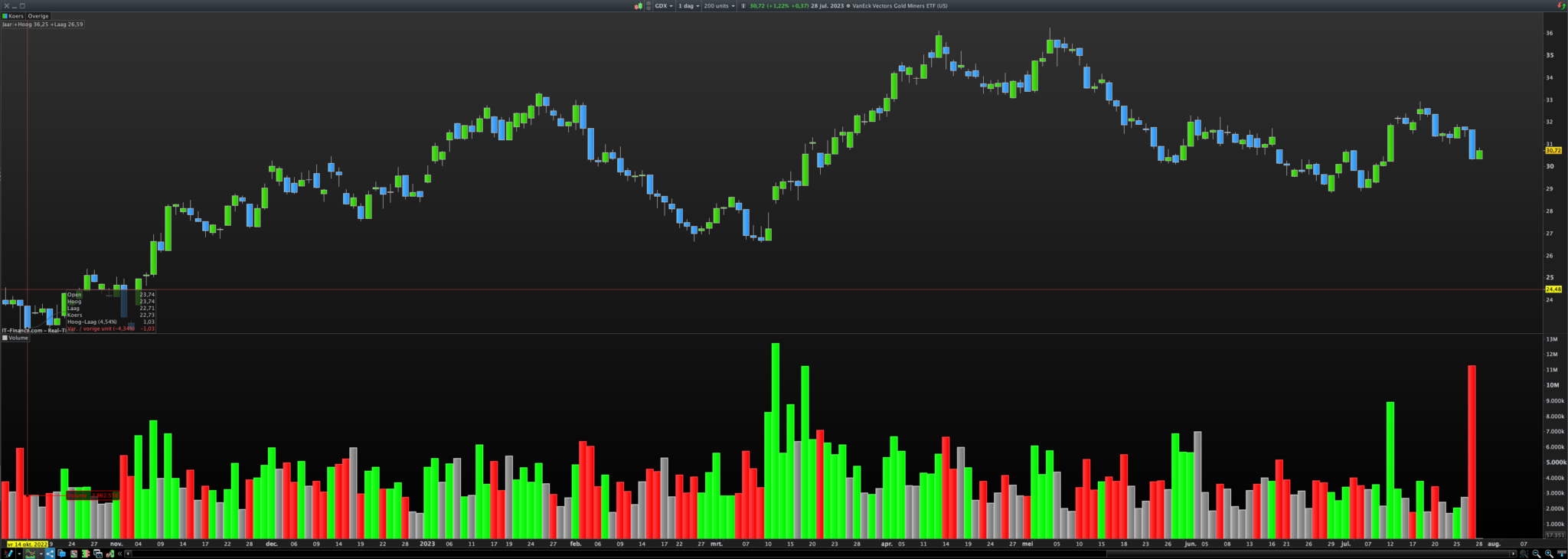
HawkEye volume, developed by Nigel Hawks, is supposed to be a premier VSA indicator.
First, it starts by setting up some rules about how far it should look back in time, which is referred to as ‘Length’, and a ‘Divisor’ that helps decide how sensitive we want our color-changing rules to be.
Next, it calculates averages or ‘moving averages’ – which are kind of like taking the temperature of the market over time – of the market’s range and volume, over the period specified by ‘Length’. This is like our baseline or ‘normal’.
Then, it calculates a ‘midpoint’ of the previous day’s high and low prices and sets an upper and lower boundary (u1 and d1) around this midpoint based on our ‘Divisor’. This is like establishing our zone of comfort around the middle point.
After setting these ground rules, it goes on to create different sets of conditions for when it should color the volume bars. These conditions are a bit like a series of “if-then” statements or a checklist it goes through.
It first looks for a set of conditions (REnabled) that might suggest the market is bearish, or going down (these conditions are a bit like seeing dark clouds on the horizon). If these conditions are met, it gets ready to paint the volume bar red.
Then it checks for a different set of conditions (GEnabled) that might suggest the market is bullish, or going up (these conditions are a bit like seeing a clear, sunny day ahead). If these conditions are met, it gets ready to paint the volume bar green.
Finally, it checks for yet another set of conditions (GREnabled) that suggest the market is neutral, or not clearly moving up or down (these conditions are a bit like a partly cloudy day). If these conditions are met, it gets ready to paint the volume bar gray.
Finally, it applies the color to the volume bars based on the met conditions and gives you the output – a colored histogram-style chart of trading volumes. This can provide a visual representation of the market conditions, helping you to see at a glance what’s happening in the market.
Length=200
xRange=Range
RangeAvg=Average[Length](xRange)
VolumeAvg=Average[Length](Volume)
Divisor=3.6
High1=High[1]
Low1=Low[1]
Mid1=(High1+Low1)/2
u1=Mid1+(High1-Low1)/Divisor
d1=Mid1-(High1-Low1)/Divisor
REnabled1=(xRange>RangeAvg) and (Close<d1) and (Volume>VolumeAvg)
REnabled2=Close<Mid1
REnabled=REnabled1 or REnabled2
GEnabled1=Close>Mid1
GEnabled2=(xRange>RangeAvg) and (Close>u1) and (Volume>VolumeAvg)
GEnabled3=(High>High1) and (xRange<RangeAvg/1.5) and (Volume<VolumeAvg)
GEnabled4=(Low<Low1) and (xRange<RangeAvg/1.5) and (Volume>VolumeAvg)
GEnabled=GEnabled1 or GEnabled2 or GEnabled3 or GEnabled4
GREnabled1=(xRange>RangeAvg) and (Close>d1) and (Close<u1) and (Volume>VolumeAvg) and (Volume<VolumeAvg*1.5) and (Volume>Volume[1])
GREnabled2=(xRange<RangeAvg/1.5) and (Volume<VolumeAvg/1.5)
GREnabled3=(Close>d1) and (Close<u1)
GREnabled=GREnabled1 or GREnabled2 or GREnabled3
If GREnabled then
R=128
G=128
B=128
ElsIf GEnabled then
R=0
G=255
B=0
ElsIf REnabled then
R=255
G=0
B=0
EndIf
Return Volume as "Volume" Coloured(R,G,B) Style(Histogram,2)
