




Global Trading Sessions Overlay Indicator
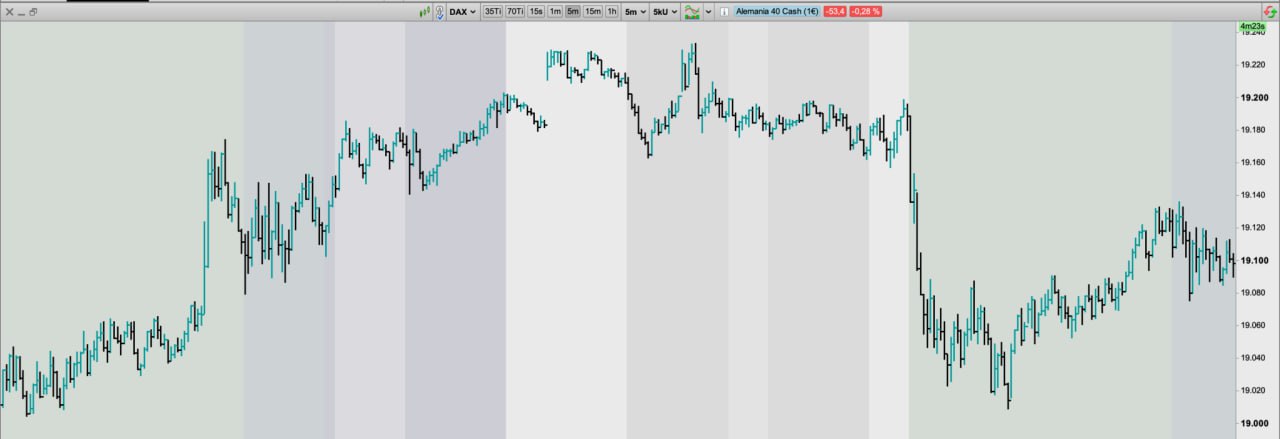
Global Trading Sessions Overlay
Introduction
The Global Trading Sessions Overlay indicator is designed to help traders visualize the active trading hours of the major financial markets: Asia, Europe, and the USA. By displaying the opening, closing, and lunch break periods of these key markets, the indicator enhances the trader’s ability to monitor market dynamics based on time zones. This tool is particularly useful for identifying high-volume periods and overlaps between major sessions, where liquidity is often at its peak.
Indicator Description
This indicator highlights the different trading sessions—Asia (Tokyo), Europe, and the USA—directly on the price chart. It also provides visual markers for the lunch breaks in each market, and the overlaps between European and US sessions.
By using different background colors, the trader can quickly identify the active market at any given time:
- Black for the Asian session.
- Green for the European session.
- Blue for the American session.
Moreover, during periods of overlap between the US and European markets, a distinct blue-green overlay will appear, indicating higher potential trading activity.
Configuration
The Global Trading Sessions Overlay indicator provides several customizable options to tailor it to your specific needs:
- EspHorarioVerano: A Boolean setting that determines whether to account for daylight savings time in Spain. This ensures the Asian and European sessions start and end at the correct times.
- NYHorarioVerano: Similar to the Spanish daylight savings option, this Boolean flag adjusts the US session based on whether New York is observing daylight savings.
- LuchTime: This option controls whether or not to highlight the lunch breaks in the Asian, European, and US sessions. Lunch breaks are generally periods of lower trading activity and are shown with a lower-opacity background color.
- Opacidad: This variable adjusts the transparency of the background colors for each session, making it easier to blend the indicator with your existing chart setup. A higher value increases the opacity, while a lower value makes the background more transparent.
Colors and Visual Markers
Each trading session is marked by a specific color, providing a quick and clear visual cue for traders:
- Asian Session (Tokyo): Displayed in black with varying opacity levels to distinguish between normal trading hours and lunch breaks. The session starts at 01:00 or 02:00 depending on the Spanish daylight savings setting, and lunch is indicated by a lighter shade of black.
- European Session: The European trading hours are shown with a green background, starting at 09:00 and ending at 17:30. A brief lunch period, if enabled, is represented by a lighter green color from 13:00 to 13:02.
- US Session: The US session is represented by a blue background. Depending on the daylight savings settings for New York, the session starts at either 14:30 or 15:30, with a lunch break in lighter blue from 16:45 to 18:30 or 17:45 to 19:30.
- Overlap between European and US Sessions: When the US and European sessions overlap, a blue-green background appears, marking this period as a highly active time for trading.
Conclusion
The Global Trading Sessions Overlay is a powerful tool for traders who want to stay aware of market activity across different time zones. By clearly marking the key trading sessions and lunch breaks, this indicator makes it easier to plan trades during times of peak liquidity and volume. The customizable options provide flexibility to adjust the visuals according to personal preferences, and the session overlap highlight is particularly helpful for identifying high-activity periods.
// Author: toniyecla - contact@rescommunesomnium.com
// Sesiones v2

DEFPARAM DrawOnLastBarOnly = True
ONCE opacidad = 1

EspHorarioVerano=0
NYHorarioVerano=0
LuchTime=1

// ASIA (solo Tokio)

if EspHorarioVerano then
ONCE AsianStart       = 020000
ONCE AsianEnd         = 080000
ONCE AsianLunchStart  = 043000
ONCE AsianLunchEnd    = 053000
else
ONCE AsianStart       = 010000
ONCE AsianEnd         = 070000
ONCE AsianLunchStart  = 033000
ONCE AsianLunchEnd    = 043000
endif

if time > AsianStart and time <= AsianEnd then
backgroundcolor(0, 0, 0, 16 * opacidad)
endif

if LuchTime then
if time > AsianLunchStart and time <= AsianLunchEnd then
backgroundcolor(0, 0, 0, 8 * opacidad)
endif
endif

// EUROPE

ONCE EuropeStart      = 090000
ONCE EuropeEnd        = 173000
ONCE EuropeLunchStart = 130000
ONCE EuropeLunchEnd   = 143000

if (time > EuropeStart and time <= EuropeEnd) then
backgroundcolor(0, 64, 0, 24 * opacidad)
endif

if (LuchTime) then
if time > EuropeLunchStart and time <= EuropeLunchEnd then
backgroundcolor(0, 64, 0, 8 * opacidad)
endif
endif

// USA

if (EspHorarioVerano = NYHorarioVerano) then
ONCE USAStart         = 153000
ONCE USAEnd           = 220000
ONCE USALunchStart    = 174500
ONCE USALunchEnd      = 193000
else
ONCE USAStart         = 143000
ONCE USAEnd           = 210000
ONCE USALunchStart    = 164500
ONCE USALunchEnd      = 183000
endif

if (time > USAStart and time <= USAEnd) then
backgroundcolor(0, 0, 64, 32 * opacidad)
endif

// horario estimado NYSE no hace pausa oficial para comer
if (LuchTime) then
if time > USALunchStart and time <= USALunchEnd then
backgroundcolor(0, 0, 64, 16 * opacidad)
endif
endif

// OVERLAPS

if time > USAStart and time <= EuropeEnd then
backgroundcolor(0, 48, 64, 32 * opacidad)
endif

RETURN
