







Fractals ZigZag
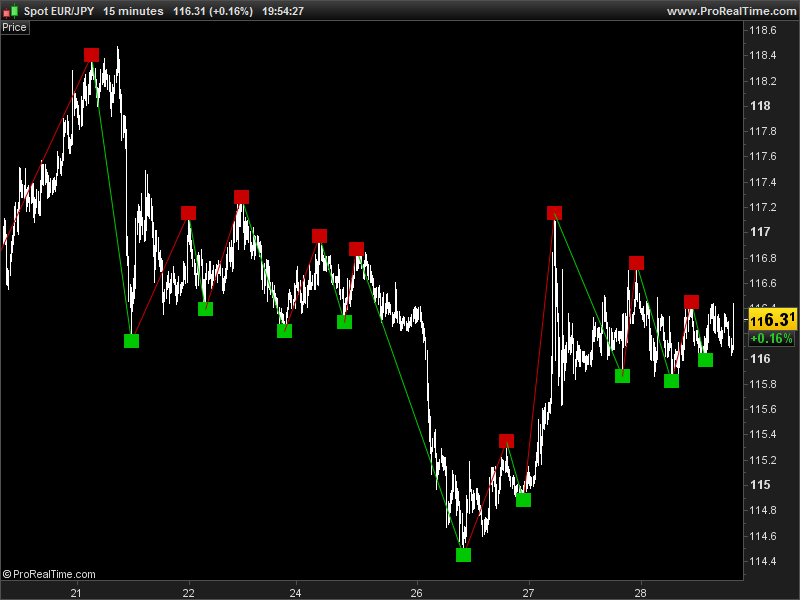
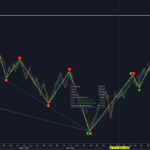
This indicator is a new attempt to draw compatible zigzag for automated trading with ProOrder.
The zigzag are drawn with the new fractal point that is contrarian to the last one.
The “cp” parameter control the depth of analysis to find fractals, higher is the value, deeper are the valleys and taller the peaks. Default value is 20.
//---external parameters
//cp = 20

once lastpoint = 0

if high[cp] >= highest[2*cp+1](high) then
 LH = 1
else
 LH = 0
endif

if low[cp] <= lowest[2*cp+1](low)  then
 LL = -1
else
 LL = 0
endif

if LH = 1 then
 TOPy = high[cp]
 TOPx = barindex[cp]
endif

if LL = -1 then
 BOTy = low[cp]
 BOTx = barindex[cp]
endif

if LH>0 and (lastpoint=-1 or lastpoint=0) then
 DRAWSEGMENT(lastX,lastY,TOPx,TOPy) COLOURED(200,0,0,255)
 DRAWTEXT("■",TOPx,TOPy,Dialog,Bold,20) coloured(200,0,0,255)
 lastpoint = 1
 lastX = TOPx
 lastY = TOPy
endif

if LL<0 and (lastpoint=1 or lastpoint=0) then
 DRAWSEGMENT(lastX,lastY,BOTx,BOTy) COLOURED(0,200,0,255)
 DRAWTEXT("■",BOTx,BOTy,Dialog,Bold,20) coloured(0,200,0,255)
 lastpoint = -1
 lastX = BOTx
 lastY = BOTy
endif

RETURN 
Comments
You must be logged in to post a comment.


Dear Nicolas, and others, Third comment: my solution as presented does not work satisfactory with my previous presented code, sorry. It should present in the graph only fractal points that a x % higher or lower as the previously fractal point, but that does not always appear in the graph, sometimes the next top fractal point is even lower as the previous bottom fractal point, which is maybe caused by the limited bars used for the calculation and the setting of the point of reference, CP bars in the past ? Alternatively code below, which is easier to read, but regrettable gives still not my desired result. Sometimes the next top fractal point is even lower as the previous bottom fractal point or vice versa, if close[cp] >= highest[2*cp+1](close) and close[cp] >= BOTy[1] *(1+ Perc) then //top, base for short LH = 1 else LH = 0 endif if close[cp] <= lowest[2*cp+1](close)and close[cp] <= TOPy[1]*(1- Perc) then //bottom, base for long LL = -1 else LL = 0 endif Comments or remarks would be appreciated. Nice weekend, Jan
Dear Nicolas, Forget my previous post, apparently too many text with an appendix, text was mixed up, hereby new try: I extended your Fractals Zigzag indicator with a minimum percentage of change before a fractal point will be set, like the percentage you can choose in the standard PRT-ZIGZAG indicator. This is meant to avoid Fractal Points in a relative flat market. I tested the adjusted code, and it seems to work correctly. The changes I made are shown in CAPITAL LETTERS below, (all other code remains the same.) (I based the adjusted Fractals Zig Zag code on the CLOSE, not on the original high/low in your code, because the original PRT ZigZag indicator is also based on the Close) //—external parameters cp = cp1 // default 20 Perc = perc1/10000 // default 2% = highest[2*cp+1](close) AND CLOSE[CP] >= LOWEST[2*CP+1](CLOSE)*(1+ PERC) then //top, base for short <== RENEWED LINE LH = 1 else LH = 0 endif if close[cp] <= lowest[2*cp+1](close) AND CLOSE[CP] <= HIGHEST[2*CP+1](CLOSE)*(1- PERC) then //bottom, base for long <== RENEWED LINE LL = -1 else LL = 0 endif If you have any comments please let me know. Kind regards, Jan
Dear Nicolas, I extended your Fractals Zigzag indicator with a minimum percentage of change before a fractal point will be set, like the percentage you can choose in the standard PRT-ZIGZAG indicator. This is meant to avoid Fractal Points in a relative flat market. I tested the adjusted code, and it seems to work correctly. The changes I made are shown in CAPITAL LETTERS below, (all other code remains the same.) (I based the adjusted Fractals Zig Zag code on the CLOSE, not on the original high/low in your code, because the original PRT ZigZag indicator is also based on the Close) //---external parameters cp = cp1 // default 20 Perc = perc1/10000 // default 2% = highest[2*cp+1](close) AND CLOSE[CP] >= LOWEST[2*CP+1](CLOSE)*(1+ PERC) then //top, base for short <== RENEWED LINE LH = 1 else LH = 0 endif if close[cp] <= lowest[2*cp+1](close) AND CLOSE[CP] <= HIGHEST[2*CP+1](CLOSE)*(1- PERC) then //bottom, base for long = highest[2*cp+1](close) and close[cp] >= lowest[2*cp+1](close)*(1+ Perc) then //top, base for short LH = 1 else LH = 0 endif if close[cp] <= lowest[2*cp+1](close)and close[cp] 0 and (lastpoint=-1 or lastpoint=0) then DRAWSEGMENT(lastX,lastY,TOPx,TOPy) COLOURED(200,0,0,255) DRAWTEXT("■",TOPx,TOPy,Dialog,Bold,20) coloured(200,0,0,255) lastpoint = 1 lastX = TOPx lastY = TOPy endif if LL<0 and (lastpoint=1 or lastpoint=0) then DRAWSEGMENT(lastX,lastY,BOTx,BOTy) COLOURED(0,200,0,255) DRAWTEXT("■",BOTx,BOTy,Dialog,Bold,20) coloured(0,200,0,255) lastpoint = -1 lastX = BOTx lastY = BOTy endif RETURN




ondas de wolf please


On peut retourner les valeurs de BOTy et de TOPy pour connaître les derniers Fractals trouvés. Puisqu'on ne peut pas tracer dans le passé avec la version 10.2, ces valeurs apparaîtront à partir du moment où elles seront trouvés et donc en décalage par rapport la bougie en question, le rendu visuel ne sera pas du tout le même.


En effet, c'est ce que je viens de spécifier à Zilliq. Puisque on ne peut pas supprimer et retracer des éléments déjà tracés, j'ai pris le partie de ne tracer que les plus haut et plus bas que si le précédent était un signal inverse. Tu peux modifier ce comportement en supprimant tout ce qui se rapporte à "lastpoint" dans le code. Bien entendu, les précédents signaux resteront tracés sur le graphique.

hola buenos días: yo estoy buscando una cosa parecida para realizar con ello un indicador de divergencias con el precio y el RSI y no se donde estais escribiendo sobre éste tema, alguien podría decirmelo?