




EMA Wave & GRaB
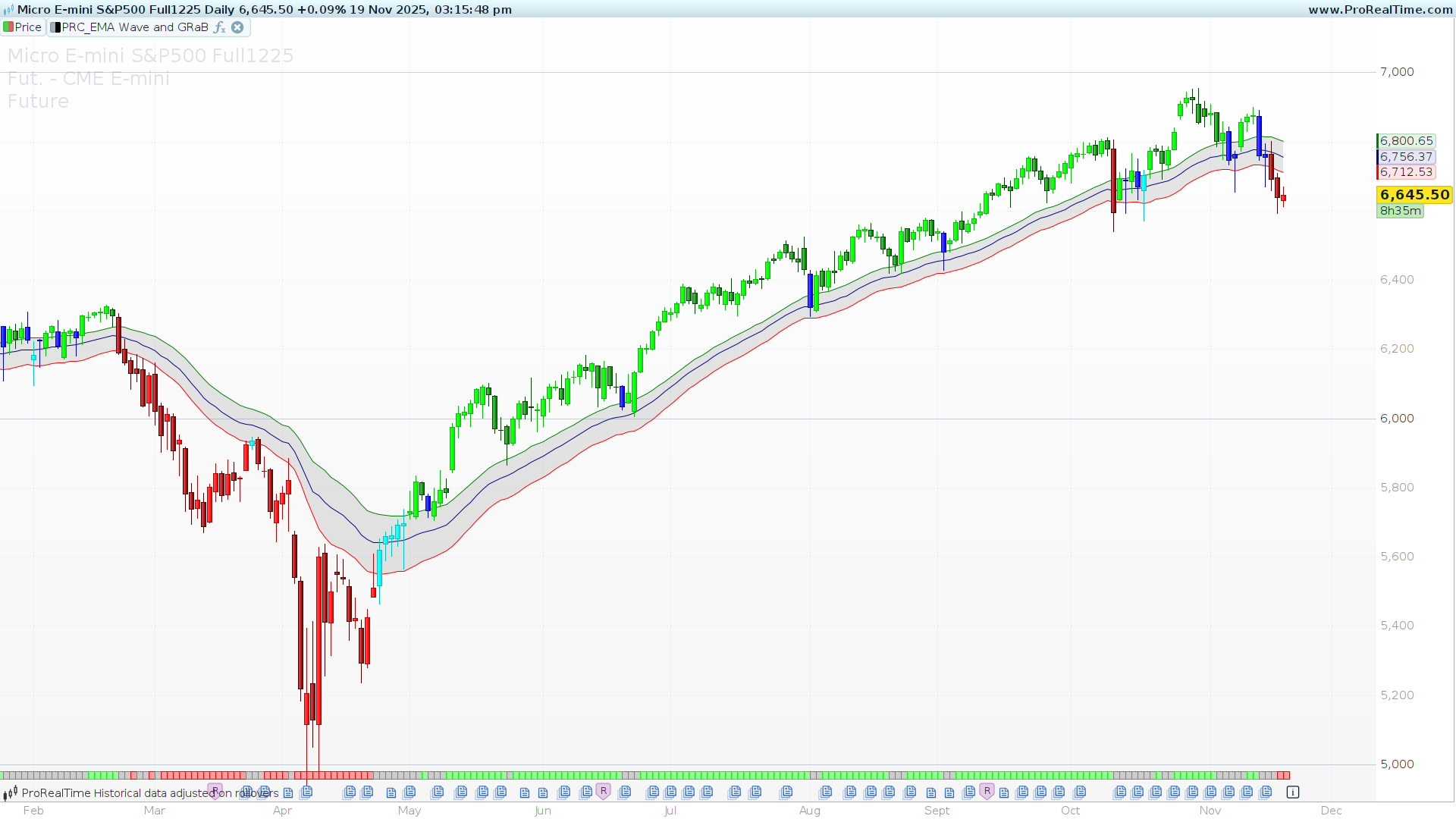
This indicator brings a comprehensive trend-following system (by JustUncleL), combining the classic 34-period EMA Wave with the popular GRaB (Green, Red, and Blue) candle coloring logic.
Designed to keep traders on the right side of the market, this tool provides immediate visual feedback on trend direction, momentum, and volatility. It helps filter out noise during ranging markets and highlights strong momentum phases.
How it Works
The system is built upon two main components:
1. The EMA Wave (Price Action Channel) The “Wave” consists of three Exponential Moving Averages (EMA) set to 34 periods:
-
High Wave: 34 EMA of the High.
-
Low Wave: 34 EMA of the Low.
-
Centre Wave: 34 EMA of the Close.
This band acts as a dynamic support and resistance zone. When the price is “riding” the bands, the trend is healthy.
2. GRaB Candles (Color Logic) The candles are painted based on their relationship with the Wave, giving you an instant read on market sentiment:
-
Green (Bullish): The candle closes above the High Wave. This indicates strong bullish momentum.
-
Red (Bearish): The candle closes below the Low Wave. This indicates strong bearish momentum.
-
Blue/Aqua (Neutral): The candle closes inside the Wave (between the High and Low EMAs). This typically signals consolidation, retracement, or a lack of momentum.
3. Trend Indicator (Bottom Ribbon) The code also includes an optional trend ribbon plotted at the bottom of the chart. This provides a secondary confirmation:
-
Lime Box: Strong Uptrend (High and Low of the candle are completely above the Wave).
-
Red Box: Strong Downtrend (High and Low of the candle are completely below the Wave).
-
Gray: Neutral/Transition zone.
Configuration
You can customize the indicator using the variable settings at the start of the code:
-
ShowPAC: Set to1to draw the 3 EMA lines on the chart, or0to hide them. -
ShowBarColor: Set to1to paint the candlesticks (GRaB style), or0to keep your default chart colors. -
ShowTrendIndi: Set to1to display the trend strength ribbon at the bottom of the panel. -
PACLen: The lookback period for the Wave. The default is 34, which is standard for this strategy, but you can adjust it to fit different timeframes.
The Code
// ------------------------------------------
//PRC_EMA Wave and GRaB
//version = 0
//30.10.2025
//Iván González @ www.prorealcode.com
//Sharing ProRealTime knowledge
// ------------------------------------------
// --- VARIABLES DE USUARIO ---
// ------------------------------------------
// (1 = Mostrar, 0 = Ocultar)
ShowPAC = 1 // Mostrar la "Wave" (las 3 líneas EMA)
ShowBarColor = 1 // Mostrar las velas coloreadas GRaB
ShowTrendIndi = 1 // Mostrar indicador de tendencia
PACLen = 34 // Longitud de la EMA (34 por defecto)
// ------------------------------------------
// --- CÁLCULO DE LA WAVE (PAC) ---
// ------------------------------------------
pacCe = exponentialaverage[PACLen](close)
pacLo = exponentialaverage[PACLen](low)
pacHi = exponentialaverage[PACLen](high)
// ------------------------------------------
// --- LÓGICA DE COLOR DE VELAS (GRaB) ---
// ------------------------------------------
// Definimos los componentes RGB para cada color
colorR = 0
colorG = 0
colorB = 0

IF close >= open THEN // Vela Alcista
   IF close >= pacHi THEN // Lime (Verde Lima)
      colorR = 0
      colorG = 255
      colorB = 0
   ELSIF close <= pacLo THEN // Red (Rojo)
      colorR = 255
      colorG = 0
      colorB = 0
   ELSE // Aqua (Dentro de la Wave)
      colorR = 0
      colorG = 255
      colorB = 255
   ENDIF
ELSE // Vela Bajista
   IF close >= pacHi THEN // Green (Verde Oscuro)
      colorR = 0
      colorG = 128
      colorB = 0
   ELSIF close <= pacLo THEN // DarkRed (Rojo Oscuro)
      colorR = 139
      colorG = 0
      colorB = 0
   ELSE // Blue (Azul)
      colorR = 0
      colorG = 0
      colorB = 255
   ENDIF
ENDIF
// ------------------------------------------
// --- LÓGICA DEL INDICADOR DE TENDENCIA ---
// ------------------------------------------
// 1 = Fuerte Alcista (Lime)
// -1 = Fuerte Bajista (Red)
// 0 = Neutral (Gray)

trendValue = 0 // Gris por defecto
IF high > pacHi AND low > pacHi THEN
   trendValue = 1 // Lime
ELSIF low < pacLo AND high < pacLo THEN
   trendValue = -1 // Red
ENDIF

// Asignar colores
colortrendR = 128 // Gris por defecto
colortrendG = 128
colortrendB = 128

IF trendValue = 1 THEN // Lime
   colortrendR = 0
   colortrendG = 255
   colortrendB = 0
ELSIF trendValue = -1 THEN // Red
   colortrendR = 255
   colortrendG = 0
   colortrendB = 0
ENDIF
// ------------------------------------------
// --- DIBUJO DE VELAS ---
// ------------------------------------------
// Si está activado, dibujamos las velas con el color calculado
IF ShowBarColor THEN
   DRAWCANDLE(open, high, low, close) COLOURED(colorR, colorG, colorB)
ENDIF
// ------------------------------------------
// --- PLOTEO DE LÍNEAS (WAVE) ---
// ------------------------------------------
// Si ShowPAC es 0, devolvemos 'undefined' para ocultar las líneas
plotPacHi = undefined
plotPacLo = undefined
plotPacCe = undefined

IF ShowPAC THEN
   plotPacHi = pacHi
   plotPacLo = pacLo
   plotPacCe = pacCe
   colorbetween(plotPacHi,plotPacLo,"grey",50)
ENDIF
// ------------------------------------------
// --- PLOTEO Indicador Tendencia---
// ------------------------------------------
// Devolvemos el valor solo si ShowTrendIndi es 1
plotValue = undefined
IF ShowTrendIndi THEN
   plotValue = trendValue
   drawrectangle(barindex,30,barindex+1,40)coloured(colortrendR,colortrendG,colortrendB)fillcolor(colortrendR,colortrendG,colortrendB,90)anchor(bottom,index,yshift)
ENDIF
// --------------------------------------
RETURN plotPacHi AS "High Wave"coloured("green"), plotPacCe AS "Centre Wave"coloured("darkblue"), plotPacLo AS "Low Wave"coloured("red")

