







Elliott Wave - Impulse v2
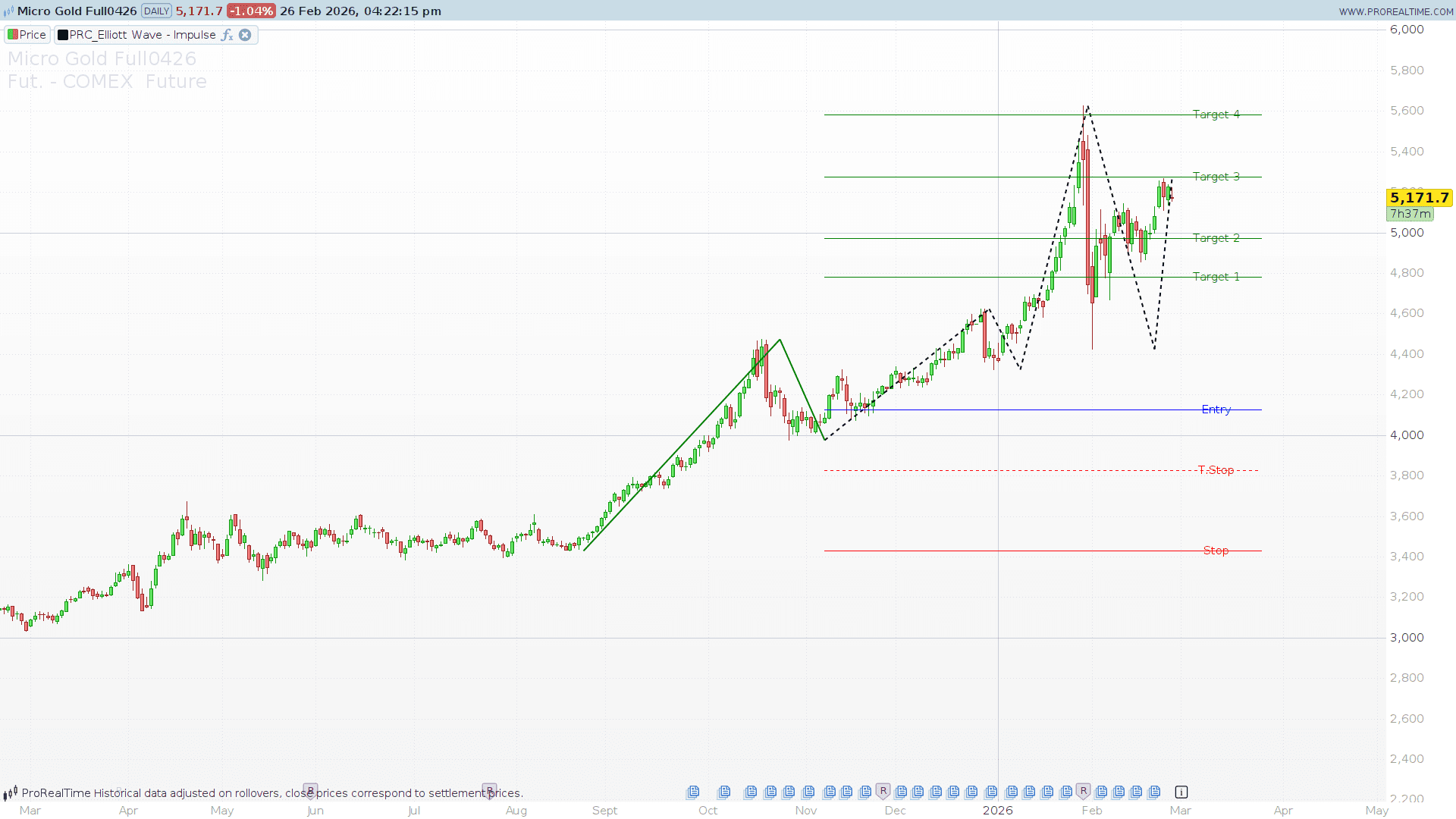
Elliott Wave theory is one of the most powerful methodologies for understanding market cycles and anticipating future price movements. However, any trader who has tried to count waves manually knows the main struggle: it can be highly subjective and time-consuming.
To solve this, we are sharing the Elliott Wave – Impulse v2, a custom indicator that automatically identifies the initial impulse of a new trend (Wave 1 and Wave 2) and projects actionable trading levels to help you ride the explosive Wave 3.
Whether you are a day trader looking for intraday swings or a swing trader analyzing daily charts, this tool takes the guesswork out of wave counting.
How the Indicator Works
The Elliott Wave – Impulse v2 does not just blindly draw lines on your chart; it uses a strict mathematical approach to validate market structures:
- Dynamic Pivot Detection: The code utilizes a custom ZigZag logic based on
HighestBarsandLowestBarsto map out the market’s structural highs and lows. - Wave 1 & Wave 2 Identification: Once the pivots are established, the indicator looks for a strong initial move (Wave 1) followed by a corrective pullback (Wave 2).
- Fibonacci Validation: Not every pullback is a valid Wave 2. The indicator strictly validates the Wave 2 retracement against classic Fibonacci levels (50%, 61.8%, 76.4%, and 85.4%). If the pullback doesn’t fit these ratios (within a customizable error margin), the pattern is ignored.
Trading with the Indicator: Projected Levels
Once a valid Wave 1 and Wave 2 pattern is confirmed, the indicator automatically plots several strategic horizontal lines on your chart (drawing only on the last bars to keep your chart clean).
Here is what each level means for your trading plan:
- Entry (Blue Line): The breakout trigger level. It calculates an entry point based on a percentage of the W2 length, signaling that Wave 3 is likely underway.
- Stop (Red Line): The absolute invalidation level of the setup (placed at the origin of Wave 1).
- T.Stop (Dotted Red Line): A suggested Trailing Stop level to protect your capital as the price begins to move in your favor.
- Targets 1 to 4 (Green/Red Lines depending on trend): These are your Take Profit zones. They are calculated using Fibonacci extensions of W2 (1.618, 2.0, 2.618, and 3.236), giving you a roadmap to scale out of your position during the powerful Wave 3.
Configuration & Parameters
Every market behaves differently, so the indicator comes with three highly customizable inputs. You can easily tweak these in the indicator’s settings window:
zigzagLength(Default: 10): This controls the sensitivity of the pivot detection. A lower number will detect smaller, intraday micro-waves. A higher number will filter out the noise and only detect major macroeconomic waves.errorPercent(Default: 5): The tolerance margin for the Fibonacci retracement validation. Setting this to 5 means the pullback can deviate by 5% from the exact Fib levels and still be considered a valid Wave 2. Increase this for more signals, or decrease it for stricter setups.entryPercent(Default: 30): Defines the breakout threshold to trigger the “Entry” line. A value of 30 means the price needs to retrace 30% of the Wave 2 distance in the direction of the new trend to plot the entry level.
ProBuilder Code
//-------------------------------------------
// PRC_Elliott Wave - Impulse v2 (by HeWhoMustNotBeNamed)
// version = 0
// 26.02.2026
// Iván González @ www.prorealcode.com
// Sharing ProRealTime knowledge
//-------------------------------------------
defparam drawonlastbaronly = true

//// --- Inputs ---
zigzagLength = 10
errorPercent = 5
entryPercent = 30

// --- Constants ---
errMin = (100 - errorPercent) / 100
errMax = (100 + errorPercent) / 100
entryRatio = entryPercent / 100

// ==============================================
// DETECCION DE PIVOTS (HighestBars/LowestBars)
// ==============================================
waveFound = 0

IF barindex >= zigzagLength THEN

   hb = highestbars[zigzagLength](high)
   lb = lowestbars[zigzagLength](low)

   IF hb = 0 AND lb <> 0 THEN
      phigh = high
      plow = undefined
      dir = 1
   ELSIF lb = 0 AND hb <> 0 THEN
      phigh = undefined
      plow = low
      dir = -1
   ELSIF hb = 0 AND lb = 0 THEN
      phigh = high
      plow = low
      dir = prevDir
   ELSE
      phigh = undefined
      plow = undefined
      dir = prevDir
   ENDIF

   // Hay pivot?
   hasPivot = 0
   IF phigh <> undefined OR plow <> undefined THEN
      hasPivot = 1
   ENDIF

   IF hasPivot THEN

      IF dir = 1 THEN
         newVal = high
      ELSE
         newVal = low
      ENDIF
      newBar = barindex
      newPDir = dir

      // Cambio de direccion?
      dirChanged = 0
      IF dir <> prevDir AND prevDir <> 0 THEN
         dirChanged = 1
      ENDIF

      // --- MISMA DIRECCION: reemplazar pvt0 si el nuevo es mas extremo ---
      IF dirChanged = 0 AND pCount >= 1 THEN
         // Comparar con pvt0 (mismo lado del zigzag)
         // Para dir=1 (highs): quedarse con el mayor
         // Para dir=-1 (lows): quedarse con el menor
         IF dir = 1 THEN
            IF newVal < pvt0 THEN
               newVal = pvt0
            ENDIF
         ELSE
            IF newVal > pvt0 THEN
               newVal = pvt0
            ENDIF
         ENDIF

         // Superseding: si supera pivot 2 posiciones atras (pvt2 = mismo lado)
         IF pCount >= 3 THEN
            IF dir = 1 AND newVal > pvt2 THEN
               newPDir = 2
            ELSIF dir = -1 AND newVal < pvt2 THEN
               newPDir = -2
            ENDIF
         ENDIF

         // Reemplazar pvt0 sin shift
         pvt0 = newVal
         bx0 = newBar
         pd0 = newPDir

      ELSE
         // --- CAMBIO DE DIRECCION: shift FIFO e insertar ---

         // Superseding: comparar con pvt1 (mismo lado, 2 atras en zigzag)
         IF pCount >= 2 THEN
            IF dir = 1 AND newVal > pvt1 THEN
               newPDir = 2
            ELSIF dir = -1 AND newVal < pvt1 THEN
               newPDir = -2
            ENDIF
         ENDIF

         // Shift: 4->5, 3->4, 2->3, 1->2, 0->1
         pvt5 = pvt4
         bx5 = bx4
         pd5 = pd4
         pvt4 = pvt3
         bx4 = bx3
         pd4 = pd3
         pvt3 = pvt2
         bx3 = bx2
         pd3 = pd2
         pvt2 = pvt1
         bx2 = bx1
         pd2 = pd1
         pvt1 = pvt0
         bx1 = bx0
         pd1 = pd0

         // Insertar nuevo en posicion 0
         pvt0 = newVal
         bx0 = newBar
         pd0 = newPDir

         IF pCount < 6 THEN
            pCount = pCount + 1
         ENDIF
      ENDIF

      prevDir = dir
   ENDIF

   // ==============================================
   // DETECCION DE ONDA IMPULSO
   // ==============================================
   // waitForConfirmation = true: usamos pvt1,pvt2,pvt3
   // pvt0 = confirmacion, pvt1 = Point2 (W2 end)
   // pvt2 = Point1 (W1 end), pvt3 = Point0 (W1 start)

   IF pCount >= 4 THEN

      p2 = pvt1
      p2bar = bx1
      p2dir = pd1

      p1 = pvt2
      p1bar = bx2
      p1dir = pd2

      p0 = pvt3
      p0bar = bx3

      w1Len = abs(p1 - p0)
      w2Len = abs(p2 - p1)

      IF w1Len > 0 THEN
         ir2 = w2Len / w1Len
      ELSE
         ir2 = 0
      ENDIF

      // Evitar re-detectar mismo patron
      ignore = 0
      IF oldP0 = p0 AND oldP1 = p1 AND oldP2 = p2 THEN
         ignore = 1
      ENDIF

      // Validar ratio Fibonacci con tolerancia
      patternMatched = 0
      IF ir2 > 0.50 * errMin AND ir2 < 0.50 * errMax THEN
         patternMatched = 1
      ENDIF
      IF ir2 > 0.618 * errMin AND ir2 < 0.618 * errMax THEN
         patternMatched = 1
      ENDIF
      IF ir2 > 0.764 * errMin AND ir2 < 0.764 * errMax THEN
         patternMatched = 1
      ENDIF
      IF ir2 > 0.854 * errMin AND ir2 < 0.854 * errMax THEN
         patternMatched = 1
      ENDIF

      // Validar direcciones: W1=supersede(+-2), W2=normal(+-1)
      dirMatched = 0
      IF (p1dir = 2 AND p2dir = -1) OR (p1dir = -2 AND p2dir = 1) THEN
         dirMatched = 1
      ENDIF

      IF ignore = 0 AND patternMatched = 1 AND dirMatched = 1 THEN

         IF p0 > p1 THEN
            wdir = -1
         ELSE
            wdir = 1
         ENDIF

         wEntry = p2 + wdir * entryRatio * w2Len
         wStop = p0
         wTStop = p2 - wdir * entryRatio * w2Len
         wT1 = p2 + wdir * 1.618 * w2Len
         wT2 = p2 + wdir * 2.0 * w2Len
         wT3 = p2 + wdir * 2.618 * w2Len
         wT4 = p2 + wdir * 3.236 * w2Len

         wP0 = p0
         wP1 = p1
         wP2 = p2
         wB0 = p0bar
         wB1 = p1bar
         wB2 = p2bar
         wDir = wdir

         oldP0 = p0
         oldP1 = p1
         oldP2 = p2

         IF wdir = 1 THEN
            bullCount = bullCount + 1
         ELSE
            bearCount = bearCount + 1
         ENDIF

         waveFound = 1
         waveEver = 1
      ENDIF
   ENDIF
ENDIF

// ==============================================
// DIBUJO (solo ultima barra)
// ==============================================
IF islastbarupdate THEN

   // --- Zigzag ---
   IF pCount >= 2 THEN
      drawsegment(bx0, pvt0, bx1, pvt1) coloured(0, 0, 0) style(dottedline, 2)
   ENDIF
   IF pCount >= 3 THEN
      drawsegment(bx1, pvt1, bx2, pvt2) coloured(0, 0, 0) style(dottedline, 2)
   ENDIF
   IF pCount >= 4 THEN
      drawsegment(bx2, pvt2, bx3, pvt3) coloured(0, 0, 0) style(dottedline, 2)
   ENDIF
   IF pCount >= 5 THEN
      drawsegment(bx3, pvt3, bx4, pvt4) coloured(0, 0, 0) style(dottedline, 2)
   ENDIF
   IF pCount >= 6 THEN
      drawsegment(bx4, pvt4, bx5, pvt5) coloured(0, 0, 0) style(dottedline, 2)
   ENDIF

   // --- Patron W1+W2 + Niveles ---
   IF waveEver = 1 THEN

      IF wDir = 1 THEN
         wr = 0
         wg = 128
         wb = 0
         sr = 255
         sg = 0
         sb = 0
         tcr = 0
         tg = 128
         tb = 0
      ELSE
         wr = 255
         wg = 0
         wb = 0
         sr = 0
         sg = 128
         sb = 0
         tcr = 255
         tg = 0
         tb = 0
      ENDIF

      // W1 y W2
      drawsegment(wB0, wP0, wB1, wP1) coloured(wr, wg, wb) style(line, 2)
      drawsegment(wB1, wP1, wB2, wP2) coloured(wr, wg, wb) style(line, 2)

      // Coordenadas niveles
      lvlX1 = wB2
      lvlX2 = barindex + 20
      lblX = barindex + 10

      // Entry
      drawsegment(lvlX1, wEntry, lvlX2, wEntry) coloured(0, 0, 255) style(line, 1)
      drawtext("Entry", lblX, wEntry) coloured(0, 0, 255)

      // Stop
      drawsegment(lvlX1, wStop, lvlX2, wStop) coloured(sr, sg, sb) style(line, 1)
      drawtext("Stop", lblX, wStop) coloured(sr, sg, sb)

      // Trailing Stop
      drawsegment(lvlX1, wTStop, lvlX2, wTStop) coloured(sr, sg, sb) style(dottedline, 1)
      drawtext("T.Stop", lblX, wTStop) coloured(sr, sg, sb)

      // Targets
      drawsegment(lvlX1, wT1, lvlX2, wT1) coloured(tcr, tg, tb) style(line, 1)
      drawtext("Target 1", lblX, wT1) coloured(tcr, tg, tb)

      drawsegment(lvlX1, wT2, lvlX2, wT2) coloured(tcr, tg, tb) style(line, 1)
      drawtext("Target 2", lblX, wT2) coloured(tcr, tg, tb)

      drawsegment(lvlX1, wT3, lvlX2, wT3) coloured(tcr, tg, tb) style(line, 1)
      drawtext("Target 3", lblX, wT3) coloured(tcr, tg, tb)

      drawsegment(lvlX1, wT4, lvlX2, wT4) coloured(tcr, tg, tb) style(line, 1)
      drawtext("Target 4", lblX, wT4) coloured(tcr, tg, tb)
   ENDIF
ENDIF

return
Muchísimas gracias Iván, el indicador que siempre he deseado... ahora lo que me interesa es un ProScreener de cuando se toca la línea azul o de entrada, por eso me voy al foro indicado para hacer la petición, saludos y de nuevo muchas gracias por el trabajo que realizas.