




Demand/Supply Zones Indicator
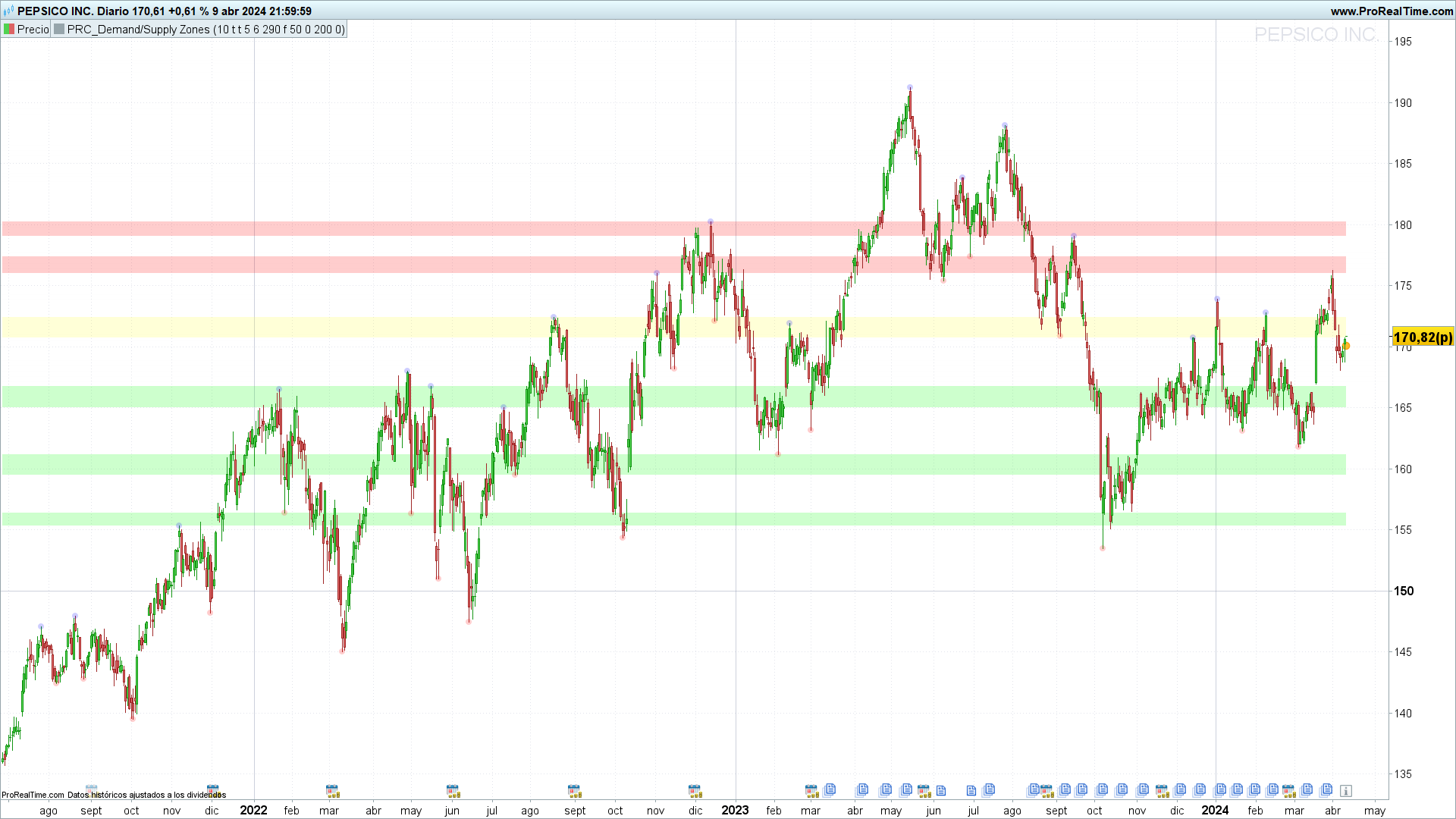
Demand/Supply Zones Indicator: An Essential Tool for Technical Analysis in ProRealTime
Introduction
I want to introduce you to the Demand/Supply Zones indicator. As the name suggests, this indicator specifically focuses on the zones of demand and supply, which are fundamental in the analysis of supports and resistances.
The theory behind this indicator is that prices show predictable reactions as they approach these zones, which can be leveraged to make more precise buying or selling operations.
Thus, the Demand/Supply Zones indicator becomes a very powerful tool for those interested in including a study of supports and resistances in their technical analysis, automatically highlighting key market levels.
Importance of the Indicator
The relevance of the Demand/Supply Zones indicator lies in its ability to break down and visualize zones where significant orders of buying or selling are concentrated, influencing the future price behavior. By identifying these zones, traders can strategically plan their entry and exit points, capitalizing on trend reversals or continuations of price movements.
This indicator is especially useful due to its adaptability and customization through the indicator settings window. Later we will see, but there are many parameters that can be adjusted in the indicator according to the specific needs of the trader.
In the next section, we will detail the operation of the Demand/Supply Zones indicator and how it interprets price action to signal the zones of demand and supply, fundamental for decision making in trading.
Functioning of the Indicator
The Demand/Supply Zones indicator is designed to identify and effectively visualize the zones of demand (support) and supply (resistance). This analysis is based on the observation of historical price patterns and uses various parameters to precisely determine these critical areas where the price is likely to experience significant changes.
Identification of Demand and Supply Zones
The identification of these zones is carried out through the analysis of price pivots, which are points on the chart where the price has significantly changed direction. The indicator marks these points using specific criteria of period and amplitude, thus allowing the visualization of zones where there has historically been an accumulation of buying (demand) or selling (offer) orders.
Key Parameters
Pivot Period (prd): This parameter determines the time interval for the analysis of pivots, directly influencing the sensitivity of the indicator to price changes.
Price Source Selection (ppsrc): Allows choosing between the high/low and close/open for the calculation of pivots, adjusting the focus of the indicator to the most relevant price action for the trader.
Channel Width (channelw): Defines the maximum percentage of channel width that can exist between zones of support and resistance, thus filtering the zones according to their relevance.
Maximum Number of S/R (maxnumsr): Limits the number of support and resistance zones to be shown, allowing focus on the most significant ones.
Practical Application and Signals
The indicator uses these parameters to plot zones of demand and supply on the chart, which can be interpreted as signals for buying or selling operations. A strong demand zone may indicate a good buying point, anticipating a bounce upwards, while a significant supply zone may suggest a selling point, anticipating a drop in price.
The zones identified by the indicator can also be used to establish stop-loss or take-profit levels, improving risk management in operations.
The Demand/Supply Zones indicator offers a clear and detailed view of the interest zones in the market, providing traders with a valuable tool to enhance their technical analysis and decision-making. The customization of its parameters allows adapting the indicator to any trading strategy, making it an indispensable complement in the arsenal of any trader.
Integration with Other Analysis Tools
The Demand/Supply Zones indicator, with its ability to precisely identify demand and supply zones, is a highly powerful technical analysis tool by itself. However, its integration with other techniques and analysis tools can further enrich the trading strategy, offering a more complete view of the market and helping to confirm detected signals.
Combination with Trend Indicators
Integrating the Demand/Supply Zones with trend indicators such as moving averages (Simple Moving Average – SMA or Exponential Moving Average – EMA) or the ADX (Average Directional Index) can provide a deeper understanding of the general market direction. By identifying a demand or supply zone in alignment with the overall trend, signals of higher probability can be filtered, thus increasing the effectiveness of operations.
Synergy with Volume Indicators
Trading volume is a critical component that can validate the strength of a demand or supply zone. Tools like the On-Balance Volume (OBV) or the Volume Oscillator can be used in conjunction with the Demand/Supply Zones to confirm the presence of buyer or seller interest in the identified zones. A significant increase in volume approaching a supply zone may indicate strong selling pressure, and vice versa for demand zones.
Application of Divergence Tools
Divergence between the price and a momentum indicator like the RSI (Relative Strength Index) or the MACD (Moving Average Convergence Divergence) can be another powerful filter when used alongside the Demand/Supply Zones indicator. Identifying a bearish divergence in a supply zone, or a bullish divergence in a demand zone, can provide early signals of possible price reversals.
Confirmation Strategies
Using the Demand/Supply Zones in combination with Japanese candlestick patterns or chartist figures such as triangles, head and shoulders, or flags, can provide an additional level of confirmation for operations. The appearance of a reversal or continuation pattern in or near a key zone can be a strong signal to enter or exit the market.
Conclusion
The integration of the Demand/Supply Zones indicator with other tools and analysis techniques not only strengthens the validity of trading signals but also provides a more robust and holistic strategy. The key lies in the selection and combination of appropriate tools that complement and confirm the generated signals, allowing for more informed decision-making and potentially more profitable trading.
This integrative approach highlights the importance of a well-rounded trading strategy, where different tools work together to provide a comprehensive view of the market, facilitating the identification of trading opportunities with a higher degree of confidence.
//--------------------------------------------------------//
//PRC_Demand/Supply Zones
//version = 0
//08.04.24
//Iván González @ www.prorealcode.com
//Sharing ProRealTime knowledge
//--------------------------------------------------------//
//-----inputs--------------------------------------------//
prd = 10 //Pivot period
ppsrc = 1// 1 = "high/low" // 0 = "close/open"
showpp = 1//Show Pivot Points

channelw = 5 //Maximum channel width %
maxnumsr = 6 //Maximum Number of S/R
loopback = 290 //Loopback Period

ShowEMA = 0 //Show moving averages
ma1len = 50 //MA 1
ma1type = 0 //sma=0 ema=1
ma2len = 200 //MA 2
ma2type = 0 //sma=0 ema=1
//-------------------------------------------------------//
//-----AVERAGES------------------------------------------//
if ShowEMA then
ma1 = average[ma1len,ma1type](close)
ma2 = average[ma2len,ma2type](close)
else
ma1 = undefined
ma2 = undefined
endif
//-------------------------------------------------------//
//-----Get Pivot high / low------------------------------//
if ppsrc then
src1 = low
src2 = high
else
src1 = max(close,open)
src2 = min(close,open)
endif
//-----pivots low
if src1 > src1[prd] and lowest[prd](src1) > src1[prd] and src1[prd] < lowest[prd](src1)[prd+1] then
$pivotlowy[z+1] = src1[prd]
$pivotlowx[z+1] = barindex[prd]
z=z+1
endif
//-----pivots high
if src2 < src2[prd] and highest[prd](src2)<src2[prd] and src2[prd]>highest[prd](src2)[prd+1] then
$pivothighy[t+1]=src2[prd]
$pivothighx[t+1]=barindex[prd]
t=t+1
endif
//-------------------------------------------------------//
//-----Draw pivot points---------------------------------//
if showpp and z <> z[1] then
drawpoint($pivotlowx[z],$pivotlowy[z],2)coloured("red",50)
elsif showpp and t <> t[1] then
drawpoint($pivothighx[t],$pivothighy[t],2)coloured("blue",50)
endif
//-------------------------------------------------------//
//-----Calculate maximum S/R channel width---------------//
prdhighest = highest[300](high)
prdlowest = lowest[300](low)
cwidth = (prdhighest - prdlowest) * ChannelW / 100
//-------------------------------------------------------//
//-----Get/keep Pivot levels-----------------------------//
if z <> z[1] then
$pivotvals[m+1]=src1[prd]
$pivotlocs[m+1]=barindex[prd]
m=m+1
elsif t <> t[1] then
$pivotvals[m+1]=src2[prd]
$pivotlocs[m+1]=barindex[prd]
m=m+1
endif
//-------------------------------------------------------//
//-----Calculate Strengs---------------------------------//
if islastbarupdate then
//get levels and strengs
for x=0 to m-1 do
lo=$pivotvals[x]
hi=lo
numpp=0
for Y= 0 to m-1 do
cpp=$pivotvals[y]
if cpp <=hi then
wdth=hi-cpp
else
wdth=cpp-lo
endif
if wdth<=cwidth then
numpp=numpp+20
if cpp<=hi then
lo=min(lo,cpp)
else
hi=max(hi,cpp)
endif
endif
next
$lo[x]=lo
$hi[x]=hi
$strength[x]=numpp
next
//add each HL to strengh
for z=0 to m-1 do
lo2=$lo[z]
hi2=$hi[z]
s=0
for t=0 to loopback do
if (high[t]<=hi2 and high[t]>=lo2) or (low[t]<=hi2 and low[t]>=lo2) then
s=s+1
endif
$strength[z]=$strength[z]+s
next
next
endif
//-------------------------------------------------------//
//-----Support&Resistance levels Array-------------------//
//reset SR levels
unset($suportresistance)
// get strongest SRs
src=0
for i=0 to m-1 do
stv=-1
stl=-1
for j=0 to m-1 do
if $strength[j]>stv and $strength[j]>=20 then
stv=$strength[j]
stl=j
endif
next
if stl>=0 then
//get sr level
hh=$hi[stl]
ll=$lo[stl]
$suportresistance[src*2]=hh
$suportresistance[src*2+1]=ll
$stren[src]=$strength[stl]
// make included pivot points' strength zero
for n=0 to m-1 do
if ($hi[n]<=hh and $hi[n]>=ll) or ($lo[n]<=hh and $lo[n]>=ll) then
$strength[n]=-1
endif
next
src=src+1
if src>=10 then
break
endif
endif
next
//-------------------------------------------------------//
//-----Draw Support&Resistance---------------------------//
for x=0 to min(9,maxnumsr-1) do
//Calculate Top level
if x*2 < LastSet($suportresistance) then
if $suportresistance[x*2] <> 0 then
boxtop = $suportresistance[x*2]
endif
endif
//Calculate Bottom level
if x*2+1 < LastSet($suportresistance) then
if $suportresistance[x*2+1] <> 0 then
boxbot = $suportresistance[x*2+1]
endif
endif
//Color definition
if close > boxtop then
r=0
g=255
b=0
elsif close < boxbot then
r=255
g=0
b=0
else
r=255
g=255
b=50
endif
//Draw rectangle
drawrectangle(0,boxtop,barindex,boxbot)coloured(r,g,b,0)fillcolor(r,g,b,50)
next
//-------------------------------------------------------//
return ma1 as "SMA 1" coloured("blue"),ma2 as "SMA 2" coloured("red")

