




Custom ROC Indicator
April 13, 2017, 5:02 PM
Indicators
0 Comments
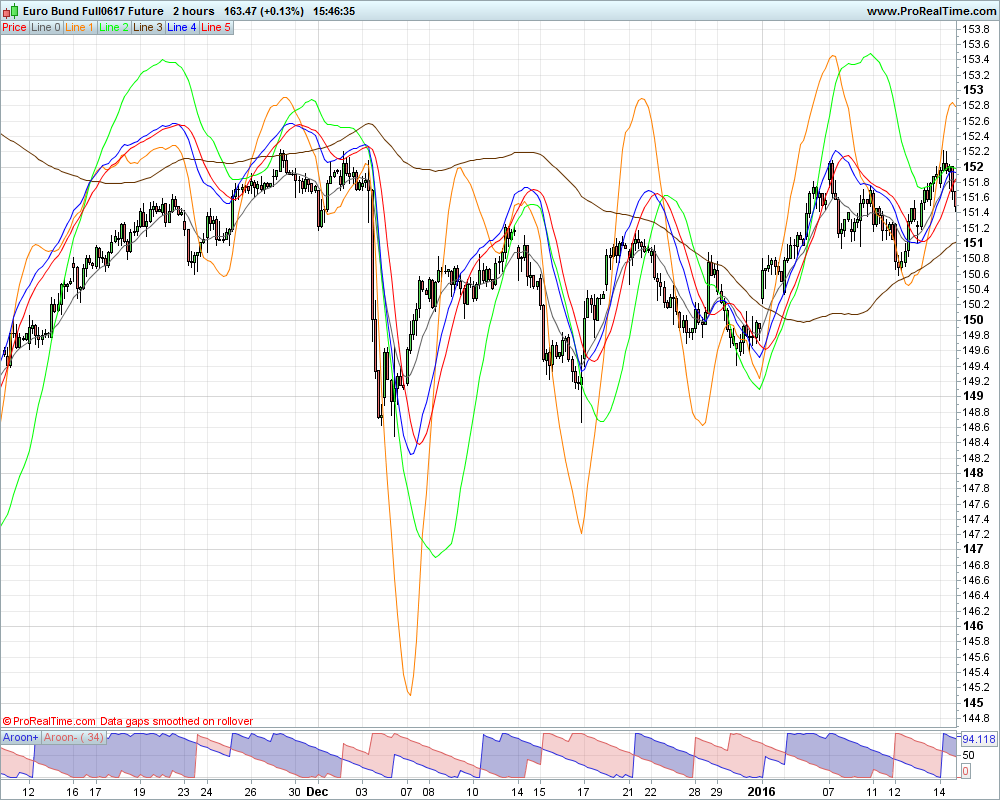
Hello everyone. I found this indicator on the internet and I got help with PRT code from the Great Nicolas ,thanks man.
The ROC indicator described here has some advantages as compared to a simple MA – it has smaller lag and is more illustrative.
Starting the indicator you will see 6 indicator lines in a chart window:
// ---^paremeters^---
PeriodMA0=13          // Period of supporting MA for cur. timefr.
PeriodMA1=21          // Period of calculated MA
BarsV    =13          // Amount of bars for calc. rate
AverBars =5           // Amount of bars for smoothing
K        =2           // Amplifier gain

// Calculating coefficient for different timeframes
// case     1: K2=5;K3=15;  Timeframe M1
// case     5: K2=3;K3= 6;  Timeframe M5
// case    15: K2=2;K3= 4;  Timeframe M15
// case    30: K2=2;K3= 8;  Timeframe M30
// case    60: K2=4;K3=24;  Timeframe H1
// case   240: K2=6;K3=42;  Timeframe H4
// case  1440: K2=7;K3=30;  Timeframe D1
// case 10080: K2=4;K3=12;  Timeframe W1
// case 43200: K2=3;K3=12;  Timeframe MN
K2 = 2
K3 = 12
// ---^paremeters^---

Sh1=BarsV                     // Period of rate calcul. (bars)
Sh2=K2*Sh1                    // Calc. period for nearest TF
Sh3=K3*Sh1                    // Calc. period for next TF
PeriodMA2 =K2*PeriodMA1       // Calc. period of MA for nearest TF
PeriodMA3 =K3*PeriodMA1      // Calc. period of MA for next TF
PeriodMA02=K2*PeriodMA0     // Period of supp. MA for nearest TF
PeriodMA03=K3*PeriodMA0     // Period of supp. MA for next TF

//-------------------------------------------------------- 12 --
MA0=weightedaverage[PeriodMA0](typicalprice)
Line0=MA0 // Value of supp. MA
//-------------------------------------------------------- 13 --
MAc=weightedaverage[PeriodMA1](typicalprice)
MAp=weightedaverage[PeriodMA1](typicalprice)[Sh1]
Line1=MA0+K*(MAc-MAp) // Value of 1st rate line
//-------------------------------------------------------- 14 --
MAc=weightedaverage[PeriodMA2](typicalprice)
MAp=weightedaverage[PeriodMA2](typicalprice)[Sh2]
MA02= weightedaverage[PeriodMA02](typicalprice)
Line2=MA02+K*(MAc-MAp) // Value of 2nd rate line
//-------------------------------------------------------- 15 --
MAc=weightedaverage[PeriodMA3](typicalprice)
MAp=weightedaverage[PeriodMA3](typicalprice)[Sh3]
MA03= weightedaverage[PeriodMA03](typicalprice)
Line3=MA03+K*(MAc-MAp) // Value of 3rd rate line
//-------------------------------------------------------- 16 --
Line4=(Line1+Line2+Line3)/3 // Summary array

Sum=0 // Technical means
for n=0 to AverBars do // Summing last values
Sum=Sum + Line4[n] // Accum. sum of last values
Line5= Sum/(AverBars+1) // Indic. array of smoothed line
next

RETURN Line0 coloured(100,100,100) as "Line 0",Line1 coloured(255,128,0) as "Line 1",Line2 coloured(0,255,0) as "Line 2",Line3 coloured(102,51,0) as "Line 3",Line4 coloured(0,0,255) as "Line 4", Line5 coloured(255,0,0) as "Line 5"
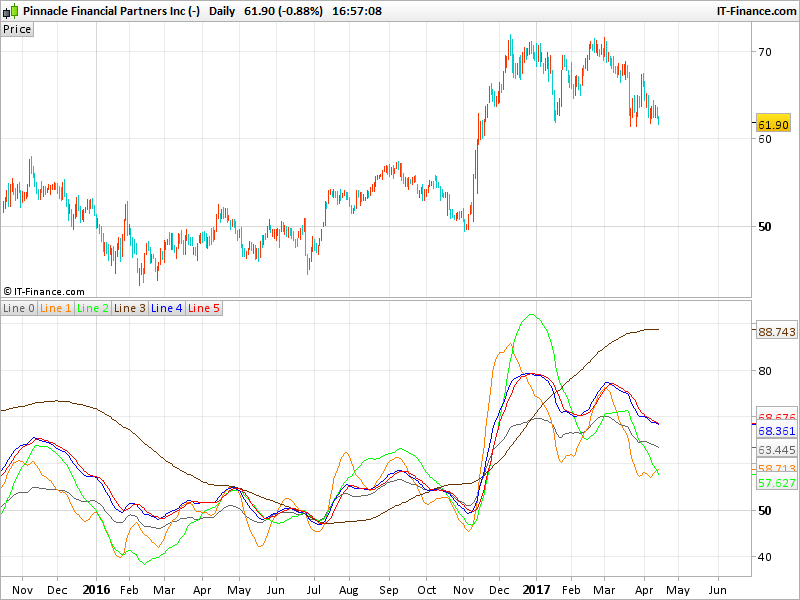
- black line – supporting MA for building a price rate line on the current timeframe;
- orange line – price rate of change on the current timeframe;
- green line – price rate of change on the nearest higher timeframe;
- brown line – price rate of change on the next higher timeframe;
- blue line – average line of the rate of price change;
- red line – smoothed average line of the rate of price change.
Parameters can be set in the code from line 2 to 21. For the coefficient applied to the current timeframe, you’ll need to adapt them yourself (settings are in code from line 10 to 18), because PRT code can’t retrieve that is the current timeframe.
By default, I set the K2 and K3 coefficients to 2 hour timeframe.
And K2 and K3 need to be changed dependent on which timeframe you are using
Download
Filename:
custom-rate-of-change-indicator.png
Downloads:
45
Download
Filename:
Custom-ROC-indicator.itf
Downloads:
116
Average
I usually let my code do the talking, which explains why my bio is as empty as a newly created file. Bio to be initialized...
Author’s Profile


Loading...