




Commodity Trend Reactor
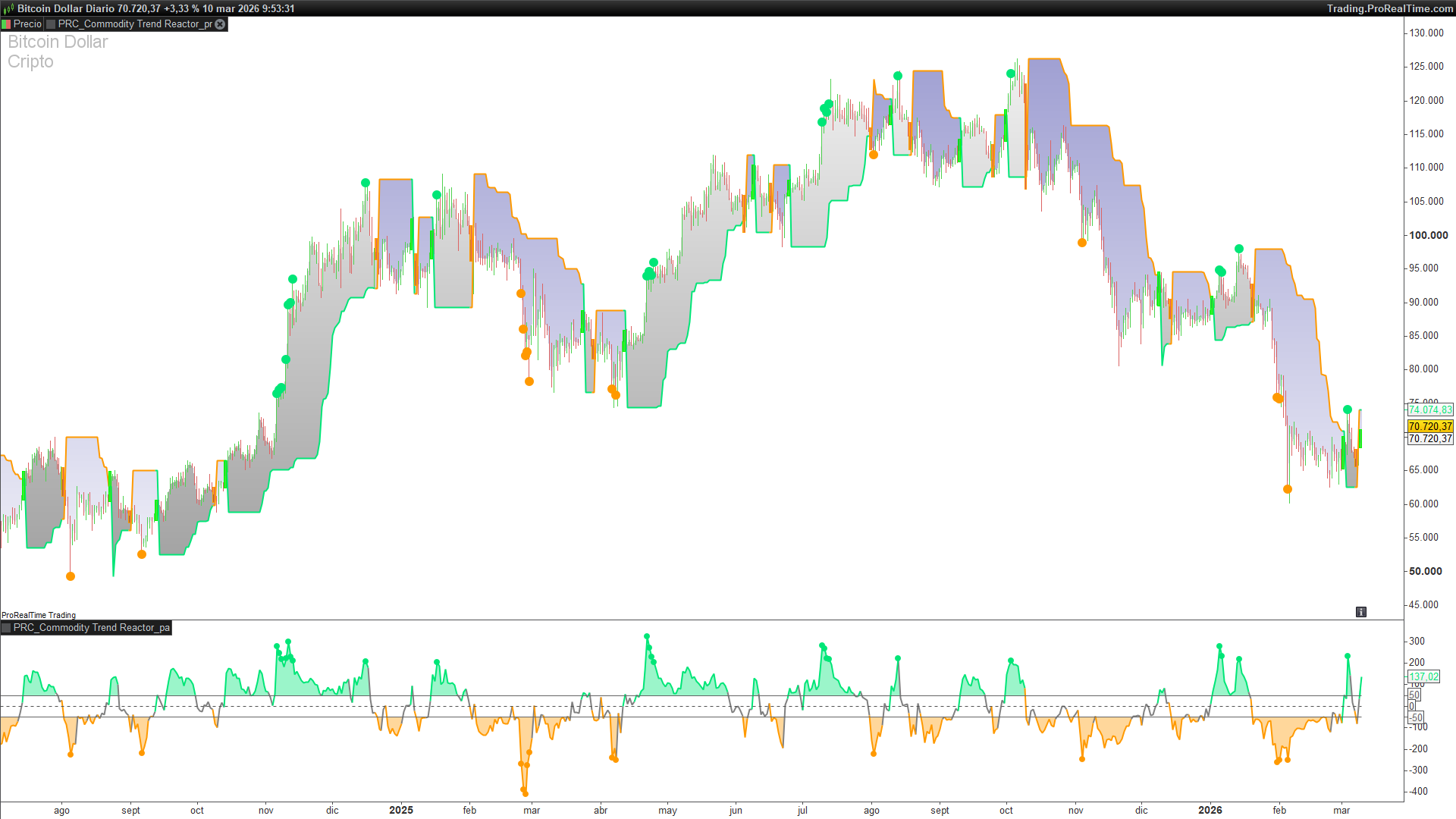
The Commodity Trend Reactor (by BigBeluga) is a comprehensive trend-following tool designed to bridge the gap between pure momentum oscillators and price action support levels. By utilizing the Commodity Channel Index (CCI) as its core “reaction engine,” this indicator identifies high-probability trend shifts and provides a dynamic trailing line directly on your price chart.
This suite consists of two parts: a Price Overlay for immediate trend direction and a Separate Oscillator for monitoring momentum intensity and overextended conditions.
Core Functionality
1. The Price Overlay
The overlay script transforms raw momentum data into actionable price levels. It features:
- Dynamic Trail Line: When a bullish trend is confirmed, the indicator plots a trailing support based on the lowest price of the last n periods. Conversely, in a bearish trend, it plots a trailing resistance based on the highest price of the last n periods.
- Trend Change Flashes: To ensure you never miss a reversal, the indicator uses
DRAWRECTANGLEto create a visual “flash” on the price bar where the CCI crosses your defined thresholds. - Extreme Momentum Dots: Small lime or orange dots appear above or below the price candles when CCI values exceed ±200, signaling that the current move is entering an extreme phase.
2. The Oscillator Panel
The separate oscillator provides a clear view of the “Reactor’s” internal state:
- Zone Fills: Using the
COLORBETWEENinstruction, the oscillator fills the space between the CCI line and the thresholds, making it easy to see when momentum is sustaining a trend. - Reactive Coloring: The CCI line itself changes color—Lime for bullish zones, Orange for bearish zones, and Gray for neutral “wait” periods.
How to Use
- Trend Entry: A transition from Gray to Lime (Bullish) or Orange (Bearish) suggests a new trend is forming. The “flash” on the price chart confirms the entry bar.
- Trailing Support/Resistance: Use the
trailLineas a dynamic stop-loss or to gauge if the current price retracement is healthy or a sign of trend failure. - Momentum Exhaustion: When the CCI hits the ±200 levels, look for potential profit-taking opportunities or a tightening of your stops.
Settings & Customization
You can fine-tune the “Reactor” via the following variables in the Settings window:
- cciLen (Default: 25): Adjusts the sensitivity of the CCI calculation. Higher values result in fewer, more stable signals.
- tLen (Default: 20): Sets the lookback period for the trailing line (Highs/Lows).
- upperThr (Default: 50): The level the CCI must cross above to trigger a bullish state.
- lowerThr (Default: -50): The level the CCI must cross below to trigger a bearish state.
ProBuilder Code
//-----------------------------------------------
// PRC_Commodity Trend Reactor [BigBeluga] - CCI Oscillator
// Display: Price chart overlay
// version = 0
// 23.02.2026
// Iván González @ www.prorealcode.com
// Sharing ProRealTime knowledge
//-----------------------------------------------
// --- INPUTS ---
cciLen = 25 // CCI Length
tLen = 20 // Trail Line Length
upperThr = 50 // Upper Threshold
lowerThr = -50 // Lower Threshold


// --- CALCULATIONS ---
lowVal = lowest[tLen](low)
highVal = highest[tLen](high)
cciVal = CCI[cciLen](close)


// --- TREND DETECTION ---
// trend: -1=undefined, 1=bullish, 0=bearish
ONCE trend = -1


IF cciVal crosses over upperThr THEN
trend = 1
ENDIF


IF cciVal crosses under lowerThr THEN
trend = 0
ENDIF


// --- TRAIL LINE + COLORS ---
IF trend = 1 THEN
trailLine = lowVal
r1 = 0
g1 = 230
b1 = 119
ELSIF trend = 0 THEN
trailLine = highVal
r1 = 255
g1 = 153
b1 = 0
ELSE
trailLine = undefined
r1 = 128
g1 = 128
b1 = 128
ENDIF


// --- BREAK LINE ON TREND CHANGE ---
IF trend >= 0 AND trend[1] >= 0 AND trend <> trend[1] THEN
trailLine = undefined
ENDIF


// --- EXTREME CCI SIGNALS ON PRICE ---
IF cciVal > 200 THEN
DRAWPOINT(barindex, high, 3) COLOURED(0, 230, 119)
ENDIF


IF cciVal < -200 THEN
DRAWPOINT(barindex, low, 3) COLOURED(255, 153, 0)
ENDIF


// --- BACKGROUND FLASH ON TREND CHANGE (optional visual) ---
// PRT doesn't have bgcolor - using drawrectangle for 1-bar highlight
IF trend = 1 AND trend[1] = 0 THEN
DRAWRECTANGLE(barindex - 1, low, barindex, high) COLOURED(0, 255, 0, 220) BORDERCOLOR(0, 255, 0, 255)
ENDIF


IF trend = 0 AND trend[1] = 1 THEN
DRAWRECTANGLE(barindex - 1, low, barindex, high) COLOURED(255, 153, 0, 220) BORDERCOLOR(255, 153, 0, 255)
ENDIF


RETURN trailLine COLOURED(r1, g1, b1) style(line, 2), close COLOURED(0, 0, 0, 0)
//-----------------------------------------------
// PRC_Commodity Trend Reactor [BigBeluga] - CCI Oscillator
// Display: Separate oscillator panel
// version = 0
// 23.02.2026
// Iván González @ www.prorealcode.com
// Sharing ProRealTime knowledge
//-----------------------------------------------
// --- INPUTS ---
cciLen = 25 // CCI Length
upperThr = 50 // Upper Threshold
lowerThr = -50 // Lower Threshold


// --- CCI CALCULATION ---
cciVal = CCI[cciLen](close)


// --- CCI COLOR ---
// gray when between thresholds, lime above upper, orange below lower
IF cciVal > upperThr THEN
rc = 0
gc = 230
bc = 119
ELSIF cciVal < lowerThr THEN
rc = 255
gc = 153
bc = 0
ELSE
rc = 128
gc = 128
bc = 128
ENDIF


// --- FILLS ---
// Fill between CCI and upper threshold when CCI > upper
IF cciVal > upperThr THEN
alphaUp=100
else
alphaUp=0
ENDIF
COLORBETWEEN(cciVal, upperThr, 0, 230, 119, alphaUp)
// Fill between CCI and lower threshold when CCI < lower
IF cciVal < lowerThr THEN
alphaDn=100
else
alphaDn=0
ENDIF
COLORBETWEEN(cciVal, lowerThr, 255, 153, 0, alphaDn)
// --- EXTREME SIGNALS ---
IF cciVal > 200 THEN
DRAWPOINT(barindex, cciVal, 2) COLOURED(0, 230, 119)
ENDIF


IF cciVal < -200 THEN
DRAWPOINT(barindex, cciVal, 2) COLOURED(255, 153, 0)
ENDIF
//-----------------------------------------------
RETURN cciVal COLOURED(rc, gc, bc) style(line, 2), upperThr COLOURED(100, 100, 100) style(line, 1), lowerThr COLOURED(100, 100, 100) style(line, 1), 0 AS "Zero" COLOURED(80, 80, 80) style(dottedline, 1)

