







Bull & Bear Volume-by-Price levels
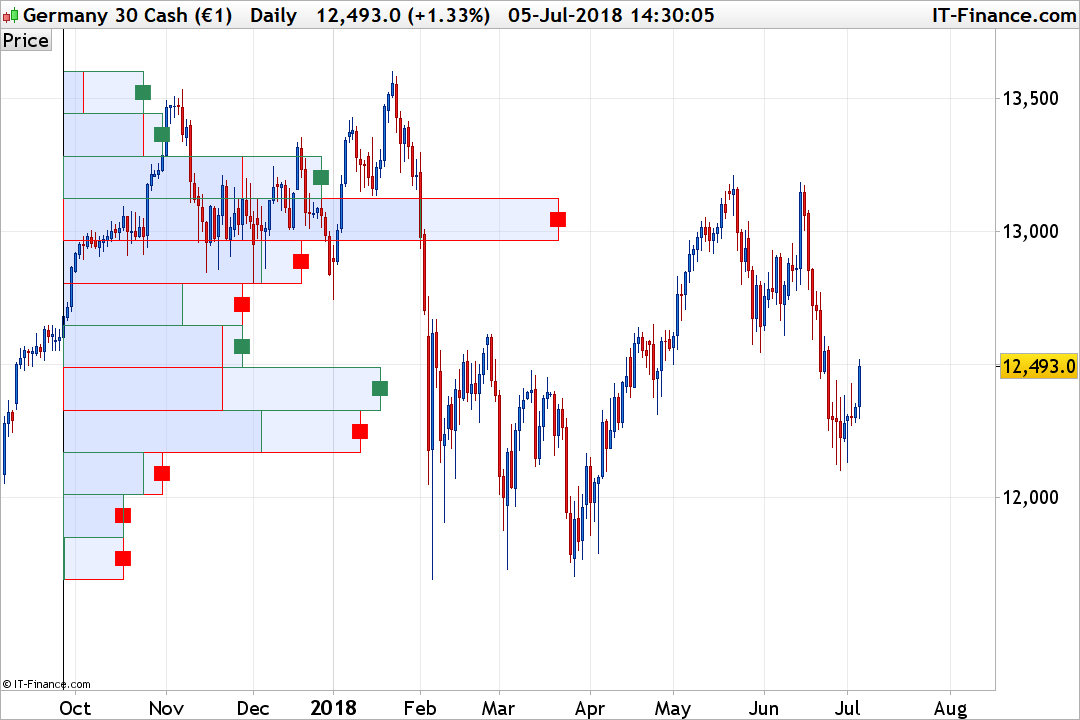
This “Volume-by-Price” indicator shows the amount of volume for a particular price range selected with the “lookback” setting, which is based on closing prices. The bars are horizontal and shown on the left side of the chart to correspond with these price ranges. The bars are separated into 2 colors to clearly identify the bull and bear Volumes in each price range. By combining volume and closing prices, this indicator can be used to identify high-volume price ranges to mark support or resistance.
The code shows 12 Volume-by-Price bars by default, but users can increase or decrease this number to suit their preferences with the “NbrBars” setting. Be aware that due to some ProBuilder limitations, this setting, as well as the lookback one, cannot be extended very much.
For a better visualization of which side has higher volumes on each price range, I added a small square of the corresponding color.
The ScaleFactor setting is used to adapt the length of the bars, depending of your choice to have small or big bars plotted over the price chart.
//PRC_Bull&Bear Volume on Price | indicator
//05.07.2018
//Nicolas @ www.prorealcode.com
//Sharing ProRealTime knowledge

defparam drawonlastbaronly=true
defparam calculateonlastbars=1000

// --- settings
ScaleFactor = 5
NbrBars=12
lookback=200
// --- end of settings

hh=highest[lookback](high)
ll=lowest[lookback](low)
div = (hh-ll)/NbrBars
i=0
volsum=summation[lookback](volume)
startbar = barindex[lookback]
while i<NbrBars do
 lrange=ll+div*i
 hrange=lrange+div
 volbull=0
 volbear=0
 for j = 1 to lookback do
  if close[j]>=lrange and close[j]<=hrange then
   if close[j]>open[j] then
    volbull=volbull+volume[j]
   else
    volbear=volbear+volume[j]
   endif
  endif
 next
 bullbar = round((volbull*lookback)/volsum)*scalefactor
 bearbar = round((volbear*lookback)/volsum)*scalefactor

 drawrectangle(startbar,lrange,startbar+bullbar,hrange) coloured(46,139,87)
 drawrectangle(startbar,lrange,startbar+bearbar,hrange) coloured(255,0,0)

 if bullbar>bearbar then
  drawtext("■",startbar+bullbar,(lrange+hrange)/2,Dialog,Bold,22) coloured(46,139,87)
 else
  drawtext("■",startbar+bearbar,(lrange+hrange)/2,Dialog,Bold,22) coloured(255,0,0)
 endif
 i=i+1
wend
drawvline(barindex[lookback])

return
Comments
You must be logged in to post a comment.

Hello Nicolas, This is just what I’ve been looking for, but I have a few questions: 1. Is it possible to increase the number of bars above 20? I tried 50 but I get a loop error. 2. Is it possible to do it on a set timeframe/session? 3. Is it possible to show previous days/sessions profiles? Thanks for any help :)


Hi, thanks for this, Nicolas. Quick question: can this be modified so that, for intraday timeframes, it displays the relevant volume at price levels at the start of each new trading day based on the last trading day, like here: https://images.app.goo.gl/cc3oRLoeUMcHDrrK6 I have seen Kris75's variations on your work, but wanted to pose the question to you first. Thanks.

Dans le code, il n'y a qu'à cet endroit ou tu déclares que LastStartBar doit être à minima égal à 1: if StartBar > StartBar[1] then LastStartBar = max(1,startbar) endif Hors si cette condition n'est pas vrai, LastStartBar est toujours égal à 0 à la première lecture du code, d'ou l'erreur générée par la plateforme. Je pense que tu devrais arriver à corriger cette petite erreur :)
//PRC_Bull&Bear Volume on Price | indicator //05.07.2018 //Nicolas @ www.prorealcode.com //Sharing ProRealTime knowledge //defparam drawonlastbaronly=true //defparam calculateonlastbars=300 // --- settings //ScaleFactor = 5 //NbrBars=25 //lookback=50 // --- end of settings for i=0 to 400 do StartVol=highest[400](high) if high[i] = StartVol then StartBar = i //else //StartBar =1 endif if StartBar > StartBar[1] then LastStartBar = max(1,startbar) endif next hh=highest[LastStartBar](high) ll=lowest[LastStartBar](low) div = (hh-ll)/NbrBars i=0 volsum=summation[LastStartBar](volume) while i=lrange and close[j]open[j] then volbull=volbull+volume[j] else volbear=volbear+volume[j] endif endif next bullbar = round((volbull*LastStartBar)/volsum)*scalefactor bearbar = round((volbear*LastStartBar)/volsum)*scalefactor drawrectangle(LastStartBar,lrange,LastStartBar+bullbar,hrange) coloured(46,139,87,255) drawrectangle(LastStartBar,lrange,LastStartBar+bearbar,hrange) coloured(255,0,0,255) if bullbar>bearbar then drawtext("■",LastStartBar+bullbar,(lrange+hrange)/2,Dialog,Bold,22) coloured(46,139,87) else drawtext("■",LastStartBar+bearbar,(lrange+hrange)/2,Dialog,Bold,22) coloured(255,0,0) endif i=i+1 wend drawvline(barindex[LastStartBar]) return
BTW I tried to add a piece of code which makes the indicator automaticaly starts the "llokback" at the highest of the time frame but it did not work: here is what I tried (FYI the Add PRT code is down) but it givest me an error saying the highest only accept positive integer (I debugged it but could not make it work) ... for i=400 to barindex StartVol=highest[400](high) if high = StartVol then StartBar = barindex else StartBar =0 endif if StartBar > StartBar[1] then LastStartBar = StartBar endif next hh=highest[LastStartBar](high) ll=lowest[LastStartBar](low) div = (hh-ll)/NbrBars i=0 volsum=summation[LastStartBar](volume) while i=lrange and close[j]open[j] then volbull=volbull+volume[j] else volbear=volbear+volume[j] endif endif next bullbar = round((volbull*LastStartBar)/volsum)*scalefactor bearbar = round((volbear*LastStartBar)/volsum)*scalefactor drawrectangle(LastStartBar,lrange,LastStartBar+bullbar,hrange) coloured(46,139,87,255) drawrectangle(LastStartBar,lrange,LastStartBar+bearbar,hrange) coloured(255,0,0,255) if bullbar>bearbar then drawtext("■",LastStartBar+bullbar,(lrange+hrange)/2,Dialog,Bold,22) coloured(46,139,87) else drawtext("■",LastStartBar+bearbar,(lrange+hrange)/2,Dialog,Bold,22) coloured(255,0,0) endif i=i+1 wend drawvline(barindex[LastStartBar]) return
;-) ok thanks What about creating a strategy based on this indicator using the same trick you used in "swing lines : https://www.prorealcode.com/topic/swing-lines-strategy/", registering the different maximimums of volume level which are a definition of a support or resistance? Best, Chris
Bonjour Nicolas. Je viens de découvrir cet indicateur, que je trouve bien intéressant Mais j'ai un petit problème technique (peut-être lié à la version 11 de PRT ?). Précision : j'ai importé la file *itf ci-dessus sans rien y changer. Les rectangles ne sont pas colorés, et ils sont donc difficiles à voir sur le graphe (malheureusement, impossible ici d'ajouter une pièce jointe pour envoyer la copie d'écran). As-tu idée d'où cela peut-il provenir ? Merci par avance