




Aroon Impulse
August 16, 2023, 10:30 AM
Indicators
3 Comments
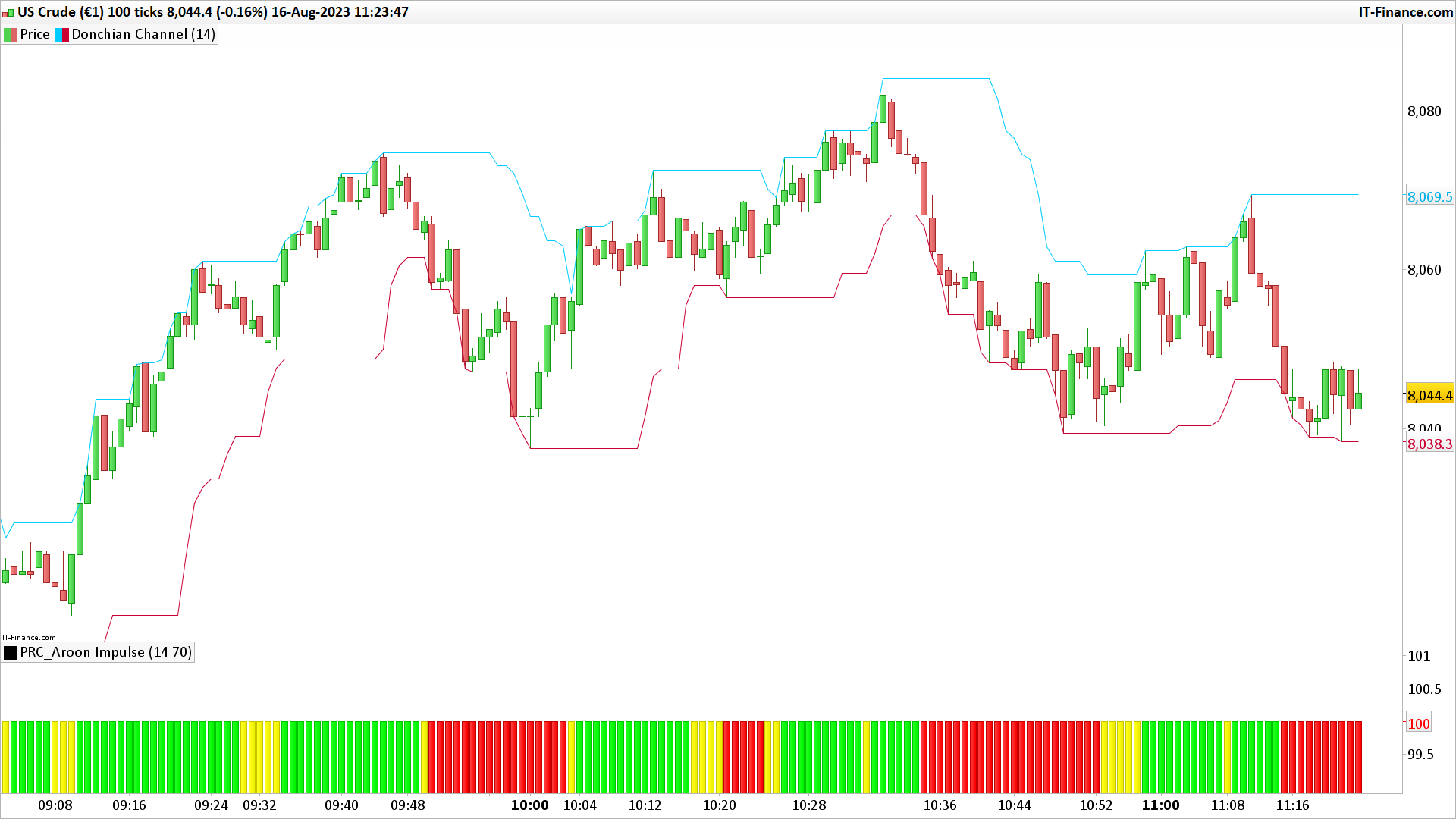
This code is designed to visually represent the “Aroon” indicator, a popular tool in financial trading. The Aroon indicator helps determine the strength and direction of a trend in the market.
Here’s what the code does step by step:
- Aroon Values:
– `up = AroonUp[period]`: This gets the value of the “Aroon Up” for a specified period.
– `dn = AroonDown[period]`: Similarly, this gets the value of the “Aroon Down” for the same period. These two values show how long it’s been since the highest high (for “Aroon Up”) and the lowest low (for “Aroon Down”) were last seen within that period. - Setting Default Colors `r=255` and `g=255`: Sets up default red (r) and green (g) values to a maximum (255 is the max value in RGB color code). This combination results in a yellow color.
- Checking Aroon Values and Adjusting Colors: – If the “Aroon Up” value is greater than the “Aroon Down” value and surpasses a certain level (determined by `leveltrigger`), the color is set to green (`r=0` and `g=255`). – If the “Aroon Down” value is greater than the “Aroon Up” value and it exceeds the `leveltrigger`, the color is set to red (`r=255` and `g=0`).
- Output: return 100 coloured(r,g,0) style(histogram)`: This is displaying a histogram (like a bar chart) with a height of 100 units, and the color of the histogram bar will be either green or red based on the conditions above. The height value “100” here is arbitrary and is likely for visualization consistency.
In simpler terms: The code checks the strength and direction of the market trend using the Aroon values. If the market trend is going upwards and is strong, it displays a green bar. If it’s heading downwards and is strong, it displays a red bar. If neither condition is met, it might display a yellow bar, depending on how the rest of the code is structured.
//PRC_Aroon Impulse | indicator
//16.08.23
//Nicolas @ www.prorealcode.com
//Sharing ProRealTime knowledge

Period = 14
LevelTrigger = 70

up=AroonUp[period]
dn=AroonDown[period]

r=255
g=255

if up>dn and up>=leveltrigger then
 r=0
 g=255
endif
if up<dn and dn>=leveltrigger then
 r=255
 g=0
endif

return 100 coloured(r,g,0) style(histogram)
Download
Filename:
PRC_Aroon-Impulse.itf
Downloads:
163
Master
I created ProRealCode because I believe in the power of shared knowledge. I spend my time coding new tools and helping members solve complex problems.
If you are stuck on a code or need a fresh perspective on a strategy, I am always willing to help. Welcome to the community!
Author’s Profile


Loading...