




More from ProRealCode
ProRealCode - Trading & Coding with ProRealTime™
The ProRealTime™ community on the web! Officially sharing ProRealTime knowledge to Worldwide users since 2015!



Adaptive CCI
March 3, 2016, 3:31 PM
Indicators
4 Comments
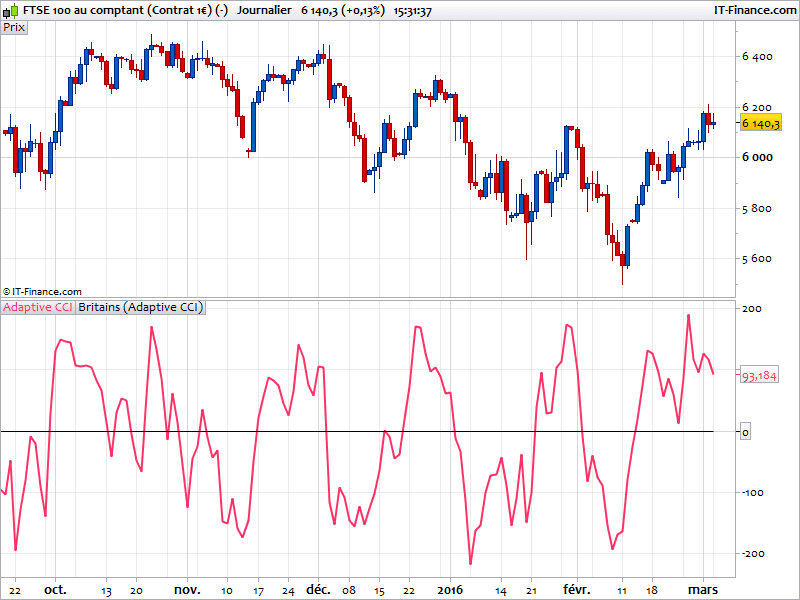
This is the Ehlers’ adaptive CCI code. The modified John Ehlers version of the CCI adapt the classical CCI period dynamically adapted to the market cycle. It tends to give more better indication as the CCI indicator itself.
c = 0.5
pri=Customclose
CycPart=c

If Barindex > 5 Then

Smooth=(4*pri+3*pri[1]+2*pri[2]+pri[3])/10
Detrender=(0.0962*Smooth+0.5769*Smooth[2]-0.5769*Smooth[4]-0.0962*Smooth[6])*(0.075*Period[1]+0.54)

REM Compute InPhase & Quadrature Components

Q1=(0.0962*Detrender+0.5769*Detrender[2]-0.5769*Detrender[4]-0.0962*Detrender[6])*(0.075*Period[1]+0.54)
I1=Detrender[3]

REM Advance The Phase Of I1 & Q1 By 90 Degrees

jI=(0.0962*I1+0.5769*I1[2]-0.5769*I1[4]-0.0962*I1[6])*(0.075*Period[1]+0.54)
jQ=(0.0962*Q1+0.5769*Q1[2]-0.5769*Q1[4]-0.0962*Q1[6])*(0.075*Period[1]+0.54)

REM Phasor Addition

I2=I1-jQ
Q2=Q1+jI

REM Smooth The I & Q Components

I2=0.2*I2+0.8*I2[1]
Q2=0.2*Q2+0.8*Q2[1]

REM Homodyne Discriminator

Re=I2*I2[1]+Q2*Q2[1]
Im=I2*Q2[1]-Q2*I2[1]
Re=0.2*Re+0.8*Re[1]
Im=0.2*Im+0.8*Im[1]

If Im <> 0 And Re <> 0 Then
 Period=360/ATAN(Im/Re)
Endif

If Period > 1.5*Period[1] Then
 Period=1.5*Period[1]
Endif

If Period < 0.67*Period[1] Then
 Period=0.67*Period[1]
Endif

If Period < 6 Then
 Period=6
Endif

If Period > 50 Then
 Period=50
Endif

Period=0.2*Period+0.8*Period[1]
SmoothPeriod=0.33*Period+0.67*SmoothPeriod[1]

Length=Round(CycPart*Period)
MP=(High+Low+Close)/3

Avg=0

For count=0 To Length-1
 Avg=Avg+MP[count]
Next

Avg=Avg/Length

MD=0

For count=0 To Length-1
 MD=MD+ABS(MP[count]-Avg)
Next

MD=MD/Length

If MD <> 0 Then
 ACCI=(MP-Avg)/(0.015*MD)
Endif
Endif

Return ACCI as "Adaptive CCI",0
//indicator from the Kevin Britains archive.
Download
Filename:
Britains-Adaptive-CCI.itf
Downloads:
263
Legend
I created ProRealCode because I believe in the power of shared knowledge. I spend my time coding new tools and helping members solve complex problems.
If you are stuck on a code or need a fresh perspective on a strategy, I am always willing to help. Welcome to the community!
Author’s Profile
Similar code
Adaptive Momentum FusionIndicators
Adaptive Regression Breakout MapIndicators
Multi-Oscillator Adaptive KernelIndicators
Adaptive Trend ChannelIndicators


Loading...
I've tried to modify this so I can display on 1min chart with the 5 min chart variant as a separate indicator below. I did this by editing the file to include "Timeframe 5minutes"... Is there a way to alter the code to call the 5 minute values like that but without having to use the timeframe commands? The purpose being to be able to use it as part of a multi-TF strategy. So, if 1m >0 and 5m>0 etc. Thanks in advance to anyone able to assist...