




CM_UCS_Modified SlingShot
August 4, 2020, 1:04 PM
Indicators
2 Comments
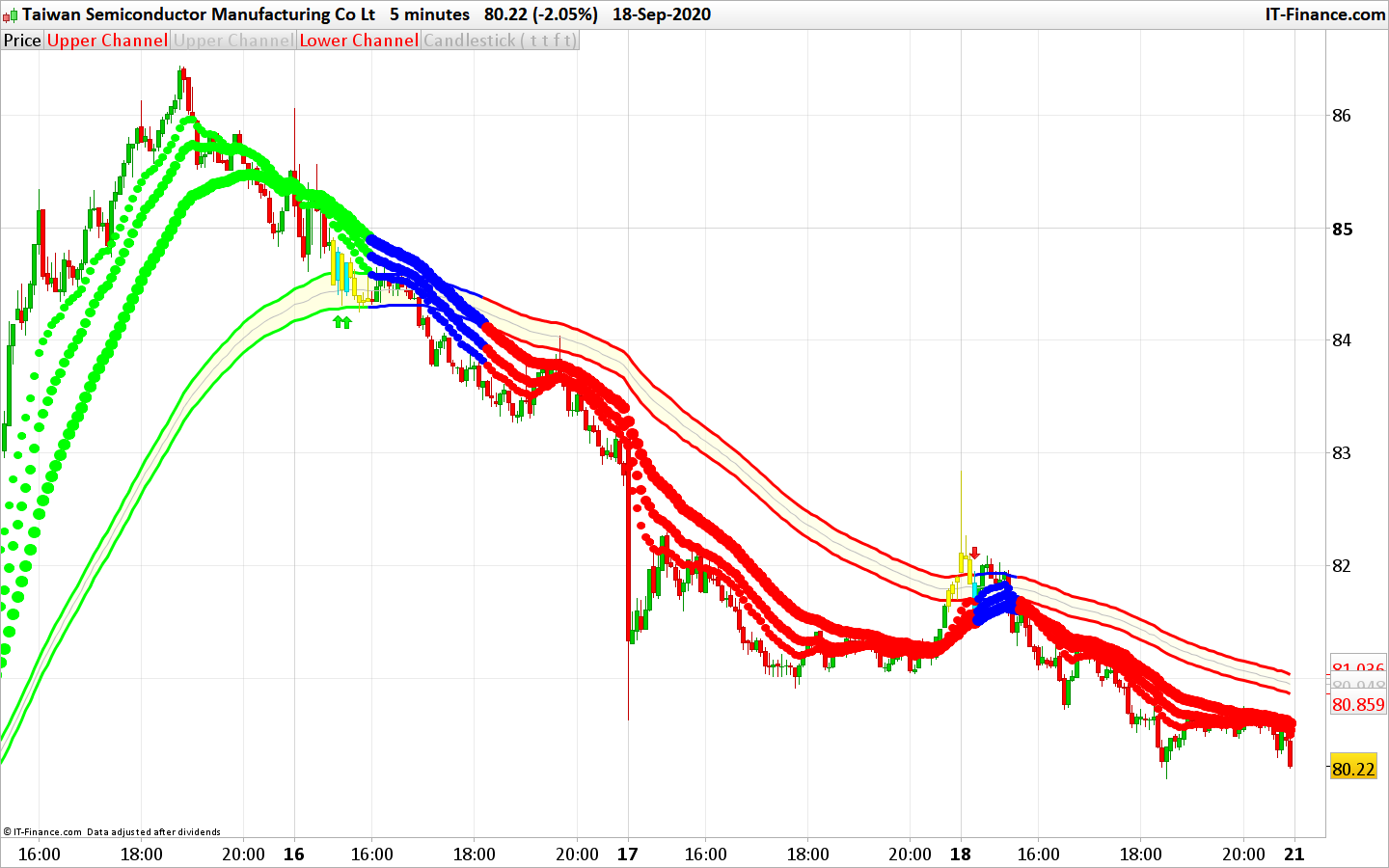
A slingshot reversal is a reliable trading pattern and is defined as a false breakout + reversal and occurs when a major support or resistance point is broken but the price does not hold below support or above resistance and moves back into it’s previous trend.
This indicator identifies and plots the slingshot pattern on the price chart. A long term trend channel (with lines) and a medium term ones (with dots) help to identify the potential continuation entries after a pullback in the major trend.
Code translated following a query in the indicator’s forum section.
//PRC_CM_UCS_Modified SlingShot | indicator
//21.09.2020
//Nicolas @ www.prorealcode.com
//Sharing ProRealTime knowledge
//converted from tradingview
//https://www.prorealcode.com/topic/conversion-from-tradengview-slingshot/

// --- settings
// 1 = true ; 0 = false
sae = 1 //Show Aggressive Entry?, Or Use as Alert To Potential Conservative Entry?
sce = 1 //Show Conservative Entry?
st = 1 //Show Trend Arrows at Top and Bottom of Screen?
pa = 1 //Show Conservative Entry Arrows?
// --- end of settings

ma1 = average[13,1]
ma2 = average[21,1]
ma3 = average[34,1]
ma = average[89,1]

irange = tr
rangema = average[89](irange)
upper = ma + rangema * 0.5
lower = ma - rangema * 0.5
midChan = (upper + lower)/2
//Trend Definition
trup = ma1 > upper and ma2 > upper and ma3 > upper
trdown = ma1 < lower and ma2 < lower and ma3 < lower //Aggressive Entry
pullbackUpT = trup and close < upper
pullbackDnT = trdown and close > lower
//Conservative Entry
entryUpT = trup and close[1] < upper and close > upper
entryDnT = trdown and close[1] > lower and close < lower //Conservative Entry True/False Condition
entryUpTrend = ma1 > upper and ma2 > upper and ma3 > upper and close[1] < upper and close > upper
entryDnTrend = ma1 < lower and ma2 < lower and ma3 < lower and close[1] > lower and close < lower //Define Up and Down Trend for Trend Arrows at Top and Bottom of Screen
upTrend = ma1 > upper and ma2 > upper and ma3 > upper
downTrend = ma1 < lower and ma2 < lower and ma3 < lower

//Definition for Conseervative Entry Up and Down PlotArrows
codiff = entryUpTrend //== 1 ? entryUpTrend : 0
codiff2 = entryDnTrend //== 1 ? entryDnTrend : 0

//Trend Color Definition for Moving Averages and Channel
if trup then
scolorr = 0
scolorg=255
scolorb=0
elsif trdown then
scolorr=255
scolorg=0
scolorb=0
else
scolorr=0
scolorg=0
scolorb=255
endif

if (sae and pullbackUpT) or (sae and pullbackDnT) then
//yellow
drawcandle(open,high,low,close) coloured(255,255,0)
endif
if (sce and entryUpT) or (sce and entryDnT) then
//aqua
drawcandle(open,high,low,close) coloured(0,255,255)
endif

//Plot 3 MA’s
drawtext("●",barindex,ma1,dialog,bold,10) coloured(scolorr,scolorg,scolorb) //fast MA
drawtext("●",barindex,ma2,dialog,bold,13) coloured(scolorr,scolorg,scolorb) //medium MA
drawtext("●",barindex,ma3,dialog,bold,16) coloured(scolorr,scolorg,scolorb) //slow MA


//Trend Triangles at Top and Bottom of Screen
atr=averagetruerange[14](close)
if st and uptrend then
drawtext("▲",barindex,low-atr/2,dialog,bold,16) coloured(0,255,0)
endif
if st and downTrend then
drawtext("▼",barindex,high+atr/2,dialog,bold,16) coloured(255,0,0)
endif

//Plot Arrows OR Letters ↑ and ↓ for Buy Sell Signals
if pa and codiff then
drawarrowup(barindex,low-atr/2) coloured(0,255,0)
endif
if pa and codiff2 then
drawarrowdown(barindex,high+atr/2) coloured(255,0,0)
endif

return upper coloured(scolorr,scolorg,scolorb) style(line,3) as "Upper Channel", midChan coloured(192,192,192) style(line) as "Mid Channel", lower coloured(scolorr,scolorg,scolorb) style(line,3) as "Lower Channel"
Download
Filename:
PRC_CM_UCS_Modified-SlingShot.itf
Downloads:
217
Master
I created ProRealCode because I believe in the power of shared knowledge. I spend my time coding new tools and helping members solve complex problems.
If you are stuck on a code or need a fresh perspective on a strategy, I am always willing to help. Welcome to the community!
Author’s Profile


Loading...