



Coding a Phase-Based Trailing Stop for Breakout Trading
Breakouts can be brutally profitable, but they’re also where traders get chopped up: price pokes above a level, triggers us in, then snaps back and hits the stop. The real inefficiency we’re exploiting is that strong breakouts often continue in waves, while weak breakouts fail quickly. So we want a system that gets in fast, then locks in gains in steps without suffocating the trade too early.
The Problem: Breakouts Pay… Until They Don’t
A basic breakout entry is easy. The hard part is trade management: if the stop is too tight, normal volatility kicks us out; too loose, and winners turn into scratch trades or losses.
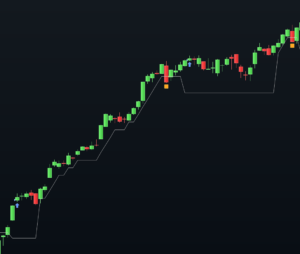
This tutorial builds a step-based trailing stop designed for breakout continuation. It’s built to (1) protect quickly after the breakout proves itself, and (2) trail in discrete ‘stairs’ so we don’t overreact to every candle.
The Logic: A Two-Phase Stop That ‘Graduates’ With the Trade
We’ll use a breakout condition: close crosses above an upper band (PRTBANDSUP). Once we enter long, we define two key distances:
- triggerDistanceLoss: initial risk buffer logic for the stop placement.
- triggerDistanceProfit: how far price must progress before we ‘step’ the stop upward.
Then we manage the trade in two phases:
- Before break-even: once price has moved enough, we move the stop to (position price + MinimumProfit). This converts the trade into a ‘paid attempt’ if momentum continues.
- After break-even: every time price advances another step, we raise the stop to the prior step level.
This approach works best when the instrument trends in bursts (indices, liquid FX, major futures) rather than slow mean-reverting markets.
The Code (ProRealTime)
Paste this into a ProRealTime strategy. It assumes you already have PRTBANDSUP plotted/available (for example from a custom band indicator or a built-in band you’ve named accordingly). I’ve kept your parameters and structure, and added a few safety initializations so it behaves consistently.
defparam cumulateorders=false
defparam preloadbars=0

// ===========================
// Trail Stop steps
// ===========================
triggerDistanceProfit = 20
triggerDistanceLoss = 15
MinimumProfit=20
MaxLoss=100
// ===========================

Breakout = close[0] CROSSES OVER PRTBANDSUP

IF (NOT LONGONMARKET AND Breakout[0]) THEN
BUY 1 CONTRACTS AT MARKET
stoploss = close-((maxloss*pointsize)-(triggerDistanceLoss *pointsize))
newStopLevel = close + (triggerDistanceProfit * pointsize)
set stop price stoploss
ENDIF

// Management of open position
IF LONGONMARKET THEN
// Check if profit is greater or equal to trigger distance
IF close >= (newStopLevel + MinimumProfit) and MoveToBreakEven=0 THEN
MoveToBreakEven=1
stoploss=positionprice + Minimumprofit //Stoploss with small profit
newStopLevel = newStopLevel+triggerDistanceProfit*pointsize
set stop price stoploss
ENDIF

IF close >= newStopLevel + (triggerDistanceProfit * pointsize) and MoveToBreakEven=1 THEN
stoploss = newStopLevel
newStopLevel = newStopLevel+triggerDistanceProfit*pointsize
set stop price stoploss
ENDIF
ENDIF

graphonprice stoploss
Interpretation: How to Read This on the Chart
1) The entry
You’ll get a long entry when close crosses over PRTBANDSUP. This is a ‘confirmation close’ style breakout, not an intrabar touch. It reduces some noise, but it can enter later than a stop-entry above the band.
2) The stop line (graphonprice)
The plotted line is your active stop. Initially it’s placed using the MaxLoss and triggerDistanceLoss relationship in the script. After price moves far enough, the stop ‘graduates’ to a small locked-in profit (position price + MinimumProfit).
3) The step-trailing behavior
Once MoveToBreakEven flips to 1, the system only raises the stop when price pushes far enough beyond each step. That’s the whole point: we don’t want the stop to creep up on every candle; we want it to move when the market proves momentum again.
What a false signal looks like
- Price closes above the band, triggers long, then immediately closes back below the band and stalls.
- You’ll often see this during low-volume sessions, lunchtime ranges, or right ahead of major news.
- In those cases, the step logic won’t activate, and you’ll usually exit via the initial stop.
When it works best
- Trending days where breakouts lead to continuation legs.
- Post-consolidation expansion (tight range, then volatility expansion).
- Markets with clean follow-through (major indices, liquid futures, top FX pairs).
Conclusion: One Practical Filter to Improve It
If you want fewer false breakouts, add a simple trend filter: only take long breakouts when price is above a rising moving average (for example, 50 EMA) or when RSI(14) is above 50. The goal is to align the breakout with directional pressure, so your step-trailing stop gets a chance to do its job instead of defending you from chop.
More examples of trailing stop for ProRealTime can be found in our codes snippets chest: Code Snippets for Automated Trading Strategies

