




MTF Adaptive ATR
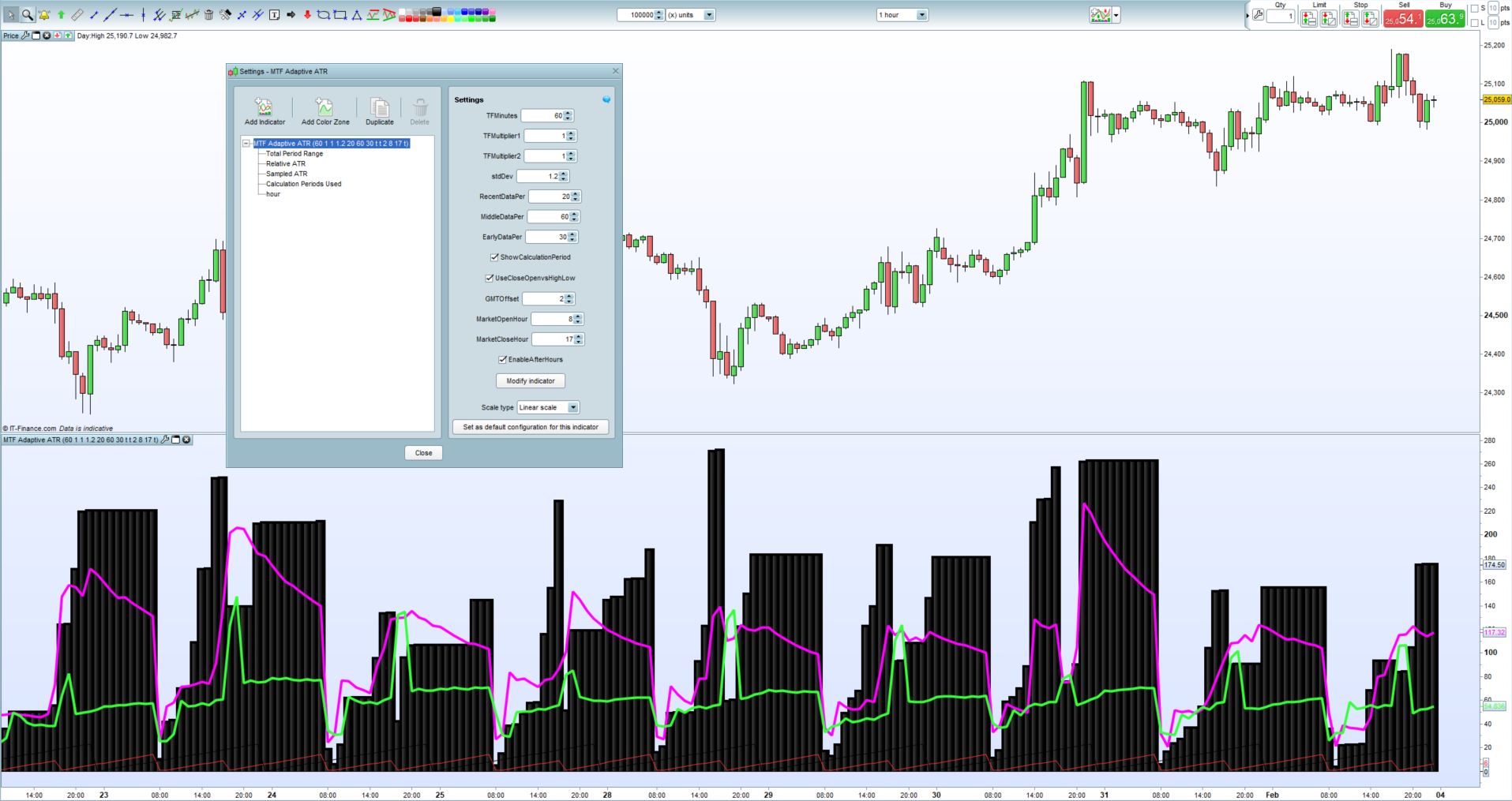
True Multi-Timeframe Dynamically Adapting ATR
This is actually a major overall to an earlier indicator I submitted to the library. The idea behind this indicator is to provide us with an Average True Range indicator than instead of the standard ATR indicator which is calculated with a static look back period, rather give us an ATR indicator that will only look at the most relevant price data. This means the indicator will (depending on the timeframe selected) only consider either market hours, after market hours or current weekly data. In this way, the sampled price data will always be relevant. The look-back period used to calculate the ATR will thus dynamically adapt as the trading day or week progress.
Explanation of the parameters:
- TFMinutes: This parameter is used to input the current timeframe in minutes. (So for 5m TF set the parameter to 5, for hourly set it to 60)
- TFMultiplier1: Those too lazy to work out higher timeframes you can use the multipliers. (Hourly TF is: TFMinutes = 1 and TFMultiplier1 = 60)
- TFMultiplier2: Extention to the above functionality. (4-Hour TF is: TFMinutes = 1, TFMultiplier1 = 60 and TFMultiplier2 = 4)
- stdDev: Standard deviation used to calculate the Relative ATR line
- RecentDataPer: What percentage of the lookback period to sample for the SampledATR calculation (Recent Data)
- MiddleDataPer: What percentage of the lookback period to sample for the SampledATR calculation (Middle Data)
- EarlyDataPer: What percentage of the lookback period to sample for the SampledATR calculation (Early Data)
- ShowCalculationPeriod: Can be enabled to show a line on the indicator with the lookback period used for calculations
- UseCloseOpenvsHighLow: If enabled will use open and close values instead of high and low to calculate the Total Price Range
- GMTOffset: This is used to offset the GMT time difference in the code. (Default is set to GMT+2)
- MarketOpenHour: Enter the hour (24hr) in which the market opens
- MarketCloseHour: Enter the hour (24hr) in which the market closes
- EnableAfterHours: Enable to calculate ATR values for after hours
Indicator Output Explained:
- The black histogram shows the total price range for the evaluated period (be that for in-market hours, after-market hours or current weekly data)
- The pink line called ‘Relative ATR’ shows the standard deviation adjusted ATR value based on the evaluation period
- The green line called ‘Sampled ATR’ shows the averaged ATR as sampled over the 3 different data sets (within the evaluation period)
Possible Interpretations:
- When the black histogram expands it signifies that price is breaking higher or lower and expanding the current trading range.
- When the black histogram increases in steps without remaining static for extended periods we can assume the market is trending
- When the black histogram remains static we can assume the market is consolidating or ranging (watch for expansion)
- When the pink line rises with the green line we can assume that volatility is increasing
- When the pink line falls with the green line we can assume that volatility is decreasing
- When the pink line and the green line diverge we can assume a possible direction change is probable
- When either the pink line or the green line extends above the histogram it implies current volatility is extreme
- When the pink line stays high relative to the histogram it implies market is choppy with no clear direction
- When the pink line stays low relative to the histogram it implies the market has a lot of momentum and trending
//MTF Adaptive ATR v1.0 (For ProRealTime)
//By Juan Jacobs
//www.FXautomate.com

defparam calculateonlastbars = 1440

//Default Parameters:
//TFMinutes = 60 (Integer)
//TFMultiplier1 = 1 (Integer)
//TFMultiplier2 = 1 (Integer)
//stdDev = 1.2 (Decimal)
//RecentDataPer = 20 (Integer)
//MiddleDataPer = 60 (Integer)
//EarlyDataPer = 30 (Integer)
//ShowCalculationPeriod = Not Ticked (Boolean)
//UseCloseOpenvsHighLow = Ticked (Boolean)
//GMTOffset = +2 (Integer)
//MarketOpenHour = 8 (Integer)
//MarketCloseHour = 17 (Integr)
//EnableAfterHours = Ticked (Boolean)

TF = TFMinutes*TFMultiplier1*TFMultiplier2
OpenMin = (MarketOpenHour)*60
cGMTOffset = (GMTOffset)*-1

If TF > 60 Then
 If hour = 0 Then
  per = per[1]+1
 Else
  per = abs(((DayofWeek*1440)-OpenMin-((24-(Hour+cGMTOffset))*60))/TF)
 EndIf
ElsIf TF = 60 Then
 If Hour < (MarketOpenHour+((cGMTOffset+1)*-1)) or Hour > (MarketCloseHour+((cGMTOffset+1)*-1)) Then
  If EnableAfterHours Then
   If Hour < (MarketOpenHour+((cGMTOffset+1)*-1)) and hour > 0 Then
    per = (((Hour+cGMTOffset+1)*60) + ((24-MarketCloseHour)*60))/TF
   Else
    If hour = 0 Then
     per = (((24+cGMTOffset+1)-MarketCloseHour)*60)/TF
    Else
     per = (((hour+cGMTOffset+1)-MarketCloseHour)*60)/TF
    EndIf
   EndIf
  Else
   per = 1
 EndIf
Else
 per = abs((1440-OpenMin-((24-(Hour+cGMTOffset+1))*60))/TF)
EndIf
Else
 If (Hour < (MarketOpenHour+((cGMTOffset+3)*-1))) or (Hour-1 < (MarketOpenHour+((cGMTOffset+3)*-1)) and minute >= 0) or Hour > (MarketCloseHour+((cGMTOffset+3)*-1)) Then
  If EnableAfterHours Then
   If Hour < (MarketOpenHour+((cGMTOffset+1)*-1)) and hour > 0 Then
    per = ((((Hour+cGMTOffset+2)*60)+minute + ((24-MarketCloseHour)*60))/TF)-1
   Else
    If hour = 0 Then
     per = (((((24+cGMTOffset+2)-MarketCloseHour)*60)+minute)/TF)-1
    Else
     per = (((((hour+cGMTOffset+2)-MarketCloseHour)*60)+minute)/TF)-1
    EndIf
   EndIf
  Else
   per = 1
  EndIf
 Else
  per = abs((1440-OpenMin-((24-(Hour))*60)+minute)/TF)-1
 EndIf
EndIf

If per < 1 Then
 per = 1
Else
 per = abs(round(per))
EndIf

If UseCloseOpenvsHighLow Then
 PeriodHigh = Max(Highest[per](close),Highest[per](open))
 PeriodLow = Min(Lowest[per](close),Lowest[per](open))
Else
 PeriodHigh = Highest[per](high)
 PeriodLow = Lowest[per](low)
EndIf

PeriodRange = PeriodHigh - PeriodLow
RelativeATR = average[per](range)+stdDev*STD[per](range)

If abs(Round(per/(100/RecentDataPer))) < 1 Then
 Sample1 = 1
Else
 Sample1 = abs(Round((100/RecentDataPer))) //Represents first and last 20% of data
EndIf
If abs(Round(per/(100/MiddleDataPer))) < 1 Then
 Sample2 = 1
Else
 Sample2 = abs(Round(per/(100/MiddleDataPer))) //Represents middle 40% of data
EndIf
If abs(Round(per/(100/EarlyDataPer))) < 1 Then
 Sample3 = 1
Else
 Sample3 = abs(Round(per/(100/EarlyDataPer))) //Represents middle 40% of data
EndIf
SampledATR = average[per](((AverageTrueRange[Sample3](close)[Sample1+Sample2+1])+(AverageTrueRange[Sample2](close)[Sample1+1])+(AverageTrueRange[Sample1](close)[1]))/3)

If ShowCalculationPeriod Then
 showcalcper = 255
Else
 showcalcper = 0
EndIf

Return PeriodRange coloured(0,0,0) style(histogram,4) as "Total Period Range",RelativeATR coloured(255,0,255) style(line,4) as "Relative ATR", SampledATR coloured(55,255,55) style(line,4) as "Sampled ATR", per coloured(255,50,50,showcalcper) as "Calculation Periods Used", hour as "hour"Comments

