



Complete trailing stop code function
A lot of people on forums asked for an alternative to the embedded trailing stop instruction of Probacktest. So I decided to code a complete function that can be implemented to any trading strategy.
When trades go well, we often need to protect gain against market turnaround. To do this, we need to move progressively our stoploss to safer zones, a trailing stop can achieve this functionality.
Also, because there is some difference between the embedded trailing stop of the platform in backtest in comparison of real time trading, a hard coded trailing stop is a better option I believe, to make backtest more accurate to what would happen in live trading.
First step, setting our variables
Firstly, we need to activate the trailing stop functionality of our function. So we need to set a profit level where we’ll begin to move our stoploss.
We set a variable “trailingstart” :
trailingstart = 20 //trailing will start @trailinstart points profitIndeed, trailing will start when trade will be in profit of at least 20 points in our example.
Then, we need to set a step of profit to continuously move the stoploss accordingly to the price movement:
trailingstep = 5 //trailing step to move the "stoploss"Each time the price move in favour of the trade, the stoploss will move of “trailingstep” to protect more profit.
So now, in order to exit a position at defined price level, we use a new variable called “newSL” that will settled a pending stop order. This variable will be calculated on the fly each time the price has moved favourably.
When we are not in market, this variable is reset:
//reset the stoploss value
IF NOT ONMARKET THEN
 newSL=0
ENDIF
Set our trades to breakeven, at first good move
For this example, we only consider long positions.
//manage long positions
IF LONGONMARKET THEN
//first move (breakeven)
 IF newSL=0 AND close-tradeprice(1)>=trailingstart*pipsize THEN
  newSL = tradeprice(1)+trailingstep*pipsize
 ENDIF
ENDIF
If “newSL” is 0 (no move before) and the price went up at least “trailingstart” points from our price entry, we set our new stoploss at price entry + “trailingstep” points.
For our long position to exit at that level, we need to set now a sell position order with a pending stop one:
IF newSL>0 THEN
 SELL AT newSL STOP
ENDIF
That’s it, we have set our trade to breakeven.
Next moves, trailing stop the position
Now that our trade is safe, we’ll move our stoploss of “trailingstep” each time price move of “trailingstep” too.
We add the “next moves” lines into our previous code:
//manage long positions
IF LONGONMARKET THEN
 //first move (breakeven)
 IF newSL=0 AND close-tradeprice(1)>=trailingstart*pipsize THEN
  newSL = tradeprice(1)+trailingstep*pipsize
 ENDIF
 //next moves (trailing stop)
 IF newSL>0 AND close-newSL>=trailingstep*pipsize THEN
  newSL = newSL+trailingstep*pipsize
 ENDIF
ENDIF
Trailing stop coded!
What to expect with a trailing stop in a trading strategy?
Trailing stop can be a profit shower or a profit cutter, it depends of your strategy, the instrument traded and time horizon of your trade. Nevertheless it can improve a lot simple trend following strategy and prevent loss because of market whipsaws, especially in volatile market and short timeframe.
In the next paragraph, you’ll find the whole code to use for your own strategy. In this picture below the test of a simple SELL condition trading (close<close[1]):
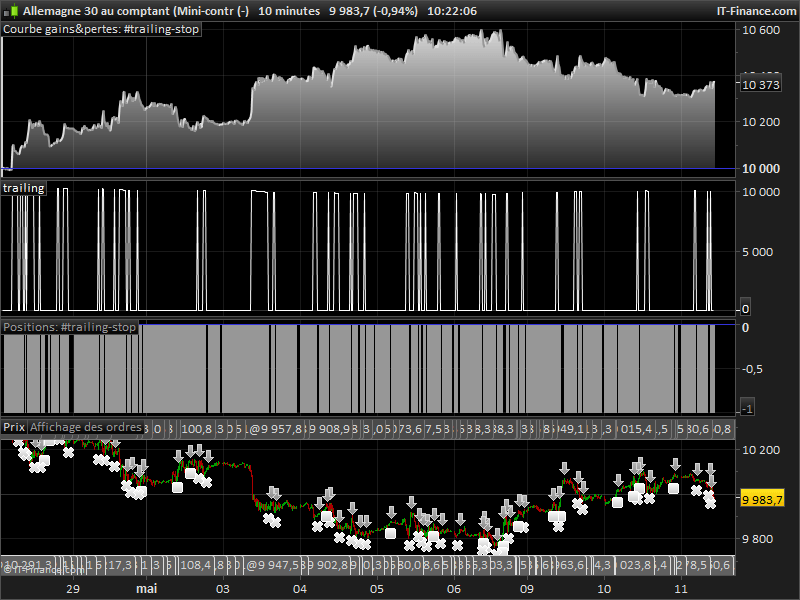 So it’s up to you to improve your already made strategies or to create new ones! I count on you to share them on ProRealCode! 🙂
Trailing stop, the complete ProRealTime code
defparam cumulateorders = false

//order launch (example) would be set to any other entry conditions
//c1 = close>close[1]
c2 = close<close[1]

//if c1 then
//BUY 1 LOT AT MARKET
//SET STOP PLOSS 50
//endif

if c2 then
SELLSHORT 1 LOT AT MARKET
SET STOP PLOSS 50
endif

//************************************************************************
//trailing stop function
trailingstart = 20 //trailing will start @trailinstart points profit
trailingstep = 5 //trailing step to move the "stoploss"

//reset the stoploss value
IF NOT ONMARKET THEN
 newSL=0
ENDIF

//manage long positions
IF LONGONMARKET THEN
//first move (breakeven)
 IF newSL=0 AND close-tradeprice(1)>=trailingstart*pipsize THEN
  newSL = tradeprice(1)+trailingstep*pipsize
 ENDIF
//next moves
 IF newSL>0 AND close-newSL>=trailingstep*pipsize THEN
  newSL = newSL+trailingstep*pipsize
 ENDIF
ENDIF

//manage short positions
IF SHORTONMARKET THEN
//first move (breakeven)
 IF newSL=0 AND tradeprice(1)-close>=trailingstart*pipsize THEN
  newSL = tradeprice(1)-trailingstep*pipsize
 ENDIF
//next moves
 IF newSL>0 AND newSL-close>=trailingstep*pipsize THEN
  newSL = newSL-trailingstep*pipsize
 ENDIF
ENDIF

//stop order to exit the positions
IF newSL>0 THEN
 SELL AT newSL STOP
 EXITSHORT AT newSL STOP
ENDIF
//************************************************************************

GRAPH newSL as "trailing"
ITF file is attached too. Enjoy and ask questions in comments if you need better explanation.

