



Debugging in ProBacktest with GRAPH instruction
While developing with ProBacktest, or any other programming languages, it is always necessary to have a clue of what are the variables values at specific times. Since ProRealTime don’t embed any developer’s logs of any kind, a new instruction have come in the recent 10.2 version of the software, it is called “GRAPH”. This instruction is only available for the ProBacktest module. I’m gonna show how it works in this article.
A so simple intraday strategy
Let’s go, a simple strategy with STOP orders positions adding in the same direction on the mini SP500 while the MACD indicator crosses its 0 value on a 5 minutes chart.
myMACD = MACD[12,26,9](close)
long = myMACD crosses over 0

IF long THEN
  BUY 1 LOT AT close-10 STOP
ENDIF

SET STOP %TRAILING 0.2
As simple as it is, it may works in trending days :
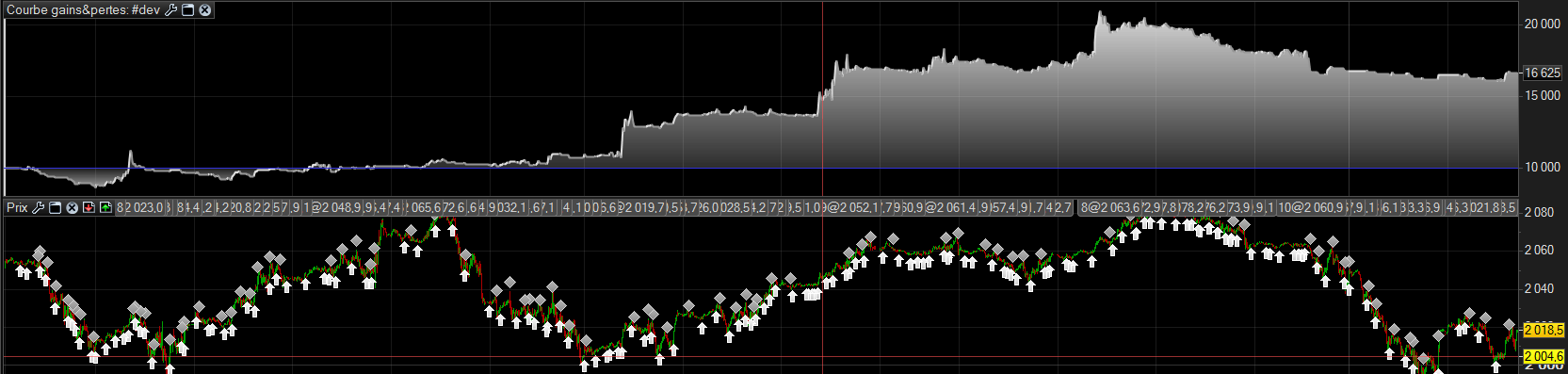 Since it is a long only strategy, if we wanna see how our trades go in intraday, we need to follow the indicator value that trigger our orders : MACD. So let’s add our signals triggers to the strategy result window, just by adding :
if(myMACD>0) THEN
  signals = 1
ELSE
  signals = -1
ENDIF

GRAPH signals AS "MACD signals"
at the end of our strategy code.
The GRAPH instruction kindly show our signals variables :
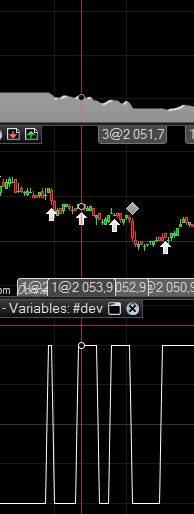
Nice informations that we’ll help us in the next section of the article .. see you there …
Make it even better with GRAPH instruction !
Still here ? OK, what we see in the previous picture is that adding positions while the MACD have fluctuated above and below its zero line is not a good option. Buying lower than initial positions that are have been unconfirmed by the indicator that trigger them is not a good idea. Thanks to the GRAPH instruction we now have a better idea for adding positions, let’s do it the same trend, not in a new one, never.
To easily detect that we are on the same ‘MACD trend’, we add a “flag” in our code. If the MACD cross below the zero line, we reset the flag to 0. No new “add” trade can be initiate until a new trend (or “long condition” in our code) when the flag is set to 1.
IF long AND NOT LONGONMARKET THEN
  BUY 1 LOT AT close-10 STOP
  flag = 1
  lastclose = Close
ENDIF
The flag is set only for the first trade to make sure we are on the beginning of a trend, so we add the “NOT LONGONMARKET” condition. We reset the flag if the trend is exhausting :
IF myMACD < 0 THEN
  flag = -1
endif
With GRAPH instruction added to the end of the ProBacktest code :
GRAPH flag as "flag"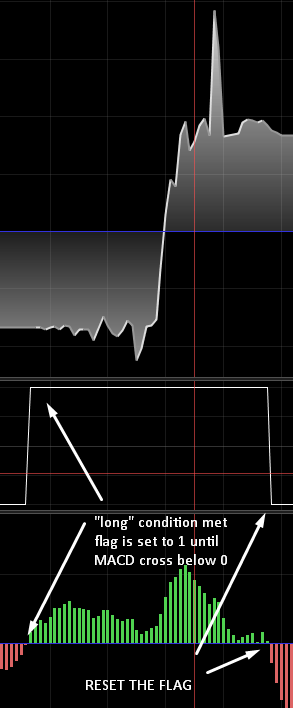
(NB: you can add any amount of GRAPH instruction in the code, although their results will be shown in the same window)
Add positions can now be only added while flag condition is met :
IF flag = 1 AND Close>lastclose THEN
  BUY 1 LOT AT close-10 STOP
ENDIF
My flag variable is perfectly set when I want it. My code development can go on and see what to do next to make this strategy profitable… Maybe in an other article ? Remember that this strategy is simple example and cannot be trade as is in a live environment.
Don’t be shy, show me your flag
As you can see, variable drawn on the ProBacktest window result are time-saver. I find it the only way to validate variables conditions stuff, when you got a lot of ones in your code. Are my variables already reset at that time ? Or why does my trade is not initiate ? Don’t spend time too much on browsing your code, use the GRAPH instruction instead !

