



Different kinds of Trailing Stop in ProOrder
Managing stop loss and risk with opened positions in an automated strategy is primordial. While we secure profit, we also limiting risk of bad win/loss ratio in a long run, with the help of “moving stop loss” aka trailing stop.
The ProOrder language embed different kinds of trailing stop and i describe them all in this article.
Trailing stop definition
A trailing stop is a stop loss price that moves with the market. For instance, if you are buying an asset and the price goes up, the stop loss will move according to the trailing setup you have defined (percentage of loss, amount of points).
In that specific case, if the price goes down, your stop loss will be executed with profit, but only if the price have moved enough for the stop loss to be set above your entry price.
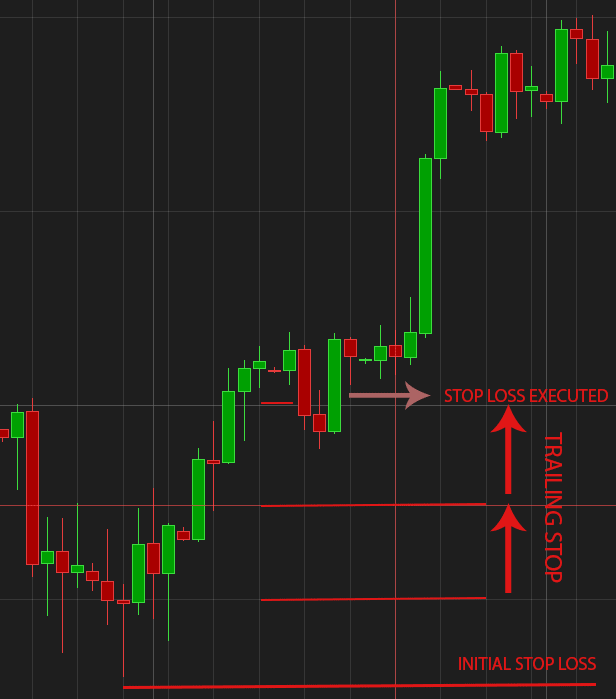
For a short position, the price has to move south enough for the stop loss to be set below the entry price.
While it is a great way to secure profit in an automated trading strategy, it is also a very valuable way to set a loss limit with false trading signals (e.g. : buy an asset that is too close of a big resistance area).
Price related trailing stop setup
In ProBuilder language, there is 2 different kinds of trailing stop for setting up a price related moving stop loss :
SET STOP TRAILING y
Sets a trailing stop y units from average position price.
and
SET STOP pTRAILING y
Sets a trailing stop y points from average position price.
Units and points are different between instruments, because units depends on price digits and points is a constant value.
Example : (from the ProBacktest documentation)
On the EuroDollar (EUR/USD), 1 point =0.0001 units on the chart
On index Futures (DAX, FCE), 1 point = 1 unit on the chart
On futures on european interest rates,1 point = 0.01 units on the chart
Simple long only strategy on GBPUSD code example :
i1 = RSI[14](close)
i2 = exponentialaverage[10](i1)

golong = i1>i2 AND i1[1]<i2[1] AND i1[1]<50

IF NOT LongOnMarket AND golong THEN
  BUY 1 CONTRACTS AT MARKET
ENDIF

// points based STOP LOSS and TRAILING STOP
// initial STOP LOSS
SET STOP pLOSS 50

// trailing stop
SET STOP pTRAILING 50
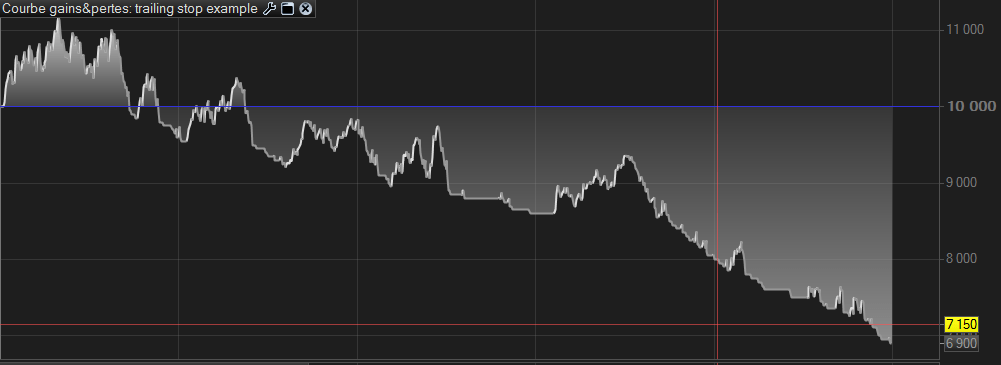
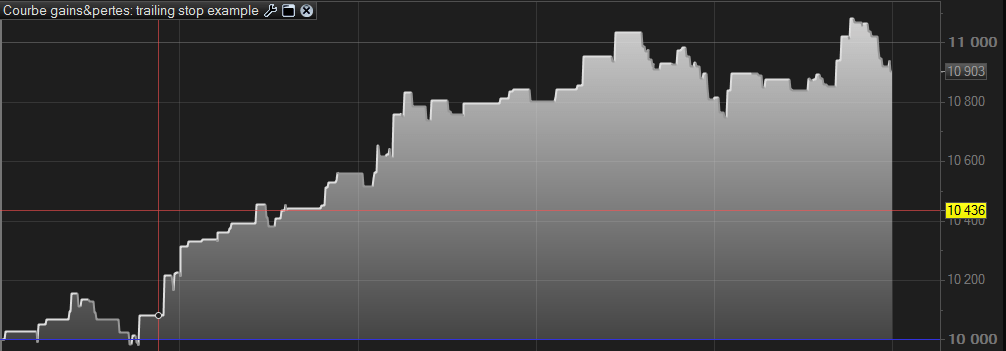
The result of using trailing stop on this little strategy on a daily basis talk by itself :
Without a trailing stop :
With a trailing stop :
Using “units” based for this forex pair would be :
// units based STOP LOSS and TRAILING STOP
//initial STOP LOSS
SET STOP LOSS 0.0050

//trailing stop
SET STOP TRAILING 0.0050
Because GBPUSD has 4 digits and 50 points is 0.0050 units for this instrument. Of course result would be the same as the first example, but the units stop loss and trailing stop is useful for dynamic calculation of its value.
For instance, you could use ATR which returns only units values and not point ones :
// dynamic units based STOP LOSS and TRAILING STOP

myATR = 5* averagetruerange[14](close)

//initial STOP LOSS
SET STOP LOSS myATR

//trailing stop
SET STOP TRAILING myATR
Percentage from price trailing stop
Another way of moving the stop loss is to set a percentage of variation of the price in the direction of the opened positions.
SET STOP %TRAILING y
Sets a trailing stop y% percent(s) from average position price.
In this example, if the price has moved +1% since inception of the trade, then the stop loss will move +1% higher than its last placement :
// percentage based TRAILING STOP
//initial STOP LOSS
SET STOP LOSS 50

//trailing stop
SET STOP %TRAILING 1
Risk related trailing stop
The other kind of trailing stop that are embed in ProBuilder language is risk related one. It sets the stop loss according to an amount of money that the strategy have won with the average of the currently opened positions prices.
SET STOP $TRAILING y
Sets a trailing stop y €,$ (currency of the instrument) from average position price. Brokerage fees not included.
Example :
// money based TRAILING STOP
//initial STOP LOSS
SET STOP $LOSS 50

//trailing stop
SET STOP $TRAILING 50
Setting up stop loss and trailing stop at once
Within ProBuilder, we can setup the stop loss and the trailing stop parameters in a single line of code. In the documentation it is described as the picture below :

It does not affect in any way the ProBacktest/ProOrder behaviour in any way, it is only a more convenient way to code these 2 important instructions.
Examples of use : (from the ProBacktest documentation)
SET STOP LOSS x TRAILING yA stop loss is placed at x units from entry price and it becomes a trailing stop of y units if the trailing stop level becomes closer to current price than the stop loss level (when price varies favourably by y units – x units).
SET STOP LOSS x pTRAILING yA stop loss is placed at x units from average position price and it becomes a trailing stop of y points if the trailing stop level becomes closer to current price than the stop loss level (when price varies favourably by
y points – x units).
SET STOP LOSS x $TRAILING yA stop loss is placed at x units from average position price and it becomes a trailing stop of y$ or € (currency of the instrument) if the trailing stop level becomes closer to the current price than the stop loss level.
SET STOP LOSS x %TRAILING yA stop loss is placed at x units from average position price and it becomes a trailing stop of y% if the trailing stop level becomes closer to the current price than the stop loss level.
SET STOP pLOSS x TRAILING y
A stop loss is placed at x points from average position price and it becomes a trailing stop of y units if the trailing stop level becomes closer to current price than the stop loss level (this occurs when price varies favourably by y units – x points).
SET STOP pLOSS x pTRAILING yA stop loss is placed at x points from average position price and it becomes a trailing stop of y points if the trailing stop level becomes closer to current price than the stop loss level (this occurs price varies favourably by
y points – x points).
SET STOP pLOSS x $TRAILING yA stop loss is placed at x points from average position price and it becomes a trailing stop of y $ or € (currency of the instrument) if the trailing stop level becomes closer to the current price than the stop loss level.
SET STOP pLOSS x %TRAILING y
A stop loss is placed at x points from average position price and it becomes a trailing stop of y% if the trailing stop level becomes closer to the current price than the stop loss level.
SET STOP $LOSS x TRAILING yA stop loss of x $ or € (currency of the instrument) is placed and it becomes a trailing stop of y units if the trailing stop level becomes closer to current price than the stop loss level.
SET STOP $LOSS x pTRAILING yA stop loss of x $ or € (currency of the instrument) is placed and it becomes a trailing stop of y points if the trailing stop level becomes closer to current price than the stop loss level.
SET STOP $LOSS x $TRAILING yA stop loss of x $ or € (currency of the instrument) is placed and it becomes a trailing stop of y $ or € (currency of the instrument) if the trailing stop level is closer to the current price than the stop loss level.
SET STOP $LOSS x %TRAILING yA stop loss of x $ or € (currency of the instrument) is placed and it becomes a trailing stop of y% if the trailing stop level becomes closer to the current price than the stop loss level.
SET STOP %LOSS x TRAILING yA stop loss of x% is placed and it becomes a trailing stop of y units if the trailing stop level becomes closer to current price than the stop loss level.
SET STOP %LOSS x pTRAILING yA stop loss of x% is placed and it becomes a trailing stop of y points if the trailing stop level becomes closer to current price than the stop loss level.
SET STOP %LOSS x $TRAILING yA stop loss of x% is placed and it becomes a trailing stop of y $ or € (currency of the instrument) if the trailing stop level is closer to the current price than the stop loss level.
SET STOP %LOSS x %TRAILING yA stop loss of x% is placed and it becomes a trailing stop of y% if the trailing stop level becomes closer to the current price than the stop loss level.
Managing existing positions
Using a trailing stop on a single or a basket of positions is always a good option and would be use only accordingly to a strategy that needs it. If you do not stop and reverse positions or if you are working on percentage price movement only, i think it is the better way to manage opened positions. While every paths lead to Rome, everyone will find utilities or not to trailing stop. Setting them up with the ease of ProBuilder will not exhaust anyone, so let’s give a try in all your automated strategies !

