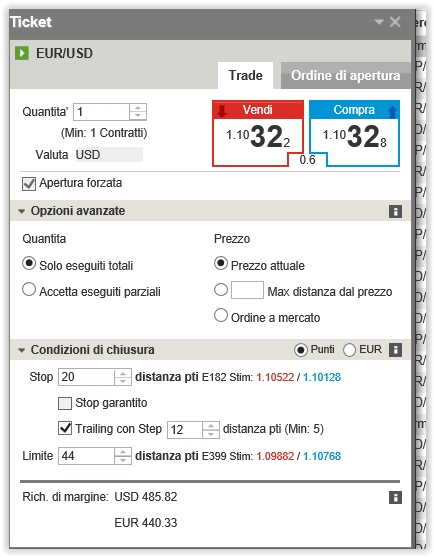
I coded my strategy with Profits/Stops like this:
// Stop e target
SET TARGET pPROFIT 100
SET STOP pLOSS 30 pTRAILING 61
but, while it works fine in ProBackTest, I am given am error when subòitting it to ProOrder because the system says that ProOrder cannot have two different kind of STOP instructions per strategy.
I solved by recoding it as follows:
// Stop e target
SET TARGET pPROFIT 100
SET STOP pLOSS 30
SET STOP pTRAILING 61
But I have notice that this isn’t exactly what I wanted. It ALWAYS hit the maximun 61 pips before terminating, instead of stopping at a 30-pip loss.
It seems that it starts a BUY trade at, say, 1.1000. It should set a STOP LOSS at 1.0970 and raise it by 61 pips at each 61-pip increment in price, so that after the first increment the STOP LOSS should be in PROFIT for 31 pips, thus granting me a positive exit in case it turns against me.
How can I code it?
Thank you.
I could find this code: http://www.prorealcode.com/blog/trading/complete-trailing-stop-code-function/ which should do.
Also, this guide http://www.prorealcode.com/blog/learning/kinds-trailing-stop-proorder/ seems not to work with ProOrder, because, as I said, the instruction SET STOP pLOSS x pTRAILING y returns an error and ProOrder won't accept that code.
It’s odd enough, since IG accepts correct trailing stops when opening manual trades (see picture), there must be something ProOrder does not take into account, be it deliberate or not.
Dear all,
I’m facing the same issue i.e. SET STOP ploss x pTrailing y when ProOrder returns error message “combine stops cannot be used with ProOrders”.
Can anyone help to identify what went wrong?
Yes, in real live environment, it’s not possible to combine 2 kind of stoploss at the same time : stoploss and trailing stop (with embedded instructions).
So, the best option to combine a trailing stop with a stoploss is to use a soft coded one, like in these 2 articles wrote recently:
http://www.prorealcode.com/blog/learning/trailing-stop-max-favorable-excursion-mfe/
http://www.prorealcode.com/blog/trading/complete-trailing-stop-code-function/
Please let me know if you need more assistance to setup them.
I started using the code at http://www.prorealcode.com/blog/trading/complete-trailing-stop-code-function/ and it seems to be working great so far!
Of course I still would appreciate the next release of ProOrder to allow:
SET STOP pLOSS x pTRAILING y
which is shorter, easily readable and compliant with manual trading.
Dear Nicholas/Roberto
Thank you for your wonderful reply. 🙂
From the link <<http://www.prorealcode.com/blog/trading/complete-trailing-stop-code-function/>>, the trailing stop can only be activated at the next opening of the candlestick? i.e. if the trailing stop has being breached, the position will only be closed at the next opening candlestick.
Kindly correct me if this observation is true.
The code place pending stop orders on the market, so if price breach the level of this order it would close at this exact price in real time.
Of course probacktest don’t know when exactly it occurred so you’ll see round hours and minutes in strategy tester result. Hopefully it will be fixed in the next version.
Dear Nicolas,
Thank you for your help. This has clarified my confusion regarding the trailing stop.
Looking forward to the new version soon.